
Introduction
This manual provides comprehensive instructions for the Akko MG75 ABNT2 Mechanical Keyboard. Designed for efficiency and customization, this 75% layout keyboard features Akko Silver V3 Pro mechanical switches, full RGB backlighting, and hot-swappable switch sockets. Please read this manual carefully to ensure proper use and maintenance of your device.
1. Орнотуу
1.1 Пакеттин мазмуну
- Akko MG75 ABNT2 Mechanical Keyboard
- USB-C Cable (Removable)
- Баскыч капкагын тарткыч
- Switch Puller
- Кошумча которгучтар
- Колдонуучунун Колдонмосу (бул документ)
1.2 Баскычтопту туташтыруу
- USB-C портун клавиатуранын арткы бетинен табыңыз.
- Берилген USB-C кабелин клавиатурага туташтырыңыз.
- USB-C кабелинин экинчи учун компьютериңиздеги жеткиликтүү USB портуна туташтырыңыз.
- Баскычтоп сиздин операциялык тутумуңуз тарабынан автоматтык түрдө таанылат. Негизги функциялар үчүн, адатта, кошумча драйверлер талап кылынбайт.

Image: USB-C port for connecting the keyboard.
1.3 Баскычтоптун бийиктигин тууралоо
The Akko MG75 keyboard features three levels of adjustable height. Flip out the feet located on the underside of the keyboard to select your preferred typing angle.
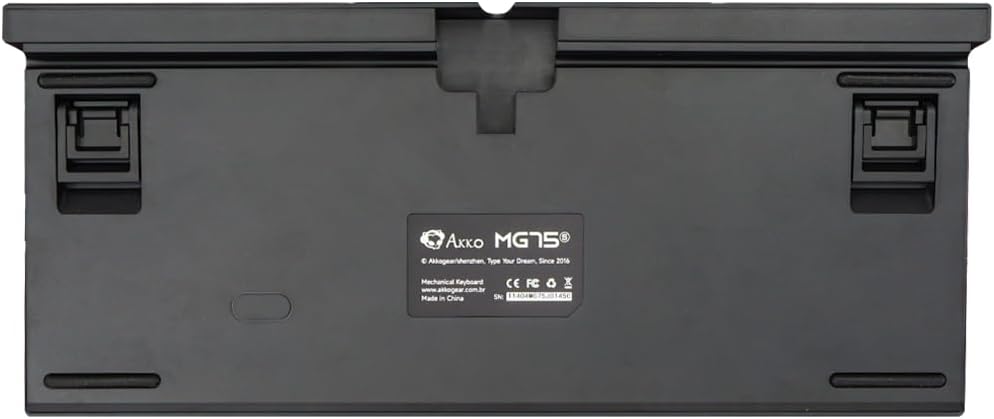
Image: Underside of the keyboard with adjustable feet.
2. Иштөө нускамалары
2.1 RGB жарыкты башкаруу
The Akko MG75 keyboard features full RGB backlighting with multiple effects and customization options. Refer to the included quick guide or the official Akko software for detailed instructions on changing lighting modes, colors, and brightness. Typically, lighting effects can be cycled using specific key combinations (e.g., Fn + certain keys).
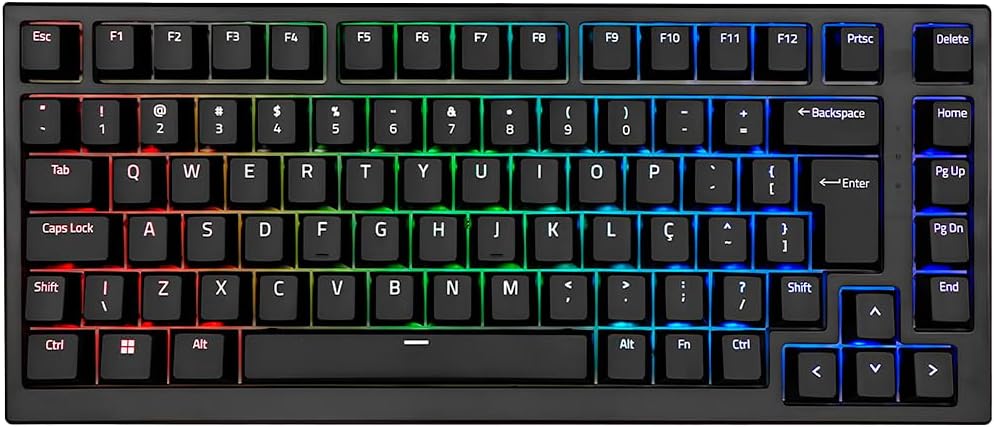
Image: Akko MG75 keyboard displaying RGB lighting.
2.2 Ыкчам алмаштыруучу которгучтар
The Akko MG75 supports hot-swappable mechanical switches, compatible with both 3-pin and 5-pin switches. This allows for easy customization of your typing experience without soldering.
Коммутаторлорду алмаштыруу:
- Берилген өчүргүчтү тартуучуну колдонуп, керектүү өчүргүчтү клавиатурадан этияттык менен чыгарыңыз. Өчүргүчтү бекем кармап, түз өйдө тартыңыз.
- Жаңы өчүргүчтүн төөнөгүчтөрүн платадагы тешиктер менен тегиздеңиз. Төөнөгүчтөрдүн түз экенин текшериңиз.
- Gently press the new switch into place until it clicks securely. Do not force the switch if it does not go in easily; check pin alignment.

Image: Akko mechanical switches, illustrating their design for hot-swapping.
2.3 ABNT2 Layout
This keyboard features the ABNT2 layout, which includes specific keys for Portuguese language characters and punctuation, such as 'Ç' and dedicated keys for accents. This layout is standard for Brazilian Portuguese users.

Сүрөт: жогорудан төмөнгө view of the Akko MG75 keyboard, highlighting the ABNT2 layout.
3. Техникалык тейлөө
3.1 Баскычтопту тазалоо
- Тазалоодон мурун клавиатураны компьютерден ажыратыңыз.
- Баскыч капкактарынын ортосундагы чаңды жана калдыктарды тазалоо үчүн жумшак щетка же кысылган абаны колдонуңуз.
- Кежир кир үчүн, баскычтардын капкактарын жана клавиатуранын бетин бир аз d менен акырын сүртүңүзamp cloth (water only). Avoid excessive moisture.
- Катуу химиялык заттарды же абразивдүү тазалоочу каражаттарды колдонбоңуз.
3.2 Баскыч капкагын алмаштыруу
To replace keycaps, use the provided keycap puller. Gently hook the puller onto the keycap and pull straight up. To install a new keycap, align it with the switch stem and press down firmly until it is seated.
4. Кыйынчылыктарды
4.1 Баскычтоп жооп бербейт
- USB-C кабели клавиатурага жана компьютериңизге коопсуз туташканын текшериңиз.
- Try disconnecting and reconnecting the USB-C cable multiple times. Some users have reported this resolves initial connection issues.
- Test the keyboard on a different USB port on your computer.
- If possible, test the keyboard on another computer to rule out system-specific issues.
- Check if the cable itself is damaged by trying a different USB-C cable if available.
4.2 RGB жарыктандыруу туура эмес иштеүүдө
- Баскычтоп туура туташып жана кубат алып жатканын текшериңиз.
- Refer to the quick guide for key combinations to cycle through lighting modes and adjust brightness.
- If using Akko software, ensure it is up-to-date and correctly configured.
5. Техникалык шарттар
| Өзгөчөлүк | Деталь |
|---|---|
| Бренд | Акко |
| Модел | MG75 |
| Макет | 75% ABNT2 |
| Которгучтар | Akko Silver V3 Pro Mechanical |
| ысык алмашуу | Ооба (3 жана 5 пиндүү уячалар менен шайкеш келет) |
| Байланыш | USB-C (Removable Cable) |
| Арткы жарыктандыруу | RGB |
| Anti-Ghosting | N-keys Rollover |
| Баскыч капкактары | ABS Laser |
| Жөнгө салынуучу бийиктик | Ооба, 3 деңгээл |
| Шайкеш түзмөктөр | PC |
| Түс | Кара |
| Ачкычтардын саны | 84 |
| Жалпы салмак | 1582 г |
| Таза Салмак | 1451 г |
| Package Dimensions (L x H x D) | 350мм x 250мм x 50мм |
6. Кепилдик жана колдоо
6.1 Продукциянын кепилдиги
The Akko MG75 Mechanical Keyboard comes with a 12 айлык кепилдик against manufacturing defects from the date of purchase. Please retain your proof of purchase for warranty claims. This warranty does not cover damage caused by misuse, accidents, unauthorized modifications, or normal wear and tear.
6.2 Кардарларды колдоо
For technical assistance, warranty claims, or further inquiries, please visit the official Akko website or contact your local retailer. You may find additional resources, FAQs, and software downloads on the manufacturer's support page.
Расмий Акко Webсайт: www.akkogear.com