
1. Маанилүү коопсуздук нускамалары
Бул шайманды колдонуудан мурун бардык көрсөтмөлөрдү кунт коюп окуп чыгыңыз жана келечекте колдонуу үчүн сактап коюңуз. Бул көрсөтмөлөрдү аткарбоо электр тогуна урунууга, өрткө же олуттуу жаракатка алып келиши мүмкүн.
- электр менен жабдууну камсыз кылуу voltage шаймандагы рейтинг белгисине дал келет.
- Шайманды, шнурду же сууга же башка суюктуктарга батырбаңыз.
- Колдонбогондо, тазалоодон мурун же көчүүдөн мурун розеткадан ажыратыңыз.
- Keep hands, hair, and clothing away from the fan opening during operation.
- Эч кандай шайманды зымы же сайы бузулган, же шайман иштебей калгандан кийин же кандайдыр бир түрдө бузулгандан кийин иштетпеңиз.
- Бул шайман үй ичинде гана колдонуу үчүн.
- Аба тешиктерин жаппаңыз же аба агымын тосо турган пардалардын же башка материалдардын жанында иштебеңиз.
- Балдар шайман менен ойнобошу үчүн аларды көзөмөлгө алуу керек.
2. Продукт бүтүп калдыview
The Defy DBF400 is a bladeless fan and air purifier designed to provide both cooling and improved air quality. Its sleek design integrates seamlessly into various home environments.

Сүрөт 2.1: Фронт view of the Defy DBF400 Bladeless Fan and Purifier. This image shows the tall, black, bladeless design with the control panel and display located at the base.
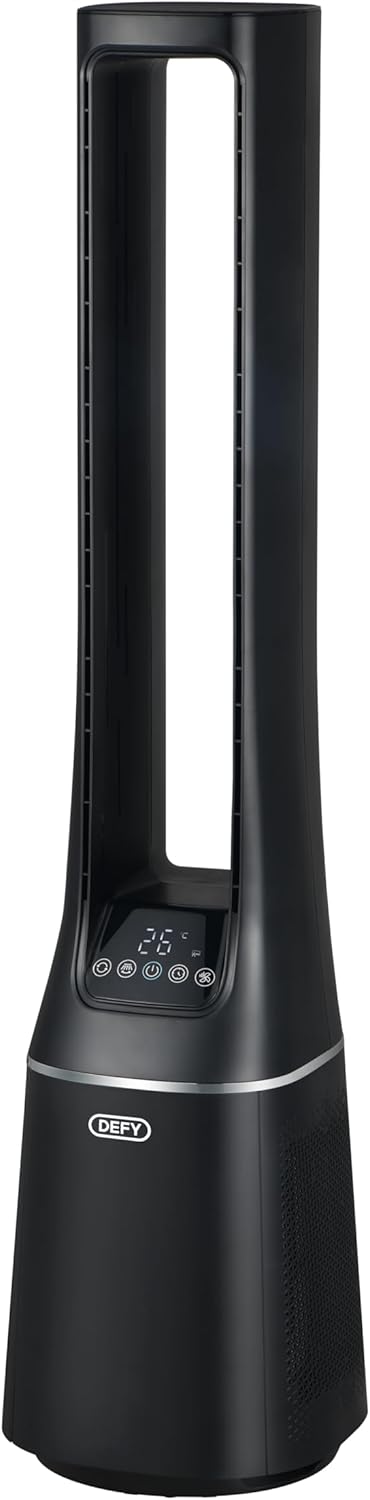
Сүрөт 2.2: Side view of the Defy DBF400, highlighting its slim profile and the air intake vents located at the lower section of the unit.

Сүрөт 2.3: Арткы view of the Defy DBF400, showing the smooth, continuous surface and the location of the power cord connection point.
3. Орнотуу
Follow these steps to set up your Defy DBF400 Bladeless Fan and Purifier:
- Пакеттен чыгаруу: Carefully remove the appliance from its packaging. Retain all packaging materials for future storage or transport.
- Жайгашкан жери: Place the unit on a firm, level surface. Ensure there is at least 30 cm (12 inches) of clear space around the unit for optimal airflow. Avoid placing it near heat sources or in direct sunlight.
- Кубат туташуу: Insert the power plug into a standard 220V AC electrical outlet. Ensure the cord is not pinched or placed under heavy objects.
4. Иштөө нускамалары
The Defy DBF400 can be operated using the touch control panel on the unit or the included remote control.
4.1 Башкаруу панели
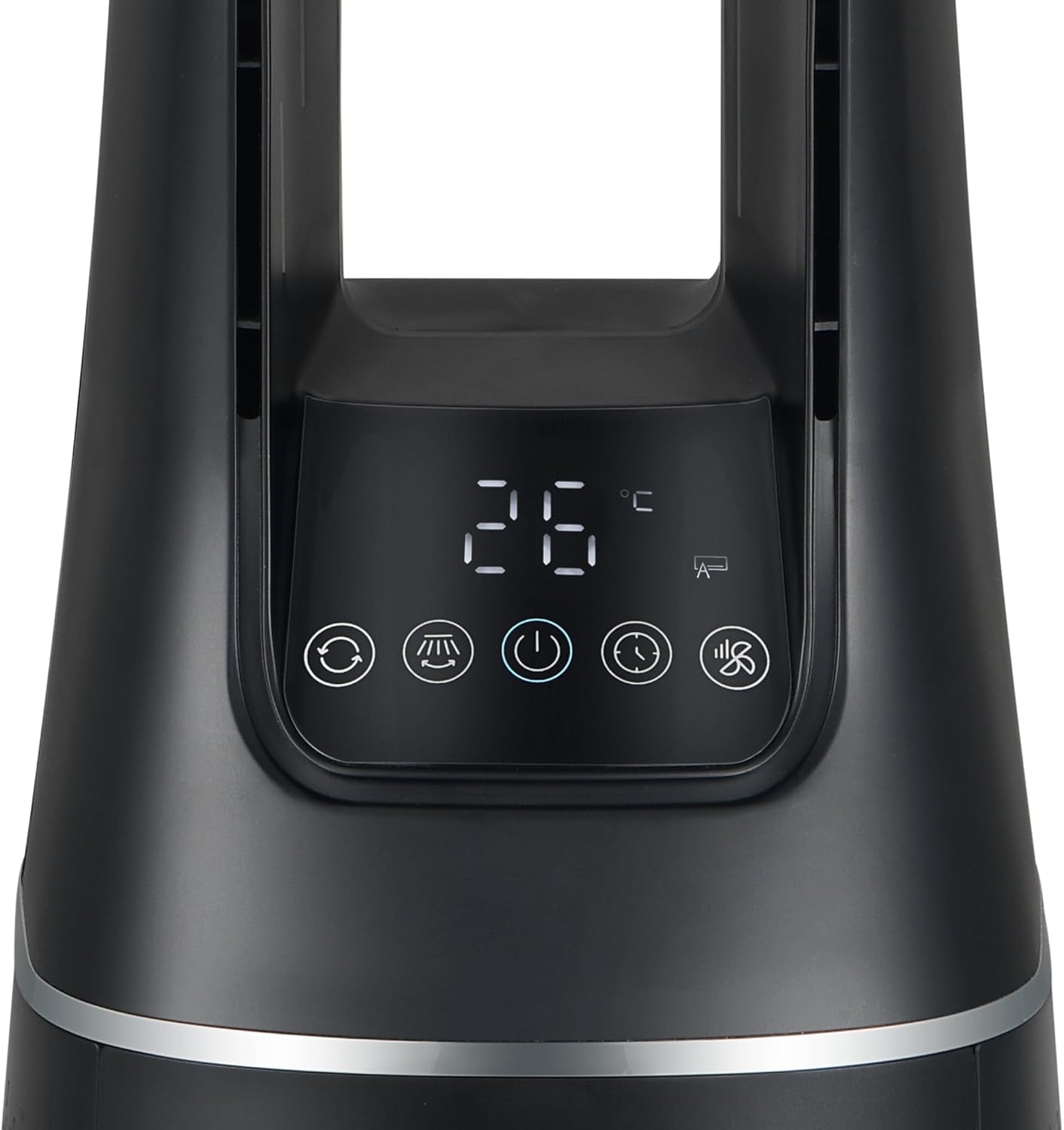
Сүрөт 4.1: Close-up of the control panel and digital display on the Defy DBF400. The display shows '26 °C' and various icons for modes and functions.
Башкаруу панелинде санариптик дисплей жана ар кандай функцияларды аткаруу үчүн сенсордук баскычтар бар:
- Кубат баскычы (⏻): Агрегатты КҮЙГҮЗӨТ же ӨЧҮРөт.
- Режим баскычы (M): Cycles through the 4 wind modes: Normal, Sleep, Smart, and Baby.
- Ылдамдыкты жөндөө (+ / -): Increases or decreases the fan speed (10 speed settings).
- Термелүү баскычы (⟳): 60 градустук термелүү функциясын иштетет же өчүрөт.
- Таймер баскычы (🕒): Авто өчүрүү таймерин орнотот.
4.2 Алыстан башкаруу

Сүрөт 4.2: The multi-functional remote control for the Defy DBF400. It is black with white buttons, including power, mode, speed adjustment, and timer functions.
The remote control provides convenient access to all functions from a distance. Ensure the remote control is pointed towards the unit's control panel for proper operation.
- Кубат баскычы: Агрегатты КҮЙГҮЗӨТ же ӨЧҮРөт.
- Режим баскычы (M): Selects desired wind mode.
- Speed Adjustment (+ / -): желдеткич ылдамдыгын тууралайт.
- Термелүү баскычы: Toggles oscillation.
- Timer Button (L): Авто өчүрүү таймерин орнотот.
4.3 Шамал режими
- Normal Wind Mode: Provides a continuous airflow at the selected speed.
- Уйку режими: Уйку үчүн тынчыраак чөйрөнү камсыз кылуу максатында желдеткичтин ылдамдыгын акырындык менен азайтат.
- Smart Mode: Желдеткичтин ылдамдыгын бөлмөнүн температурасына жараша автоматтык түрдө тууралайт.
- Ымыркай режими: Operates at a gentle, low speed for minimal disturbance.
5. Техникалык тейлөө
Regular maintenance ensures optimal performance and longevity of your Defy DBF400.
5.1 Сырты тазалоо
- Тазалоодон мурун ар дайым розеткадан ажыратыңыз.
- Сырткы беттерин жумшак менен сүртүңүз, гamp кездеме. Абразивдүү тазалагычтарды же эриткичтерди колдонбоңуз.
- Ички компоненттерге суу кирбесин текшериңиз.
5.2 Аба чыпкасын тазалоо/алмаштыруу
The air purifier function relies on a clean filter. Refer to the product's specific filter access instructions for cleaning or replacement. Typically, filters should be checked every 3-6 months depending on usage and air quality.
- Агрегатты сууруп алыңыз.
- Locate the filter cover (usually at the back or bottom of the unit).
- Remove the filter. If washable, clean according to instructions. If not, replace with a genuine Defy replacement filter.
- Reinsert the filter and secure the cover.
6. Кыйынчылыктарды
If you encounter issues with your Defy DBF400, refer to the following common problems and solutions:
| Көйгөй | Мүмкүн себеп | Чечим |
|---|---|---|
| Түзмөк күйбөйт | No power supply; Power cord not properly plugged in | Розетканы текшериңиз; Электр шнурунун бекем сайылганын текшериңиз |
| Алсыз аба агымы | Air intake/outlet blocked; Filter dirty; Low fan speed setting | Clear obstructions; Clean or replace filter; Increase fan speed |
| Пульт иштебей жатат | Batteries depleted; Obstruction between remote and unit; Remote not pointed correctly | Replace batteries; Remove obstructions; Point remote directly at control panel |
| Адаттан тышкаркы ызы -чуу | Unit not on a level surface; Foreign object inside | Place on a stable, level surface; Unplug and carefully check for obstructions (do not disassemble) |
Бул чечимдерди колдонуу аракетинен кийин көйгөй чечилбесе, кардарларды колдоо кызматына кайрылыңыз.
7. Техникалык шарттар
| Өзгөчөлүк | Деталь |
|---|---|
| Модель номери | DBF400 |
| Бренд | Defy |
| Power / Wattage | 36 ватт |
| Тtage | 220 вольт |
| Ылдамдыктын саны | 10 |
| Шамал режимдери | Normal, Sleep, Smart, Baby |
| Термелүү | 60 градус |
| Башкаруу түрү | Сенсордук панель, алыстан башкаруу |
| Материал | Пластик |
| Өлчөмдөр (D x W x H) | 25.5 x 25.5 x 105.6 см |
| Элемент Салмагы | 5.8 кг |
8. Кепилдик маалыматы
This Defy appliance comes with a standard manufacturer's warranty. Please refer to the warranty card included with your purchase for specific terms, conditions, and duration. Keep your proof of purchase for any warranty claims.
The warranty typically covers defects in materials and workmanship under normal household use. It does not cover damage resulting from misuse, accident, unauthorized modification, or failure to follow the instructions in this manual.
9. Кардарларды колдоо кызматы
For technical assistance, spare parts, or service inquiries, please contact Defy customer support. Have your model number (DBF400) and proof of purchase ready when contacting support.
Contact details can typically be found on the Defy official webсайтында же өнүмүңүз менен бирге берилген кепилдик картасында.