Introduction
Бул колдонмодо Qualcomm унаа радио стереоңузду орнотуу, иштетүү жана тейлөө боюнча кеңири нускамалар берилген. 2014-жылдан 2016-жылга чейинки Toyota Corolla моделдери үчүн атайын иштелип чыккан бул өркүндөтүлгөн баш блок Android 13, 10.1 дюймдук QLED сенсордук экран, GPS навигациясы, зымсыз CarPlay, Android Auto, Bluetooth 5.0 жана AM/FM радиосу менен жабдылган. Оптималдуу иштөөнү жана коопсуздукту камсыз кылуу үчүн колдонуудан мурун бул колдонмону кылдат окуп чыгыңыз.
Продукт бүттүview
Негизги өзгөчөлүктөрү
- Шайкештик: Toyota Corolla 2014, 2015 жана 2016 моделдери үчүн атайын иштелип чыккан, рулдук башкаруу жана үн системалары сыяктуу оригиналдуу унаа функцияларын колдойт. 360° толук бурулушка ээ. viewэкрандын жарыктыгын күндүз да, түнкүсүн да тууралоо мүмкүнчүлүгү жана бурчу.
- Жогорку аткаруу: Күчтүү иштөө жана тез жооп берүү убактысы үчүн Android 13.0, Qualcomm 3987 сегиз ядролуу процессор, 4 ГБ оперативдик эс тутум жана 64 ГБ ROM менен жабдылган.
- Жогорку дисплей: Так визуалдык көрүнүш үчүн 10.1 дюймдук 1280x720 жогорку сапаттагы QLED дисплей.
- Жакшыртылган аудио: Бай, тунук үн жана ыңгайлаштырылуучу аудио жөндөөлөрү үчүн орнотулган санариптик сигнал процессору (DSP).
- Акылдуу туташуу: GPS навигациясы, колсуз чалуулар жана үн менен башкаруу (Siri/Google Assistant) аркылуу колдонмолорго кирүү сыяктуу смартфондорду үзгүлтүксүз интеграциялоо үчүн зымсыз Apple CarPlay, Android Auto жана Bluetooth 5.0 менен Mirror Link колдойт.
- Интернетке кирүү: Онлайн навигация, видео агымы (YouTube, Netflix) жана тиркемелерди жүктөп алуу үчүн 4G тармагын жана Wi-Fi байланыштарын колдойт.
Визуалдык өкүлчүлүк

Сүрөт: Негизги продукт бирдиги, көрсөтүүasing Навигация, радио жана колдонмо сүрөтчөлөрү бар 10.1 дюймдук QLED дисплей. Ошондой эле арткы бөлүгүн камтыйтview зымсыз CarPlay/Android Auto функциясын көрсөткөн камера жана смартфон.

Сүрөт: Башкы блоктун негизги функцияларынын визуалдык кыскача баяндамасы: CarPlay/Android Auto/Mirror Link, орнотулган DSP Surround үнү, Wifi/4G Online/Offline мүмкүнчүлүктөрү жана Bluetooth/GPS/APP колдоосу.
Пакеттин мазмуну
Пакетти ачканда, бардык компоненттер бар экенин текшериңиз:
- Прибордун ичиндеги баш блок (Qualcomm унаа радиосунун стереосу)
- Зымдардын кабелдери
- CANBUS декодери
- Frame Panel
- Instruction Book
- Кошумча кабелдер (белгилүү бир туташуулар үчүн зарыл болгондо)
Орнотуу
Бул башкы блокту орнотуу үчүн зымдарды туташтырууга жана орнотууга кылдат көңүл буруу керек. Эгер сиз унаанын аудио системасынын зымдарын туташтыруу менен тааныш болбосоңуз, анда толук, этап-этабы менен көрсөтмө алуу үчүн тиркелген нускама китебин карап чыгуу же кесипкөй орнотуучуга кайрылуу сунушталат.
Орнотуу процесси бүттүview
- Унаанын кубаты өчүрүлгөнүн жана батареянын ажыратылганын текшериңиз.
- Унаа радиосун жана жасалгалоо панелин этияттык менен алып салыңыз.
- Берилген зымдардын кабелдерин жана CANBUS декодерин унаанын учурдагы зымдарына жана жаңы башкы блокко туташтырыңыз.
- Берилген рамка панелин колдонуп, жаңы баш блокту башкаруу панелине орнотуңуз.
- Батареяны кайра туташтырып, түзмөктүн иштешин текшериңиз.
Зымдардын схемалары жана орнотуу боюнча көрсөтмөлөр үчүн, таңгагыңыздагы "Нускама китебин" караңыз.

Сүрөт: Унаанын башкаруу панелинин визуалдык трансформациясын көрсөтүп, баштапкы орнотууну ("Орнотуудан мурун") жана интеграцияланган Qualcomm унаа радио стереосун ("Орнотуудан кийин") көрсөтөт.

Сүрөт: Башкы блок Toyota Corolla (2014-2016-жылдардагы модел) унаасынын башкаруу панелине кемчиликсиз интеграцияланган жана Android 13 интерфейсин ар кандай колдонмо сүрөтчөлөрү менен көрсөтөт.
Операция
Qualcomm унаа радиосунун стереосу интуитивдик Android 13 сенсордук экран интерфейсинде иштейт. Жөнөкөй таптоо жана серпүү менен менюларды аралап, тиркемелерди ишке киргизип жана жөндөөлөрдү башкарыңыз.
Колдонуучу интерфейсин ыңгайлаштыруу
Система тажрыйбаңызды жекелештирүү үчүн эркин алмаштырыла турган 21 ар кандай колдонуучу интерфейсинин (UI) топтомун сунуштайт.
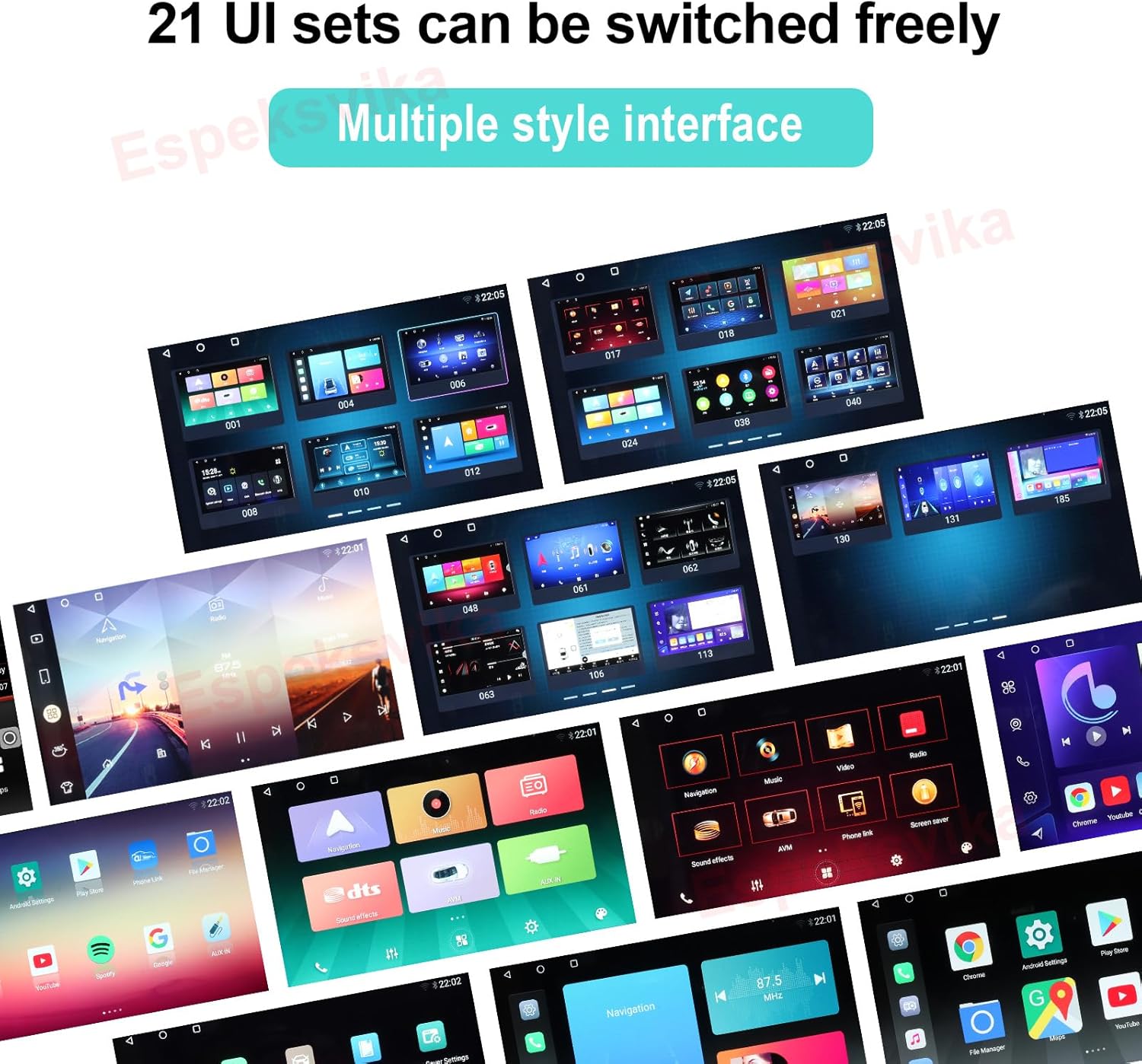
Сүрөт: Башкы блокто жеткиликтүү болгон 21 ыңгайлаштырылуучу UI топтомун көрсөткөн ар кандай колдонуучу интерфейсинин дизайндарынын коллажы.
Байланыш
Зымсыз CarPlay жана Android Auto
Apple CarPlay же Android Auto'го кирүү үчүн смартфонуңузду Bluetooth 5.0 аркылуу зымсыз туташтырыңыз. Бул телефонуңуздун функцияларын, анын ичинде GPS навигациясын, колсуз чалууларды, билдирүү алмашууну жана музыканы агымдоону үзгүлтүксүз интеграциялоого мүмкүндүк берет, мунун баарын сенсордук экран же үн буйруктары (Siri/Google Assistant) аркылуу башкарууга болот.
Mirror Link
Смартфонуңуздун экранын түз эле башкы блокко көрсөтүү үчүн Mirror Link функциясын колдонуңуз, бул сизге кеңири колдонмолорго жетүүнү камсыз кылат.
Wi-Fi жана 4G тармагы
Башкы блоктон түз интернетке кирүү үчүн Wi-Fi байланыш чекиттерине туташыңыз же 4G SIM картаны (эгер сиздин моделиңиз колдосо) салыңыз. Бул онлайн навигацияны, YouTube жана Netflix сыяктуу агым кызматтарын жана колдонмолор дүкөнүнөн колдонмолорду жүктөп алууну камсыз кылат.
GPS навигациясы
Орнотулган GPS модулу так навигацияны камсыз кылат. Онлайн жана оффлайн режиминде колдонуу үчүн алдын ала орнотулган карталарды колдонсоңуз же өзүңүзгө жаккан навигация тиркемелерин жүктөп алсаңыз болот.
Аудио өзгөчөлүктөрү
Digital Signal Processor (DSP)
Интеграцияланган DSP аудио сапатын бир топ жакшыртып, бай жана так үн берет. 16 диапазондуу эквалайзер, катуу үн, кечигүү жана балансты башкаруу сыяктуу ар кандай үн жөндөөлөрү менен угуу тажрыйбаңызды ыңгайлаштырыңыз.

Сүрөт: DTS HiFi аудио интерфейси, үндү так ыңгайлаштыруу үчүн бир нече жыштык тилкелери менен деталдуу эквалайзер жөндөөлөрүн көрсөтөт.
FM радиосу
Орнотулган FM/AM тюнери сизге сүйүктүү радиостанцияларыңызды издөөгө жана угууга мүмкүндүк берет. Тез жетүү үчүн реалдуу убакыттагы радио берүүлөрдөн ырахат алыңыз жана каалаган каналдарды сактап коюңуз.

Сүрөт: Башкы блокто көрсөтүлгөн FM радио интерфейси жыштыкты жөндөөнү, сүйүктүү станцияларды жана аудио деңгээлдеринин визуалдык көрүнүшүн көрсөтөт.
Проблемаларды чечүү
Эгерде сиз Qualcomm унаа радио стереоңуз менен кандайдыр бир көйгөйлөргө туш болсоңуз, төмөнкү жалпы көйгөйлөрдү чечүү боюнча кеңештерди караңыз. Татаалыраак көйгөйлөр үчүн, толук нускама китебин караңыз же кардарларды колдоо кызматына кайрылыңыз.
- Кубат жок: Бардык электр туташууларын жана сактагычтарды текшериңиз. Унаанын аккумулятору туура туташтырылганын жана заряддалганын текшериңиз.
- Үн жок: Динамиктердин туташууларын текшериңиз. Аудио жөндөөлөрүн текшериңиз (үн, үнсүз режим, DSP жөндөөлөрү). Туура аудио булагынын тандалганын текшериңиз.
- GPS сигналынын көйгөйлөрү: GPS антеннасынын туура орнотулганын жана ачык экенин текшериңиз view асмандан. Унааны ачык жерге жылдырып көрүңүз.
- Bluetooth туташуу көйгөйлөрү: Башкы блокто да, смартфонуңузда да Bluetooth күйгүзүлгөнүн текшериңиз. Мурунку жупташтырууларды өчүрүп, кайра туташып көрүңүз.
- CarPlay/Android Auto туташпай жатат: Телефонуңуздун операциялык тутуму жаңыртылганын текшериңиз. Туура USB кабели (эгер зымдуу болсо) же күчтүү зымсыз байланыш орнотулганын текшериңиз.
- Сенсордук экран жооп бербейт: Түзмөктү кайра иштетип көрүңүз. Эгерде көйгөй чечилбесе, заводдук жөндөөлөргө кайтаруу керек болушу мүмкүн (кадамдар үчүн нускама китебин караңыз).
Техникалык шарттар
| Өзгөчөлүк | Деталь |
|---|---|
| Элемент Салмагы | 4.52 фунт |
| Пакеттин өлчөмдөрү | 12.99 x 7.9 x 7.6 дюйм |
| Элемент моделинин номери | ES-KS-TY-012 |
| Дисплей өлчөмү | 10.1 дюйм |
| Операция системасы | Android 13.0 |
| Процессор | Qualcomm 3987 сегиз ядролуу процессор |
| RAM | 4 ГБ |
| ROM | 64 ГБ |
| Screen Resolution | 1280x720 QLED |
| Bluetooth версиясы | 5.0 |
| Байланыш технологиясы | Bluetooth, Wi-Fi, USB, 4G тармагы |
| Өзгөчөлүктөр | Сенсордук экран, Bluetooth, Зымсыз CarPlay, Android Auto, Mirror Link, DSP, GPS навигациясы |
| Унаа кызматынын түрү | Унаа (Toyota Corolla 2014-2016) |
Кепилдик жана колдоо
Qualcomm унаа радиоңуздун стереосу төмөнкүлөр менен келет 2 жылдык кепилдик сатып алынган күндөн тартып, өндүрүштүн кемчиликтерин жана нормалдуу колдонууда бузулууларды камтыйт.
Орнотуу, зымдарды орнотуу, чогултуу, иштетүү же туташуу каталары боюнча кандайдыр бир суроолоруңуз болсо, кардарларды тейлөө кызматыбызга кайрылуудан тартынбаңыз. Колдоо кызматына кайрылганда продуктуңуздун моделинин номерин (ES-KS-TY-012) жана сатып алуу жөнүндө маалыматты даярдап коюңуз.
Эскертүү: Кепилдик туура эмес орнотуудан, туура эмес колдонуудан, кырсыктардан же уруксатсыз өзгөртүүлөрдөн улам келип чыккан зыянды камтыбайт.


