
Introduction
The Dreamegg Nite 1 is a versatile device designed to assist in establishing healthy sleep habits for babies, kids, and toddlers. It combines a sound machine, sleep trainer, night light, and alarm clock into one unit, offering a comprehensive solution for a peaceful sleep environment. With 34 soothing sounds, multiple night light modes, and convenient app control, the Nite 1 helps children understand sleep and wake-up cues, promoting consistent routines.
This particular variant includes charming cartoon coverlets, allowing for personalization and adding a delightful touch to the device. These coverlets are designed to enhance the visual appeal of your Dreamegg Nite 1, creating an atmosphere your child will love.
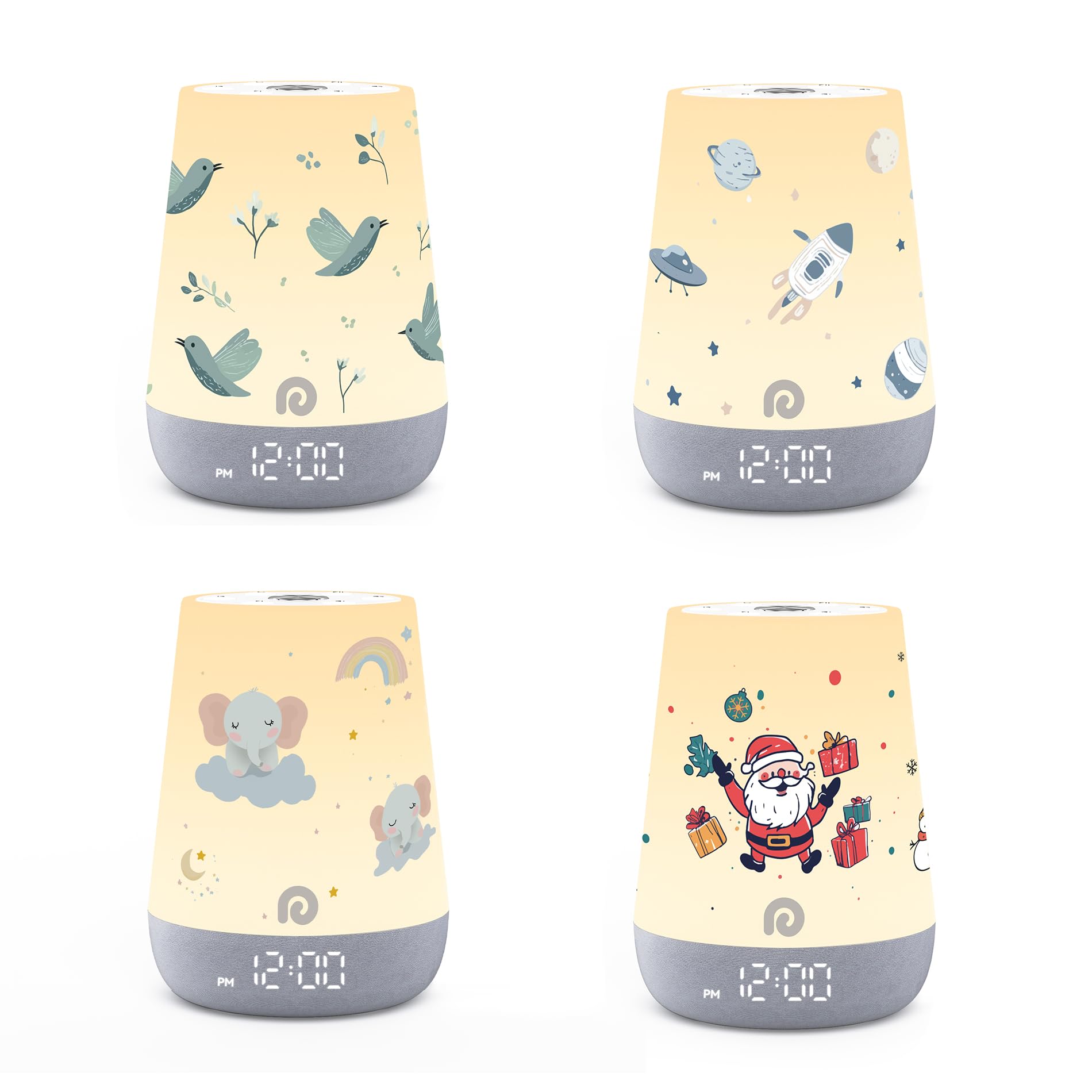
Image: Dreamegg Nite 1 Sound Machine with various coverlet designs.
Продукт өзгөчөлүктөрү
- Effective Sleep Habits: Combines light and music to signal sleep and wake times, aiding in building healthy sleep routines.
- 34 Тынчтандыруучу үн: Includes 11 nature sounds, 7 ambient sounds, 6 white noise sounds, and 10 melodies to help children relax and fall asleep faster.
- 3 Night Light Modes: Offers Solid Color, Sunlight, and Dynamic modes (Color Changing, Color Fading, Sunlight Breathing) to suit individual preferences and curiosity.
- Effortless App Control: Manage sleep routines, 'Ok to Wake' clocks, night light modes, timers, child lock, and display brightness remotely via a user-friendly app interface.
- Автоматтык убакытты тууралоо: The device automatically adjusts the time, eliminating manual adjustments.
Жайгашуу
- Кутудан чыгаруу: Carefully remove the Dreamegg Nite 1 device and its power cable from the packaging.
- Кубат туташуу: Plug the provided power cable into the device and then into a standard electrical outlet. The device display should light up.
- Колдонмону жүктөө: Download the Dreamegg app from your smartphone's app store (iOS or Android).
- Колдонмо туташуусу: Open the app and follow the on-screen instructions to connect your Dreamegg Nite 1 device via Wi-Fi or Bluetooth. This typically involves pressing a pairing button on the device (often located on the bottom) and confirming the connection in the app.
- Coverlet Installation: If using coverlets, gently slide the chosen coverlet over the top of the Dreamegg Nite 1 device, ensuring it fits snugly and does not obstruct any buttons or the speaker.
Иштөө нускамалары
Device Controls (Top Panel)
The top panel of the Dreamegg Nite 1 features several touch-sensitive buttons for direct control:
- Power/Play/Pause Button (Center): Tap to turn the device on/off or to play/pause the current sound.
- Көлөмдү өйдө / ылдый баскычтары: Үндүн үнүн тууралаңыз.
- Үн тандоо баскычтары: Cycle through the available soothing sounds.
- Жарык режим баскычы: Change between different night light colors and modes.
- Жарык баскычы: Adjust the brightness level of the night light.
Колдонмонун башкаруу элементтери
For full customization and remote management, use the Dreamegg app:
- Үн тандоо: Browse and select from 34 soothing sounds (nature, ambient, white noise, melodies). Adjust volume precisely.
- Night Light Customization: Choose from Solid Color, Sunlight, or Dynamic modes. For Dynamic mode, select Color Changing, Color Fading, or Sunlight Breathing. Adjust color and brightness levels.
- Sleep Routines & Alarms: Set personalized sleep routines and 'Ok to Wake' alarms to help children establish consistent sleep-wake schedules.
- Таймерлер: Set timers for sounds and lights to automatically turn off after a specified duration.
- Балдар кулпусу: Activate the child lock feature to prevent accidental changes by little hands.
- Дисплей жарыктыгы: Adjust the brightness of the digital clock display on the device.
Техникалык тейлөө
- Тазалоо: Аппаратты жумшак, кургак чүпүрөк менен сүртүңүз. Суюк тазалагычтарды же абразивдүү материалдарды колдонбоңуз.
- Coverlets: Remove coverlets for cleaning as per their specific care instructions (usually hand wash or gentle machine wash).
- Сактагыч: Аппаратты колдонбогондо салкын, кургак жерде сактаңыз.
Проблемаларды чечүү
- Түзмөк күйбөй жатат: Кубат кабелинин түзмөккө жана иштеп жаткан розеткага бекем туташтырылганын текшериңиз.
- Колдонмонун туташуу маселелери: Verify your device's Wi-Fi/Bluetooth is enabled and within range. Ensure the Dreamegg app is updated to the latest version. Try restarting both the device and your smartphone.
- Үн/Жарык жок: Check the volume and brightness settings on both the device and within the app. Ensure the device is not in child lock mode.
- Time Display Incorrect: The time should automatically adjust via the app connection. If incorrect, check your app settings and ensure the device is properly synced.
Техникалык шарттар
- Модель аты: MBZ228-COVERLETS-US
- Модель номери: D40-Coverlets Set -CA
- Бренд: Dreamegg
- Материал: Акрилонитрил бутадиен стирол (ABS), Пластмасса
- Кубат булагы: Battery Powered (Note: The device is typically powered via a cable and does not operate on internal batteries for extended periods, implying it needs to be plugged in for continuous use.)
- Пакеттин өлчөмдөрү: 0.14 x 0.1 x 0.06 дюйм
- Элемент Салмагы: 2.08 унция
Коопсуздук маалыматы
Always supervise children when using this product. Keep batteries out of reach of children. Do not expose the product to excessive heat or moisture. If the product malfunctions, stop using it immediately and contact the manufacturer.
Юридикалык баш тартуу
Диеталык кошулмаларга байланыштуу билдирүүлөр FDA тарабынан бааланган эмес жана диагноз коюу, дарылоо, айыктыруу же кандайдыр бир ооруну же ден соолуктун абалын алдын алуу үчүн арналган эмес.
Кепилдик жана колдоо
For warranty information, technical support, or any inquiries regarding your Dreamegg Nite 1 device, please visit the official Dreamegg webсайтка же түздөн-түз кардарларды тейлөөгө кайрылыңыз. Кепилдик дооматтар үчүн сатып алуу дүмүрчөгүңүздү сактаңыз.