
Introduction
Thank you for choosing the TECKNET TK-MS017 Ergonomic Wireless Vertical Mouse. This manual provides detailed instructions for setting up, operating, maintaining, and troubleshooting your new mouse. Designed for comfort and efficiency, this vertical mouse helps reduce wrist strain during prolonged use.

The TECKNET Ergonomic Vertical Mouse, designed for comfortable use.
Продукт өзгөчөлүктөрү
- Эргономикалык вертикалдык дизайн: Mimics a natural handshake posture to reduce wrist and arm pressure, preventing discomfort from prolonged use.
- Жөнгө салынуучу DPI: 5 levels of DPI (800/1600/2400/3200/4800) for precise tracking and adaptable sensitivity.
- Унчукпай чыкылдатуулар: 99% noise reduction for a quiet working environment. (Forward/Backward buttons are not silent).
- 6 Баскычтар: Includes standard left/right click, scroll wheel, DPI switch, and convenient forward/backward buttons for web навигация.
- Туруктуу 2.4G зымсыз байланышы: Provides a reliable connection up to 10 meters with a plug-and-play USB receiver.
- Батареянын узак иштөө мөөнөтү: Features an independent power switch and automatic sleep function to conserve battery, offering up to 24 months of use.
- Кеңири шайкештик: Supports Windows 11/10/8/7/XP, Mac OS X10.4, Chrome OS, and Linux.

Comparison of vertical ergonomic grip and traditional mouse grip, highlighting reduced wrist tension with the vertical design.
Орнотуу нускамалары
- Батареяны орнотуу:
Locate the battery compartment on the underside of the mouse. Open the cover and insert two AA batteries (not included), ensuring correct polarity. Close the battery cover securely.

The underside of the mouse, illustrating the battery compartment and the storage slot for the USB receiver.
- USB кабылдагычты туташтыруу:
Remove the USB receiver from its storage slot next to the battery compartment. Plug the receiver into an available USB port on your computer (PC, laptop, Mac, Chromebook, or tablet).
- Күйгүзүү:
Flip the ON/OFF switch on the bottom of the mouse to the "ON" position. The mouse should automatically connect to your device. No additional drivers are typically required for most operating systems.
Иштөө нускамалары
Баскыч функциялары
- Сол чыкылдатуу: Стандарттык тандоо жана активдештирүү.
- Оң чыкылдатуу: Контексттик менюларды ачат.
- Жылдыруу дөңгөлөгү: Документтерди жылдырат жана web барактар тигинен жайгаштырылган. Ортоңку чыкылдатуу функциясы үчүн да басууга болот.
- DPI которуу баскычы: Located near the scroll wheel. Press to cycle through DPI settings (800/1600/2400/3200/4800). The red indicator light will flash to confirm the change.
- Алга баскычы: Алга карай жылдырат web браузерлер же file explorers. (Not supported on Mac OS).
- Артка баскычы: Артка карай багыт алат web браузерлер же file explorers. (Not supported on Mac OS).
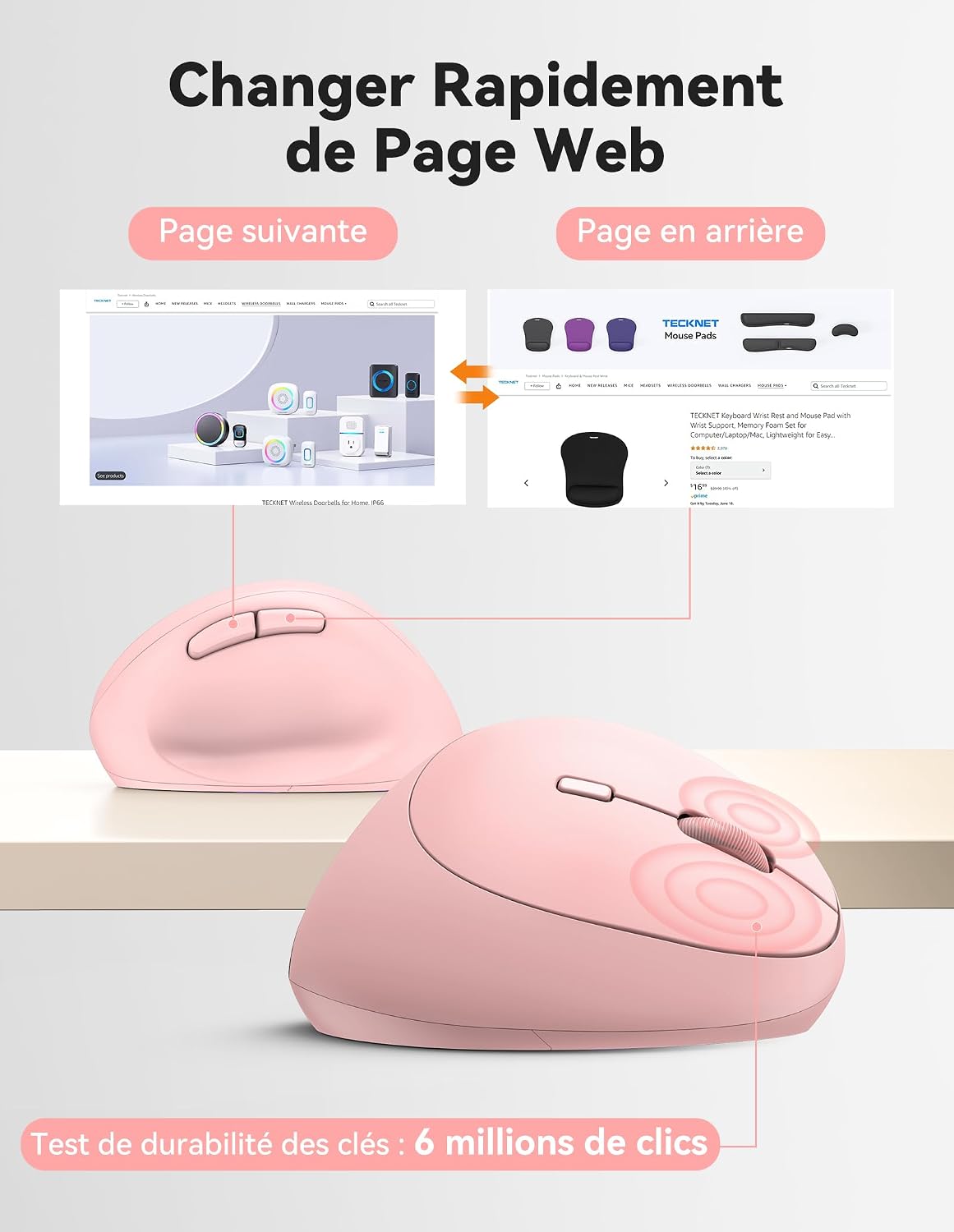
Diagram illustrating the location and function of each button on the TECKNET vertical mouse.
DPI тууралоо
The mouse offers 5 adjustable DPI levels to suit various tasks and preferences. Press the DPI switch button to change the cursor speed. The red indicator light will flash a corresponding number of times to indicate the current DPI setting:
- Flash X1: 800 DPI (Web Navigation)
- Flash X2: 1600 DPI (Excel Editing)
- Flash X3: 2400 DPI (Video Editing)
- Flash X4: 3200 DPI (Photoshop)
- Flash X5: 4800 DPI (Gaming Track)

Visual representation of the 5 adjustable DPI levels for different usage scenarios.
Энергияны үнөмдөө режими
To conserve battery life, the mouse will automatically enter sleep mode after 8 minutes of inactivity. To wake it up, simply move the mouse or click any button.
Техникалык тейлөө
- Тазалоо: Чычканды тазалоо үчүн жумшак, кургак чүпүрөктү колдонуңуз. Катуу химиялык заттарды же абразивдүү материалдарды колдонуудан алыс болуңуз.
- Батареяны алмаштыруу: When the mouse performance degrades or the cursor becomes erratic, it's time to replace the batteries. Ensure you use fresh AA batteries and dispose of old batteries responsibly.
- Сактагыч: When not in use for extended periods, turn off the mouse using the ON/OFF switch to further conserve battery life. Store the USB receiver inside the mouse's battery compartment to prevent loss.
Проблемаларды чечүү
- Чычкан жооп бербей жатат:
- Чычкандын күйүп турганын текшериңиз.
- Батареялар туура орнотулганын жана заряды жетиштүү экендигин текшериңиз. Керек болсо алмаштырыңыз.
- USB кабыл алгыч иштеп жаткан USB портуна бекем сайылып турганын текшериңиз. Башка USB портун колдонуп көрүңүз.
- Move the mouse closer to the USB receiver to rule out range issues.
- Компьютериңизди өчүрүп күйгүзүңүз.
- Курсордун туура эмес кыймылы:
- Чычкандын түбүндөгү оптикалык сенсорду тазалаңыз.
- Ensure you are using the mouse on a suitable surface. The mouse is designed to track on various surfaces like resin, wood, fabric, paper, and metal. Avoid highly reflective or transparent surfaces.
- Эгерде курсор өтө сезгич болсо, DPI жөндөөсүн төмөнкү деңгээлге тууралаңыз.
- Mac'та алдыга/артка баскычтары иштебей жатат:
These side buttons are not supported by Mac OS. This is a system limitation, not a mouse malfunction.
Техникалык шарттар
| Бренд | TECNET |
| Модель номери | TK-MS017 |
| Байланыш технологиясы | 2.4G Wireless (Radio-frequency) |
| Кыймылды аныктоо технологиясы | Оптикалык |
| DPI деңгээли | 800, 1600, 2400, 3200, 4800 |
| баскычтардын саны | 6 |
| Колдун багыты | Туура |
| Продукциянын өлчөмдөрү | 10.5L x 6.5W сантиметр |
| Зымсыз диапазон | 10 метрге чейин |
| Power Source | 2 x AA батарейкалар (киргизилген эмес) |
| Батареянын орточо иштөө мөөнөтү | 24 айга чейин |
| Шайкеш операциялык системалар | Windows 11/10/8/7/XP, macOS X10.4+, Chrome OS, Linux |
Кепилдик жана колдоо
TECKNET provides a 36-month support period for registered products. If you encounter any issues during the use of this product, please contact the professional TECKNET customer service team for assistance.
For more information and support, please visit the official TECKNET webсайтка же түздөн-түз кардарларды тейлөөгө кайрылыңыз.
Webсайт: Amazon'догу TECKNET дүкөнү