
Blogole CP3C2041US
Blogole 4FT Whip Light and Rock Light Combo Kit User Manual
Model: CP3C2041US
1. Киришүү
This manual provides detailed instructions for the installation, operation, and maintenance of your Blogole 4FT Whip Light and Rock Light Combo Kit. This kit is designed to enhance visibility and aesthetics for various off-road vehicles, including UTVs, ATVs, RZRs, SxSs, and Can-am models. Please read this manual thoroughly before installation and use to ensure proper function and safety.
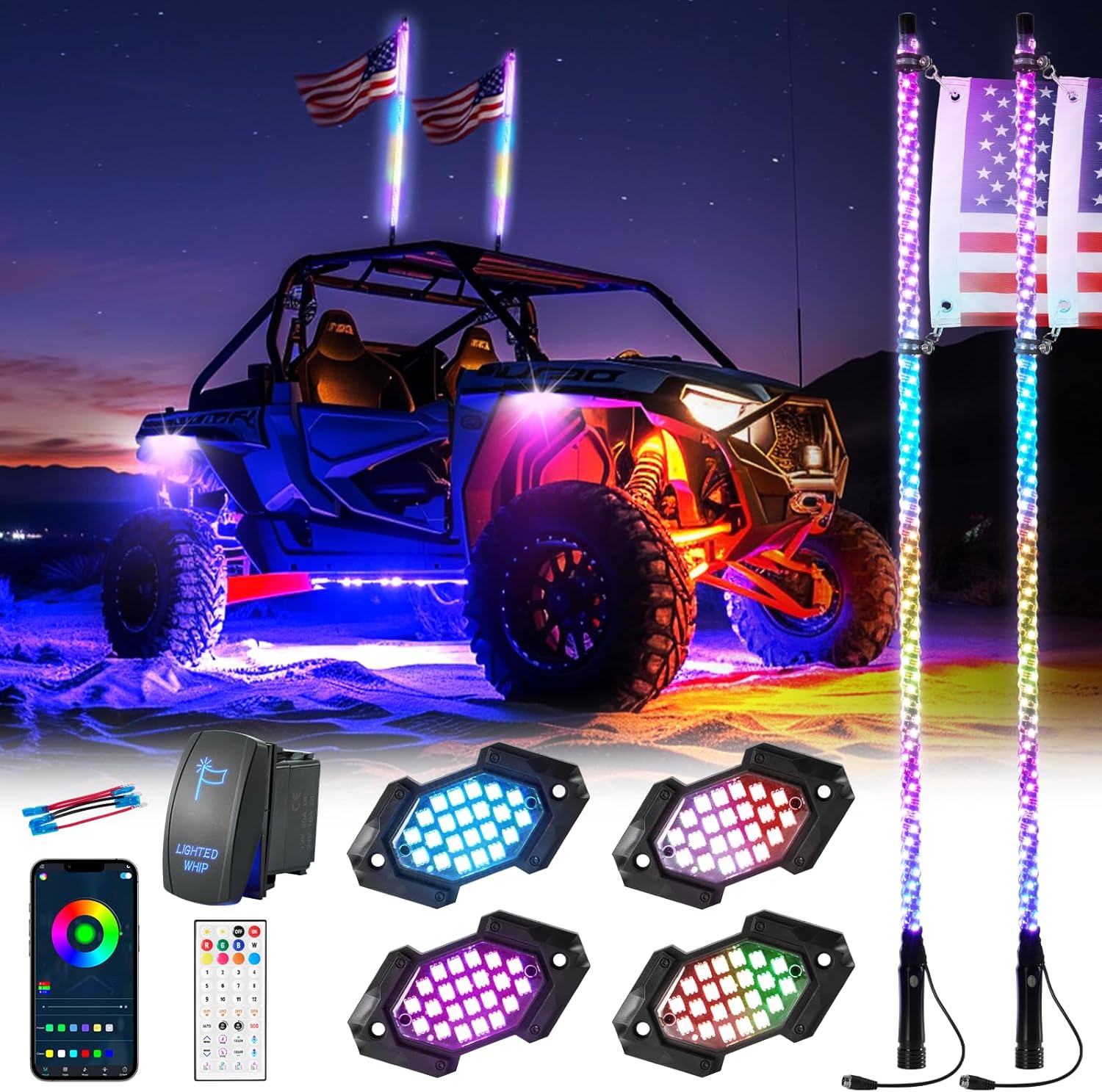
Image 1.1: Blogole 4FT Whip Light and Rock Light Combo Kit in use.
This image displays an off-road vehicle equipped with the Blogole 4FT Whip Light and Rock Light Combo Kit. The vehicle is illuminated with bright, multi-colored LED lights from both the whip lights mounted on the rear and the rock lights underneath, creating a striking visual effect against a dark, outdoor backdrop.
2. Пакеттин мазмуну
Төмөндө көрсөтүлгөн бардык буюмдар таңгагыңызда бар экенин текшериңиз. Эгерде кандайдыр бир компоненттер жок болсо же бузулуп калса, кардарларды колдоо кызматына кайрылыңыз.

Image 2.1: Complete Kit Contents.
This image illustrates all components of the Blogole 4FT Whip Light and Rock Light Combo Kit neatly laid out and individually numbered for easy identification. Key items include two 4FT Spiral Whip Lights, four RGB Rock Lights, a Controller, an Instruction Manual, a Flag Holder Set, a Remote Control, a Rocker Switch, two American Flags, two Spring Bases, and two Extension Harnesses.
- 2 x 4FT Spiral Whip Lights
- 4 x RGB Rock Lights
- 1 х башкаруучусу
- 1 x Instruction Manual
- 1 x Flag Holder Set
- 1 x Алыстан башкаруу
- 1 x Рокер которгуч
- 2 x American Flags
- 2 x Spring Bases
- 2 x Extension Harnesses
- Other Installation Accessories (various connectors, screws, etc.)
3. Техникалык шарттар
| Өзгөчөлүк | Спецификация |
|---|---|
| Бренд | Blogole |
| Модел | CP3C2041US |
| Жарык түрү | RGB LED Whip Light and Rock Light |
| Whip Light Length | 4 Фут |
| Башкаруу ыкмасы | Mobile App (Bluetooth) & RF Remote Control |
| Өзгөчөлүктөр | Music Sync, Turn Signal Integration, Brake Warning, Reverse Lighting, Timer Function, Memory Function |
| Туруктуу | IP67 Waterproof, Sand-proof, Shockproof |
| Негизги түрү | Upgraded Spring Base |
| Power Source | 12V DC Vehicle Battery |
| Automotive Fit түрү | Universal Fit (UTV, ATV, RZR, SxS, Can-am, Polaris, Dune Buggies, Sand Rails, Motorcycles, Boats) |
| Элемент Салмагы | 7.09 фунт |
| Пакеттин өлчөмдөрү | 45.75 x 6 x 3 дюйм |
4. Орнотуу жана орнотуу
4.1 Mounting the Whip Lights
- Identify a suitable mounting location on your vehicle, typically at the rear. Ensure the surface is flat and stable.
- Drill a 12mm diameter hole at the chosen mounting point.
- Attach the upgraded spring base to the whip light. The spring base provides flexibility and shock absorption.
- Insert the whip light with the attached spring base into the drilled hole and secure it using the provided hardware (nut and washer) from underneath. Ensure it is tightened securely to prevent movement during operation.

Image 4.1: Upgraded Spring Base Detail.
Бул сүрөт майда-чүйдөсүнө чейин камсыз кылат view of the upgraded shock spring base, highlighting its thicker diameter and increased number of coils designed for enhanced elasticity and pressure absorption, contributing to the whip light's durability.
4.2 Электр зымдары боюнча нускамалар
Proper wiring is crucial for the functionality and safety of your light kit. Follow these steps carefully:
- Connect Whip Lights and Rock Lights to Controller: Connect the whip lights and rock lights to the main controller unit using the provided extension harnesses. Ensure all connections are secure and waterproof.
- Connect Controller to Rocker Switch: Connect the controller's power input to the included rocker switch. This switch allows for convenient power control and helps prevent battery drain when the lights are not in use.
- Connect Rocker Switch to 12V Battery: Connect the rocker switch to your vehicle's 12V battery. It is recommended to connect the whip light to the rocker switch first instead of directly to the battery to avoid draining the battery.
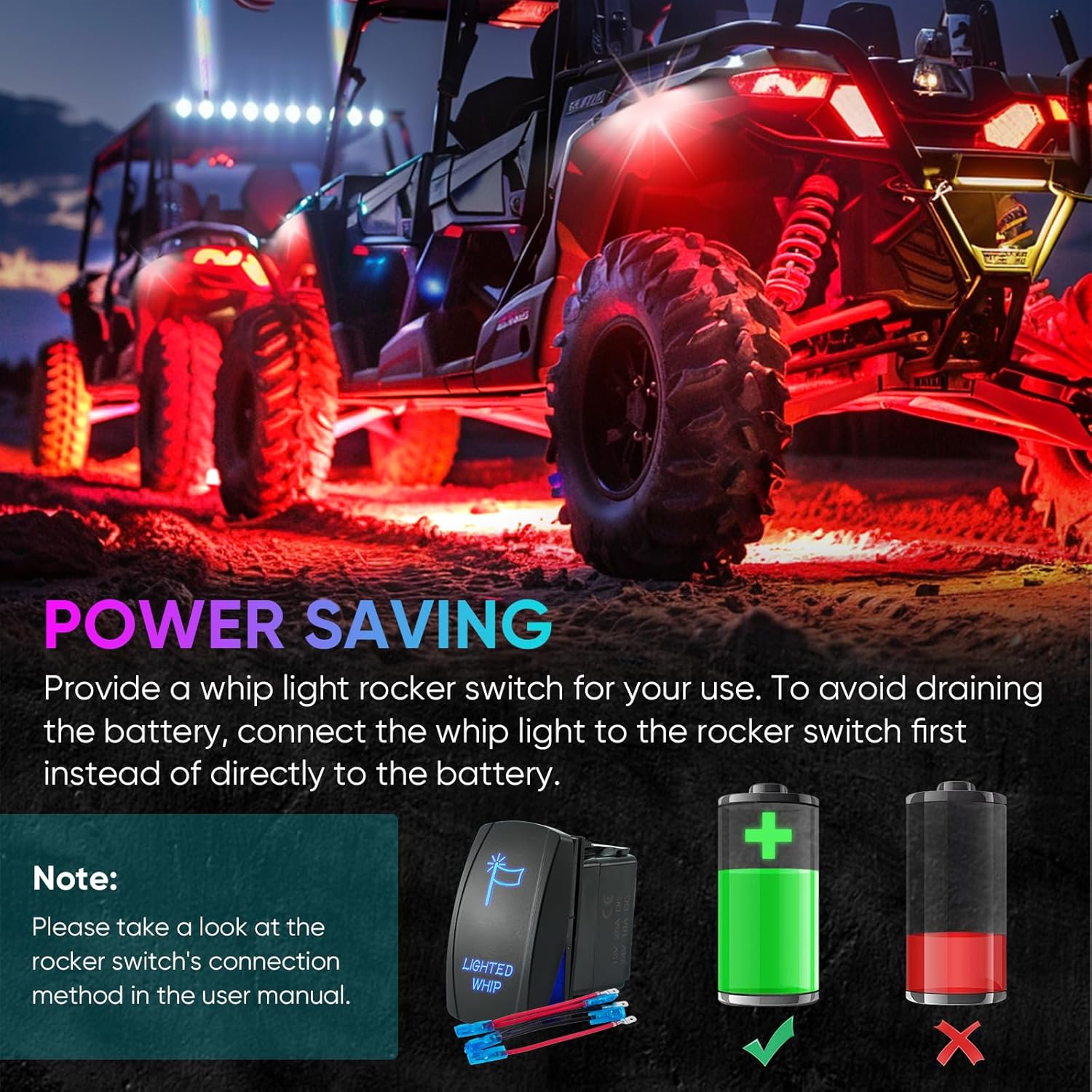
Image 4.2: Power Saving Connection Diagram.
This diagram shows the recommended wiring for the whip light system, emphasizing the connection through a rocker switch to the vehicle's 12V battery. It highlights the correct method (green checkmark) to prevent battery drainage compared to a direct connection (red cross).
Rocker Switch Pin-Tab Outs:
Refer to the diagram for proper wiring of the rocker switch:
- 8 -пин: Upper Light Negative (-) source
- 2 -пин: Incoming From Power (+)
- 3 -пин: Outgoing To Relay, Accessory Or Equipment (+)
- 7 -пин: Lower Light Negative (-)
- 6 -пин: Lower Light Positive (+)
- 5 -пин: Connect the positive of the lamp's controller
- 1 -пин: Connect the positive of battery
- 4 -пин: Connect the negative of the lamp's controller and battery

Image 4.3: Rocker Switch Wiring Diagram.
This image provides a clear wiring diagram for the rocker switch, detailing the connections for each pin (1-8) to the battery, controller, and other accessories. It serves as a visual guide for correct electrical installation.
4.3 Turn Signal and Brake Light Integration
The kit supports integration with your vehicle's turn signals, brake lights, and reverse lights for added safety. Connect the corresponding wires from the controller to your vehicle's wiring harness:
- Кызыл зым: Оң электрод
- Кара зым: Негатив электрод
- Сары зым: Сол жарыкты буруңуз
- Жашыл зым: Оңго жарыкты буруңуз
- Ак зым: Тормоз жарык

Image 4.4: Turn/Stop/Reverse Light Wiring and Function.
This image displays a wiring diagram for the turn, stop, and reverse light functions, indicating the color-coded wires for each purpose. Below the diagram, three visual examples show the whip lights illuminating in blue for a right turn signal, light blue for a left turn signal, and red for a brake light, demonstrating the integrated safety features.
5. Операция
5.1 Мобилдик тиркемелерди башкаруу
Download the dedicated mobile application (available for iOS and Android) to unlock full customization options for your lights. The app allows you to control colors, brightness, patterns, and music synchronization.
- Колдонмону жүктөп алуу: Scan the QR code in the instruction manual or search for the app name (usually provided in the manual) on your device's app store.
- Bluetooth аркылуу туташуу: Ensure your device's Bluetooth is enabled. Open the app and follow the on-screen instructions to connect to your light kit's controller.
- Орнотууларды ыңгайлаштыруу: Use the app interface to select from a wide range of colors, dynamic patterns, adjust brightness and speed settings. The app includes a memory function to save your preferred settings.
5.2 RF алыстан башкаруу
The included RF remote control provides quick access to basic functions without needing your phone.
- Күйгүзүү/өчүрүү: КҮЙГҮЗҮҮ/ӨЧҮРҮҮ баскычтарын колдонуңуз.
- Түс тандоо: Choose from 8 preset RGB colors.
- Динамикалык режимдер: Select various pre-programmed dynamic lighting patterns.
- Жарыктыкты/Ылдамдыкты жөндөө: Increase or decrease the brightness of the lights or the speed of dynamic patterns.
- DIY Keys: Program custom color or pattern sequences.
- Music Activation Mode: Музыканы синхрондоштурууну иштетүү.
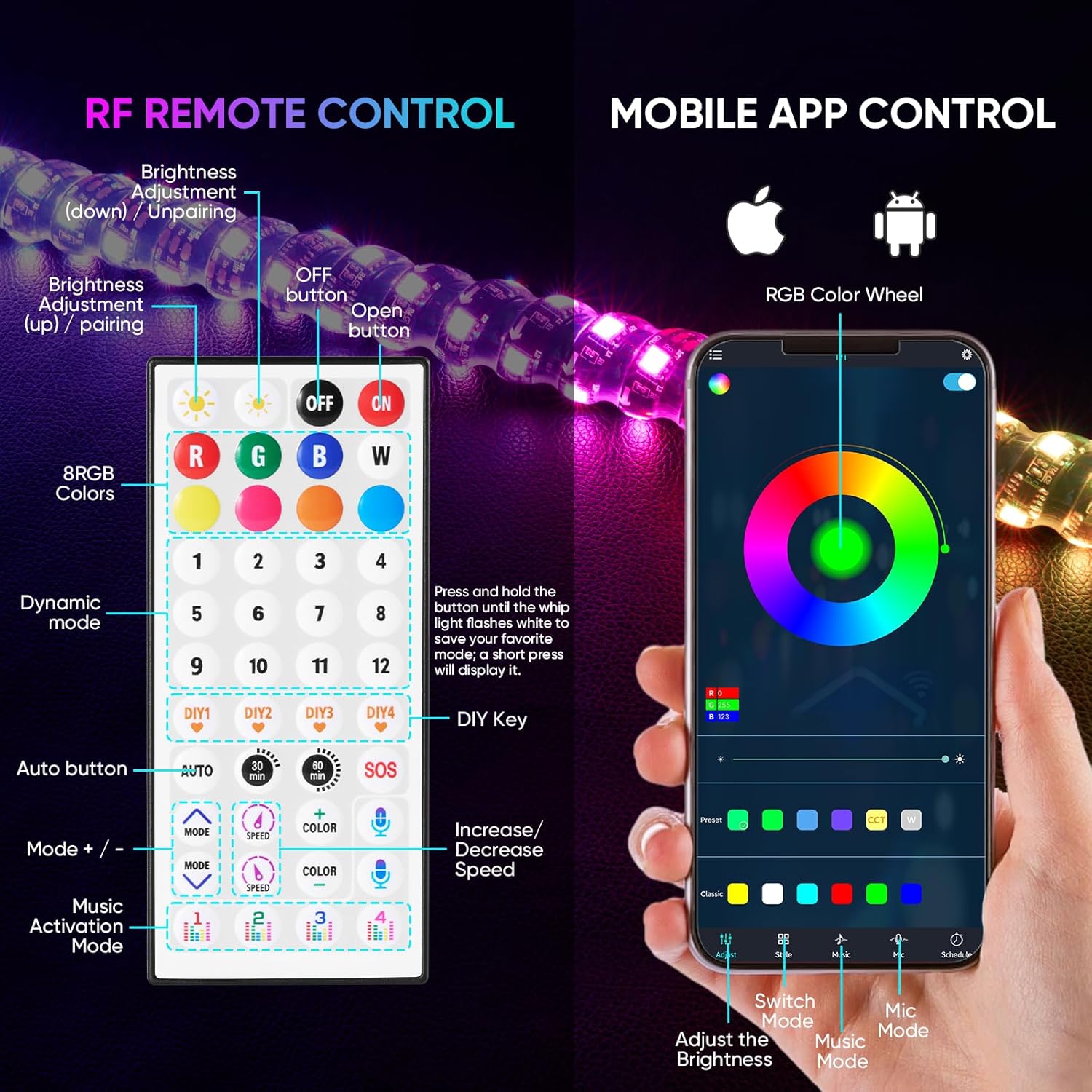
Image 5.1: RF Remote Control and Mobile App Interface.
Бул сүрөт жанаша тартуулайт view of the RF remote control and the mobile application interface. The remote shows buttons for color selection, dynamic modes, and brightness adjustment, while the app displays a color wheel, various control options, and music sync settings, illustrating the dual control capabilities of the light kit.
5.3 Музыканы синхрондоштуруу
The lights can sync with your music, creating an immersive experience. This feature can be activated via the mobile app or the remote control.
- Колдонмону башкаруу: Use the music sync feature within the app. You may need to adjust the external microphone's sensitivity in the app settings for optimal performance.
- Алыстан башкаруу: Press the dedicated music activation button on the RF remote.

Image 5.2: Music Sync Feature in Action.
This image depicts an off-road vehicle at night, with its whip lights and rock lights dynamically changing colors and patterns in sync with music, represented by a graphic equalizer overlay. This illustrates the music synchronization capability of the light kit.
6. Шайкештик
The Blogole 4FT Whip Light and Rock Light Combo Kit is designed for universal fitment across a wide range of 12V off-road vehicles, including but not limited to:
- UTVs (Utility Task Vehicles)
- Бардык жерде жүрүүчү ATVлер (жол жүрүүчү унаалар)
- RZR models
- SxS (Side-by-Side) vehicles
- Can-am vehicles
- Polaris models
- Go-karts
- Dune Buggies
- Sand Rails
- Мотоциклдер
- Кайыктар
7. Техникалык тейлөө
To ensure the longevity and optimal performance of your Blogole light kit, follow these maintenance guidelines:
- үзгүлтүксүз тазалоо: Periodically clean the whip lights and rock lights with a soft cloth and mild soap solution. Avoid abrasive cleaners or high-pressure water jets directly on the LED strips.
- Байланыштарды текшерүү: Regularly check all wiring connections for tightness and signs of corrosion. Ensure waterproof seals are intact.
- Check Spring Bases: Inspect the spring bases for any signs of fatigue or damage, especially after rigorous off-road use. Replace if necessary.
- Батареянын ден соолугу: Monitor your vehicle's battery health, as consistent low voltage can affect light performance.
- Сактагыч: If storing the vehicle for extended periods, ensure the lights are turned off via the rocker switch to prevent battery drain.
8. Кыйынчылыктарды
| Көйгөй | Мүмкүн себеп | Чечим |
|---|---|---|
| Жарыктар күйбөйт | No power, loose connection, faulty switch/controller | Check battery connection, ensure rocker switch is ON, inspect all wiring for secure connections, test controller/switch if possible. |
| Part of a whip light is not illuminating | Damaged LED segment, internal wiring issue | Inspect the specific section for visible damage. If damaged, contact customer support for replacement. |
| Remote control or app not working | Battery low (remote), Bluetooth disconnected (app), interference | Replace remote battery. Re-pair app via Bluetooth. Ensure no obstructions or strong interference sources. |
| Lights flicker or change erratically | Unstable power supply, loose connection, faulty controller | Check vehicle's 12V power supply for stability. Secure all wiring connections. If problem persists, controller may need replacement. |
| Музыка синхрондоштуруу жооп бербейт | Microphone sensitivity (app), poor audio input | Adjust microphone sensitivity in the mobile app. Ensure music source is clear and loud enough for the microphone to pick up. |
9. Кепилдик жана колдоо
For warranty information or technical support, please refer to the contact details provided with your purchase documentation or visit the official Blogole webсайт. Ар кандай кепилдик дооматтары үчүн сатып алганыңыздын далилин сактаңыз.
Ask a question about this manual
Ask about setup, troubleshooting, compatibility, parts, safety, or missing instructions. Manuals+ will review the question and use this page’s manual context to help answer it.