
1. Киришүү
This manual provides essential information for setting up, operating, maintaining, and troubleshooting your Acer Nitro V ANV15-41 gaming laptop. Please read this manual thoroughly to ensure proper use and to maximize the performance and longevity of your device.

Сүрөт 1.1: Алдыңкы view of the Acer Nitro V ANV15-41 Gaming Laptop.
2. Баштоо
2.1 Таңгактан чыгаруу жана баштапкы орнотуу
- Ноутбукту жана бардык аксессуарларды таңгактан этияттык менен алып салыңыз.
- Verify that all components listed in the 'What's in the Box' section are present.
- Кубат адаптерин ноутбуктун кубат туташтыргычына, андан кийин розеткага туташтырыңыз.
- Ноутбуктун капкагын ачып, аппаратты иштетүү үчүн кубат баскычын басыңыз.
- Windows 11 Home'ду баштапкы орнотууну аяктоо үчүн экрандагы нускамаларды аткарыңыз.
2.2 Кутуда эмне бар
- Acer Nitro V ANV15-41 Laptop
- Кубаттуу адаптер
- Батарея (интегралдык)
3. Техникалык жабдыктар бүттүview
3.1 Дисплей
The laptop features a 15.6-inch (39.6 cm) Full HD (1920 x 1080) IPS display with a 165 Hz refresh rate. It includes Acer ComfyView technology for reduced glare and enhanced viewсооронуч.
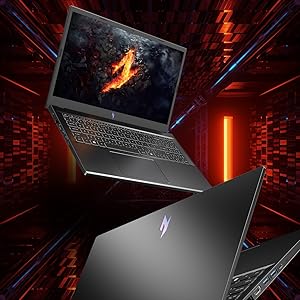
Figure 3.1: The laptop's 15.6-inch Full HD IPS display with a high refresh rate.
3.2 Баскычтоп жана сенсордук такта
The Acer Nitro V ANV15-41 is equipped with a backlit keyboard, offering visibility in low-light conditions. It includes a dedicated NitroSense key for quick access to system performance settings and a Copilot key for AI assistance.
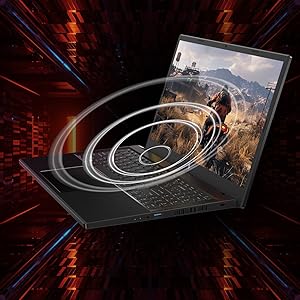
Figure 3.2: Keyboard layout highlighting the NitroSense and Copilot keys.
3.3 Порттор жана туташтыргычтар
The laptop provides various ports for connectivity:
- 2 x USB 3.2 Gen 1 порттору
- 1 x USB 3.2 Gen 1 port with power-off charging
- 1 x USB 4 порту
- 1 x HDMI 2.1 порту
- 1 x Ethernet (RJ-45) порту
- 1 x Headset/speaker jack
- Power connector (DC-in)
- Кенсингтон кулпу уячасы
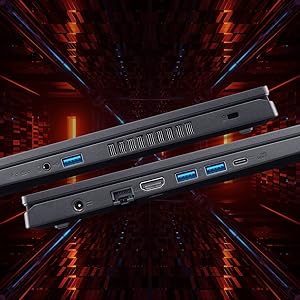
3.3-сүрөт: Каптал view illustrating the available ports and connectors.
4. Performance Features
4.1 Процессор жана графика
The laptop is powered by an AMD Ryzen 5 6600H hexa-core processor and features an NVIDIA GeForce RTX 3050 GPU with 6 GB of dedicated GDDR6 VRAM for graphics processing.
4.2 Эстутум жана сактоо
It comes with 16 GB of DDR5 system memory, upgradable up to 32 GB. Storage is provided by a 512 GB PCIe Gen4 NVMe SSD, with support for up to two 1 TB drives.
4.3 Муздатуу системасы
The Acer Nitro V ANV15-41 incorporates a dual-fan cooling system designed to maintain optimal operating temperatures during intensive use.
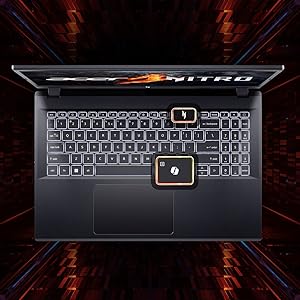
Figure 4.1: Illustration of the dual-fan cooling system.
5. Audio and Visual
5.1 Audio Technology
The laptop features DTS:X Ultra Audio for an immersive sound experience. Acer PurifiedVoice technology, with AI-powered noise reduction, enhances clarity for built-in microphones.

Figure 5.1: Visual representation of DTS:X Ultra Audio and Acer PurifiedVoice technologies.
5.2 Webcam
A T-Type HD camera is integrated for video conferencing and communication.
6. Техникалык тейлөө жана кам көрүү
- Тазалоо: Use a soft, lint-free cloth to clean the screen and exterior. Avoid harsh chemicals.
- Вентиляция: Ensure the laptop's ventilation openings are clear and unobstructed to prevent overheating.
- Программалык камсыздоо жаңыртуулары: Regularly update your operating system and drivers to ensure optimal performance and security.
- Батареяга кам көрүү: To prolong battery life, avoid extreme temperatures and fully discharging the battery frequently.
- Сактагыч: Store the laptop in a cool, dry place when not in use.
7. Кыйынчылыктарды
7.1 Жалпы маселелер жана чечимдер
| Маселе | Мүмкүн чечим |
|---|---|
| Ноутбук күйбөйт | Кубат адаптери бекем туташып турганын жана розетка иштеп турганын текшериңиз. Батарея зарядынын деңгээлин текшериңиз. |
| Система жай же жооп бербей жатат | Close unnecessary applications. Check for background processes. Ensure sufficient free storage space. Update drivers. |
| Ашыкча ысып кетүү | Ensure ventilation openings are clear. Use the laptop on a hard, flat surface. Consider using NitroSense software to adjust fan speeds. |
| Дисплей көйгөйлөрү (сүрөт жок, жымыңдайт) | Check display cable connections if using an external monitor. Restart the laptop. Update graphics drivers. |
| Баскычтоптун жарыгы иштебейт | Check keyboard backlight settings in Windows or via dedicated function keys. |
8. Техникалык шарттар
| Өзгөчөлүк | Спецификация |
|---|---|
| Бренд | Acer |
| Модель аты | Nitro V |
| Модель номери | ANV15-41 |
| Screen Size | 15.6 дюйм |
| Display Resolution | 1920 x 1080 (Full HD) |
| Дисплей технологиясы | IPS, LED, 165 Hz Refresh Rate |
| Процессор | AMD Ryzen 5 6600H hexa-core (3.3 GHz base, up to 4.5 GHz max boost) |
| Графикалык карта | 6 ГБ GDDR6 VRAM менен NVIDIA GeForce RTX 3050 |
| RAM эс тутуму | 16 GB DDR5 (4800 MHz), upgradable to 32 GB |
| Сактагыч | 512 GB NVMe SSD (PCIe Gen4) |
| Операция системасы | Windows 11 Home |
| Зымсыз байланыш | Wi-Fi 6 (802.11ax), Bluetooth |
| Порттар | 2x USB 3.2 Gen 1, 1x USB 3.2 Gen 1 (power-off charging), 1x USB 4, 1x HDMI 2.1, 1x RJ-45, 1x Headset/speaker jack |
| Webcam | T-Type HD camera |
| Баскычтоп | Арткы жарык клавиатура, Сандык баскычтоп |
| Батареянын энергия мазмуну | 57 Watt Hours (Lithium Ion) |
| Элемент Салмагы | 2.1 килограмм |
| Өлчөмдөрү (У x Туурасы x Калыңдыгы) | 24L x 36.2W x 2.4Th сантиметр |
9. Кепилдик жана колдоо
9.1 Кепилдик маалыматы
This product comes with a 1-Year Manufacturer's Limited Warranty. Please refer to the warranty card included with your product for detailed terms and conditions.
9.2 Өндүрүүчү жана импорттоочу жөнүндө маалымат
Өндүрүүчү: Acer, Compal Electronics Pvt Ltd, No.D01, Zone D, Air Port Section of LiangLu CunTan Free Trade Port Area, YuBei District, Chongqing, China
Импорттоочу: ACER INDIA PRIVATE LIMITED Embassy Heights, 6th Floor, No. 13 Magrath Road, Next to HOSMAT Hospital, Bangalore, INDIA – 560025
For technical support or service inquiries, please contact your local Acer support center or visit the official Acer webсайт.