1. Киришүү
This manual provides detailed instructions for the safe and efficient use of your Generic XO-X26 Portable Wireless Earphones. Please read this manual thoroughly before using the product and retain it for future reference. The XO-X26 earphones are designed to provide a convenient and high-quality audio experience through Bluetooth connectivity.
2. Пакеттин мазмуну
Сураныч, пакетте төмөнкү нерселерди текшериңиз:
- XO-X26 Wireless Earbuds (Left and Right)
- Заряддоо кутусу
- USB заряддоо кабели
- User Manual

Image: Retail packaging for the XO-X26 Wireless Earphones, showing the earbuds and charging case.
3. Продукт бүтүп калдыview
Familiarize yourself with the components of your XO-X26 earphones.
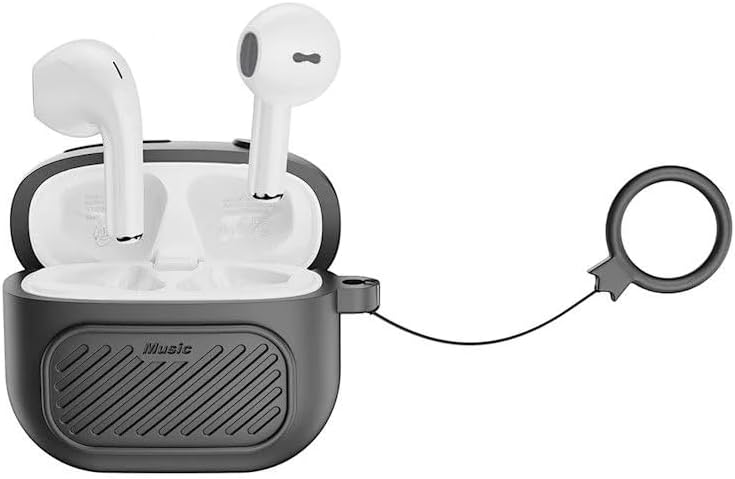
Image: The XO-X26 wireless earbuds placed inside their black charging case, which features a textured surface and an attached black lanyard.

Image: The XO-X26 wireless earbuds in their charging case, positioned on a reflective surface with a blue water background, illustrating their water resistance.

Image: The XO-X26 wireless earbuds in their charging case, resting on a clear glass desk in an indoor setting, highlighting their compact design.

Image: The XO-X26 wireless earbuds in a white charging case, with a green indicator light visible, showing the earbuds ready for use.
4. Орнотуу
4.1 Наушникти жана капты заряддоо
Биринчи колдонуудан мурун, наушникти жана кубаттоочу кутучаны толук заряддаңыз.
- Кулакчындарды заряддоо кутусуна салыңыз. Алардын туура отурганын текшериңиз.
- USB кубаттоочу кабелди корпустагы кубаттоочу портко жана USB кубат булагына (мисалы, компьютерге, дубал адаптерине) туташтырыңыз.
- The indicator light on the charging case will illuminate to show charging status.
- Толук заряддалгандан кийин, заряддоо кабелин ажыратыңыз.
The charging case provides additional charges for the earbuds, extending their usage time.
4.2 Bluetooth түзмөгү менен жупташтыруу
To connect your XO-X26 earphones to your smartphone or other Bluetooth-enabled device:
- Кулакчындардын кубатталганын текшериңиз.
- Open the charging case. The earbuds will automatically enter pairing mode, and an indicator light on the earbuds or case will flash.
- Түзмөгүңүздө Bluetooth жөндөөлөрүнө өтүп, Bluetooth күйгүзүңүз.
- Издөө available devices. Select "XO-X26" from the list.
- Once connected, a confirmation sound or indicator light change will occur.
- Эгер аппаратта Bluetooth иштетилген болсо, кулакчындар кутудан чыгарылганда акыркы жупташтырылган түзмөккө автоматтык түрдө кайра туташат.
5. Наушниктерди иштетүү
The XO-X26 earphones feature intuitive touch controls.
5.1 Негизги башкаруу каражаттары
- Ойнотуу/тындыруу: Кулакчындарды бир жолу таптаңыз.
- Кийинки трек: Оң кулакчынды эки жолу таптаңыз.
- Мурунку трек: Сол кулакчынды эки жолу таптаңыз.
- Көлөмү: Оң кулакчынды үч жолу таптаңыз.
- Үнүн азайтуу: Сол кулакчынды үч жолу таптаңыз.
5.2 Чалууларды башкаруу
- Чалууга жооп берүү/аяктоо: Кулакчындарды бир жолу таптаңыз.
- Чакырууну четке кагуу: Кулакчындардын бирин 2 секунд басып туруңуз.
5.3 Үн жардамчысы
- Үн жардамчысын иштетүү (Siri/Google Жардамчысы): Кулакчындардын бирин 3 секунд басып туруңуз.
6. Техникалык тейлөө
Proper maintenance ensures the longevity and optimal performance of your XO-X26 earphones.
- Тазалоо: Кулакчындарды жана кубаттоочу кутуну тазалоо үчүн жумшак, кургак, түксүз чүпүрөктү колдонуңуз. Абразивдүү тазалагычтарды же эриткичтерди колдонбоңуз.
- Суу каршылык: The earphones are IPX4 water-resistant, meaning they are protected against splashing water from any direction. They are not designed for submersion in water. Do not expose them to heavy rain or immerse them.
- Сактагыч: Колдонулбай турган учурда, кулакчындарды чаңдан жана бузулуудан коргоо үчүн кубаттоочу кутучасында сактаңыз. Салкын, кургак жерде сактаңыз.
- Батареяга кам көрүү: To preserve battery life, charge the earphones regularly, even if not used frequently. Avoid fully discharging the battery for extended periods.
7. Кыйынчылыктарды
If you encounter issues with your XO-X26 earphones, refer to the following common solutions:
| Көйгөй | Чечим |
|---|---|
| Кулакчындар жупташкан жок |
|
| Бир кулактын үнү чыкпайт |
|
| Заряддоо куту заряддалбай жатат |
|
| Аудио сапаты начар |
|
8. Техникалык шарттар
| Модель аты: | XO-X26 |
| Бренд: | Жалпы |
| Байланыш: | Зымсыз (Bluetooth) |
| Форма фактору: | Кулакта |
| Түсү: | Кара |
| Суу каршылык: | IPX4 |
| Камтылган компоненттер: | Charging Cable, Charging Case, Earbuds, User Manual |
9. Кепилдик жана колдоо
The Generic XO-X26 Portable Wireless Earphones come with a manufacturer's warranty of 6 ай сатып алынган күндөн тартып.
This warranty covers defects in materials and workmanship under normal use. It does not cover damage caused by misuse, accidents, unauthorized modifications, or normal wear and tear.
For warranty claims or technical support, please contact your retailer or the point of purchase. Please retain your proof of purchase for warranty validation.


