
1. Киришүү
The MiBOXER TRI-PW 500W AC Triac Dimmer is designed for precise control of lighting systems in residential and commercial environments. This device integrates WiFi and 2.4GHz technology, allowing for remote operation via compatible applications and MiBOXER remote controls. It supports triac dimming, ensuring compatibility with a wide range of lighting fixtures, including LED, halogen, and incandescent lights, for smooth and consistent dimming from full brightness to a soft glow.
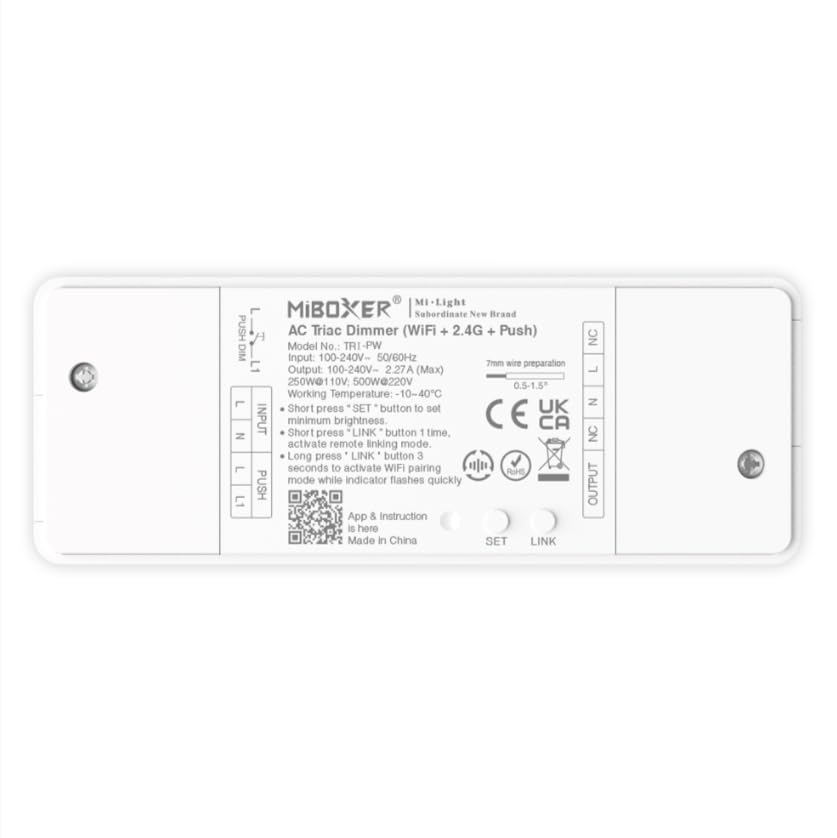
Сүрөт 1.1: Бүттүview of the MiBOXER TRI-PW 500W AC Triac Dimmer unit.
2. Коопсуздук маалыматы
- Электр орнотуу: Орнотуу жергиликтүү электр эрежелерине жана эрежелерине ылайык квалификациялуу электрик тарабынан жүргүзүлүшү керек.
- Электр энергиясын өчүрүү: Диммерди орнотуудан же тейлөөдөн мурун ар дайым автоматтык өчүргүчтөн электр кубатын өчүрүңүз.
- Тtage Шайкештик: Киргизүү көлөмүн камсыз кылыңызtage matches the dimmer's specifications (100-240V AC).
- Жүктөө жөндөмдүүлүгү: Do not exceed the maximum load capacity of 500W. Overloading can cause damage or fire.
- Үй ичинде гана колдонуу: This device is intended for indoor use in dry locations. Avoid exposure to moisture or extreme temperatures.
- Шайкештик: Use only with compatible dimmable lighting fixtures (LED, halogen, incandescent).
3. Пакеттин мазмуну
Пакетте бардык компоненттер бар экенин текшериңиз:
- MiBOXER TRI-PW 500W AC Triac Dimmer Unit
- User Manual (may be included as a separate document)

Image 3.1: MiBOXER TRI-PW Dimmer unit shown with its packaging and a user manual.
4. Продукциянын өзгөчөлүктөрү
- Powerful 500W Capacity: Supports high-power loads, suitable for various lighting fixtures.
- Триак күңүртөтүү технологиясы: Provides flicker-free dimming for LED, halogen, and incandescent lights.
- WiFi & 2.4GHz Control: Integrates with WiFi and MiBOXER 2.4GHz systems for smartphone or remote control.
- Push Control Compatibility: Allows for quick, on-site dimming adjustments via a push button.
- Колдонмо жана үн менен башкаруу: Compatible with major smart home platforms for app-based and voice command control.
- Эстутум функциясы: Retains previous lighting settings after power cycles.
5. Техникалык шарттар
| Өзгөчөлүк | Деталь |
|---|---|
| Бренд | MiBOXER |
| Модель аты | TRI-PW |
| Өзгөчө өзгөчөлүк | 500W AC Triac Dimmer |
| Жыштык тилкесинин классы | Single-band |
| Зымсыз байланыш стандарты | 802.11b |
| Шайкеш түзмөктөр | PUSH күңүртөтүүнү колдоо |
| Сунушталган Колдонуулар | Home lighting systems |
| Байланыш технологиясы | Wi-Fi |
| Smart Home шайкештиги | Smart Home Compatible (e.g., Amazon Alexa, Google Assistant) |
| Камтуу | LED, halogen, incandescent, high-power loads |
| Жыштык | 2.4 ГГц |
| Өлчөмдөрү (болжол менен) | 117мм (L) x 45mm (W) x 24mm (H) |
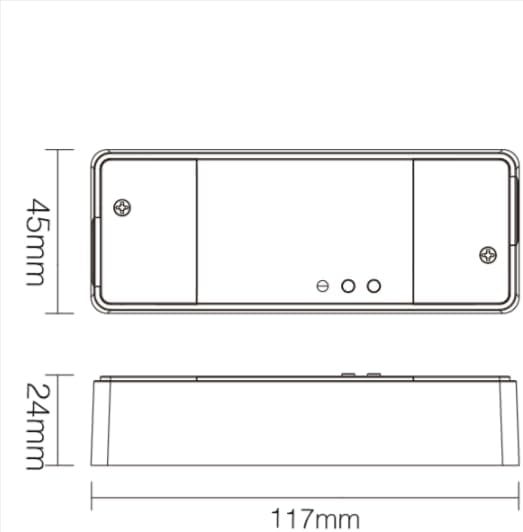
Image 5.1: Technical drawing showing the approximate dimensions of the TRI-PW dimmer.

Image 5.2: Packaging dimensions for the MiBOXER TRI-PW dimmer.
6. Орнотуу жана орнотуу
Маанилүү: Орнотууну баштоодон мурун автоматтык өчүргүчтөн электр кубаты өчүрүлгөнүн текшериңиз.
Зымдар диаграммасы
The MiBOXER TRI-PW dimmer supports two primary wiring methods for integration with a push switch. Both methods are suitable for triac dimming LED lights, traditional filament lampс, жана галоген лamps.

Image 6.1: Wiring diagrams for connecting the MiBOXER TRI-PW dimmer with a push switch.
Method 1: Single-Wire Push Switch Connection
- Connect the Live (L) and Neutral (N) input wires from your power supply (100-240V~) to the corresponding 'INPUT' terminals on the dimmer.
- Connect the Live (L) and Neutral (N) output wires to your lighting fixture (100-240V~) from the 'OUTPUT' terminals.
- Connect one wire from the push switch to the 'PUSH' terminal on the dimmer.
- Connect the other wire from the push switch to the Live (L) input terminal.
Method 2: Two-Wire Push Switch Connection
- Connect the Live (L) and Neutral (N) input wires from your power supply (100-240V~) to the corresponding 'INPUT' terminals on the dimmer.
- Connect the Live (L) and Neutral (N) output wires to your lighting fixture (100-240V~) from the 'OUTPUT' terminals.
- Connect the two wires from the push switch directly to the 'PUSH' terminals on the dimmer.
After wiring, secure the dimmer in a suitable electrical box or enclosure. Restore power at the circuit breaker.
7. Иштөө нускамалары
7.1. Push Switch Control
- Кыска басуу: Turn the lights ON or OFF.
- Узак басуу: Adjust the brightness level. Release the button to set the desired brightness.
7.2. WiFi App Control
The TRI-PW dimmer supports control via a smart app (e.g., Tuya Smart app). No additional 2.4G gateway is required for app control.
- Download the compatible smart home app from your device's app store.
- Каттоо же өз эсебиңизге кирүү.
- Put the dimmer into pairing mode (refer to the app's instructions or the dimmer's specific pairing procedure, usually involving a long press of the 'SET' button or power cycling).
- Follow the in-app instructions to add the device to your network.
- Once connected, you can control the dimmer's ON/OFF state and brightness from your smartphone.
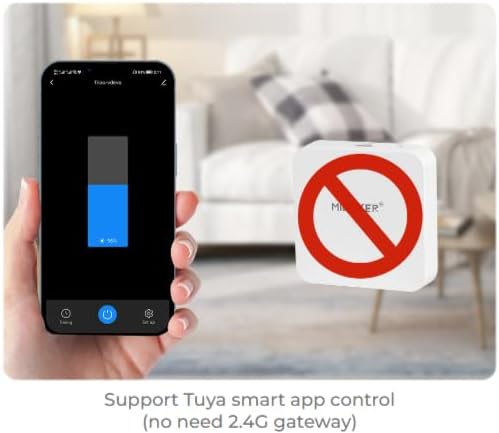
Сүрөт 7.1: Мисample of controlling the dimmer using a smartphone application.
7.3. 2.4GHz Remote Control
The dimmer can be paired with MiBOXER 2.4GHz remote controls for direct wireless control.
- Күңүрткүчтүн күйгүзүлгөнүн текшериңиз.
- Refer to your MiBOXER 2.4GHz remote control's manual for specific pairing instructions. Typically, this involves pressing a "Link" or "Pair" button on the remote within a few seconds of powering on the dimmer or pressing the dimmer's 'SET' button.
- A successful pairing is usually indicated by the connected light flashing.
7.4. Үн менен башкаруу (Alexa/Google жардамчысы)
The TRI-PW dimmer is compatible with smart home voice assistants like Amazon Alexa and Google Assistant when integrated through a compatible smart home app.
- Ensure your dimmer is successfully connected to the smart home app (e.g., Tuya Smart).
- Amazon Alexa же Google Home тиркемеңизди ачыңыз.
- Enable the skill or service for the smart home app you are using (e.g., "Tuya Smart" skill).
- Discover devices. Your dimmer should appear in the list.
- Assign a name to your dimmer (e.g., "Living Room Light").
- You can now control your light using voice commands, such as "Alexa, turn on Living Room Light" or "Hey Google, dim Living Room Light to 50%."

Image 7.2: The dimmer is compatible with voice control platforms like Amazon Alexa and Google Assistant.
8. Техникалык тейлөө
- Тазалоо: Disconnect power before cleaning. Wipe the dimmer with a soft, dry cloth. Do not use liquid cleaners or aerosols.
- Текшерүү: Зымдардын туташууларынын бекемдигин жана эскирүү же бузулуу белгилерин мезгил-мезгили менен текшерип туруңуз.
- Программалык камсыздоонун жаңыртуулары: If available, check the smart home app for firmware updates to ensure optimal performance and security.
9. Кыйынчылыктарды
| Көйгөй | Мүмкүн себеп | Чечим |
|---|---|---|
| Жарыктар күйбөйт. | No power, incorrect wiring, faulty bulb, dimmer not paired. | Check circuit breaker. Verify wiring according to diagrams. Test bulb. Re-pair dimmer with app/remote. |
| Жарыктар жымыңдайт же ызы-чуулайт. | Incompatible bulb, overloaded circuit, loose wiring. | Ensure bulbs are dimmable and compatible with triac dimmers. Reduce load. Check wiring connections. |
| Dimmer not responding to app/remote. | Dimmer out of range, WiFi issue, not paired. | Ensure dimmer is within WiFi/2.4GHz range. Check WiFi router. Re-pair dimmer with app/remote. |
| WiFi'га туташа албай жатат. | Incorrect WiFi password, 5GHz network, dimmer not in pairing mode. | Verify WiFi password. Ensure you are connecting to a 2.4GHz network. Put dimmer into WiFi pairing mode. |
10. Кепилдик жана колдоо
This MiBOXER TRI-PW dimmer comes with a 2 жылдык кепилдик сатып алынган күндөн тартып. Бул кепилдик нормалдуу колдонуудагы материалдардагы жана жасалгадагы кемчиликтерди камтыйт.
The warranty does not cover damage caused by improper installation, misuse, unauthorized modifications, or acts of nature.
For technical support or warranty claims, please contact your retailer or the manufacturer directly. Please have your purchase receipt and product model number (TRI-PW) available when contacting support.
Көбүрөөк маалымат алуу үчүн, сиз иш сапары менен болот Amazon боюнча MiBOXER дүкөнү.