
MiBOXER C3
MiBOXER C3 CCT Color Temperature Remote Controller User Manual
Model: C3
1. Киришүү

Image: The MiBOXER C3 CCT Color Temperature Remote Controller in black.
This user manual provides detailed instructions for the MiBOXER C3 CCT Color Temperature Remote Controller. The C3 remote is designed for precise control over color temperature (CCT) and brightness in single-zone lighting setups. It utilizes 2.4GHz wireless technology for reliable operation.
Продукциянын туура иштешин камсыз кылуу жана анын иштөө мөөнөтүн узартуу үчүн колдонуудан мурун ушул колдонмону кылдат окуп чыгыңыз.
2. Продукциянын өзгөчөлүктөрү
- Single-Zone Control: Dedicated for one-zone lighting setups.
- CCT & Brightness Adjustment: Fine-tune color temperature and brightness with ease.
- 2.4 ГГц зымсыз технология: Ensures reliable, long-range connectivity.
- Жылтырак кара дизайн: Modern, minimalist appearance.
- Колдонуучуга ыңгайлуу интерфейс: Simple layout for quick adjustments.
3. Пакеттин мазмуну
Пакетте бардык буюмдар бар экенин текшериңиз:
- MiBOXER C3 CCT Color Temperature Remote Controller (Black)
- User Manual

Image: The MiBOXER C3 remote control, its retail packaging, and the included user manual.
4. Орнотуу
4.1 Powering the Remote
The MiBOXER C3 remote does not require batteries. It is designed to operate without external power, likely drawing power from the connected lighting system or having an internal, non-replaceable power source.
4.2 Linking the Remote to a Light Fixture
To control a light fixture, the C3 remote must be linked. The linking process typically involves a sequence of actions on both the remote and the light fixture. Refer to your specific MiBOXER light fixture's manual for detailed linking instructions, as this process can vary.
General Linking Procedure (may vary):
- Ensure the light fixture is powered off.
- Power on the light fixture.
- Within 3 seconds of powering on the light, short press the "ON" button on the C3 remote 3 times.
- The light should flash 3 times slowly, indicating successful linking.
4.3 Unlinking the Remote from a Light Fixture
To unlink the remote from a light fixture, follow a similar procedure:
- Ensure the light fixture is powered off.
- Power on the light fixture.
- Within 3 seconds of powering on the light, short press the "ON" button on the C3 remote 5 times.
- The light should flash 10 times quickly, indicating successful unlinking.
5. Иштөө нускамалары

Сүрөт: алдыңкы view of the MiBOXER C3 remote control, highlighting the Brightness/CCT control slider and the ON/OFF buttons.
5.1 Күйгүзүү/өчүрүү
- Жарыкты буруш үчүн ON, басыңыз ON баскычы.
- Жарыкты буруш үчүн ӨЧҮРҮҮ, басыңыз ӨЧҮРҮҮ баскычы.
5.2 Adjusting Brightness and Color Temperature (CCT)
The long vertical bar on the remote serves as the control for both brightness and color temperature.
- Жарыктыкты көзөмөлдөө: Slide your finger along the vertical bar to adjust the brightness level. Sliding towards the top (sun icon) increases brightness, and sliding towards the bottom (dim sun icon) decreases brightness.
- Color Temperature (CCT) Control: While the light is on, short press the ON button again to switch the function of the vertical bar to CCT adjustment. Slide your finger along the vertical bar to change the color temperature from warm white (yellow end) to cool white (blue end).
6. Техникалык тейлөө
The MiBOXER C3 remote requires minimal maintenance.
- Тазалоо: Use a soft, dry cloth to wipe the surface of the remote. Do not use abrasive cleaners, solvents, or harsh chemicals, as these may damage the finish or internal components.
- Сактагыч: Пультту кургак жерде, күн нуру түз тийген жерлерден жана өтө жогорку температурадан алыс сактаңыз.
- Суу таасири: This device is not waterproof. Avoid exposing it to water or high humidity.
7. Кыйынчылыктарды
| Көйгөй | Мүмкүн себеп | Чечим |
|---|---|---|
| Пульт жарыкты башкара албайт. | Remote is not linked to the light fixture. | Follow the "Linking the Remote to a Light Fixture" instructions in Section 4.2. |
| Intermittent control or poor range. | Interference from other 2.4GHz devices; Obstructions between remote and light. | Reduce interference by moving other wireless devices; Ensure clear line of sight or reduce distance. |
| Brightness or CCT adjustment is not responsive. | Remote may be in an unresponsive state; Light fixture issue. | Try pressing ON/OFF buttons to reset; Check the light fixture's power supply. |
8. Техникалык шарттар
| Атрибут | Нарк |
|---|---|
| Модел | C3 |
| Бренд | MiBOXER |
| Түс | Кара |
| Материал | Пластик |
| Зымсыз технология | 2.4 ГГц |
| Башкаруу зоналары | 1 зона |
| Power Source | No batteries required (internal power) |
| Иштөө температурасы | 40°C (104°F) чейин |
| Элемент Салмагы | 2.08 унция (59 грамм) |
| Пакеттин өлчөмдөрү | 5.63 x 1.69 x 0.75 дюйм (14.3 x 4.3 x 1.9 см) |
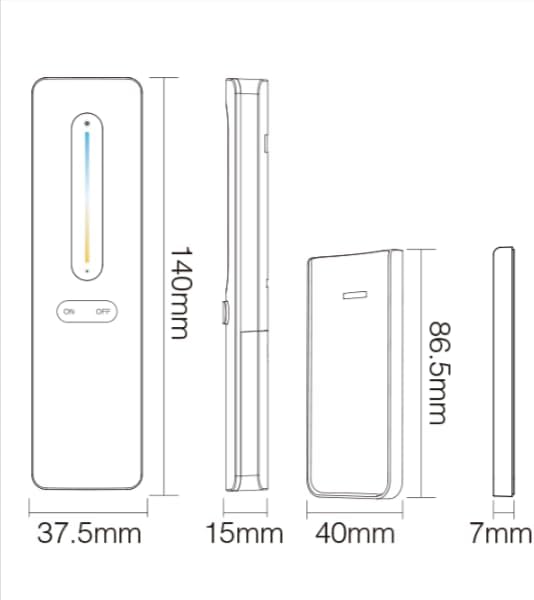
Image: Technical drawing illustrating the dimensions of the MiBOXER C3 remote control and its magnetic wall mount.

Image: Diagram showing the dimensions of the retail packaging for the MiBOXER C3 remote control.
9. Кепилдик жана колдоо
Specific warranty information for the MiBOXER C3 CCT Color Temperature Remote Controller is not provided in the product details. Please refer to the retailer or manufacturer's official webкепилдик шарттары жана эрежелери менен таанышуу үчүн сайтты караңыз.
For technical support or further assistance, please contact MiBOXER customer service through their official channels. Contact information can typically be found on the manufacturer's webсайтында же продуктунун таңгагында.
Ask a question about this manual
Ask about setup, troubleshooting, compatibility, parts, safety, or missing instructions. Manuals+ will review the question and use this page’s manual context to help answer it.