
Introduction
The MiBOXER C5 4-Zone RGB+CCT Remote is a versatile wireless controller designed to manage up to four independent lighting zones. It utilizes 2.4GHz RF wireless technology to provide precise control over brightness, color temperature (CCT), and color saturation for RGB+CCT lighting systems. This manual provides detailed instructions for setting up, operating, and maintaining your C5 remote.

Figure 1: MiBOXER C5 4-Zone RGB+CCT Remote, front view. This image shows the sleek black remote with its color ring, brightness slider, and various control buttons.
Продукт өзгөчөлүктөрү
- 4-зоналык башкаруу: Төрт айырмаланган жарык зонасын өз алдынча башкарыңыз.
- Adjustable RGB, CCT & Saturation: Fine-tune colors, color temperature (warm white to cool white), brightness, and color saturation.
- 2.4GHz RF Wireless Technology: Ensures a reliable and interference-free connection for responsive control.
- Колдонуучуга ыңгайлуу интерфейс: Ergonomic design with an intuitive button layout for easy operation.
- Ар тараптуу колдонмо: Suitable for various environments including homes, offices, restaurants, and retail spaces.
Product Components and Button Functions
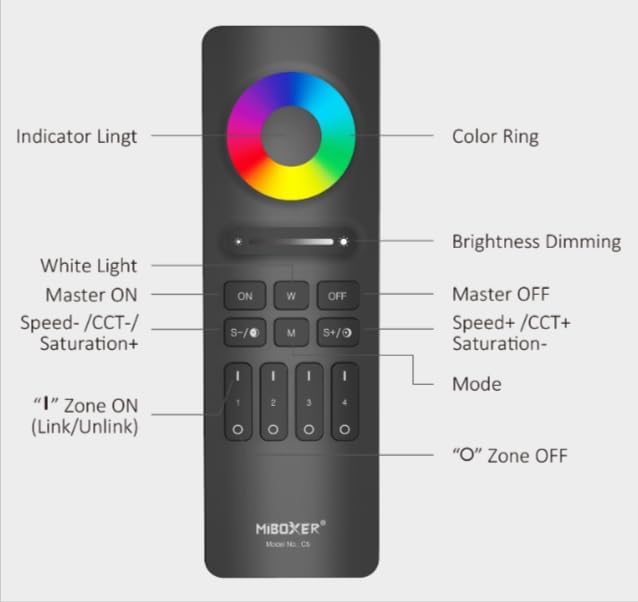
Figure 2: MiBOXER C5 Remote Button Diagram. This diagram illustrates the various buttons and their corresponding functions on the remote control.
- Түстүү шакек: Touch to select desired RGB color.
- Индикатор жарыгы: Illuminates to confirm button presses.
- Brightness Dimming Slider: Slide to adjust brightness level.
- КҮЙҮК (Мастер КҮЙҮК): Turns on all linked lights.
- W (Ак жарык): Activates pure white light mode.
- ӨЧҮРҮҮ (Мастер ӨЧҮРҮҮ): Turns off all linked lights.
- S-/CCT-/Saturation+: Decreases speed in dynamic mode, decreases color temperature (warmer white), or increases saturation.
- M (режим): Cycles through dynamic modes.
- S+/CCT+/Saturation-: Increases speed in dynamic mode, increases color temperature (cooler white), or decreases saturation.
- Zone ON (1, 2, 3, 4): Press 'I' to turn on a specific zone and link/unlink.
- Zone OFF (1, 2, 3, 4): Press 'O' to turn off a specific zone.
Орнотуу нускамалары
1. Батареяны орнотуу
The C5 remote requires 2x AAA batteries (not included). Follow these steps:
- Пульттун артындагы батарея бөлүкчөсүнүн капкагын табыңыз.
- Капкакты ачуу үчүн ылдый жылдырыңыз.
- Туура полярдуулукту (+ жана -) камсыз кылуу менен эки AAA батарейкасын салыңыз.
- Капкакты бекем чыккыча ордуна жылдырыңыз.
2. Linking/Pairing the Remote with Lights
To control your lights, the C5 remote must be linked to compatible MiBOXER lighting products. This process typically involves the following steps:
- Ensure the light(s) you wish to link are powered off.
- Power on the light(s).
- Within 3 seconds of powering on the light, press the 'I' (ON) button of the desired zone (1, 2, 3, or 4) on the C5 remote үч жолу.
- The light(s) should flash three times slowly, indicating successful linking.
- If linking fails, power off the light, wait 10 seconds, and repeat the process.
3. Unlinking the Remote from Lights
To unlink a light from a specific zone, follow these steps:
- Ensure the light(s) you wish to unlink are powered off.
- Power on the light(s).
- Within 3 seconds of powering on the light, press the 'I' (ON) button of the previously linked zone (1, 2, 3, or 4) on the C5 remote беш жолу.
- The light(s) should flash ten times quickly, indicating successful unlinking.
Иштөө нускамалары
Once linked, you can control your lights using the C5 remote:
- Мастер КҮЙГҮЗҮҮ/ӨЧҮРҮҮ: басыңыз ON button to turn on all linked lights. Press the ӨЧҮРҮҮ button to turn off all linked lights.
- Зона көзөмөлү: To control a specific zone, first press the 'I' (ON) button for that zone (1, 2, 3, or 4) to activate it. Then, use the other control buttons. Press the 'O' (OFF) button for a zone to turn off lights in that specific zone.
- Жарыктыкты жөндөө: колдонуу Brightness Dimming Slider жарык интенсивдүүлүгүн жогорулатуу же азайтуу үчүн.
- Түс тандоо (RGB): тийиңиз Түс шакеги to select any desired color from the spectrum.
- Ак жарык режими: басыңыз W button to switch to pure white light.
- Түс температурасын (CCT) жөндөө: In white light mode, use the S-/CCT-/Saturation+ жана S+/CCT+/Saturation- buttons to adjust the color temperature. S- makes it warmer, S+ makes it cooler.
- Saturation Adjustment: When in a color mode, use the S-/CCT-/Saturation+ (increase saturation) and S+/CCT+/Saturation- (decrease saturation) buttons.
- Динамикалык режимдер: басыңыз M (Mode) button to cycle through various pre-programmed dynamic lighting effects.
- Dynamic Mode Speed Adjustment: While in a dynamic mode, use the S- (decrease speed) and S+ (increase speed) buttons.
Техникалык тейлөө
- Тазалоо: Wipe the remote with a soft, dry cloth. Do not use abrasive cleaners or immerse in water.
- Батареяны алмаштыруу: Replace batteries when the indicator light becomes dim or the remote's response becomes sluggish. Always use new AAA batteries and dispose of old batteries responsibly.
- Сактагыч: Store the remote in a cool, dry place away from direct sunlight and extreme temperatures. If storing for extended periods, remove the batteries to prevent leakage.
Проблемаларды чечүү
| Көйгөй | Мүмкүн себеп | Чечим |
|---|---|---|
| Пульт жарыкка жооп бербейт. |
|
|
| Lights flash unexpectedly. |
|
|
| Color or brightness control is erratic. |
|
|
Техникалык шарттар
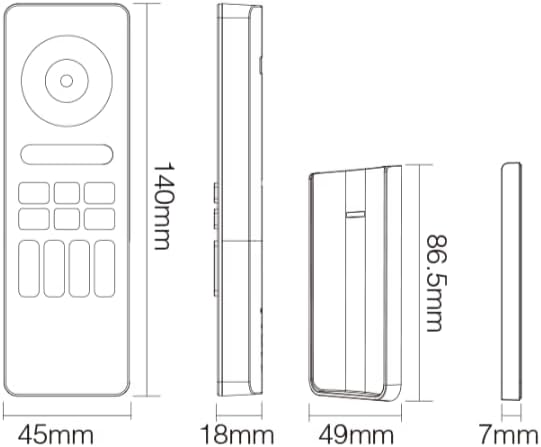
Figure 3: MiBOXER C5 Remote Dimensions. This diagram provides the physical measurements of the remote control in millimeters.
| Өзгөчөлүк | Деталь |
|---|---|
| Модель номери | C5 |
| Байланыш режими | 2.4 ГГц RF зымсыз |
| Башкаруу зоналары | 4 зона |
| Башкаруу түрү | RGB+CCT (Brightness, Color Temperature, Saturation) |
| Электр камсыздоо | 2x AAA батарейкалар (киргизилген эмес) |
| Remote Dimensions | 140 мм x 45 мм x 18 мм (болжол менен 5.5 x 1.8 x 0.7 дюйм) |
| Элемент Салмагы | 2.88 унция (болжол менен 81.6 грамм) |
| Иштөө температурасы | -20°C to 60°C (approx. -4°F to 140°F) |
| Control Distance | Up to 30 meters (approx. 98 feet) in open area |
Кепилдик жана колдоо
For detailed warranty information, please refer to the official MiBOXER website or contact your point of purchase. MiBOXER products typically come with a limited warranty covering manufacturing defects.
If you encounter any issues not covered in the troubleshooting section or require further assistance, please visit the official MiBOXER support page or contact their customer service. You can often find contact details and FAQs on the MiBOXER Amazon Store же алардын кызмат адамы webсайт.