
1. Киришүү
Thank you for choosing the Stealth Cam 40MP Deceptor Max Cellular Trail Camera. This advanced cellular trail camera is designed to capture high-quality photos and videos of wildlife with exceptional clarity and speed. Featuring 40-megapixel image resolution, a rapid 0.4-second trigger speed, and reliable cellular connectivity, the Deceptor Max ensures you stay connected to your scouting efforts. This manual provides detailed instructions for setting up, operating, and maintaining your camera to ensure optimal performance.
2. Пакеттин мазмуну
Төмөндө тизмеленген нерселердин баары пакетиңизге камтылганын текшериңиз:
- 2 x Stealth Cam 40MP Deceptor Max Cellular Trail Camera
- 4 x SanDisk 32GB Ultra SDHC UHS-I Memory Card (100MB/s)
- 1 x Vidpro 4-in-1 USB 2.0 Card Reader

Figure 2.1: Included items in the Stealth Cam Deceptor Max bundle.
3. Продукт бүтүп калдыview
The Deceptor Max camera is equipped with advanced features for reliable outdoor surveillance:
- 40 мегапикселдик чечилиш: Captures highly detailed images.
- 0.4-Second Trigger Speed: Кыймылдагы объектилерди тез тартып алууну камсыз кылат.
- Уюлдук байланыш: Dual pre-installed SIM cards for automatic connection to the strongest AT&T or Verizon network.
- 940nm No-Glo LED Array: Provides invisible detection and flash up to 80 feet for discreet operation.
- Expanded Battery Capacity: Designed to hold 16 AA batteries for extended field use.
- Аба ырайына чыдамдуу турак жай: Durable construction with an integrated lock latch.
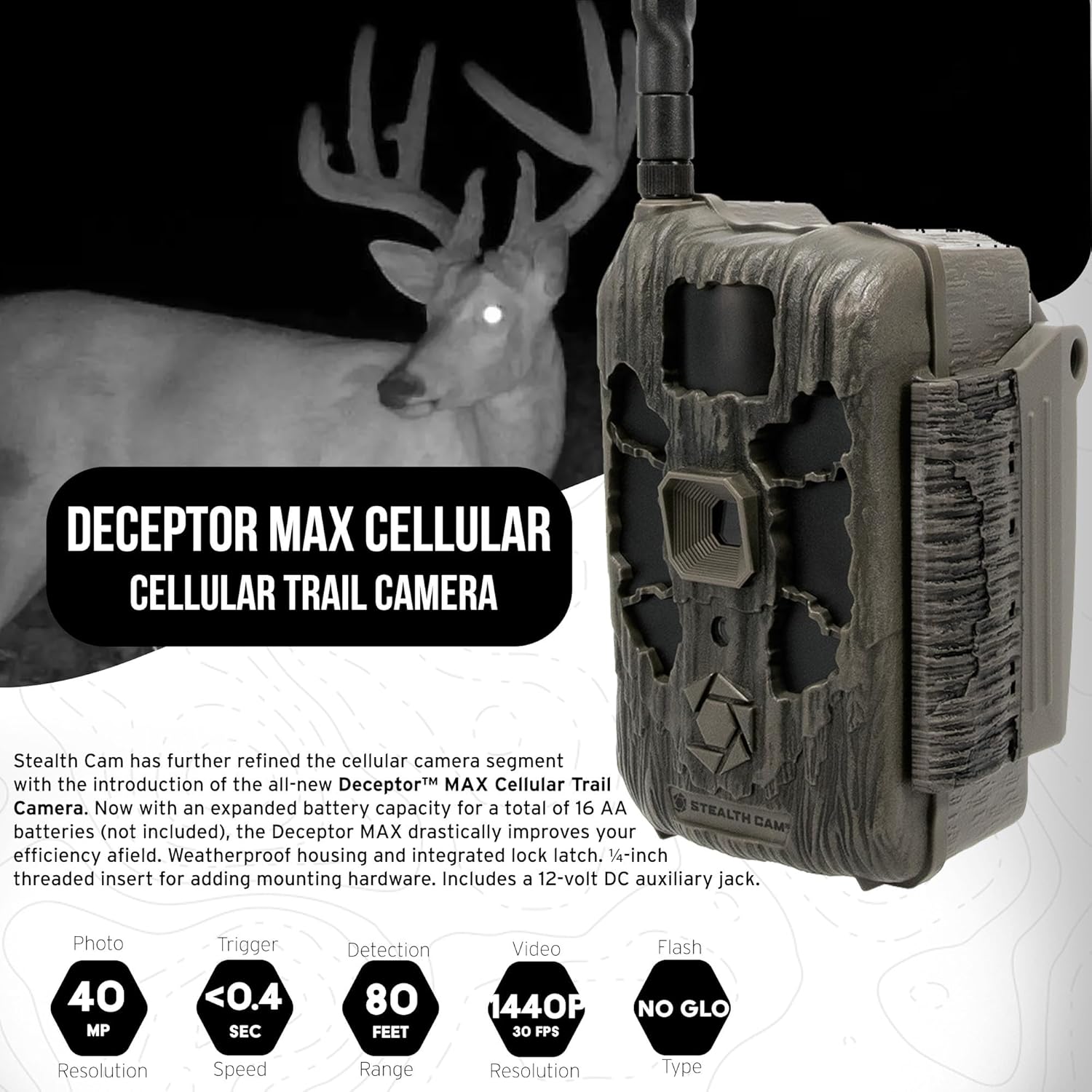
Сүрөт 3.1: Алдыңкы view of the Deceptor Max camera, showing key components.

3.2-сүрөт: Мисample image captured by the Deceptor Max, showcasing image clarity.
4. Орнотуу
4.1. Батареяны орнотуу
The Deceptor Max requires 16 AA batteries (not included) for operation. For best performance and extended battery life, use high-quality alkaline or lithium batteries. Ensure correct polarity when inserting batteries.
- Open the camera's battery compartment latch.
- Insert 16 AA batteries, matching the positive (+) and negative (-) indicators inside the compartment.
- Securely close the battery compartment latch.

Figure 4.1: Proper battery installation in the Deceptor Max camera.
4.2. Эстутум картасын орнотуу
The camera supports SDHC memory cards. A 32GB SDHC card is included in your bundle.
- SD картанын уячасын, адатта, батарейка уясынын жанынан табыңыз.
- Insert the 32GB SDHC memory card with the label facing up until it clicks into place.
- Чыгаруу үчүн картаны сыртка чыкканга чейин акырын түртүңүз.
4.3. Камераны орнотуу
The Deceptor Max features a weatherproof housing and a 1/4-inch threaded insert for various mounting options.
- Choose a suitable location, such as a tree or post, that provides a clear view каалаган аймактын.
- Use the included mounting strap to secure the camera firmly. Thread the strap through the slots on the back of the camera and around the mounting surface.
- Alternatively, utilize the 1/4-inch threaded insert at the bottom of the camera to attach it to compatible mounting hardware (sold separately).
- Adjust the camera's angle to cover the target area effectively.
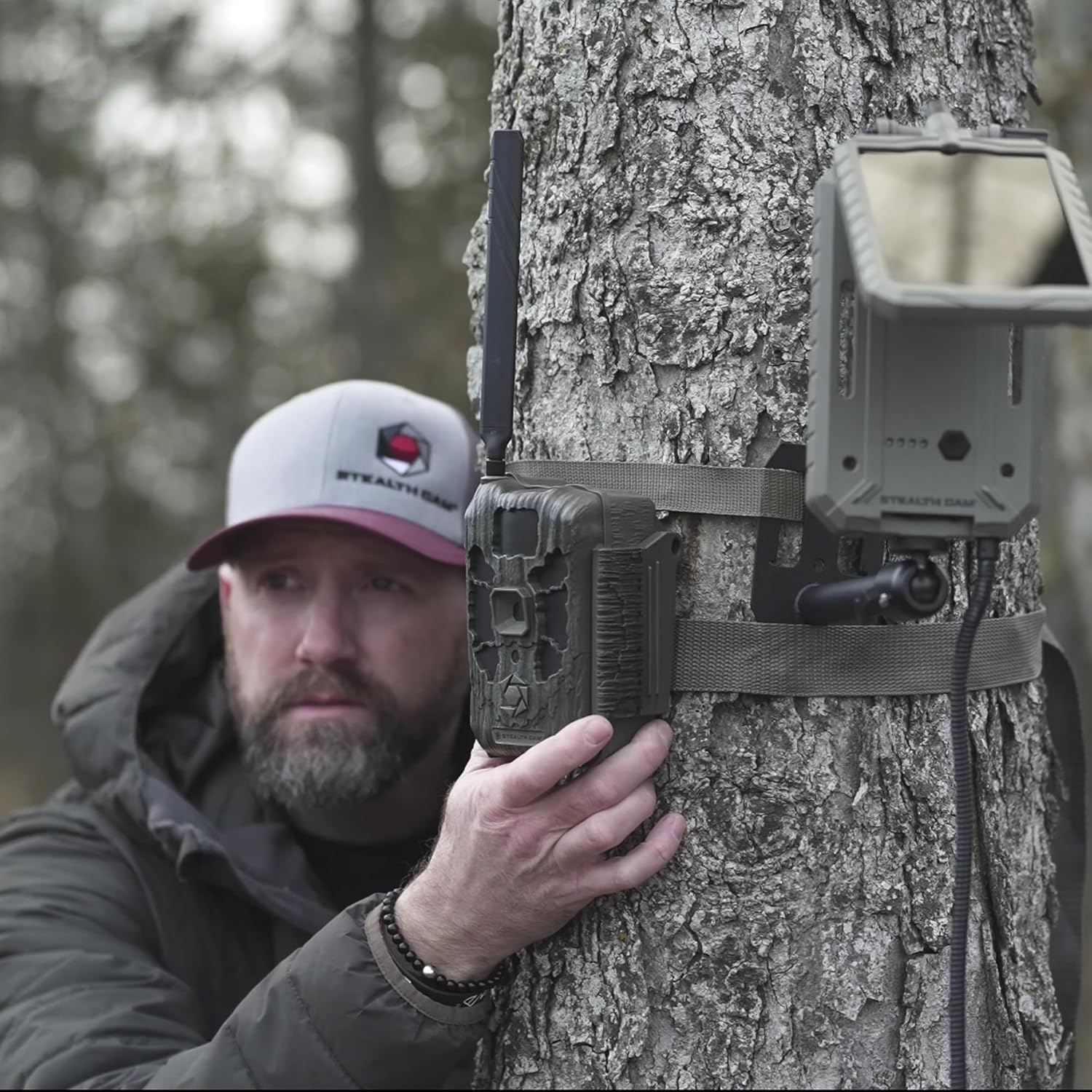
4.2-сүрөт: Мисample of mounting the Deceptor Max camera to a tree.
5. Камераны иштетүү
5.1. Күйгүзүү / Өчүрүү
Locate the power switch inside the camera's housing. Toggle it to the 'ON' position to power up the camera. To power off, toggle the switch to 'OFF'.
5.2. Cellular Connectivity and Command Pro App
The Deceptor Max utilizes two pre-installed SIM cards and an Automatic Network Coverage feature to connect to the strongest available AT&T or Verizon network. Manage your camera remotely using the Command Pro app.
- Download the Command Pro app from your smartphone's app store.
- Create an account and register your Deceptor Max camera following the in-app instructions.
- Through the app, you can remotely control camera settings, request on-demand photos and videos, and view captured media in real-time.
- The app also allows for sharing images and integrating with HuntStand for enhanced scouting.

Figure 5.1: Command Pro app interface for remote camera management.
5.3. Сүрөт жана видео тартуу
The camera is designed for high-performance image and video capture:
- Сүрөттүн чечилиши: Up to 40 Megapixels.
- Триггер ылдамдыгы: Ultra-fast 0.4 seconds.
- Жаруу режими: Captures up to nine photos per burst.
- Жарк диапазону: 80 feet with 940nm No-Glo LED array.
- Видео: Records videos with audio.
6. Техникалык тейлөө
Туура техникалык тейлөө сиздин камераңыздын узак мөөнөттүү иштешин жана оптималдуу иштешин камсыз кылат:
- Тазалоо: Камера линзасын жана корпусун жумшак, d менен акырын сүртүңүзamp кездеме. Абразивдүү тазалагычтардан алыс болуңуз.
- Батареяны алмаштыруу: Replace all 16 AA batteries when the low battery indicator appears or when performance degrades.
- Эстутум картасын башкаруу: Regularly format your SD card using the camera's menu (if available) or a computer to prevent data corruption and ensure maximum storage.
- Программалык камсыздоонун жаңыртуулары: Check the Stealth Cam website periodically for firmware updates to ensure your camera has the latest features and bug fixes.
- Сактагыч: Камераны көпкө чейин колдонбогондо, батареяларды алып чыгып, салкын, кургак жерде сактаңыз.
7. Кыйынчылыктарды
If you encounter issues with your Deceptor Max camera, refer to the following common solutions:
- Камера күйбөй жатат: Ensure batteries are inserted correctly with proper polarity and are fully charged. Check that the power switch is in the 'ON' position.
- Эч кандай сүрөт/видео тартылган жок: Verify the SD card is properly inserted and has sufficient free space. Check camera settings for trigger delay and detection sensitivity. Ensure the camera is armed.
- Сүрөттүн/видеонун сапаты начар: Clean the camera lens. Ensure the camera is mounted securely to prevent movement. Check for obstructions in front of the lens or flash.
- No Cellular Connection: Confirm you have an active data plan for your camera. Check the signal strength indicator in the Command Pro app. Relocate the camera to an area with better cellular coverage.
- Колдонмонун туташуу маселелери: Ensure your smartphone has a stable internet connection. Update the Command Pro app to the latest version. Restart both your phone and the camera.
- Кыска батареянын иштөө мөөнөтү: Use high-quality alkaline or lithium batteries. Reduce the frequency of image/video capture or cellular transmissions if possible.
8. Техникалык шарттар
| Өзгөчөлүк | Деталь |
|---|---|
| Сүрөттүн чечилиши | 40 мегапиксел |
| Триггер ылдамдыгы | 0.4 секунд |
| Flash түрү | 940nm No-Glo LED |
| Жарк диапазону | 80 метрге чейин |
| Burst Mode | Up to 9 photos per burst |
| Уюлдук тармак | Automatic connection to AT&T or Verizon |
| Батарея түрү | 16 x AA (киргизилген эмес) |
| Эстутум картасын колдоо | SDHC (up to 32GB included) |
| Продукциянын өлчөмдөрү (L x W x Y) | 9.1 x 9.1 x 9.1 дюйм |
| Элемент Салмагы | 7.39 фунт |
| Аба ырайына каршылык | Аба ырайына чыдамдуу корпус |
| UPC | 196271787891 |
9. Кепилдик маалыматы
For detailed warranty information regarding your Stealth Cam Deceptor Max Cellular Trail Camera, please refer to the official Stealth Cam website or the warranty card included with your product packaging. Warranty terms and conditions may vary.
10. Кардарларды колдоо кызматы
If you require further assistance or have questions not covered in this manual, please contact Stealth Cam customer support. You can find contact information and additional resources on the official Stealth Cam webсайт: