
1. Киришүү
This manual provides detailed instructions for the FREEWOLF M68 60% Wireless Gaming Keyboard. Please read this manual carefully before using the product to ensure proper operation and longevity.

Figure 1: FREEWOLF M68 Wireless Gaming Keyboard (Shimmer color variant)
2. Продукт бүтүп калдыview
Негизги өзгөчөлүктөрү:
- Tri-Mode туташуу: Supports wired (USB-C), 2.4GHz wireless, and Bluetooth 5.0 connections.
- Көп түзмөк шайкештиги: Connects to Windows, Mac, Linux, PC, Laptop, iPad, iOS, and Android devices.
- Компакт 60% Макет: Features 67 keys, optimizing desktop space.
- PBT баскычтоптору: Durable Polybutylene Terephthalate keycaps with clear legends.
- Rainbow LED Жарыгы: Offers constant and breathing modes with adjustable brightness and speed.
- Узак мөөнөттүү батарея: Built-in 2000mAH battery provides extended usage.
- Эргономикалык дизайн: Double leg braces allow for three adjustable typing angles.
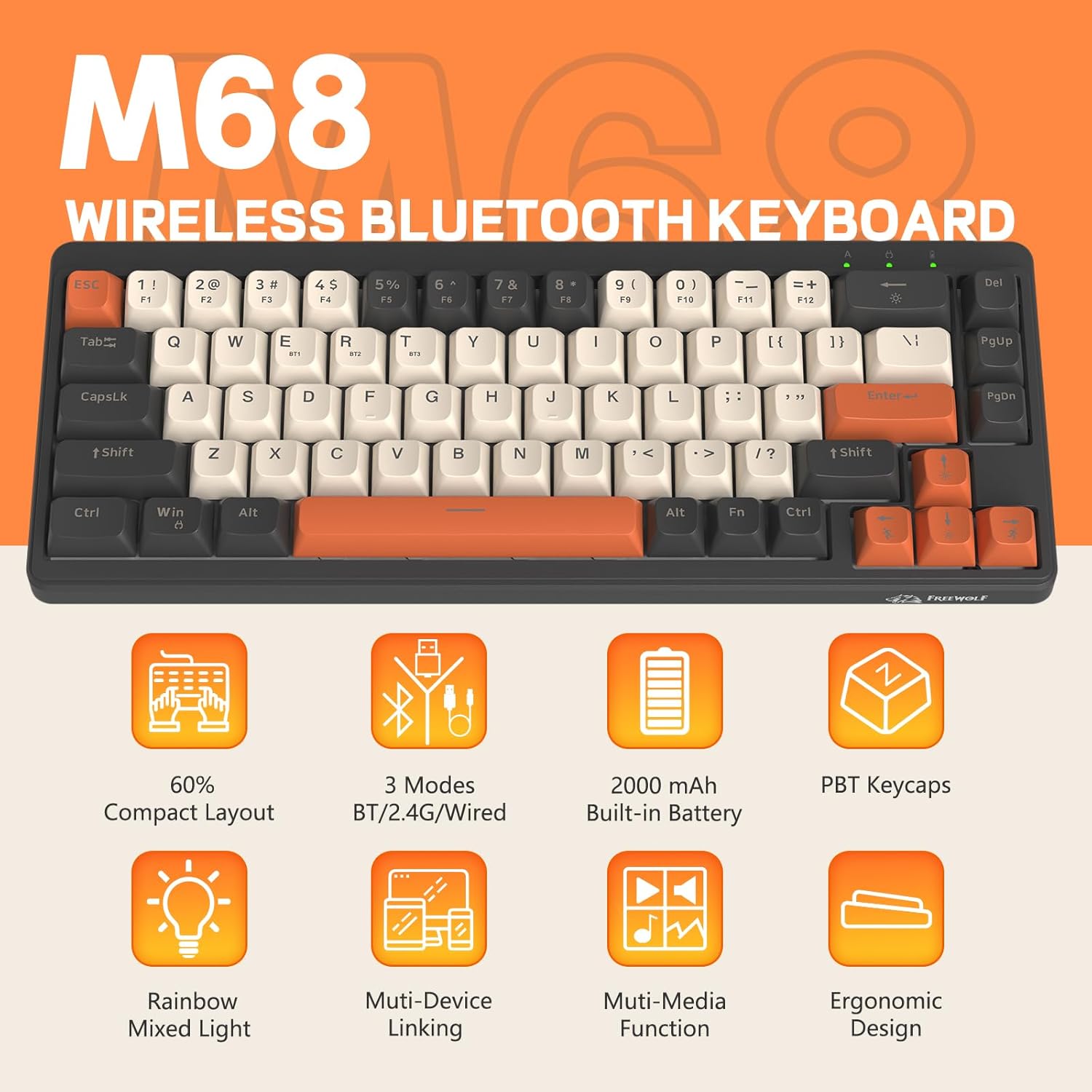
Figure 2: ашыкview of FREEWOLF M68 key features.
3. Орнотуу жана туташуу
3.1. Үч режимдүү туташуу аяктадыview
The M68 keyboard supports three connection methods: wired via USB-C, 2.4GHz wireless via a USB receiver, and Bluetooth 5.0. You can switch between these modes using the dedicated switch on the keyboard.

3-сүрөт: Детальдуу view of the 3-mode connection options.
3.2. Зымдуу туташуу
- Баскычтоптогу USB-C портун табыңыз.
- Берилген USB-C кабелин клавиатурага, экинчи учун компьютериңиздин USB портуна туташтырыңыз.
- Ensure the mode switch on the keyboard is set to the wired (USB) position.
- Баскычтоп системаңыз тарабынан автоматтык түрдө таанылат.
3.3. 2.4 ГГц зымсыз туташуу
- Locate the 2.4GHz USB receiver (often stored in a compartment on the keyboard).
- USB ресиверди компьютериңиздеги жеткиликтүү USB портуна сайыңыз.
- Set the mode switch on the keyboard to the 2.4GHz wireless position.
- Баскычтоп автоматтык түрдө туташуу керек. Болбосо, басыңыз FN + R жупташууну баштоо.
3.4. Bluetooth туташуусу
The M68 can connect to up to three Bluetooth devices simultaneously.
- Set the mode switch on the keyboard to the Bluetooth position.
- To enter pairing mode for a specific channel (BT1, BT2, or BT3), press and hold FN + Q (BT1 үчүн), FN + W (BT2 үчүн), же FN + E (for BT3) until the corresponding indicator light flashes rapidly.
- On your device (PC, laptop, tablet, phone), open Bluetooth settings and search for "FREEWOLF M68".
- Жупташтыруу үчүн баскычтопту тандаңыз. Туташтырылгандан кийин индикатор жарыгы катуу болуп калат.
- Жупташтырылган Bluetooth түзмөктөрүнүн ортосунда которулуу үчүн басыңыз FN + Q/W/E кыскача.
4. Операция
4.1. Арткы жарыкты башкаруу
The M68 features customizable rainbow LED backlighting.
- FN + Backspace: Toggle backlight on/off or switch between constant and breathing modes.
- FN + Солго жебе: Жарыктын ылдамдыгын азайтыңыз.
- FN + Оңго жебе: Арткы жарыктын ылдамдыгын жогорулатыңыз.
- FN + өйдө жебе: Арткы жарыктын жарыктыгын жогорулатыңыз.
- FN + Төмөн жебе: Арткы жарыктын жарыктыгын азайтыңыз.

Figure 4: Backlight adjustment key combinations.
4.2. Эргономикалык жөнгө салуу
The keyboard includes double leg braces on the back to adjust the typing angle for comfort.
- Flip the keyboard over to access the leg braces.
- Эки нерсени тууралаңызtage leg braces to achieve your preferred typing angle (flat, one stage, or two stagэс).

Figure 5: Ergonomic angle adjustments.
4.3. Батареяны башкаруу
The keyboard has a built-in 2000mAH rechargeable battery.
- Заряддоо: Connect the keyboard via the USB-C cable to a power source (computer USB port or wall adapter). The charging indicator will show status.
- Батареянын иштөө мөөнөтү: Up to 60 hours with backlight on, and up to 200 hours with backlight off.
- Энергияны үнөмдөө: The keyboard will enter sleep mode after a period of inactivity to conserve battery. Press any key to wake it up.

Figure 6: Battery capacity information.
5. Техникалык тейлөө
- Тазалоо: Use a soft, dry cloth to clean the keyboard surface. For keycaps, you may use a slightly damp кездеме. Ашыкча нымдуулуктан сактаныңыз.
- Клавиатураны алып салуу: If necessary, use a keycap puller to carefully remove PBT keycaps for deeper cleaning or replacement.
- Сактагыч: Клавиатураны күн нурунан жана экстремалдык температурадан алыс, салкын, кургак жерде сактаңыз.
- Суюктуктардан алыс болуңуз: Do not expose the keyboard to liquids to prevent damage to internal components.
6. Кыйынчылыктарды
| Көйгөй | Мүмкүн себеп | Чечим |
|---|---|---|
| Баскычтоп жооп бербей жатат (Зымдуу) | Кабелдик туташуу бош, туура эмес режим. | Ensure USB-C cable is securely connected. Check if the mode switch is set to wired. Try a different USB port. |
| Баскычтоп жооп бербей жатат (2.4 ГГц) | USB receiver not connected, incorrect mode, pairing issue. | Ensure USB receiver is plugged in. Set mode switch to 2.4GHz. Re-pair by pressing FN + R. Try a different USB port for the receiver. |
| Клавиатура жооп бербей жатат (Bluetooth) | Not paired, incorrect mode, device Bluetooth off. | Ensure device Bluetooth is on. Set mode switch to Bluetooth. Enter pairing mode (FN + Q/W/E) and re-pair. Forget the device on your system and re-pair. |
| Арткы жарык иштебей жатат же тыгылып калган | Backlight off, low battery, software glitch. | Басыңыз FN + Backspace to toggle. Charge the keyboard. Try resetting the keyboard (refer to advanced functions if available, or disconnect/reconnect). |
| Ачкычтар катталбайт же эки жолу терилбейт | Dust/debris under keycap, switch issue. | Carefully remove keycap and clean. If issue persists, contact support. |
7. Техникалык шарттар
| Модел | M68 |
| Бренд | FREEWOLF |
| Байланыш | Зымдуу (USB-C), 2.4 ГГц зымсыз, Bluetooth 5.0 |
| Ачкычтын жайгашуусу | 60% (67 ачкыч) |
| Клавиатура материалы | PBT (полибутилентерефталат) |
| Арткы жарыктандыруу | Rainbow LED (RGB) |
| Батарея сыйымдуулугу | 2000mAH |
| Шайкеш түзмөктөр | Laptop, PC, Tablet (Windows, Mac, Linux, iOS, Android) |
| Продукциянын өлчөмдөрү | 32.51 x 12.5 x 3.99 см |
| Салмагы | 600 г |
| Өзгөчөлүктөр | Ergonomic (adjustable angles), Backlit |
8. Кепилдик жана колдоо
For warranty information, technical support, or customer service inquiries, please refer to the contact information provided with your purchase or visit the official FREEWOLF webсайт.
Сураныч, кепилдик дооматтар үчүн сатып алуу далилиңизди сактап коюңуз.