
1. Киришүү
This manual provides detailed instructions for the installation, operation, and maintenance of your Stinger HEIGH10+ 10.1-inch Infotainment System. Designed specifically for Jeep Wrangler JL (2018-2023) and Gladiator JT (2020-2023) vehicles, this system enhances your driving experience with advanced features and seamless integration.
Please read this manual thoroughly before installation and use to ensure proper function and to maximize the benefits of your new infotainment system.
2. Коопсуздук маалыматы
Орнотуу жана эксплуатациялоо учурунда төмөнкү коопсуздук чараларын сактаңыз:
- Кесиптик орнотуу сунушталат: Due to the complexity of vehicle electrical systems, professional installation by a certified technician is highly recommended.
- Батареяны ажыратыңыз: Кыска туташуулардын жана бузулуулардын алдын алуу үчүн ар кандай электр иштерин баштоодон мурун, унаанын терс батарея терминалын сууруп салыңыз.
- Зымдар: Ensure all wiring connections are secure and properly insulated to prevent electrical hazards. Do not modify the wiring harness.
- Айдоо коопсуздугу: Do not operate system features that may distract you from driving. Always prioritize road safety.
- Экологиялык шарттар: Аппаратты экстремалдык температурага, түз күн нуруна узак убакытка же ашыкча нымдуулукка дуушар кылуудан алыс болуңуз.
3. Кутуда эмне бар
Орнотууну баштоодон мурун бардык компоненттер бар экендигин текшериңиз:
- 10.1-inch Touchscreen Display and Infotainment System
- Antenna Adapters for Satellite and AM/FM Radio
- Complete Plug-n-Play Installation Harness
- USB Retention Cables
- Орнотуу боюнча колдонмо
- Jeep Wrangler JL and Gladiator JT Radio Dash Kit (SRK-JW18EH)
- High-Definition Factory Camera Retention Module
- RadioPro Interface for Jeep Wrangler JL and Gladiator JT (2018-2023)
- Link Adapter for Stinger Radio
- SiriusXM Adaptor (retains factory-installed SiriusXM antenna; Tuner sold separately: SXV300V1)
4. Орнотуу жана орнотуу
The Stinger HEIGH10+ system is designed for a plug-and-play installation in compatible Jeep Wrangler JL and Gladiator JT models, minimizing the need for additional modifications.
4.1. Орнотуу аяктадыview
The system includes a vehicle-specific dash kit (SRK-JW18EH) and a RadioPro Interface to ensure seamless integration with your vehicle's existing electronics and controls. Follow the detailed instructions provided in the included Installation Guide for your specific vehicle model.

Figure 4.1: Stinger HEIGH10+ installed in a Jeep dashboard, illustrating the visual upgrade from the factory unit.
4.2. Display Mounting Flexibility
The HEIGH10+ display offers enhanced mounting flexibility compared to previous models. The redesigned bracket allows for greater adjustability, enabling you to select the optimal viewing angle for your vehicle's dashboard. The display can be mounted in either a single-DIN or double-DIN configuration, accommodating various dash layouts.
Video 4.2: A Stinger product manager demonstrates the mounting flexibility and features of the HEIGH10+ system, including its adjustable display bracket.
5. Негизги өзгөчөлүктөрү
5.1. 10.1" High-Resolution Touchscreen
The HEIGH10+ features a large 10.1-inch HD touchscreen with a resolution of 1280x800. The display is optically bonded and includes anti-glare, anti-reflection, and anti-fingerprint film protection for optimal visibility and durability.

5.1-сүрөт: Детальдуу view of the 10.1" screen, showcasing its protective features and tactile controls.
5.2. Зымсыз Apple CarPlay & Android Auto
Enjoy seamless smartphone integration with MFi-Certified Wireless Apple CarPlay and Android Auto. Access navigation, messages, music, and hands-free calling directly from the touchscreen without needing to plug in your device.

Figure 5.2: Apple CarPlay interface on the HEIGH10+ display.

Figure 5.3: Android Auto interface on the HEIGH10+ display.
5.3. On-Screen Vehicle Information & Off-Road Gauges
Access customizable vehicle-specific screens and apps, including off-road data such as transfer case status, current position (latitude/longitude), altitude, and steering angle. This feature provides critical information for off-road enthusiasts.

Figure 5.4: Off-Road Gauges display on the HEIGH10+ screen.
5.4. Өркүндөтүлгөн аудио функциялары
The system includes a built-in HD Radio tuner for clear digital audio. Advanced audio features include 4.5 Vrms & 8-channel RCA outputs with subwoofer control, a 15-band adjustable EQ with 6 user presets, and built-in crossovers (HPF & LPF) for personalized sound tuning.

Figure 5.5: Advanced Audio Equalizer interface.
5.5. Multiple Camera Inputs
Integrate a comprehensive camera system with support for up to 4 AHD 720p or CVBS 480p camera inputs. This allows for front/rear dashcams, blind spot cameras, and a backup camera, enhancing safety and situational awareness.

Figure 5.6: Multi-camera input display.
5.6. RGB жарыкты башкаруу
The HEIGH10+ offers direct plug-in and on-screen control for Stinger ENLIGHT10 RGB dynamic LED lighting kits. Adjust colors and brightness directly from the infotainment display to customize your vehicle's ambiance.

Figure 5.7: RGB Lighting control interface.
5.7. Optional iGO Navigation
For reliable, offline mapping, the system supports optional iGO Navigation integration. An SD card for iGO Navigation is sold separately.
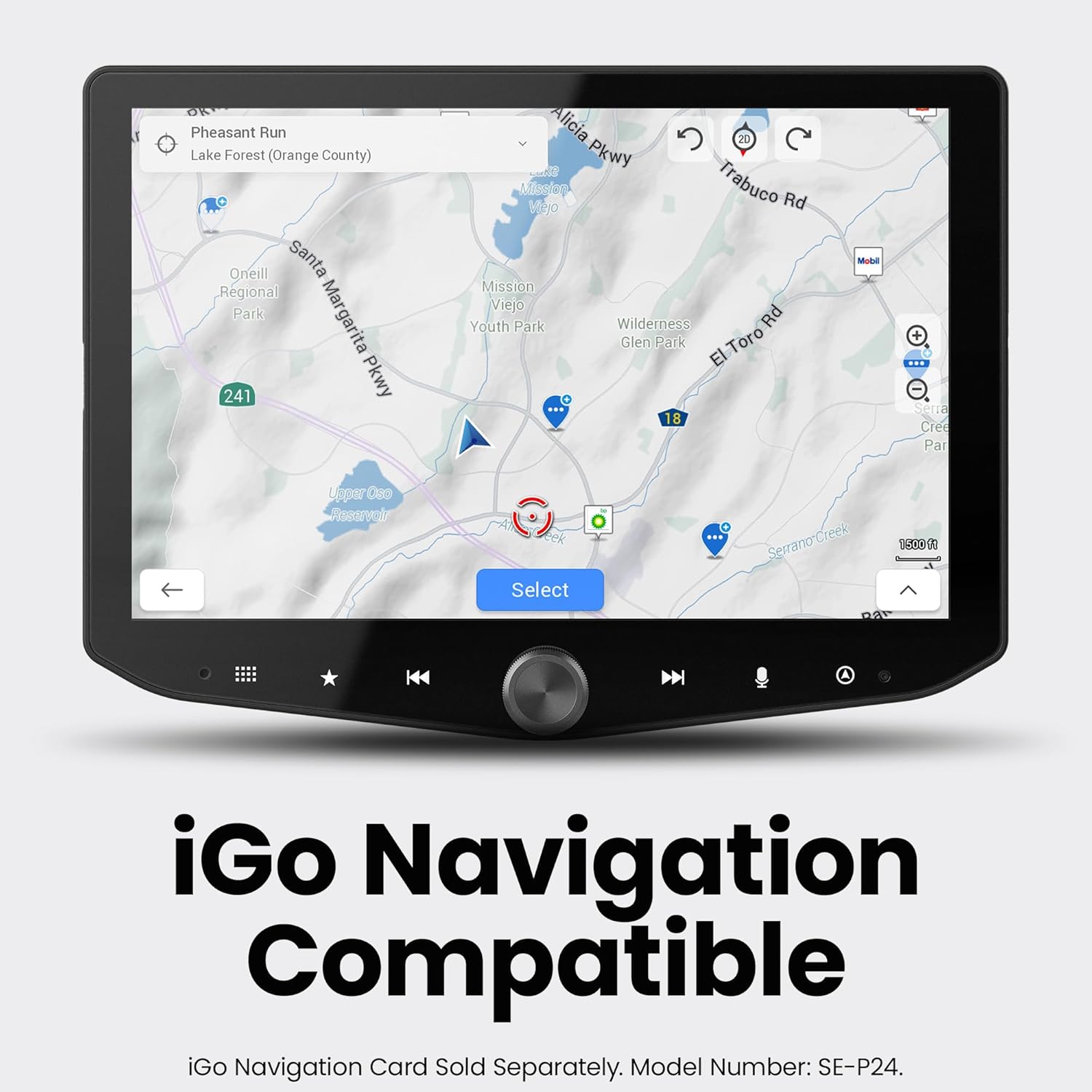
Figure 5.8: iGO Navigation interface.
6. Иштөө нускамалары
6.1. Күйгүзүү/өчүрүү
- Күйгүзүү: Turn your vehicle's ignition to the ACC or ON position. The system will power on automatically.
- Өчүрүү: Turn your vehicle's ignition to the OFF position. The system will power off automatically after a brief delay.
6.2. Сенсордук экран навигациясы
The 10.1-inch touchscreen is highly responsive. Tap icons to select functions, swipe to navigate menus, and use pinch-to-zoom gestures where applicable (e.g., maps).
6.3. Apple CarPlay / Android Auto
- Зымсыз туташуу: Ensure Bluetooth and Wi-Fi are enabled on your smartphone. Select the Apple CarPlay or Android Auto icon on the HEIGH10+ home screen and follow the on-screen prompts to pair your device.
- Зымдуу туташуу: Connect your smartphone to the system's USB-A or USB-C port using a compatible cable. The system will automatically launch Apple CarPlay or Android Auto.
6.4. Радио операциясы
Select the 'HD Radio' icon from the home screen. Use the on-screen controls to tune to AM/FM stations, scan for available frequencies, and save presets. HD Radio provides crystal-clear digital audio where available.
6.5. Аудио орнотуулары
Access the 'Audio Settings' icon to adjust the 15-band equalizer, select from 6 user EQ presets, configure subwoofer control, and set high-pass (HPF) and low-pass (LPF) filters for optimal sound output.
6.6. Камера View Тандоо
Tap the 'Cameras' icon to cycle through available camera views (front, rear, left, right, etc.). Parking guidelines may be displayed on the backup camera feed.
6.7. Off-Road Gauge Monitoring
Select the 'Off-Road' icon to view real-time vehicle data such as pitch, roll, heading, altitude, and tire angle. This information is crucial for navigating challenging terrains.
6.8. RGB жарыкты башкаруу
If an ENLIGHT10 RGB kit is connected, tap the 'ENLIGHT10 RGB' icon to access the control interface. Adjust colors, brightness, and lighting modes directly from the touchscreen.
7. Техникалык тейлөө
- Экранды тазалоо: Бир аз жумшак, түксүз кездемени колдонуңуз dampened with a screen cleaner or water. Avoid abrasive materials or harsh chemicals that could damage the anti-glare coating.
- Программалык камсыздоо жаңыртуулары: Мезгил-мезгили менен Стингерди текшерип туруңуз website for firmware updates. Updates can improve performance, add features, and resolve issues. Follow the instructions provided with the update package carefully.
- Жалпы кам көрүү: Keep the unit free from dust and debris. Ensure all connections remain secure.
8. Кыйынчылыктарды
8.1. Күч жок
- Check vehicle's ignition status.
- Verify all power connections to the head unit and interface module are secure.
- Inspect vehicle fuses related to the radio/infotainment system.
8.2. Үн чыгышы жок
- Үндүн үнү өчүп же минималдуу деп коюлбагандыгын текшериңиз.
- Check audio settings (EQ, fader/balance) for incorrect configurations.
- Verify speaker connections. If using external ampкөтөргүчтөрдү, алардын кубаттуулугун жана сигнал байланыштарын текшериңиз.
8.3. Apple CarPlay / Android Auto Connectivity Issues
- For wireless connection, ensure Wi-Fi and Bluetooth are active on your phone and the system. Try forgetting the device on both ends and re-pairing.
- For wired connection, try a different USB cable (ensure it's a data-capable cable, not just charging).
- Restart your smartphone and the infotainment system.
8.4. Camera Display Issues
- Verify camera connections to the head unit.
- Check camera settings within the infotainment system to ensure correct input selection.
- Ensure the vehicle is in the correct gear (e.g., reverse for backup camera).
9. Техникалык шарттар
| Өзгөчөлүк | Спецификация |
|---|---|
| Бренд | СТИНГЕР |
| Модель номери | RB10JW18HP. |
| Дисплей өлчөмү | 10.1 дюйм |
| Display Resolution | 1280x800 HD |
| Байланыш технологиясы | Bluetooth, HDMI, USB |
| Өзгөчөлүктөр | Wireless Android Auto, Wireless Apple CarPlay, Built-In Bluetooth, Equalizer, HDMI; USB-A, USB-C, Touchscreen |
| Шайкеш түзмөктөр | iPhone, Android |
| Аудио чыгаруу режими | Стерео |
| Каналдардын саны | 8 |
| Аудио чыгаруу түрү | RCA |
| Башкаруу ыкмасы | тийүү |
| Түс | Кара |
| Өндүрүүчү | Стингер |
| UPC | 609098907712 |
10. Кепилдик жана колдоо
The Stinger HEIGH10+ Infotainment System comes with a 1 жылдык Өндүрүүчүнүн Кепилдиги. For warranty claims, technical support, or additional product information, please visit the official Stinger webсайтка же түздөн-түз кардарларды тейлөөгө кайрылыңыз.
Онлайн колдоо: www.stinger.com