
1. Продукт бүтүп калдыview
The COUGAR FV150 RGB is a mid-tower gaming case designed for high-performance PC builds. It features a dual-chamber design, separating the main components from cables, storage drives, and the power supply unit (PSU) for a clean aesthetic and improved airflow. The case supports various motherboard form factors and offers extensive cooling options, including pre-installed ARGB fans.
Негизги өзгөчөлүктөрү:
- Эки камералуу дизайн: ачык-айкын камсыз кылат view of your build through glass panels while concealing cables and other components.
- GPU колдоосу: Accommodates graphics cards up to 400mm in length, with options for vertical GPU orientation.
- Motherboard шайкештиги: Supports Mini-ITX, Micro-ATX, and ATX motherboards.
- Инженердик түбүндөгү желдеткич кронштейни: Simplifies fan installation by allowing attachment prior to setup.
- Extensive Fan & Water Cooling Support: Multiple fan mounting points and radiator support up to 360mm.
- Үзгүлтүксүз RGB синхрондоштуруу: Integrated universal fan hub for easy ARGB lighting control.
- Заманбап киргизүү/чыгаруу панели: Includes 2 x USB Type-A and 1 x USB 3.2 Type-C ports.
- Ийкемдүү сактагыч: Supports combinations of 3.5" HDDs and 2.5" SSDs.
- Магниттик чаң чыпкалары: Located on the top and right side for easy maintenance.

Сүрөт 1.1: Бурчтуу view of the COUGAR FV150 RGB case, highlighting its dual-chamber design and pre-installed ARGB fans.
2. Орнотуу жана орнотуу
Follow these steps for proper installation of your PC components into the COUGAR FV150 RGB case.
2.1 Таңгактан чыгаруу жана алгачкы текшерүү
- Кутучаны таңгагынан этияттык менен чыгарыңыз.
- Inspect the case for any signs of damage during transit.
- Remove the tempered glass side panel by unscrewing the thumb screws, if present, or by releasing the latch mechanism.
2.2 Motherboard орнотуу
- Ensure the correct standoffs are installed for your motherboard form factor (Mini-ITX, Micro-ATX, or ATX).
- I/O калканын корпустун арткы тешигине коюңуз.
- Энелик платаңызды тирөөчтөр жана киргизүү/чыгаруу калканы менен кылдаттык менен тегиздеңиз, андан кийин аны бурама менен бекитиңиз.
2.3 Электр менен камсыздоо блогун (PSU) орнотуу
- The FV150 RGB supports bottom-mount PSUs.
- Slide the PSU into its designated compartment in the secondary chamber from the rear of the case.
- Secure the PSU with screws from the exterior rear of the case.
2.4 Сактоочу дискти орнотуу
- Locate the drive bays in the secondary chamber.
- For 3.5" HDDs, slide the drive into the appropriate tray and secure it.
- For 2.5" SSDs, mount them to the designated brackets or trays.
2.5 Графикалык картаны (GPU) орнотуу
- Корпустун арткы жагындагы керектүү кеңейтүү уячасынын капкактарын алып салыңыз.
- Insert your GPU into the PCIe slot on the motherboard and secure it with screws.
- The case supports GPUs up to 400mm. For vertical GPU mounting, a separate riser cable and bracket (not included) are required.
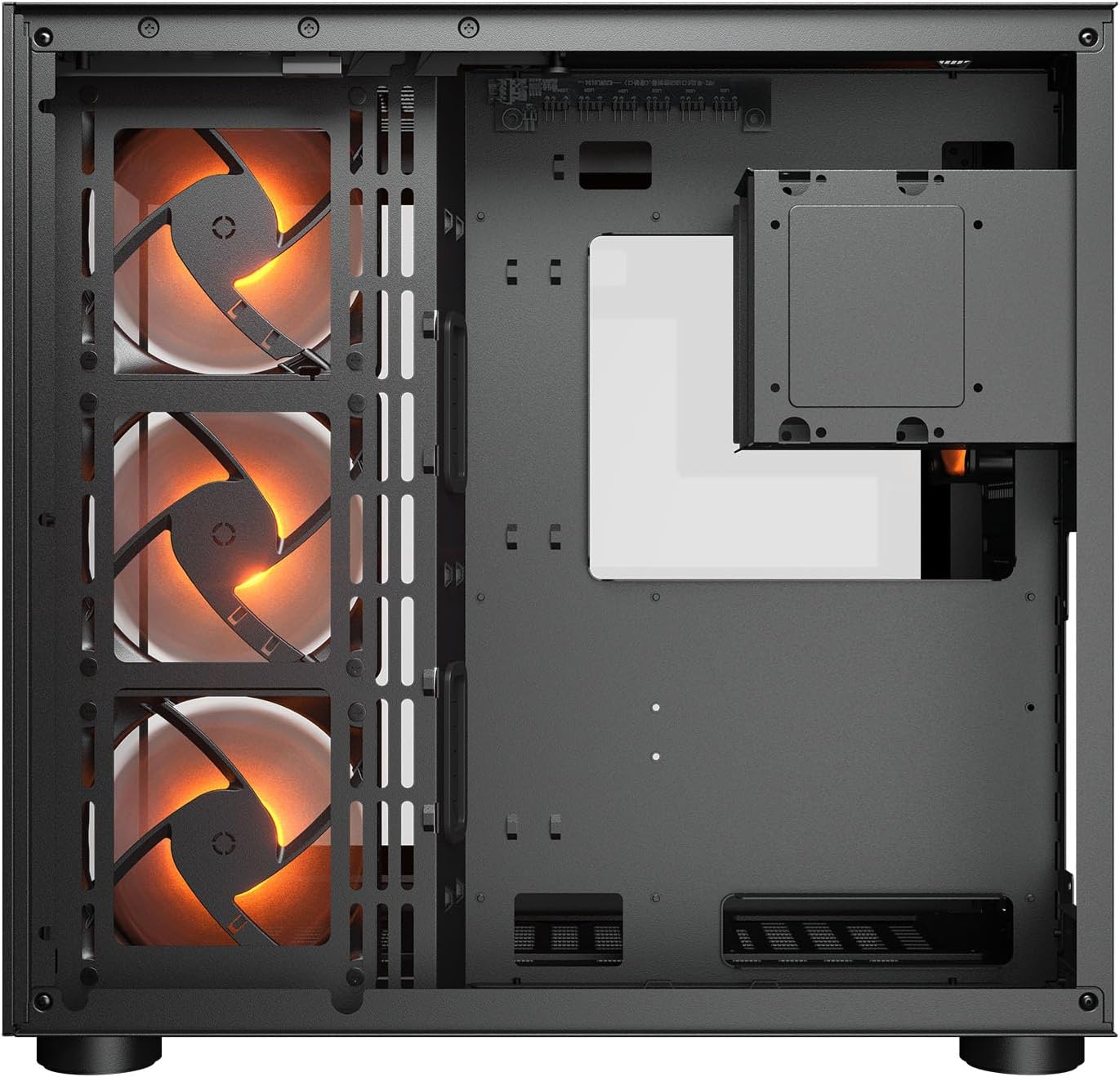
Сүрөт 2.1: Ички view illustrating the main chamber for motherboard and GPU installation, with pre-installed side fans.
2.6 Желдеткичти жана Радиаторду орнотуу
- The case comes with 3 x 120mm ARGB side fans and 1 x 120mm ARGB rear fan pre-installed.
- Additional fans can be installed at the top (3 x 120mm or 2 x 140mm) and bottom (3 x 120mm or 2 x 140mm).
- Utilize the engineered bottom fan bracket for easier installation of bottom fans.
- For water cooling, radiators up to 360mm can be mounted on the top and 240mm on the side.

Image 2.2: Top internal view, showing potential mounting locations for additional cooling fans or radiators.
2.7 Кабелди башкаруу
- Route all power and data cables through the cutouts to the secondary chamber.
- колдонуу ample space and tie-down points in the secondary chamber to organize cables for optimal airflow and a clean appearance.
2.8 Connecting Front I/O Panel
- Connect the front panel cables (USB 3.2 Type-C, USB Type-A, audio, power, reset, LED) to the corresponding headers on your motherboard.
3. Иштөө нускамалары
Бардык компоненттер орнотулуп, туташтырылгандан кийин, сиз тутумуңузду иштете аласыз.
3.1 Күйгүзүү
- PSU которгучу 'ON' абалында экенин текшериңиз.
- Press the power button on the front I/O panel of the case.
3.2 RGB жарыкты башкаруу
- The integrated universal fan hub allows for easy synchronization of ARGB lighting.
- Connect the hub to your motherboard's ARGB header (5V 3-pin) to control lighting effects via motherboard software.
- Alternatively, use the dedicated RGB button on the front I/O panel to cycle through pre-set lighting modes if not connected to a motherboard header.
4. Техникалык тейлөө
Үзгүлтүксүз тейлөө сиздин PC компоненттеринин оптималдуу иштешин жана узак иштөөсүн камсыз кылууга жардам берет.
4.1 Чаң чыпкасын тазалоо
- The COUGAR FV150 RGB features magnetic dust filters on the top and right side, along with a ventilated bottom cover.
- Gently remove the magnetic dust filters.
- Clean them using compressed air or by rinsing with water (ensure they are completely dry before reattaching).
- Periodically clean the ventilated bottom cover.
4.2 Жалпы тазалоо
- Корпустун сырткы беттерин сүртүү үчүн жумшак, кургак чүпүрөктү колдонуңуз.
- For tempered glass panels, use a glass cleaner and a microfiber cloth to avoid streaks.
- Финишке зыян келтирүүчү катаал химиялык заттарды же абразивдүү материалдарды колдонуудан алыс болуңуз.
5. Кыйынчылыктарды
Бул бөлүм сиз кабылышы мүмкүн болгон жалпы маселелер боюнча чечимдерди берет.
5.1 Система күйбөй жатат
- Check PSU: Ensure the power supply unit is properly connected to the wall outlet and the PSU switch is in the 'ON' position.
- Алдыңкы панелдин байланыштары: Verify that the power button cable from the case is correctly connected to the motherboard's front panel header.
- Internal Power Cables: Confirm all necessary power cables (24-pin ATX, 8-pin CPU, PCIe for GPU) are securely connected to the motherboard and components.
5.2 Күйөрмандар Айланбайт же RGB иштебейт
- Желдеткич туташуулары: Ensure all fan power cables are securely connected to the fan hub or motherboard headers.
- RGB Connections: Verify the ARGB cables are correctly connected to the fan hub and the hub is connected to a 5V 3-pin ARGB header on the motherboard.
- Software/Button: If connected to the motherboard, check your motherboard's RGB control software. If not, try pressing the RGB button on the case's I/O panel to cycle modes.
5.3 USB порттору иштебей жатат
- Internal USB Headers: Confirm that the USB 3.0 and USB Type-C cables from the front I/O panel are correctly plugged into the corresponding headers on your motherboard.
- Motherboard Drivers: Ensure you have installed the latest chipset and USB drivers for your motherboard.
6. Техникалык шарттар
Detailed technical specifications for the COUGAR FV150 RGB Gaming Case.

Image 6.1: Case dimensions for planning your setup.
| Өзгөчөлүк | Спецификация |
|---|---|
| Продукт аты | FV150 RGB |
| Case Form Factor | Ара Tower |
| Motherboard шайкештиги | Mini-ITX, Micro-ATX, ATX |
| Өлчөмдөрү (W x Y x D) | 300 x 400 x 415 мм (11.8" x 15.7" x 16.3") |
| I/O панели | USB 3.2 Gen 2 Type-C x 1, USB-A 3.0 x 2, 4 Pole Headset Audio Jack, RGB Button |
| 3.5" Drive Bay | 2 |
| 2.5" Drive Bay | 1+1 (converted from 3.5" drive bays) |
| Кеңейтүү уячалары | 7+3 |
| Вертикалдык GPU колдоо | Ооба |
| Cooling Fan Support (Top) | 3 x 120 мм же 2 x 140 мм |
| Cooling Fan Support (Bottom) | 3 x 120 мм же 2 x 140 мм |
| Cooling Fan Support (Side) | 3 x 120 мм |
| Cooling Fan Support (Rear) | 1 x 120 мм |
| Pre-installed Fans (Side) | 3 x 120mm ARGB (Reversed) |
| Pre-installed Fans (Rear) | 1 x 120mm ARGB |
| Pre-installed Fan Speed | 1000 (± 10%) RPM |
| Pre-installed Fan Connector | 5V 3 Pin (ARGB) / 3 Pin (Fan) |
| Күйөрмандардын максималдуу саны | 10 |
| Water Cooling Support (Top) | 360мм / 280мм / 240мм |
| Water Cooling Support (Side) | 240мм / 120мм |
| Water Cooling Support (Rear) | 120мм |
| RGB Hub Sync with M/B | Ооба |
| Макс. Графикалык картанын узундугу | 400 мм (15.7 дюйм) |
| Макс. CPU муздаткычтын бийиктиги | 180 мм (7.1 дюйм) |
| Макс. PSU узундугу | 210 мм (8.3 дюйм) |
| Материал | Металл |
| Элемент Салмагы | 6.83 килограмм |
7. Кепилдик маалыматы
COUGAR products are manufactured to the highest quality standards. This product is covered by a manufacturer's warranty against defects in materials and workmanship. The specific duration and terms of the warranty may vary by region and retailer. Please retain your proof of purchase for warranty claims.
For detailed warranty information, please refer to the official COUGAR webсайтына кириңиз же жергиликтүү сатуучуңузга кайрылыңыз.
8. Колдоо
If you encounter any issues or have questions regarding your COUGAR FV150 RGB Gaming Case that are not covered in this manual, please contact COUGAR customer support.
- Visit the official COUGAR webКөп берилүүчү суроолор, драйверлерди жүктөө жана колдоонун байланыш маалыматы үчүн сайт.
- Contact your retailer for assistance with product returns or exchanges.