
1. Киришүү
Thank you for choosing the H-Tech HT-1025 Car MP3 Radio. This manual provides essential information for the safe and efficient operation of your new device. Please read it thoroughly before installation and use, and keep it for future reference.
Коопсуздук маалыматы
- Always ensure the vehicle is parked safely before operating the radio's controls.
- Do not attempt to install this product if you are not experienced with car audio systems. Professional installation is highly recommended.
- Incorrect wiring can cause damage to the unit or the vehicle's electrical system.
- Агрегатты суудан жана ашыкча нымдан алыс кармаңыз.
- Агрегатты ажыратпаңыз. Бардык тейлөөлөрдү квалификациялуу кызматкерлерге тапшырыңыз.
2. Пакеттин мазмуну
Пакетте бардык буюмдар бар экенин текшериңиз:
- 1 x H-Tech HT-1025 Car MP3 Radio
- 1 x Алыстан башкаруу
- 1 х Инструкция (бул документ)
- 1 x Set of Installation Harnesses

Image: The H-Tech HT-1025 Car MP3 Radio unit, its remote control, and the included wiring harnesses for installation.
3. Орнотуу жана орнотуу
The H-Tech HT-1025 is designed for a standard 1-DIN car audio slot. Professional installation is strongly recommended to ensure correct wiring and avoid damage.
3.1 Өлчөмдөр
Унааңыздын башкаруу панелинин ачылышы төмөнкү өлчөмдөргө шайкеш келишин текшериңиз:
- Length: Approximately 18.5 cm
- Width: Approximately 6 cm
- Height: Approximately 5.8 cm

Image: A diagram illustrating the length (18.5 cm), width (6 cm), and height (5.8 cm) of the H-Tech HT-1025 unit.
3.2 Зымдарды туташтыруу
Use the provided installation harnesses to connect the unit to your vehicle's electrical system and speakers. Refer to the wiring diagram provided with the harnesses for specific connections. Key connections include:
- Power (Constant 12V, Switched 12V, Ground)
- Speaker Outputs (4 channels)
- RCA Audio Outputs (for external amplifiers, if used)
- Антенна киргизүү
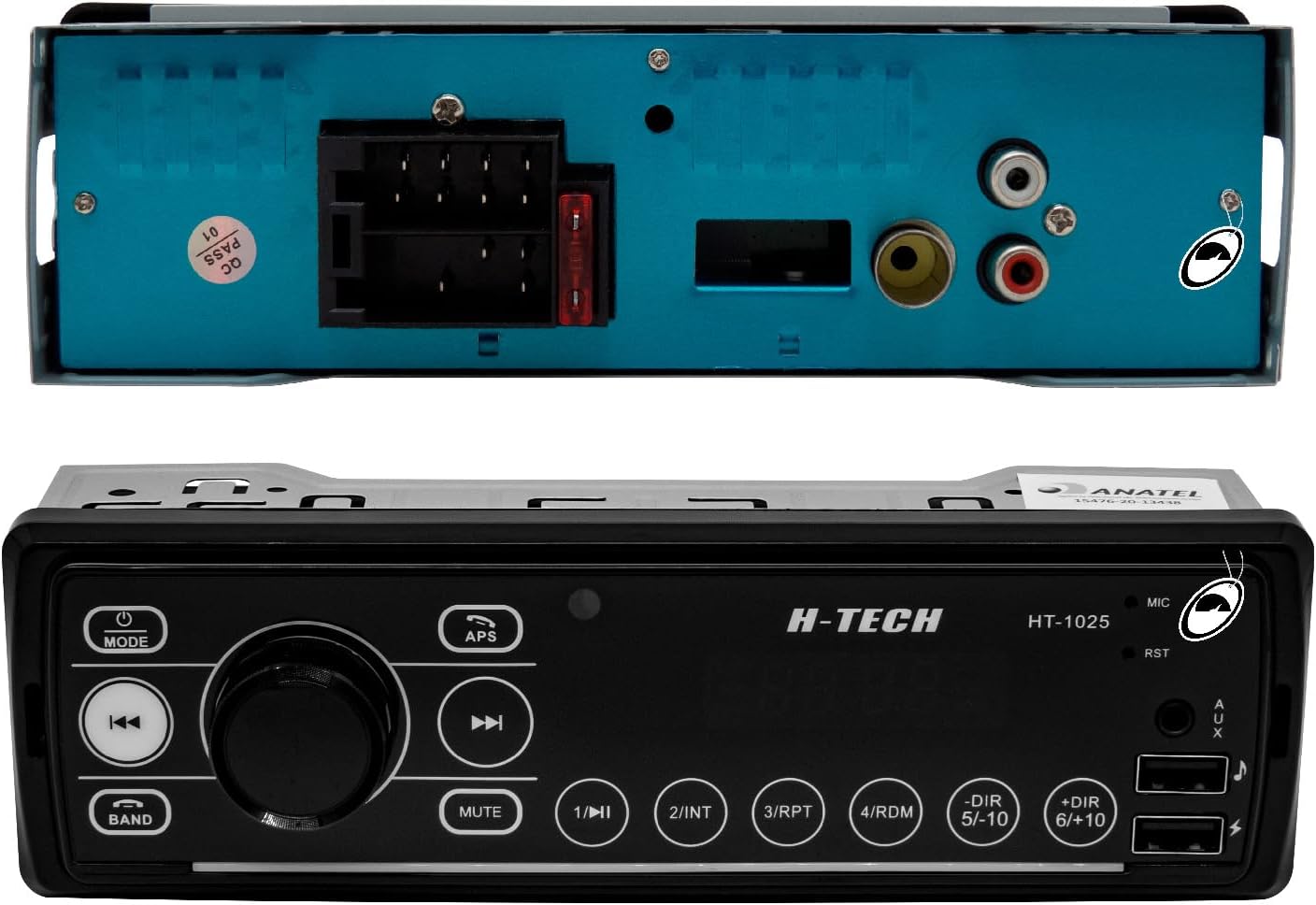
Image: The rear panel of the H-Tech HT-1025 radio, displaying the main wiring harness connector, fuse, and two RCA audio output jacks.
4. Иштөө нускамалары
This section details the basic operation of your H-Tech HT-1025 Car MP3 Radio.
4.1 Алдыңкы панелдин башкаруу элементтери

Image: The H-Tech HT-1025 Car MP3 Radio's front panel, showing the digital display, rotary volume knob, and various control buttons, alongside the remote control.
- MODE баскычы: Press to cycle through available audio sources (Radio, USB, AUX, Bluetooth). Press and hold to power the unit on or off.
- Ротари баскычы: Үндү тууралоо үчүн буруңуз. Меню параметрлерин тандоо же жөндөөлөрдү ырастоо үчүн басыңыз.
- БАНД баскычы: In Radio mode, press to switch between AM and FM bands.
- APS Button: In Radio mode, press to automatically scan and store strong stations.
- MUTE баскычы: Аудио чыгышынын үнүн өчүрөт же ачат.
- USB порттору: One port for music playback (MP3 files), another for charging devices.
- AUX киргизүү: Тышкы аудио түзүлүштөрдү туташтыруу үчүн 3.5 мм уяча.
- Сан баскычтары (1-6): In Radio mode, these can be used to select preset stations. In USB mode, they may have other functions like INT (Intro scan), RPT (Repeat), RDM (Random), DIR (Directory navigation).
4.2 Радио операциясы (AM/FM)
- басыңыз РЕЖИМ button until "RADIO" is displayed.
- басыңыз БАНД FM1, FM2, FM3, AM1 же AM2 тандоо үчүн баскыч.
- колдонуу ❮ жана ❯ станцияларды кол менен күүлөө же издөө үчүн баскычтар.
- Басыңыз APS to automatically scan and store the strongest stations into presets.
- To manually store a station, tune to the desired frequency, then press and hold one of the number buttons (1-6) until you hear a beep.
4.3 USB ойнотуу
- MP3 аудиосу бар USB флэш-дискти салыңыз files into the designated USB port for music.
- The unit will automatically switch to USB mode and begin playback. If not, press the РЕЖИМ баскычы.
- колдонуу ❮ жана ❯ трек навигациясы үчүн баскычтар.
- The number buttons (e.g., DIR 5/-10, DIR 6/+10) can be used for folder navigation or skipping multiple tracks.
- RPT (Repeat) and RDM (Random) functions are available via the number buttons.
4.4 AUX киргизүү
- Connect an external audio device (e.g., smartphone, MP3 player) to the 3.5mm AUX input jack on the front panel using an audio cable (not included).
- басыңыз РЕЖИМ баскычын "AUX" көрсөтүлгөнгө чейин басыңыз.
- Control playback from the connected device.
4.5 Bluetooth операциясы
- басыңыз РЕЖИМ button until "BT" (Bluetooth) is displayed.
- Мобилдик түзмөгүңүздө Bluetooth иштетип, жеткиликтүү түзмөктөрдү издеңиз.
- Select "HT-1025" from the list to pair. No password is typically required.
- Once paired, you can stream audio from your device to the car radio.
- Use the radio's controls or your mobile device to play/pause, skip tracks.
4.6 Audio Settings (Equalization)
- басыңыз EQ button on the remote control (or the rotary knob on the unit, if applicable) to cycle through preset equalization modes: POP, ROCK, CLASS, FLAT.
5. Техникалык тейлөө
To ensure the longevity and optimal performance of your H-Tech HT-1025 Car MP3 Radio, follow these simple maintenance guidelines:
- Тазалоо: Use a soft, dry cloth to clean the front panel. Do not use abrasive cleaners, solvents, or excessive moisture, as these can damage the finish or internal components.
- Суюктуктардан алыс болуңуз: Prevent any liquids from entering the unit.
- Температура: Аппаратты экстремалдык температурага, түз күн нуруна узак убакытка же жогорку нымдуулукка дуушар кылуудан алыс болуңуз.
- USB порт: Keep the USB ports free from dust and debris.
6. Кыйынчылыктарды
If you encounter issues with your H-Tech HT-1025, please refer to the following common problems and solutions before seeking professional assistance.
| Көйгөй | Мүмкүн себеп | Чечим |
|---|---|---|
| Күч жок | туура эмес зымдар; күйгөн сактагыч; Унаанын аккумулятору маселеси. | Check all power connections. Verify the fuse (located at the rear of the unit). Ensure vehicle battery is charged. |
| Үн жок | Volume too low; Mute function active; Incorrect speaker wiring; Source not selected. | Increase volume. Press MUTE button. Check speaker connections. Ensure correct audio source is selected. |
| Bluetooth туташпай жатат | Телефондо Bluetooth иштетилген эмес; Бирдик жупташтыруу режиминде эмес; Интерференция. | Ensure Bluetooth is enabled on your device and the radio is in BT mode. Try restarting both devices. Move closer to the unit. |
| USB not reading | Колдоого алынбайт file format; Corrupted USB drive; Incorrect USB port used. | камсыз кылуу files are MP3 format. Try a different USB drive. Use the USB port designated for music playback. |
| Радио кабыл алуу начар | Антенна туташкан эмес; Сигнал алсыз аймак; Антенна бузулган. | Check antenna connection. Try tuning to a stronger station. Consider checking or replacing the antenna. |
7. Техникалык шарттар
Detailed technical specifications for the H-Tech HT-1025 Car MP3 Radio:
| Модел | HT-1025 |
| Power Output | 25W x 4 каналдар |
| Аудио чыгуулар | 2 х RCA |
| USB кириштери | 1 x for Charging, 1 x for Music Playback |
| AUX киргизүү | 1 x 3.5mm Front Panel |
| Bluetooth | Yes (Version not specified, but typically 5.0 as per feature bullet) |
| Радио тюнер | AM/FM |
| Дисплей | Digital with LED Illumination |
| Equalization Presets | POP, ROCK, CLASS, FLAT |
| Өлчөмдөр (Продукт) | 20 x 8 x 7 см (болжол менен) |
| Салмагы (Продукт) | 250 г |
| Сертификация | ANATEL: 15476-20-13438 |
8. Кепилдик жана колдоо
8.1 Өндүрүүчүнүн кепилдиги
This H-Tech HT-1025 Car MP3 Radio comes with a 1 жылдык өндүрүүчүнүн кепилдиги сатып алынган күндөн тартып.
Кепилдик алып салуулар: The warranty does NOT cover damages caused by:
- Туура эмес орнотуу
- Буюмду туура эмес пайдалануу же кыянаттык менен пайдалануу
- Уруксатсыз оңдоолор же өзгөртүүлөр
- Кокус зыян
Кепилдик дооматтары үчүн сатып алганыңыздын далилин сактап коюңуз.
8.2 Кардарларды колдоо
For technical assistance, warranty claims, or any questions regarding your H-Tech HT-1025 Car MP3 Radio, please contact your retailer or the manufacturer's customer service department. Refer to your purchase documentation for specific contact information.