
Introduction
Thank you for choosing the 5Rcom Floor TV Stand with Hidden Wheels. This manual provides essential information for the safe and correct assembly, operation, and maintenance of your new TV stand. Please read these instructions carefully before beginning assembly and retain them for future reference.

Image: The 5Rcom Floor TV Stand positioned in a modern bedroom, showcasing its sleek design and how it integrates with home decor.
Продукт бүттүview
The 5Rcom Floor TV Stand is designed for versatility and stability, offering a mobile and adjustable solution for your television. Key features include:
- Concealed Caster Wheels: Four ultra-low, nearly invisible wheels allow for smooth movement across various rooms.
- Универсалдуу сыналгы шайкештиги: Supports most TVs from 24 to 55 inches, weighing up to 30 kg.
- VESA шайкештиги: Compatible with VESA patterns ranging from 100x100 mm (min) to 400x400 mm (max).
- Айлануучу функция: Screen can be rotated 30 degrees left or right for optimal viewбурчтар.
- Бийиктигин тууралоо: Easily adjust the TV height for a comfortable viewтажрыйбасы.
- Мыкты курулуш: Features a reinforced alloy steel pole and a stable wood-textured base.
- Интегралдык кабелдик башкаруу: Кабелдерди иреттүү жана көрүнбөгөн жерде сактоого жардам берет.

Image: A close-up showing the integrated cable management clips, the safety lock mechanism for the TV bracket, and the durable alloy steel pole.
Техникалык шарттар
| Өзгөчөлүк | Деталь |
|---|---|
| Монтаж түрү | Пол стенд |
| Кыймыл түрү | Айлануу (±30°) |
| Туура келген сыналгы өлчөмдөрү | 24 - 55 дюйм |
| Максималдуу жүктөө жөндөмдүүлүгү | 30 кг (66 фунт) |
| VESA шайкештиги | 100x100ммден 400x400ммге чейин |
| Материал | Эритме болот, жыгач |
| Түс | White (pole), Wood texture (base) |
| Жалпы өлчөмдөрү (L x W x Y) | 550 x 380 x 1010-1310 mm (adjustable height) |
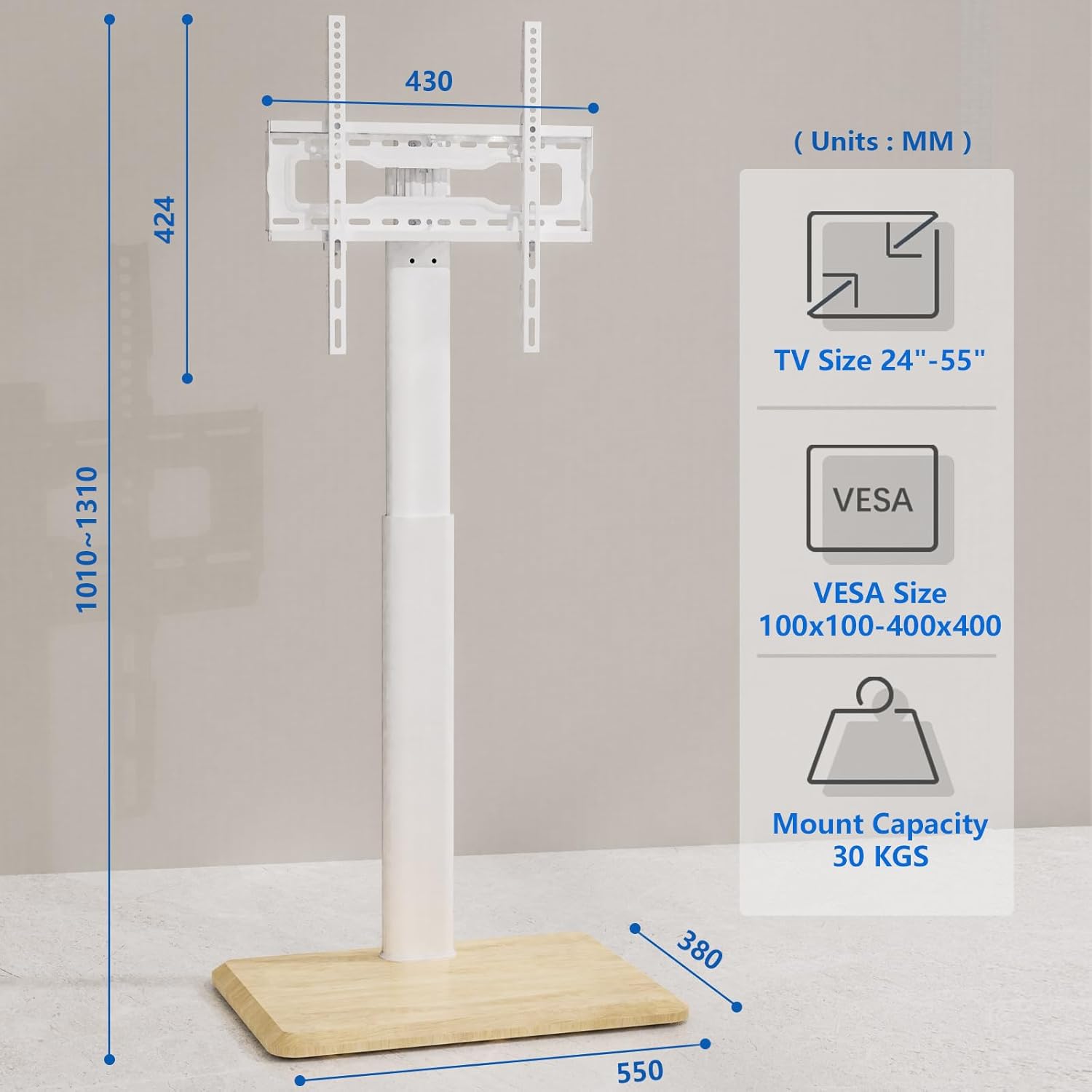
Image: A detailed diagram illustrating the stand's dimensions, supported TV sizes, VESA mounting patterns, and maximum weight capacity.

Image: A chart explaining how to check VESA compatibility, TV size, and TV weight to ensure proper fit with the stand.
Коопсуздук маалыматы
Коопсуз эксплуатацияны камсыз кылуу жана зыян келтирбөө үчүн төмөнкү коопсуздук эрежелерин сактаңыз:
- 30 кг (66 фунт) максималдуу салмактан ашпаңыз.
- Ensure your TV's VESA pattern falls within the supported range (100x100mm to 400x400mm).
- Чийилип калбашы үчүн, стендди ар дайым жумшак, таза бетке чогултуңуз.
- Verify all screws and connections are securely tightened before mounting the TV.
- Чогултуу жана иштетүү учурунда балдарды жана үй жаныбарларын стендден алыс кармаңыз.
- Телевизордун стендине асылбаңыз жана ага чыкпаңыз.
- Distribute the TV's weight evenly on the mounting brackets.
- Use the provided safety lock to secure the TV to the stand.
Орнотуу жана монтаждоо нускамалары
The 5Rcom Floor TV Stand is designed for easy assembly. Follow these steps carefully:
- Компоненттерди таңгактан чыгаруу: Carefully remove all parts from the packaging and lay them out on a soft, flat surface. Verify all parts are present according to the included parts list.
- Базаны чогултуу: Attach the main support pole to the wooden base using the designated screws. Ensure a firm connection.
- Кастер дөңгөлөктөрүн орнотуу: Insert the concealed caster wheels into the pre-drilled holes on the underside of the base.
- Сыналгы кашааларын тиркөө: Secure the vertical TV brackets to the back of your television using the appropriate VESA screws and spacers. Refer to your TV's manual for specific VESA hole locations.
- Телевизорду стендге орнотуу: Carefully lift the TV with the attached brackets and hook them onto the main support pole's mounting plate. Ensure the brackets are properly seated.
- Secure TV with Safety Lock: Engage the safety lock mechanism to prevent the TV from accidentally dislodging from the stand.
- Кабелдик башкаруу: Route all TV cables through the integrated cable management clips on the back of the support pole for a tidy appearance.
Video: Official product video demonstrating the assembly process, key features like swivel and height adjustment, and the concealed caster wheels of the 5Rcom Floor TV Stand.
Иштөө нускамалары
- Телевизорду айландыруу: Gently grasp the sides of your TV and rotate it left or right. The stand allows for a ±30 degree swivel to achieve your desired viewing angle. Avoid forcing the TV beyond its rotational limits.
- Телевизордун бийиктигин тууралоо: The TV plate offers 2 levels of height adjustment, and the brackets offer 3 levels. To adjust, carefully remove the TV from the stand (if necessary), reposition the brackets or plate to the desired height, and re-secure. Always ensure the TV is stable after adjustment.
- Стендди жылдыруу: The concealed caster wheels allow for easy repositioning. Gently push the stand from the base to move it. Ensure the path is clear of obstacles and the floor surface is suitable for smooth movement.

Image: An illustration demonstrating the TV stand's ability to swivel the television screen 30 degrees to either side.

Image: A diagram showing the different height adjustment options for both the TV plate and the mounting brackets.

Сүрөт: жакын план view of the discreetly integrated caster wheels located on the underside of the stand's wooden base.
Техникалык тейлөө
Regular maintenance helps prolong the life and appearance of your TV stand:
- Тазалоо: Трибунаны жумшак, кургак чүпүрөк менен сүртүңүз. Өжөр тактар үчүн бир аз сүртүңүзamp жумшак самын менен кездемени сүртүп, андан кийин жакшылап кургатыңыз. Катуу химиялык заттардан же абразивдүү тазалоочу каражаттардан алыс болуңуз.
- Байланыштарды текшерүү: Мезгил-мезгили менен бардык бурамалар менен болтторду текшерип туруңуз, алар бекем жана бекем бойдон калууда. Керек болсо кайра тартыңыз.
- Дөңгөлөктөрдү текшерүү: Ensure the caster wheels are free of debris and roll smoothly. Clean if needed.
Проблемаларды чечүү
Эгер сыналгы стендиңизде кандайдыр бир көйгөйгө туш болсоңуз, төмөнкү жалпы көйгөйлөрдү жана чечимдерди караңыз:
- Стенд туруксуз:
- Бардык монтаж бурамалары толугу менен бекемделгенин текшериңиз.
- Verify the TV's weight and VESA pattern are within the stand's specifications.
- Make sure the stand is placed on a flat, level surface.
- Стендди жылдыруунун кыйынчылыгы:
- Check if the caster wheels are obstructed by debris or carpet fibers.
- Ensure the floor surface is suitable for rolling wheels.
- TV Does Not Fit Brackets:
- Confirm your TV's VESA pattern matches the stand's supported range (100x100mm to 400x400mm).
- Сиздин сыналгы моделиңиз үчүн туура бурамалар менен бөлгүчтөрдү колдонуп жатканыңызды текшериңиз.
Кепилдик жана колдоо
This 5Rcom Floor TV Stand comes with a 2 жылдык өндүрүүчүнүн кепилдиги сатып алынган күндөн тартып. Бул кепилдик нормалдуу колдонуудагы материалдардагы жана жасалгадагы кемчиликтерди камтыйт.
For warranty claims, technical assistance, or any questions not covered in this manual, please contact 5Rcom customer support through the retailer where you purchased the product or visit the official 5Rcom webбайланыш маалыматы үчүн сайт.