
Introduction
Thank you for choosing the 5Rcom 360° Swivel Speaker Stands. This manual provides detailed instructions for assembly, operation, maintenance, and troubleshooting to ensure optimal performance and longevity of your product. These stands are designed to enhance your audio experience by positioning speakers at an optimal height, providing stability, and offering convenient cable management.

Figure 1: 5Rcom Speaker Stands Overview
The 5Rcom speaker stands are engineered for versatility and stability, supporting speakers up to 5 kg each. Their height-adjustable design and 360° swivel capability allow for precise sound positioning, making them ideal for home theater systems, studios, or any listening environment.
Продукт өзгөчөлүктөрү
- Бийиктигин тууралоо: The extensible tube allows height adjustment from 824 mm (32.4 inches) to 1094 mm (43.1 inches) for optimal acoustics.
- Туруктуу база: A 300mm x 300mm wide base plate ensures balance and safety for your speakers.
- Полдун шайкештиги: Includes adjustable plastic feet and carpet spikes for various floor types (wood, cement, tile, carpet).
- Кабелдик башкаруу: Features a cable management hole (30mm x 17mm) to conceal speaker wires for a clean setup.
- Жалпы шайкештик: Designed to work with most speakers, including those with mounting holes up to 305mm in height.
- 360° айлануу: The speaker mounting plate can swivel 360 degrees for precise sound direction.

Figure 2: Height Adjustment Range

Figure 3: Height Adjustment and Swivel Capability
Орнотуу жана чогултуу
The 5Rcom speaker stands are designed for easy assembly. All required hardware and instructions are included. Please follow these steps carefully:
- Компоненттерди таңгактан чыгаруу: Carefully remove all parts from the packaging and verify against the parts list (not provided in this manual, refer to product packaging).
- Негизги плитаны бекитүү: Securely attach the main pole to the base plate using the provided screws. Ensure the base is stable.
- Install Floor Protection: Depending on your flooring, install either the adjustable plastic feet (for wood, cement, or tile) or the carpet spikes (for carpeted surfaces) onto the base plate. Adjust feet as needed to level the stand.
- Assemble Top Plate: Attach the speaker mounting plate to the upper adjustable pole.
- Тоо спикери: Choose the appropriate installation method for your speaker:
- For speakers with keyhole: Use the keyhole attachment.
- For speakers with vertical hole: Use the vertical hole attachment.
- For speakers without mounting holes: Place the speaker directly on the top plate.
- Бийиктигин тууралоо: Loosen the knob on the main pole, adjust the height to your desired level, and then tighten the knob securely.
- Кабелдик башкаруу: Route speaker cables through the designated cable management hole in the pole to keep them tidy.

Figure 4: Speaker Installation Options
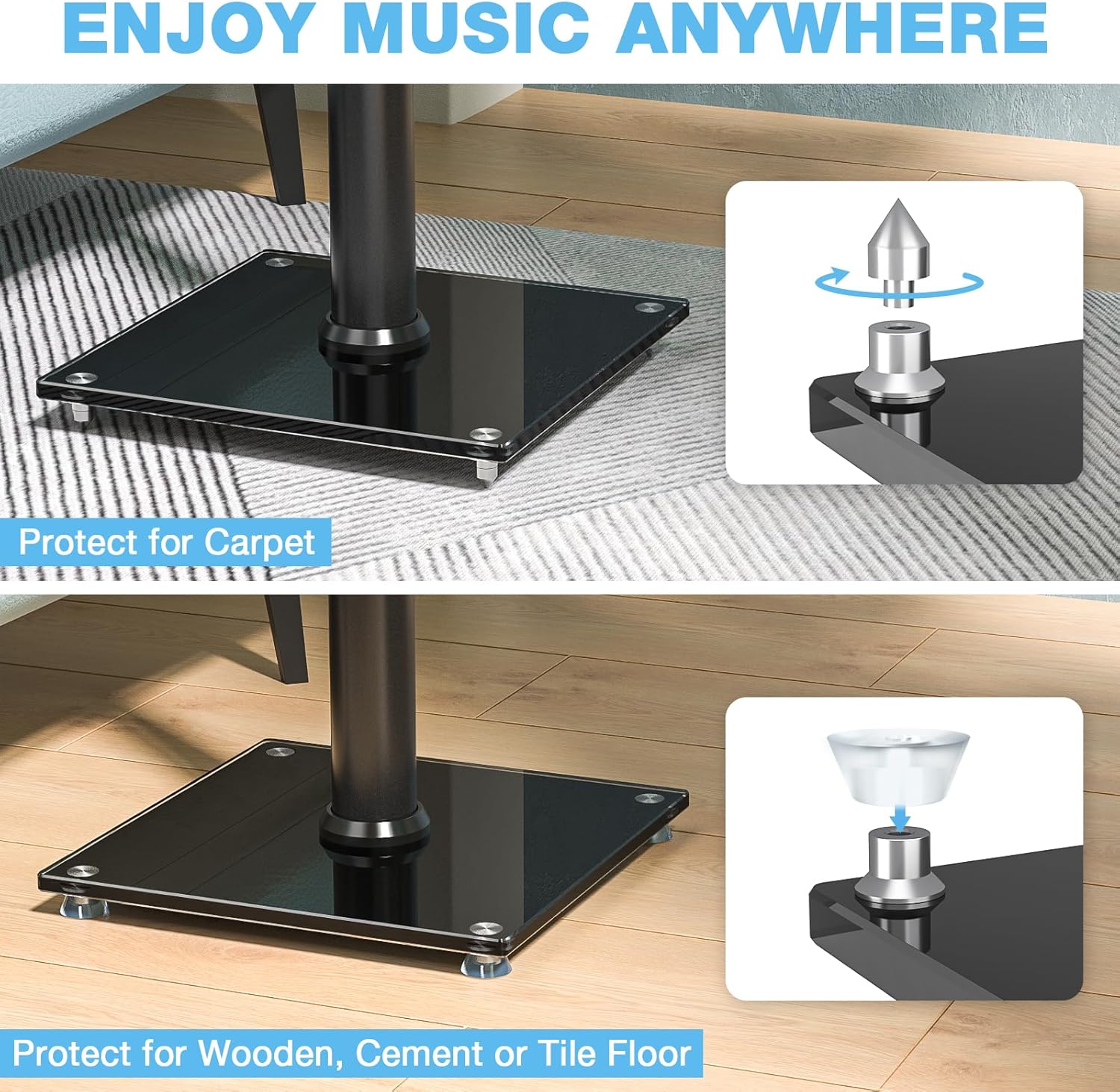
Figure 5: Floor Protection Options
Иштөө нускамалары
Once assembled, operating your 5Rcom speaker stands involves simple adjustments to optimize your listening experience.
- Бийиктигин тууралоо: To adjust the height, locate the adjustment knob on the main pole. Turn the knob counter-clockwise to loosen, slide the upper pole to the desired height, and then turn clockwise to tighten securely. Ensure the speaker is at ear level for the best sound.
- Speaker Swivel: The top plate allows for 360° rotation. Gently rotate your speaker to direct sound precisely towards your listening position.
- Кабелдик башкаруу: Utilize the internal cable routing system to keep speaker wires organized and out of sight. This contributes to a cleaner aesthetic and reduces tripping hazards.

Figure 6: Optimal Speaker Placement for Sound Quality
Техникалык тейлөө
To maintain the appearance and functionality of your 5Rcom speaker stands, follow these simple maintenance guidelines:
- Тазалоо: Wipe the stands with a soft, dry cloth to remove dust. For more stubborn marks, a slightly damp кездемени колдонсо болот, андан кийин дароо кургатуу. Абразивдүү тазалагычтардан же эриткичтерден качыңыз.
- Байланыштарды текшерүү: Periodically check all screws and connections to ensure they remain tight and secure. This is crucial for stability and safety.
- Inspect Feet/Spikes: Ensure the floor protection (plastic feet or carpet spikes) are in good condition and properly installed to prevent damage to your flooring.
Проблемаларды чечүү
If you encounter any issues with your speaker stands, refer to the following common troubleshooting tips:
- Стенд солкулдайт:
- Бардык монтаж бурамалары толугу менен бекемделгенин текшериңиз.
- Verify that the base plate is level. Adjust the plastic feet or ensure carpet spikes are properly seated.
- Check that the speaker's weight does not exceed the 5 kg maximum load capacity.
- Бийиктигин тууралоо кыйынчылыгы:
- Ensure the height adjustment knob is fully loosened before attempting to slide the pole.
- Check for any obstructions or debris within the pole mechanism.
- Speaker Not Securely Mounted:
- Re-check the speaker's mounting holes against the provided attachments. Ensure you are using the correct method (keyhole, vertical hole, or top plate).
- Verify that the speaker dimensions are within the recommended range (up to 305mm height for mounting holes).
Техникалык шарттар
| Атрибут | Нарк |
|---|---|
| Бренд | 5Rcom |
| Модел | B0DMF4XNMZ |
| Түс | Кара |
| Аяктоо түрү | Жылмаланган |
| Максималдуу жүктөө жөндөмдүүлүгү | 5 кг |
| Жөнгө салынуучу бийиктик диапазону | 824 mm - 1094 mm (32.4" - 43.1") |
| Негизги плитанын өлчөмдөрү | 300мм x 300мм |
| Кабелдик башкаруу тешиги | 30мм x 17мм |
| Speaker Mounting Hole Compatibility | Up to 305mm height |
| Дата биринчи жеткиликтүү | 8-ноябрь, 2024-жыл |
Кепилдик жана колдоо
Your 5Rcom speaker stands come with a 2 жылдык өндүрүүчүнүн кепилдиги сатып алынган күндөн тартып. Бул кепилдик нормалдуу колдонуудагы материалдардагы жана жасалгадагы кемчиликтерди камтыйт.
For warranty claims, technical support, or any questions regarding your product, please contact 5Rcom customer service through the retailer where the product was purchased. Please retain your proof of purchase for warranty validation.
Information regarding spare parts availability is currently not available. Software updates are not applicable to this product.