
1. Продукт бүтүп калдыview
The EXVIST H.265 1080P 60fps PoE VGA Encoder is a high-performance device designed for converting VGA video signals into H.265/H.264 encoded streams. It supports various streaming protocols, including RTMP, RTSP, HLS, and UDP, making it suitable for live broadcasting, video conferencing, CCTV, and digital signage applications. With Power over Ethernet (PoE) capability and a VGA loopout, this encoder offers flexible installation and real-time monitoring.
2. Негизги өзгөчөлүктөрү
- High-Quality H.264/H.265 Encoding: Supports 1080P resolution at 60fps with efficient compression for clear video and minimal bandwidth usage.
- Power Over Ethernet (PoE): Powers the encoder directly through the Ethernet connection, simplifying setup and reducing cable clutter.
- VGA Loopout for Local Display: Provides a VGA output for direct connection to a local monitor, enabling real-time video monitoring.
- Multiple Protocols Supported: Compatible with RTSP, RTMP, HLS, and UDP protocols for versatile integration with various streaming platforms and systems.
- Колдонмолордун кеңири спектри: Ideal for IP television systems, live event broadcasts, digital signage, and CCTV monitoring across diverse environments.
3. Пакеттин мазмуну
- EXVIST H.265 1080P 60fps PoE VGA Encoder (Model ON-VGA-16DP)
- User Manual
- Power Adapter (if PoE is not used)
4. Түзмөктүн жайгашуусу
Familiarize yourself with the ports and indicators on the encoder unit.

4.1-сүрөт: Front and Rear Panel of the EXVIST VGA Encoder. The front panel includes PWR (Power indicator), RUN (Operation indicator), Microphone input, VGA IN, and VGA OUT ports. The rear panel features a Reset button, DC12V power input, and a NETWORK port (supporting PoE).
- PWR көрсөткүчү: Түзмөк күйгүзүлгөндө жарык берет.
- RUN көрсөткүчү: Flashes during normal operation.
- Микрофон киргизүү: 3.5mm audio input for external microphone.
- VGA IN: Connects to the VGA video source.
- VGA OUT: VGA loopout for connecting to a local display.
- RESET баскычы: Заводдун демейки жөндөөлөрүн калыбына келтирүү үчүн басып туруңуз.
- DC12V: Power input for standard power adapter (if PoE is not used).
- ТАРМАК: RJ45 Ethernet port for network connection and PoE power input.
5. Орнотуу нускамалары
5.1 Физикалык байланыш
- Connect your VGA video source (e.g., computer, camcorder) to the VGA IN port on the encoder using a VGA cable.
- If local monitoring is required, connect a VGA display to the VGA OUT port on the encoder using a VGA cable.
- Connect an Ethernet cable from your network switch (preferably a PoE-enabled switch) to the ТАРМАК port on the encoder. If using a non-PoE switch, connect the provided DC12V power adapter to the DC12V порт.
- Optionally, connect an external microphone to the Микрофон киргизүү порт.
- экендигин текшериңиз Жек Строу менен indicator is illuminated and the RUN indicator is flashing, indicating the device is powered on and operating.
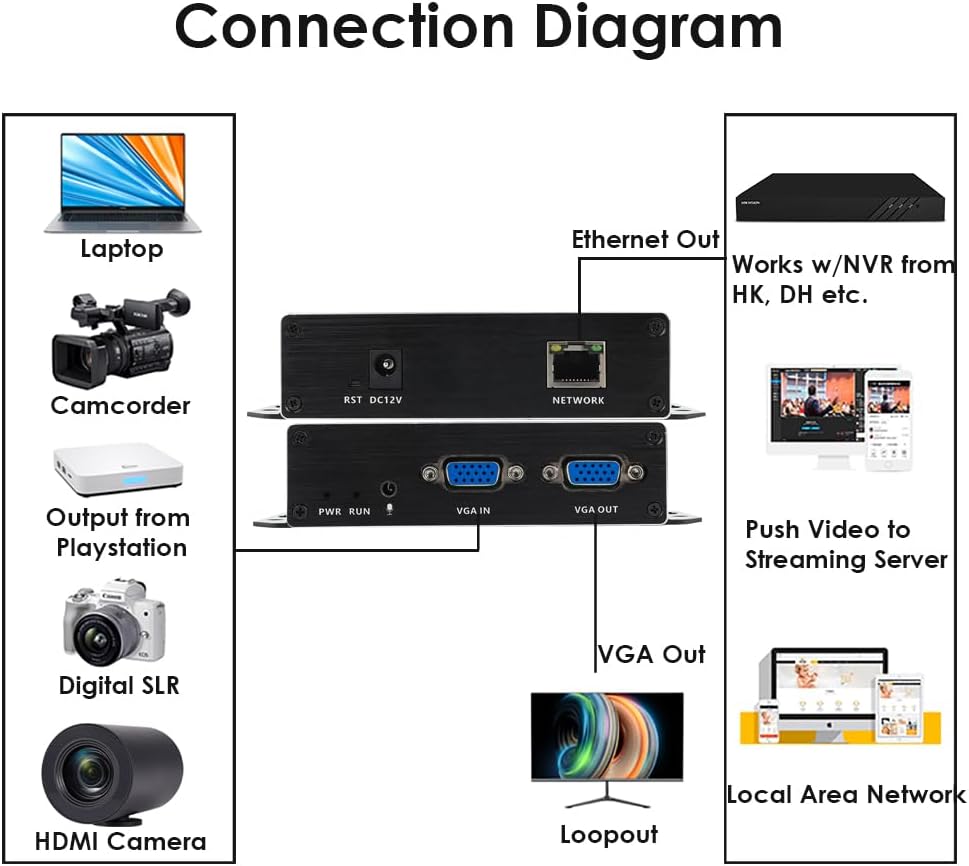
5.1-сүрөт: Typical Connection Diagram for the EXVIST VGA Encoder.
5.2 Network Configuration and Web Interface Access
The encoder typically has a default IP address (e.g., 192.168.1.168). To access the web интерфейс:
- Ensure your computer is on the same network segment as the encoder. You may need to temporarily set your computer's IP address to be in the same subnet (e.g., 192.168.1.x).
- ачуу а web browser (e.g., Chrome, Firefox) and enter the encoder's default IP address (e.g., http://192.168.1.168) дарек тилкесинде.
- Log in using the default username and password (refer to the device label or included documentation for default credentials, commonly admin/admin or admin/123456).
- Once logged in, you can configure network settings (e.g., static IP, DHCP) to integrate the encoder into your existing network infrastructure.
6. Иштөө нускамалары
6.1 Видео жана аудио жөндөөлөрү
ичинде web interface, navigate to the Video/Audio settings to configure input and output parameters.

6.1-сүрөт: Audio Settings in the Web Интерфейс.
- Аудио киргизүү: Select the desired audio source (e.g., VGA embedded audio, external microphone).
- Samples: Аудиолорду тууралооampылдамдыгы.
- Codec type: Choose the audio encoding format (e.g., AAC).
- Битрейт: Set the audio bitrate for quality and bandwidth control.
- Канал: Select audio channels (e.g., Stereo, Mono).
- Чыгуу көлөмү: Adjust the output audio level.
- Басууну унутпаңыз Сактоо after making changes.
6.2 Streaming Configuration (RTMP, RTSP, HLS, UDP)
The encoder supports various streaming protocols. Configure them under the 'Push' or 'Network' sections of the web интерфейс.

6.2-сүрөт: RTMP Streaming Settings in the Web Интерфейс.
- RTMP: For live streaming to platforms like YouTube, Facebook Live, Twitch. Enter the Stream Server URL and Stream Key in the 'Video push' field (e.g.,
rtmp://a.rtmp.youtube.com/live2/streamkey). Enable the stream and select the push mode. - RTSP: For surveillance systems or media servers. Configure the RTSP URL and stream mode (Complex, Video, Audio).
- HLS/UDP: Configure as per your specific application requirements.
- Always click Сактоо after modifying streaming settings.

6.3-сүрөт: Supported Protocols by the EXVIST VGA Encoder.
7. Техникалык тейлөө
- Тазалоо: Түзмөктү тазалоо үчүн жумшак, кургак чүпүрөктү колдонуңуз. Суюк тазалоочу каражаттарды же эриткичтерди колдонбоңуз.
- Вентиляция: Ensure the encoder is placed in a well-ventilated area to prevent overheating. Do not block ventilation openings.
- Программалык камсыздоонун жаңыртуулары: Periodically check the EXVIST official webоптималдуу иштешин жана жаңы функцияларга жетүүнү камсыз кылуу үчүн микропрограммаларды жаңыртуу үчүн сайт.
- Кабелдик башкаруу: Бардык кабелдердин бекем туташтырылганын жана чыңалуу астында эместигин текшериңиз.
8. Кыйынчылыктарды
- Кубат жок: Check power connections. If using PoE, ensure the network switch port provides power. If using a power adapter, ensure it is correctly connected and the outlet is functional.
- No Video Output (Loopout): Verify VGA cable connections. Ensure the video source is active and outputting a signal.
- Тармак туташуусу жок: Check Ethernet cable. Verify network settings (IP address, subnet mask, gateway) in the encoder's web interface. Ensure your computer is on the same subnet for initial access.
- Агым маселелери: Double-check streaming protocol settings (RTMP URL, RTSP URL, etc.). Ensure internet connectivity and sufficient bandwidth. Verify firewall settings on your network.
- Forgot Password/Settings: колдонуу RESET button on the rear panel to restore factory default settings. Note that this will erase all custom configurations.
9. Техникалык шарттар
| Өзгөчөлүк | Спецификация |
|---|---|
| Модель номери | ON-VGA-16DP |
| Видео киргизүү | 1xVGA |
| Video Output | 1x VGA Loopout |
| Видеону коддоо | H.265 / H.264 |
| Резолюция | Up to 1080P @ 60fps |
| Аудио киргизүү | 3.5mm Microphone, VGA Embedded Audio |
| Streaming Protocols | RTMP, RTSP, HLS, UDP, HTTP, Multicast, TS/SRT, ONVIF |
| Тармак интерфейси | 1x RJ45 Ethernet (PoE supported) |
| Электр камсыздоо | DC 12V or Power over Ethernet (PoE) |
| Продукциянын өлчөмдөрү | 4.33 x 2.95 x 0.98 дюйм (110 x 75 x 25 мм) |
| Элемент Салмагы | 6.1 унция (173 грамм) |
| Иштөө температурасы | 0°Cден 50°Cге чейин (32°F—122°F) |
10. Кепилдик маалыматы
This EXVIST product comes with a Limited Warranty. Please refer to the warranty card included with your product or visit the official EXVIST webкепилдик камтууга жана узактыгына байланыштуу толук шарттар жана шарттар үчүн сайт.
11. Кардарларды колдоо кызматы
For technical assistance, troubleshooting, or product inquiries, please contact EXVIST customer support through their official website or the contact information provided in your product packaging. When contacting support, please have your product model number (ON-VGA-16DP) and purchase details ready.