
Introduction
Welcome to the user manual for your new GMKtec G3 Plus Mini PC. This document provides essential information for setting up, operating, maintaining, and troubleshooting your device. Please read this manual thoroughly before using the product to ensure optimal performance and longevity.

The GMKtec G3 Plus is a compact and powerful mini PC designed for various computing needs, from daily tasks to home entertainment and office work.
Пакеттин мазмуну
Verify that all items listed below are included in your package. If any items are missing or damaged, please contact GMKtec customer support.
- 1 x Nucbox G3 Plus Mini PC
- 1 x Power Adapter & Cable
- 1 x HDMI кабели
- 1 x VESA монтаждоо бурамалар менен
- 1 х Колдонуучунун колдонмосу (бул документ)

This image displays the standard items included in the GMKtec G3 Plus Mini PC retail packaging, ensuring you have everything needed for initial setup.
Продукт өзгөчөлүктөрү
The GMKtec G3 Plus Mini PC is engineered for efficiency and performance, offering a range of features for a seamless computing experience.
- Процессор: Intel Twin Lake N150 (4-core/4-thread, up to 3.6 GHz, 6MB Cache), offering enhanced performance over previous generations.
- Эстутум: 16GB DDR4 3200MHz RAM (expandable up to 32GB).
- Сактагыч: 1TB M.2 2280 NVMe SSD (supports PCIe 3.0, expandable up to 2TB).
- Графика: Integrated Intel Graphics (up to 1000MHz).
- Операция системасы: Pre-installed Windows 11 Pro.
- Байланыш:
- WiFi 6 (802.11ax) for high-speed wireless internet.
- Зымсыз перифериялык түзүлүштөрдү туташтыруу үчүн Bluetooth 5.2.
- 2.5G Gigabit Ethernet (RJ45) for stable wired network connection.
- Порттор:
- 4 x USB 3.2 ports (up to 5 Gbit/s).
- 2 x HDMI 2.0 ports (supports 4K @ 60Hz dual display output).
- 1 x 3.5mm Audio Jack.
- 1 x DC 12V 3A Power Input.
- 1 x Security Lock slot.
- Кошумча функциялар: Supports Wake on LAN, PXE Boot, RTC Wake, and Auto Power On.
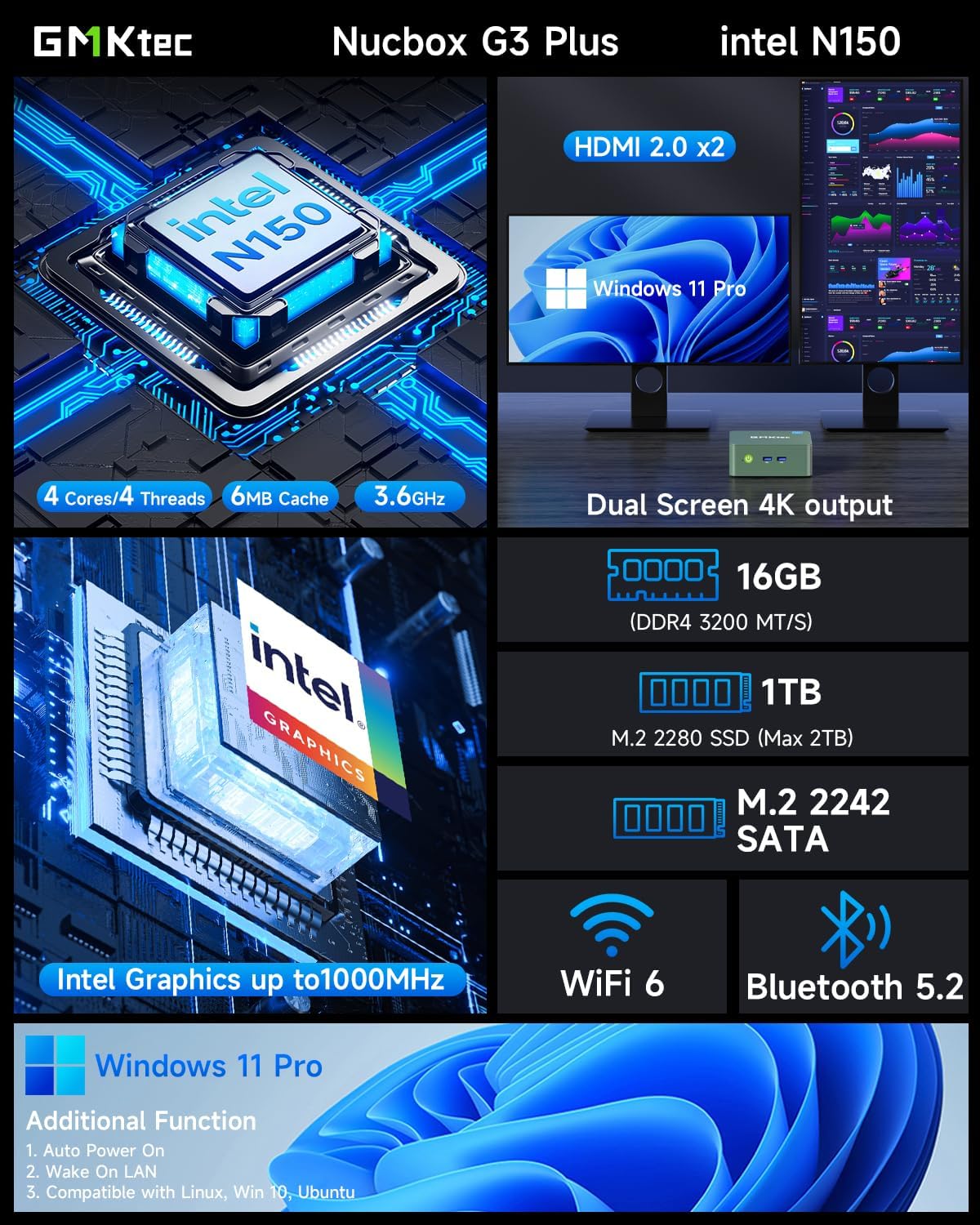
This visual summary details the core specifications and capabilities of the GMKtec G3 Plus, such as its processor, memory, storage, and display outputs.

This graph illustrates the performance advantage of the Intel Twin Lake N150 processor in the GMKtec G3 Plus, showing its improved multi-core and single-core capabilities compared to previous generation CPUs.
Орнотуу колдонмосу
Follow these steps to set up your GMKtec G3 Plus Mini PC.
Step 1: Connect to Display
Connect your monitor(s) to the Mini PC using the provided HDMI cable. The GMKtec G3 Plus supports dual 4K @ 60Hz displays.

This image shows the mini PC connected to two screens, illustrating its ability to support a dual 4K display setup for enhanced productivity or entertainment.
2-кадам: Перифериялык түзүлүштөрдү туташтыруу
Баскычтопуңузду, чычканыңызды жана башка USB түзмөктөрүңүздү жеткиликтүү USB 3.2 портторуна туташтырыңыз.
3-кадам: кубатка туташуу
Plug the power adapter into the DC 12V 3A port on the Mini PC, then plug the power cable into a wall outlet.
4-кадам: Күйгүзүү
Mini PCтин алдыңкы бетинде жайгашкан кубат баскычын басыңыз. Кубат индикатору күйөт.

This image provides a clear layout of all available ports on the GMKtec G3 Plus, guiding users on where to connect their peripherals and displays.
Иштөө нускамалары
Баштапкы жүктөө жана Windows орнотуусу
Upon the first boot, the system will guide you through the Windows 11 Pro setup process. Follow the on-screen instructions to configure your language, region, network, and user account.
Тармакка туташуу
Your Mini PC supports both wired and wireless network connections.
Зымдуу туташуу (Ethernet)
Connect an Ethernet cable from your router or modem to the 2.5G Gigabit LAN port on the Mini PC.

This image highlights the advanced wireless capabilities of the mini PC, including the faster speeds and improved performance offered by WiFi 6 and Bluetooth 5.2.
Зымсыз туташуу (Wi-Fi)
During Windows setup or via Windows settings, select your Wi-Fi network and enter the password. The Mini PC supports Wi-Fi 6 (802.11ax) for optimal wireless performance.
Bluetooth түзмөктөрү
To connect Bluetooth devices (e.g., keyboard, mouse, headphones), go to Windows Settings > Bluetooth & devices, turn on Bluetooth, and pair your device. The Mini PC features Bluetooth 5.2 for stable connections.
Кош дисплей орнотуу
The GMKtec G3 Plus supports connecting two monitors simultaneously via its two HDMI 2.0 ports. Once connected, Windows will automatically detect the displays. You can configure display settings (extend, duplicate, etc.) in Windows Display Settings.
Техникалык тейлөө
Тийиштүү техникалык тейлөө сиздин мини-компьютериңиздин узак мөөнөттүү иштешин жана оптималдуу иштешин камсыз кылат.
- Тазалоо: Regularly clean the exterior of the Mini PC with a soft, dry cloth. Use compressed air to clear dust from the ventilation grilles to prevent overheating.
- Вентиляция: Ensure the Mini PC is placed in a well-ventilated area and that the cooling vents are not obstructed.
- Программалык камсыздоо жаңыртуулары: Коопсуздукту жана иштин натыйжалуулугун камсыз кылуу үчүн Windows операциялык тутумуңузду жана драйверлериңизди жаңыртып туруңуз.
- Сактагычты башкаруу: Мезгил-мезгили менен керексиз тазалоо files and applications to maintain optimal storage performance.

This diagram provides insight into the internal design of the mini PC, highlighting key components and the cooling system, which is important for understanding maintenance needs.
Проблемаларды чечүү
Бул бөлүм сиз кабылышы мүмкүн болгон жалпы көйгөйлөрдү карайт.
Кубат жок / Система күйбөйт
- Кубат адаптери Мини компьютерге жана иштеген электр розеткасына бекем туташып турганын текшериңиз.
- Башка аспапка сайып, розетка иштеп жатканын текшериңиз.
- Мүмкүн болсо, башка розетканы колдонуп көрүңүз.
Дисплей чыгаруу жок
- Check if the HDMI cable is securely connected to both the Mini PC and the monitor.
- Ensure the monitor is powered on and set to the correct input source (HDMI 1, HDMI 2, etc.).
- Мүмкүн болсо, башка HDMI кабелин же мониторду колдонуп көрүңүз.
Wi-Fi / Bluetooth байланыш көйгөйлөрү
- Ensure Wi-Fi/Bluetooth is enabled in Windows settings.
- Мини-компьютерди жана роутериңизди/модемиңизди өчүрүп-күйгүзүңүз.
- Check for updated Wi-Fi/Bluetooth drivers on the GMKtec support webсайт.
- Mini PC Wi-Fi роутериңиздин диапазонунда экенин текшериңиз.
Система жай же жооп бербей жатат
- Фондо иштеп жаткан керексиз тиркемелерди жабыңыз.
- Жогорку CPU же RAM керектеген процесстер үчүн Task Managerди текшериңиз.
- SSDде жетиштүү бош орун бар экенин текшериңиз.
- Вирусту сканерлеңиз.
- Consider updating Windows and drivers.
Техникалык шарттар
| Өзгөчөлүк | Деталь |
|---|---|
| Бренд | GMKtec |
| Модел | GMKtec NUCBOX G3 Plus |
| Процессор | Intel Twin Lake N150 (4 Cores, 4 Threads, up to 3.6 GHz, 6MB Cache) |
| Операция системасы | Windows 11 Pro |
| RAM | 16GB DDR4 3200MHz (Max 32GB) |
| Сактагыч | 1TB M.2 2280 NVMe SSD (PCIe 3.0, Max 2TB) |
| Графика | Интеграцияланган Intel Graphics |
| Wi-Fi | Wi-Fi 6 (802.11ax) |
| Bluetooth | Bluetooth 5.2 |
| Ethernet | 2.5G Gigabit RJ45 |
| USB порттору | 4 x USB 3.2 |
| HDMI порттору | 2 x HDMI 2.0 (4K@60Гц) |
| Аудио | 1 x 3.5 мм аудио уячасы |
| Power Input | DC 12V 3A |
| Өлчөмдөр | 18 x 18 x 9 см (Пакет) |
| Салмагы | 850 грамм (таңгак) |
Кепилдик жана колдоо
GMKtec provides a limited one-year warranty for each Mini PC, effective from the date of purchase. This warranty covers defects arising from design and manufacturing faults.
For any inquiries or technical assistance, please contact GMKtec customer support.
- Amazon колдоо: For purchase-related queries, log in to your Amazon account, navigate to "Your Orders," and select "Ask Product Question."
- Сатуудан кийинки колдоо: For technical support or warranty claims, send an email to support@gmktec.com. GMKtec offers 24/7 customer support.

This image outlines the available channels for customer support and warranty claims, including Amazon's platform and direct email contact for GMKtec's after-sales team.