
1. Киришүү
Thank you for choosing the Jesverty DC Power Supply Variable and Digital Multimeter. This comprehensive instruction manual provides detailed information on the safe operation, setup, and maintenance of your new devices. The DC Power Supply (SPS-3010V) offers adjustable voltage and current output, along with convenient USB charging ports. The Digital Multimeter (HK33B) is a versatile tool for measuring various electrical parameters, including AC/DC voltage, current, resistance, temperature, and more. Please read this manual thoroughly before use to ensure proper functionality and safety.
2. Коопсуздук нускамалары
Always observe the following safety precautions to prevent electric shock, injury, or damage to the devices.
- Жалпы коопсуздук:
- Do not operate the devices if they appear damaged or are not functioning properly.
- Ensure proper ventilation for the power supply to prevent overheating.
- Keep the devices away from water, moisture, and flammable materials.
- Көрсөтүлгөн кубат шнурун жана аксессуарларды гана колдонуңуз.
- DC Power Supply Safety:
- Always connect the load to the output terminals before turning on the output.
- Максималдуу көлөмдөн ашпаңызtage жана учурдагы рейтингдер.
- Ensure correct polarity when connecting to a circuit.
- Digital Multimeter Safety:
- Эч качан колдонбоңузtage or current that exceeds the maximum rated input for each function.
- Do not use the multimeter on circuits with voltag600 Втан ашат.
- Ensure the test leads are properly inserted into the correct input jacks for the selected measurement.
- Do not measure current on a live circuit without breaking the circuit and connecting the meter in series.
- Replace batteries and fuses only with the specified types.
3. Пакеттин мазмуну
Сураныч, пакетте төмөнкү нерселерди текшериңиз:
- Jesverty SPS-3010V DC Power Supply Variable
- Jesverty HK33B Digital Multimeter
- Power Cord for DC Power Supply
- Test Leads for Digital Multimeter
- K-Type Thermocouple (for Multimeter)
- Колдонуучунун Колдонмосу (бул документ)
4. Продукт бүтүп калдыview: DC Power Supply (SPS-3010V)
The Jesverty SPS-3010V is an adjustable DC power supply featuring precise control and multiple output options.
4.1 Алдыңкы панелдин жайгашуусу

Сүрөттүн сүрөттөлүшү: This image displays the front panel of the Jesverty SPS-3010V DC Power Supply. Key features visible include the large 4-digit LED display showing voltage, current, and power, along with indicators for CV (Constant Voltage) and CC (Constant Current) modes. On the right side, there are four encoder knobs: V-COARSE, V-FINE, A-COARSE, and A-FINE for precise voltage and current adjustment. Below the display, USB-C and USB-A quick-charge ports are present, along with OCP (Over Current Protection) and OUT (Output) buttons. The main POWER button is located at the bottom left, and the output terminals (GND, +, -) are at the bottom right.
- LED дисплей: Чыныгы убактагы том көрсөтөтtage (V), current (A), and power (W) output.
- V-COARSE / V-FINE Knobs: Чыгуу көлөмүн тууралооtage. V-COARSE sets the integer part, V-FINE sets the decimal part.
- A-COARSE / A-FINE Knobs: Adjust output current limit. A-COARSE sets the integer part, A-FINE sets the decimal part.
- USB-A жана USB-C порттору: 20W quick-charge outputs for external devices.
- OCP баскычы: Toggles Over Current Protection.
- OUT Button: Негизги туруктуу токтун чыгышын өчүрөт/жөнөтөт.
- КҮЧ баскычы: Аппаратты күйгүзөт/өчүрөт.
- Output Terminals (GND, +, -): Connect test leads for DC output.
4.2 USB заряддоо функциясы
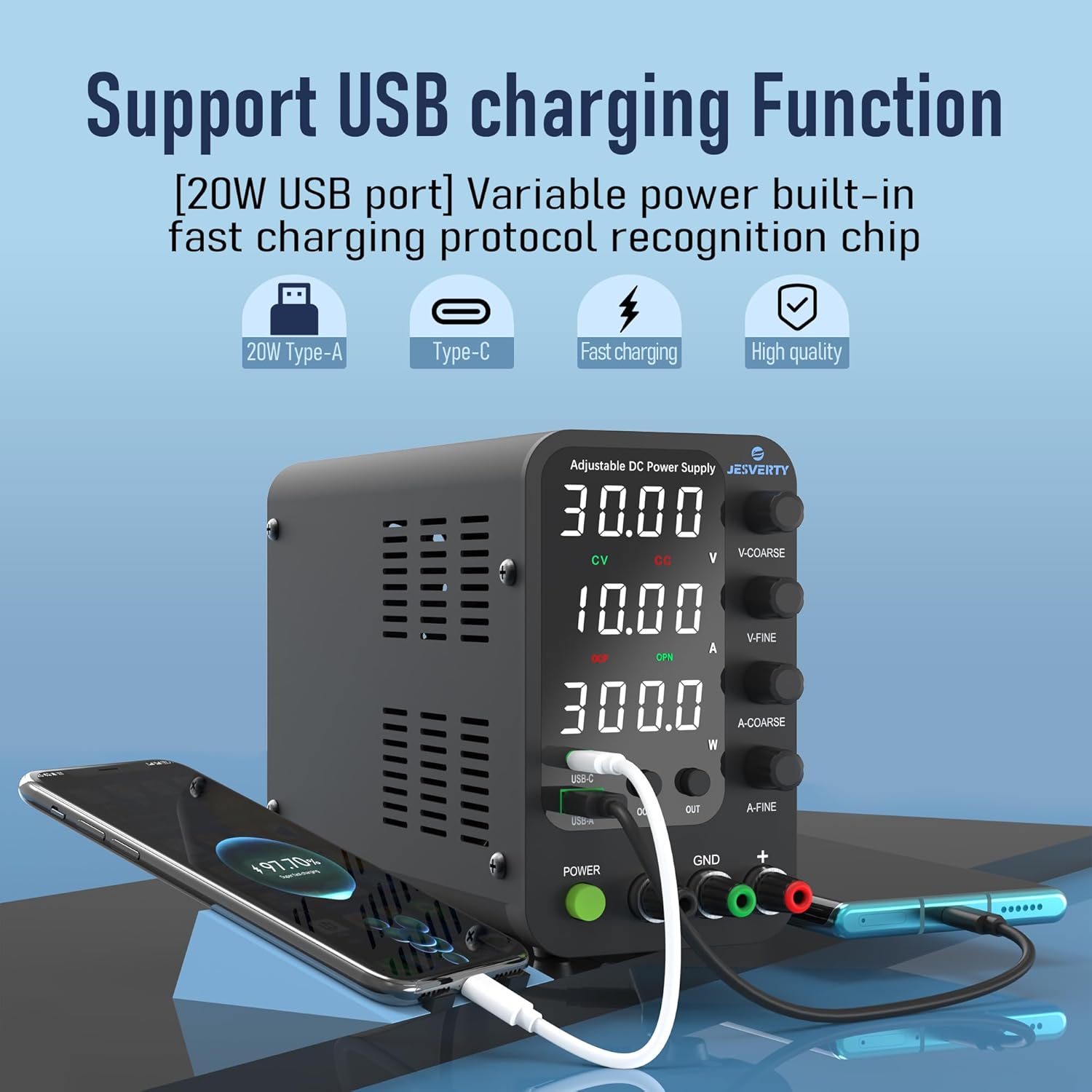
Сүрөттүн сүрөттөлүшү: This image shows the Jesverty SPS-3010V DC Power Supply actively charging a smartphone via its USB-C port and another device via its USB-A port. The display shows voltage and current settings. This highlights the integrated 20W USB-A and Type-C quick-charge functionality, allowing users to power or charge compatible devices directly from the power supply.
5. Продукт бүтүп калдыview: Digital Multimeter (HK33B)
The Jesverty HK33B is a 2000-count digital multimeter designed for accurate and versatile electrical measurements.
5.1 Multimeter Layout and Functions
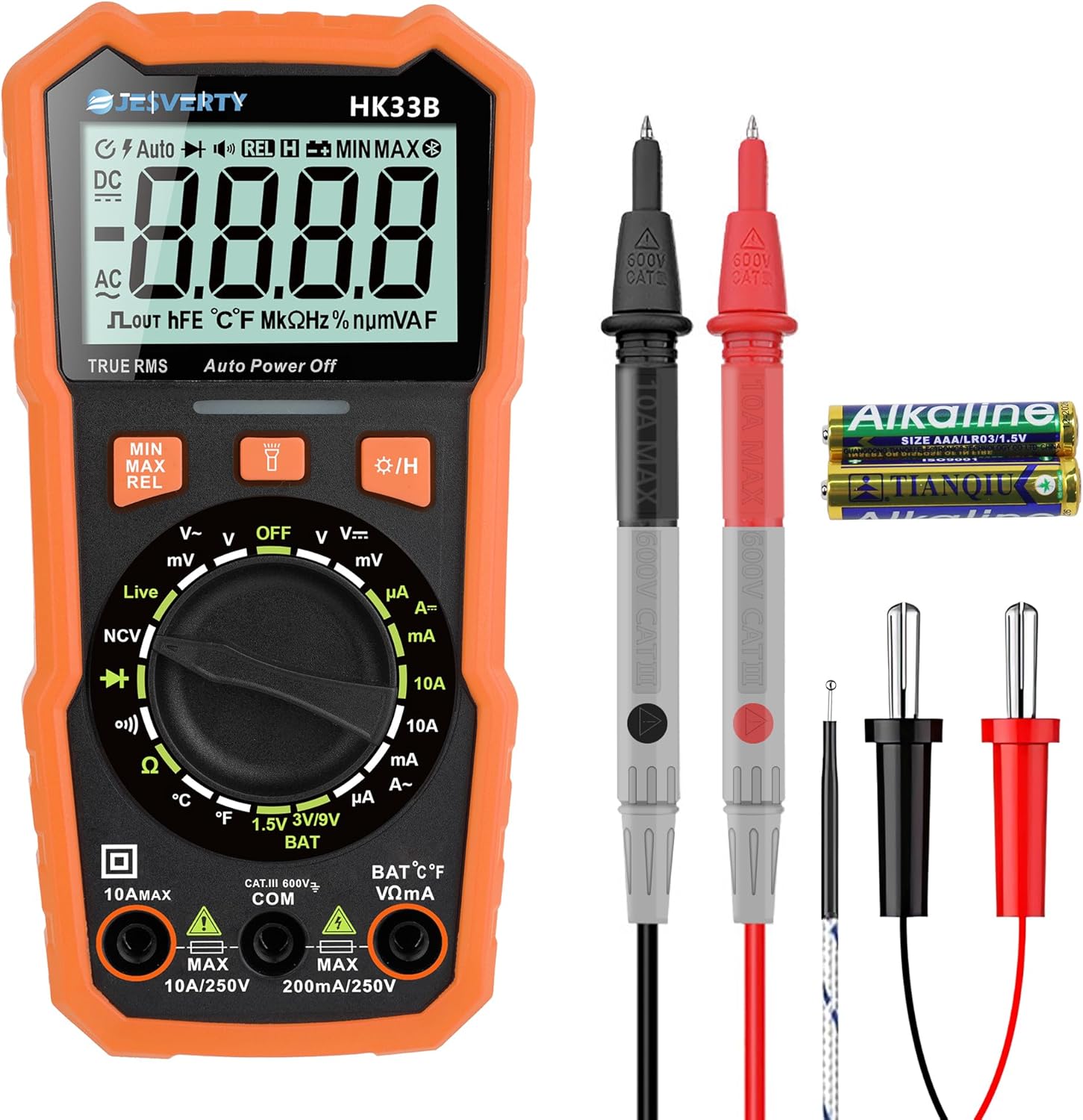
Сүрөттүн сүрөттөлүшү: This image displays the Jesverty HK33B Digital Multimeter along with its red and black test probes and a K-type thermocouple. The multimeter features a large LCD display, a central rotary dial for function selection, and several buttons for additional features like MIN/MAX, REL, and backlight. Input jacks for test leads are located at the bottom. This visual aids in identifying the device and its primary accessories.

Сүрөттүн сүрөттөлүшү: This image provides a close-up of the Jesverty HK33B Digital Multimeter's display and function indicators. It highlights the various measurement capabilities, including DC Voltage, AC Voltage, Live Wire detection, Battery Test, Duty Cycle, Diode, Resistance, DC Current, Continuity, Temperature (°C/°F), and AC Current. The clear icons and text on the display and around the rotary dial make it easy to understand the multimeter's extensive features.
- LCD дисплей: 2000 counts, shows measurement readings, units, and function indicators.
- Айлануучу терүү: Өлчөө функцияларын тандайт (Көлөмtage, Current, Resistance, Diode, Continuity, Temperature, NCV, Live).
- Функция баскычтары: Include MIN/MAX, REL (Relative Measurement), Data Hold, Backlight, and Flashlight.
- Киргизүү уячалары: COM (Common), VΩmA (Voltage, Resistance, small Current), 10A MAX (High Current).
- NCV (контактсыз томtage) Sensor: AC томун аныктайтtagд түз байланышсыз.
- Live Wire Detection: Чыккан электр зымдарын аныктайт.
6. Орнотуу
6.1 DC Power Supply Setup
- Жайгашкан жери: Place the power supply on a stable, level surface with adequate ventilation around all sides.
- Кубат туташуу: Connect the provided power cord to the AC input on the rear panel of the power supply, then plug it into a suitable AC outlet.
- Баштапкы күйгүзүү: басыңыз КҮЧ button on the front panel. The display should illuminate.
6.2 Digital Multimeter Setup
- Батарея орнотуу: Open the battery compartment on the back of the multimeter. Insert the required batteries (typically AAA, check compartment for specifics) ensuring correct polarity. Close the compartment securely.
- Сыноочу туташуусу:
- Кара сыноо өткөргүчтү орнотуңуз COM (Жалпы) джек.
- Көпчүлүк өлчөөлөр үчүн (томtage, resistance, continuity, diode, temperature, small current), insert the red test lead into the VΩmA джек.
- Жогорку токту өлчөө үчүн (10А чейин) кызыл сыноо өткөргүчтү орнотуңуз 10A MAX джек.
7. Operating Instructions: DC Power Supply (SPS-3010V)
7.1 Setting Voltage жана Current
- Жөндөө Voltage:
- айлантыңыз V-COARSE knob to set the integer part of the desired voltage.
- айлантыңыз V-FINE knob to set the decimal part of the desired voltage (0.01V resolution).
- Adjusting Current Limit:
- айлантыңыз A-COARSE knob to set the integer part of the desired current limit.
- айлантыңыз A-FINE knob to set the decimal part of the desired current limit (0.001A resolution).
- The current limit prevents damage to the connected load by limiting the maximum current drawn.
7.2 Enabling Output
- Каалаган томду койгондон кийинtage and current limit, connect your load to the output terminals (GND, +, -).
- басыңыз OUT button to enable the DC output. The display will show the actual output voltage жана ток.
- басыңыз OUT button again to disable the output.
7.3 Ашыкча ток коргоо (OCP)
- басыңыз OCP button to activate or deactivate the Over Current Protection function.
- When OCP is active, if the output current exceeds the set current limit, the power supply will automatically cut off the output to protect the load and the power supply itself.
- To reset OCP, disable the output, resolve the overcurrent condition, and then re-enable the output.
7.4 USB-A & USB-C Quick-Charge Ports
The integrated USB-A and USB-C ports provide 20W fast charging for compatible devices. These ports operate independently of the main DC output and can be used simultaneously.
- Connect your smartphone, Arduino UNO, Raspberry Pi, or other electronic modules to the USB-A or USB-C port using a compatible cable.
- The device will automatically negotiate the appropriate charging protocol.
8. Operating Instructions: Digital Multimeter (HK33B)
8.1 Негизги өлчөөлөр
Turn the rotary dial to the desired function. Ensure test leads are connected to the correct input jacks.
- DC/AC Voltage Measurement (V~ / V=):
- Set the rotary dial to V~ for AC voltage же V= DC том үчүнtage.
- Сыноо өткөргүчтөрүн чынжырчага же компонентке параллель туташтырыңыз.
- DC/AC Current Measurement (A~ / A=):
- Set the rotary dial to A~ for AC current or A= for DC current.
- Маанилүү: Break the circuit and connect the multimeter in series with the load. Ensure the red lead is in the appropriate current jack (mA or 10A).
- Каршылык өлчөө (Ω):
- Set the rotary dial to Ω.
- Ensure the circuit is de-energized before measuring resistance. Connect test leads across the component.
- Үзгүлтүксүздүк тести (Ω)))):
- Set the rotary dial to the continuity symbol.
- Үзгүлтүксүз бип сигналы каршылыктын төмөн жолун (үзгүлтүксүздүктү) көрсөтөт.
- Диод сыноо (→|):
- Set the rotary dial to the diode symbol.
- Connect test leads across the diode. A good diode will show a voltage drop in one direction and open circuit in the other.
- Температураны өлчөө (°C/°F):
- Set the rotary dial to °C/°F.
- Connect the K-type thermocouple to the input jacks (observe polarity).
- The display will show the temperature. Use the function button to switch between Celsius and Fahrenheit.
8.2 Атайын функциялар
- NCV (контактсыз томtagд):
- Set the rotary dial to NCV.
- Move the top of the multimeter near an AC voltage source. The device will beep and flash if AC voltagе аныкталат.
- Live Wire Detection:
- Set the rotary dial to Live.
- Insert the red test lead into the VΩmA jack and touch the probe to the wire. The display will indicate if it's a live wire with an alarm.
- Дайындарды кармоо: басыңыз БЕРҮҮ Учурдагы көрсөткүчтү дисплейде тоңдуруу үчүн баскычты басыңыз. Бошотуу үчүн кайра басыңыз.
- Арткы жарык/чырак: Press the backlight button to turn on the display backlight. Long press to activate the flashlight.
- MIN / MAX: басыңыз MIN / MAX button to record the minimum and maximum readings during a measurement session.
9. Техникалык тейлөө
9.1 Тазалоо
- Түзмөктөрдү кургак, жумшак чүпүрөк менен сүртүңүз. Абразивдүү тазалоочу каражаттарды же эриткичтерди колдонбоңуз.
- Ensure the devices are powered off and disconnected from all power sources before cleaning.
9.2 Сактоо
- Аппараттарды салкын, кургак жерде, түз күндүн нурунан жана экстремалдык температурадан алыс сактаңыз.
- If storing the multimeter for an extended period, remove the batteries to prevent leakage.
9.3 Multimeter Battery and Fuse Replacement
Refer to the back panel of the multimeter for specific battery and fuse types. Always replace with identical specifications.
- Батареяны алмаштыруу: Open the battery compartment, remove old batteries, insert new ones with correct polarity, and close the compartment.
- Сактагычты алмаштыруу: Fuses are typically located under the back cover. Disconnect test leads, remove the back cover screws, carefully replace the blown fuse with a new one of the correct rating, and reassemble.
10. Кыйынчылыктарды
- DC Power Supply Not Powering On:
- Кубат шнуру түзмөккө да, розеткага да бекем туташтырылганын текшериңиз.
- Ensure the AC outlet is functional.
- No Output from DC Power Supply:
- камсыз кылуу OUT button is pressed and the output is enabled.
- Check if OCP is active due to an overcurrent condition. Resolve the load issue and reset.
- тtage and current limits are set above zero.
- Multimeter Display is Blank or Faint:
- Check and replace the batteries if they are low or depleted.
- Ensure the rotary dial is not in the OFF position.
- Incorrect Multimeter Readings:
- Verify that the test leads are correctly inserted into the appropriate input jacks for the selected measurement.
- Ensure the rotary dial is set to the correct function.
- Check if the multimeter's fuses are intact (for current measurements).
- Ensure the circuit is de-energized when measuring resistance or continuity.
11. Техникалык шарттар
11.1 Jesverty SPS-3010V DC Power Supply
- Киргизүү көлөмүtage: AC 110V/220V (switchable)
- Output Voltage: 0-32V (жөнгө салынуучу)
- Чыгуу ток: 0-10A (Жөнгө салынуучу)
- Дисплей: 4-Digit LED (Voltage, Current, Power)
- Тtage Резолюция: 0.01V
- Учурдагы резолюция: 0.001A
- USB чыгышы: USB-A & USB-C, 20W Quick-Charge each
- Коргоо: Учурдагы Коргоо (OCP)
- Өлчөмдөрү: Approx. 18cm (7.1") x 9cm (3.6") x 16cm (6.2")
- Салмагы: Болжол менен 1.14 кг

Сүрөттүн сүрөттөлүшү: This image illustrates the dimensions of the Jesverty SPS-3010V DC Power Supply, showing its approximate measurements as 18cm (7.1 inches) in length, 9cm (3.6 inches) in width, and 16cm (6.2 inches) in height. The image also highlights features such as low noise operation, USB-A/Type-C fast charging, a cooling fan, and a short circuit alarm, providing a comprehensive overview of its physical attributes and key functionalities.
11.2 Jesverty HK33B Digital Multimeter
- Дисплей: 2000 Counts Backlight LCD
- DC Voltage: 600 В чейин
- AC Voltage: 600 В чейин
- Туруктуу ток: 10А чейин
- AC агымы: 10А чейин
- Каршылык: 20MΩ чейин
- Температура: °C / °F (with K-type thermocouple)
- Өзгөчөлүктөр: NCV, Live Wire Test, Continuity, Diode, Data Hold, Backlight, Flashlight, MIN/MAX, Auto Power Off.
- Кубат булагы: Battery Powered (e.g., AAA batteries)
- Коопсуздук рейтинги: CAT.III 600V

Сүрөттүн сүрөттөлүшү: This image highlights several practical features of the Jesverty HK33B Digital Multimeter. It shows the audible assurance (BUZZ) for continuity testing, the NCV (Non-Contact Voltage) function detecting live wires from a wall outlet, temperature measurement using a K-type thermocouple in a liquid, and the integrated support stand on the back of the device, which can be adjusted up to 90 degrees for convenient viewing.
12. Кепилдик маалыматы
Jesverty products are manufactured to high-quality standards. This product is covered by a limited warranty against defects in materials and workmanship from the date of purchase. Please retain your proof of purchase for warranty claims. The warranty does not cover damage caused by misuse, unauthorized modification, accident, or neglect. For specific warranty terms and conditions, please refer to the product packaging or contact customer support.
13. Кардарларды колдоо кызматы
If you have any questions, encounter issues, or require technical assistance with your Jesverty DC Power Supply or Digital Multimeter, please do not hesitate to contact our customer support team. We are committed to providing excellent service and support.
- Байланыш маалыматы: Refer to the contact details provided on the product packaging or the official Jesverty webсайт.
- Онлайн ресурстар: Visit the Jesverty brand store on Amazon or the official website for FAQs, product updates, and additional resources.