Introduction
This manual provides instructions for the installation, operation, and maintenance of the Generic Laptop CPU GPU Fan, designed for Dream Machines X170KM-G and X170SM-G laptops. Please read this manual thoroughly before installation to ensure proper function and longevity of the product.
Орнотуудан мурун маанилүү ойлор
Warning: Laptop fans have various wiring sequences for their interfaces, which are often not compatible with each other. Installing a fan with an incorrect wiring sequence can cause damage to your laptop or the fan itself.
Before proceeding with installation, it is critical to verify the compatibility of this fan with your specific laptop model's existing fan. Compare the physical appearance, dimensions, and especially the wiring sequence of the connector. If unsure, consult a professional or contact support with images of your original fan's front, back, and connector wiring.
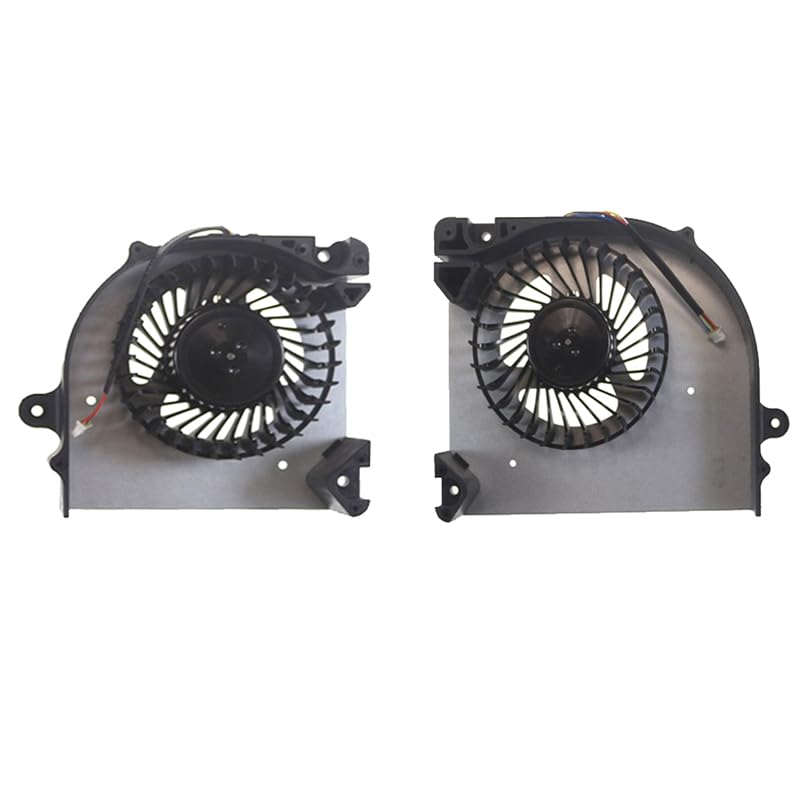
Image: Generic Laptop CPU GPU Fan. This image shows the general appearance of the CPU and GPU fan pair. Note the fan blades and the connector cable.
Орнотуу жана орнотуу
- Даярдоо: Power off your laptop completely and disconnect it from the power adapter. Remove the battery if it is external.
- Accessing the Fans: Carefully open your laptop's chassis to access the CPU and GPU fan compartments. Refer to your laptop's specific service manual for detailed instructions on how to open it.
- Removing Old Fans: Disconnect the old fan's power cable from the motherboard. Unscrew any retaining screws holding the fan in place and gently lift it out.
- Installing New Fans: Place the new CPU and GPU fans into their respective positions. Ensure they are correctly oriented. Secure them with the screws removed earlier.
- Туташуу күчү: Carefully connect the new fan's power cable to the corresponding header on the motherboard. Ensure the connector is fully seated and correctly aligned. Double-check the wiring sequence before connecting.
- Кайра чогултуу: Close the laptop chassis, ensuring all screws are tightened and no cables are pinched. Reinstall the battery if applicable.
It is recommended to use anti-static precautions during installation to prevent damage to sensitive electronic components.
Иштөө нускамалары
Once installed, the fans operate automatically, controlled by your laptop's system to maintain optimal CPU and GPU temperatures. No manual operation is required.
- Баштапкы күйгүзүү: After installation, power on your laptop. Listen for any unusual noises from the fans.
- Мониторинг: Use system monitoring software (often built into your operating system or available from your laptop manufacturer) to check CPU and GPU temperatures, especially during demanding tasks.
- Кадимки операция: The fans will spin up as temperatures rise and slow down when cooling is sufficient. This is normal behavior.
Техникалык тейлөө
Regular maintenance helps ensure efficient cooling and extends the lifespan of your laptop and its components.
- Чаңды тазалоо: Periodically (e.g., every 3-6 months, depending on environment) open your laptop and gently clean dust from the fan blades and heatsinks using compressed air or a soft brush. Hold the fan blades to prevent them from spinning excessively during cleaning.
- Термикалык паста: If you notice consistently high temperatures, consider reapplying thermal paste to the CPU and GPU heatsinks. This is an advanced procedure and should only be performed by experienced users or professionals.
- Текшерүү: Visually inspect the fan blades for any damage or obstructions during cleaning. Ensure cables are not interfering with fan rotation.
Проблемаларды чечүү
| Көйгөй | Мүмкүн себеп | Чечим |
|---|---|---|
| Желдеткич айланбай же адаттан тыш үн чыгарбайт |
|
|
| Laptop overheating despite new fans |
|
|
Техникалык шарттар
- Модел: US CPU GPU Fan X170KM-G
- Шайкештик: Dream Machines X170KM-G, X170SM-G
- Тtage/Current: DC12V 0.55A
- Материал: Пластик
- Продукциянын өлчөмдөрү: 11.81 x 7.87 x 3.94 дюйм
- Элемент Салмагы: 1.1 фунт
- Элементтердин саны: 1 (pair of CPU and GPU fans)
Кепилдик маалымат
Бул продукт менен келет 90 күндүк кепилдик from the date of purchase. The warranty covers manufacturing defects. It does not cover damage caused by improper installation, misuse, accidents, or unauthorized modifications. Please retain your proof of purchase for warranty claims.
Колдоо
For technical assistance or warranty inquiries, please contact your retailer or the manufacturer. When contacting support, please have your product model number (US CPU GPU Fan X170KM-G) and proof of purchase readily available.


