
1. Продукт бүтүп калдыview
The KODLIX AD69 Mini PC is a compact and powerful computing solution designed for various applications, from business and office tasks to multimedia and light gaming. It features an AMD Ryzen 9 6900HX processor and AMD Radeon 680M graphics, offering robust performance in a small form factor.

2. Орнотуу жана орнотуу
2.1 Кутуда эмне бар
- 1x AD69 Mini PC
- 1x АКШ кубат адаптери
- 1x HDMI кабель
- 1x Mount Support
- 1x Колдонуучунун колдонмосу
2.2 Физикалык бүтүрүүview жана порттун жайгашуусу
Familiarize yourself with the ports and buttons on your KODLIX AD69 Mini PC.

2.3 Баштапкы туташуу
- Connect the power adapter to the DC 19V input port on the rear of the Mini PC and plug it into a power outlet.
- Connect your monitor(s) using the HDMI2.1 ports or USB4 ports (with appropriate adapters if needed). The device supports up to 8K resolution and quad display output.
- Connect your keyboard and mouse to the available USB3.2 ports.
- For wired network access, connect an Ethernet cable to the 2.5GbE LAN port.
- Аны күйгүзүү үчүн түзмөктүн алдыңкы жагындагы кубат баскычын басыңыз.
2.4 RAM and SSD Installation/Upgrade
The KODLIX AD69 Mini PC supports expansion of both RAM and SSD storage. It comes with 32GB DDR5 RAM (2x16GB) and a 1TB M.2 2280 PCIe 4.0 SSD, with support for up to 64GB RAM and dual PCIe 4.0 SSDs (up to 4TB total).
- Мини компьютерди өчүрүп, бардык кабелдерди ажыратыңыз.
- Carefully remove the bottom cover of the Mini PC. Refer to the provided video for detailed steps.
- To install/upgrade RAM: Locate the two DDR5 SODIMM slots. Gently push the clips outwards to release existing modules or insert new modules at a 45-degree angle and push down until the clips secure them.
- To install/upgrade SSD: Locate the M.2 2280 PCIe 4.0 SSD slots. Insert the SSD into the slot and secure it with the provided screw.
- Replace the bottom cover and reconnect all cables.
3. Иштөө нускамалары
3.1 Күйгүзүү/өчүрүү
- To Power On: Press the power button on the front of the Mini PC. The power indicator light will illuminate.
- To Power Off: From the operating system, select 'Shut down'. Alternatively, press and hold the power button for 5 seconds to force a shutdown (use only when necessary).
3.2 Операциондук система
The KODLIX AD69 Mini PC comes pre-installed with Windows 11. It is also compatible with various Linux distributions.
3.3 Көп дисплей орнотуу
The Mini PC supports up to four displays simultaneously, with resolutions up to 8K@60Hz, providing extensive screen real estate for multitasking, video editing, or immersive entertainment.

- Use the 2x HDMI2.1 ports for direct display connections.
- Utilize the 2x USB4 ports with compatible USB-C to DisplayPort or USB-C to HDMI adapters for additional displays.
3.4 Network and Wireless Connectivity
- Зымдуу Ethernet: The device features a 2.5GbE LAN port for high-speed wired network connections.
- Wi-Fi 6E: Enjoy fast and low-latency wireless connectivity with Wi-Fi 6E (802.11ax) supporting 2.4G/5G/6G triple bands.
- Bluetooth 5.3: Connect various wireless peripherals such as headsets, mice, keyboards, and printers.
4. Аткаруу көрсөткүчү жогоруview
4.1 Процессор жана графика
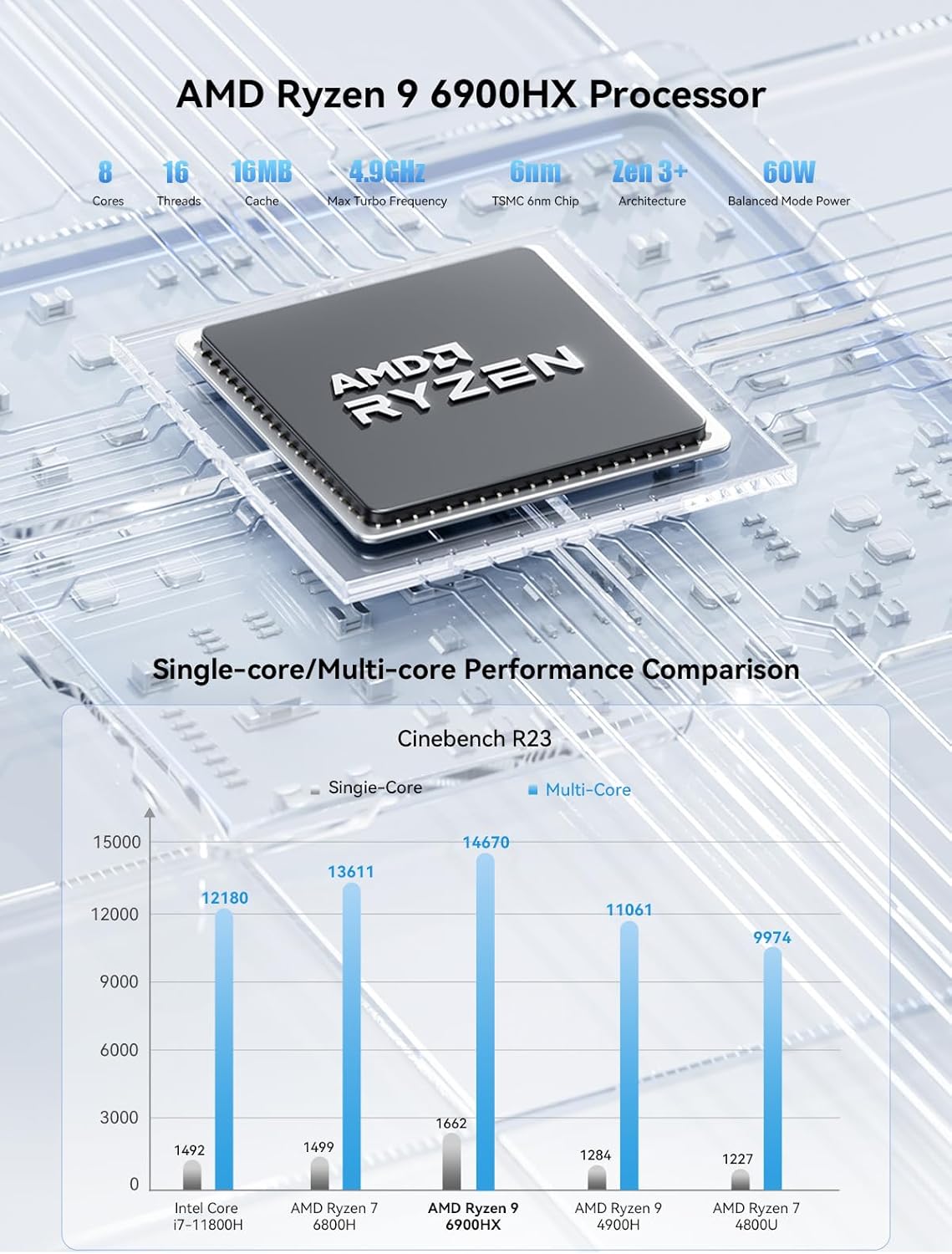
The KODLIX AD69 is powered by an AMD Ryzen 9 6900HX processor (8 cores/16 threads, up to 4.9GHz) and integrated AMD Radeon 680M graphics (based on RDNA2 architecture). This combination provides excellent performance for multitasking, content creation, and light gaming.
4.2 Эстутум жана сактоо
Equipped with 32GB DDR5 RAM (4800MHz, dual channel) and a 1TB M.2 2280 PCIe 4.0 SSD, the AD69 offers fast data access and ample space. Both RAM and SSD are expandable for future needs.

5. Техникалык тейлөө
5.1 Муздатуу системасы
The AD69 Mini PC features an efficient cooling system designed to maintain stable performance even under high loads. This system helps reduce DDR temperature by 35% and SSD temperature by 39%.

5.2 Keeping Vents Clear
Ensure that the ventilation holes on the sides and bottom of the Mini PC are not obstructed to allow for proper airflow and prevent overheating.
6. Кыйынчылыктарды
If you encounter any issues with your KODLIX AD69 Mini PC, please try the following basic troubleshooting steps:
- Кубат жок: Check all power connections. Ensure the power adapter is securely plugged into the Mini PC and a working power outlet.
- Дисплей жок: Verify that your monitor(s) are correctly connected and powered on. Try different display cables or ports.
- Перифериялык түзүлүштөр иштебейт: Ensure USB devices are properly connected. Try different USB ports.
- Тармак маселелери: For wired connections, check the Ethernet cable and router. For Wi-Fi, ensure the Wi-Fi 6E module is enabled in Windows settings and connected to your network.
- Система жооп бербейт: Press and hold the power button for 5 seconds to force a shutdown, then restart the device.
For further assistance, please refer to the official KODLIX support channels.
7. Техникалык шарттар
| Өзгөчөлүк | Спецификация |
|---|---|
| Процессор | AMD Ryzen 9 6900HX (8 Cores/16 Threads, up to 4.9 GHz) |
| Графика | AMD Radeon 680M (12 Core 2400MHz) |
| RAM | 32 GB DDR5 4800MHz (Dual Channel, expandable to 64GB) |
| Сактагыч | 1 TB M.2 2280 PCIe 4.0 SSD (Dual slot expansion up to 4TB) |
| Display Output | 2x USB4 (8K@60Hz), 2x HDMI2.1 (8K@60Hz) - Quad Display Support |
| Networking | 2.5GbE LAN, Wi-Fi 6E (802.11ax), Bluetooth 5.3 |
| USB порттору | 2x USB4, 4x USB3.2 |
| Аудио | 1x 3.5 мм аудио уячасы |
| Операция системасы | Windows 11 (алдын ала орнотулган) |
| Өлчөмдөр | 7.15 x 6.32 x 4.41 дюйм |
| Салмагы | 3.12 фунт |
8. Кепилдик жана колдоо
For warranty information and technical support, please refer to the documentation included with your product or visit the official KODLIX webсайт. Сатып алуу квитанциясын кепилдик дооматтары үчүн сатып алуунун далили катары сактаңыз.