
Introduction
This manual provides comprehensive instructions for the installation, operation, and maintenance of your LongPlus LP8MEF8D1 4K 16-Channel PoE Security Camera System. This system is designed to provide high-resolution surveillance with advanced features such as 12MP cameras, H.265+ video compression, a 16-channel NVR with a 4TB hard drive for 24/7 recording, and intelligent person/vehicle detection. Please read this manual thoroughly before using the product to ensure proper setup and functionality.

Figure 1: LongPlus 4K PoE Security Camera System Overview
Кутуда эмне бар
Төмөндө тизмеленген нерселердин баары пакетиңизге камтылганын текшериңиз:
- 16CH NVR with 4TB HDD
- 4K Dome Turret PoE Security Camera x 8
- 60ft Ethernet Cable x 8
- 3.28ft Ethernet Cable x 1
- 6.56ft HDMI Cable x 1
- USB чычкан x 1
- Кубат кабели x 1
- Adapter (48VDC 1.875A) x 1
- Орнотуу аксессуарлары
- Ыкчам орнотуу көрсөтмөлөрү
Video 1: Unboxing and Setup Guide for the LongPlus 12MP 4K-UHD 16CH NVR Security Camera System. This video demonstrates the contents of the package and initial setup steps.
Орнотуу нускамалары
Follow these steps to set up your LongPlus PoE Security Camera System:
- NVRди мониторго туташтыруу: Use the provided HDMI or VGA cable to connect the NVR to a monitor.
- Power On the NVR: Connect the power adapter to the NVR and plug it into an electrical outlet. Turn on the NVR power switch.
- Тармакка туташуу: Connect an Ethernet cable from the LAN port of the NVR to your router's LAN port for internet access.
- Connect PoE Cameras: Connect each PoE camera to any available PoE camera port on the NVR using the provided Ethernet cables. The cameras are plug-and-play and should automatically connect.
- USB чычканды туташтыруу: Plug the USB mouse into an available USB port on the NVR for navigation.
- Баштапкы конфигурация: Follow the on-screen prompts to select your language and complete the initial system configuration.
Video 2: Detailed Setup Guide for the LongPlus 12MP 4K-UHD 16CH NVR Security Camera System. This video illustrates the step-by-step process of connecting the NVR, cameras, and peripherals.
Иштөө нускамалары
4K UHD Resolution and Wide View Бурч
The system captures video in crystal-clear 4K (3840x2160) resolution, providing superior detail, contrast, and color accuracy. The cameras feature a 132° wide-angle lens, offering extensive coverage and minimizing blind spots.

Figure 2: Comparison illustrating 4K UHD video quality.

Figure 3: Visual representation of the 132° wide view бурч.
AI Motion Detection and Activity Zones
The smart PoE cameras utilize AI object detection to accurately identify humans and vehicles, reducing false alarms. Real-time alerts are sent upon detection. You can define specific activity zones to monitor critical areas and privacy masks to exclude sensitive regions from detection.

Figure 4: Smart AI motion detection distinguishing between people and vehicles.

Figure 5: Configuring motion detection zones and privacy masks.
Triple Night Vision Modes
The cameras offer three night vision modes: IR Night Vision, Color Night Vision, and Smart Night Vision. Low-light color night vision provides vibrant, full-color footage up to 100ft/30m, allowing for clear identification of faces and objects in various lighting conditions.

Figure 6: Demonstration of Full-Color, AI, and IR night vision modes.
Audio and Strobe Light Alarm with Two-Way Audio
Upon detecting a human or vehicle, the PoE dome camera can automatically trigger an audio and strobe light alarm to deter intruders. The integrated two-way audio feature allows for real-time communication through the camera.

Figure 7: Using two-way audio for communication.

Figure 8: Strobe light alarm in action.
Flexible Storage and Smart Playback
The NVR includes a 4TB HDD for 24/7 continuous recording, expandable up to 20TB. H.265+ compression saves over 75% storage space compared to H.264. Easily playback live view and recorded events via the Longvision APP/Client with highlighted timelines.

Figure 9: Interface showing 24/7 recording and smart playback features.
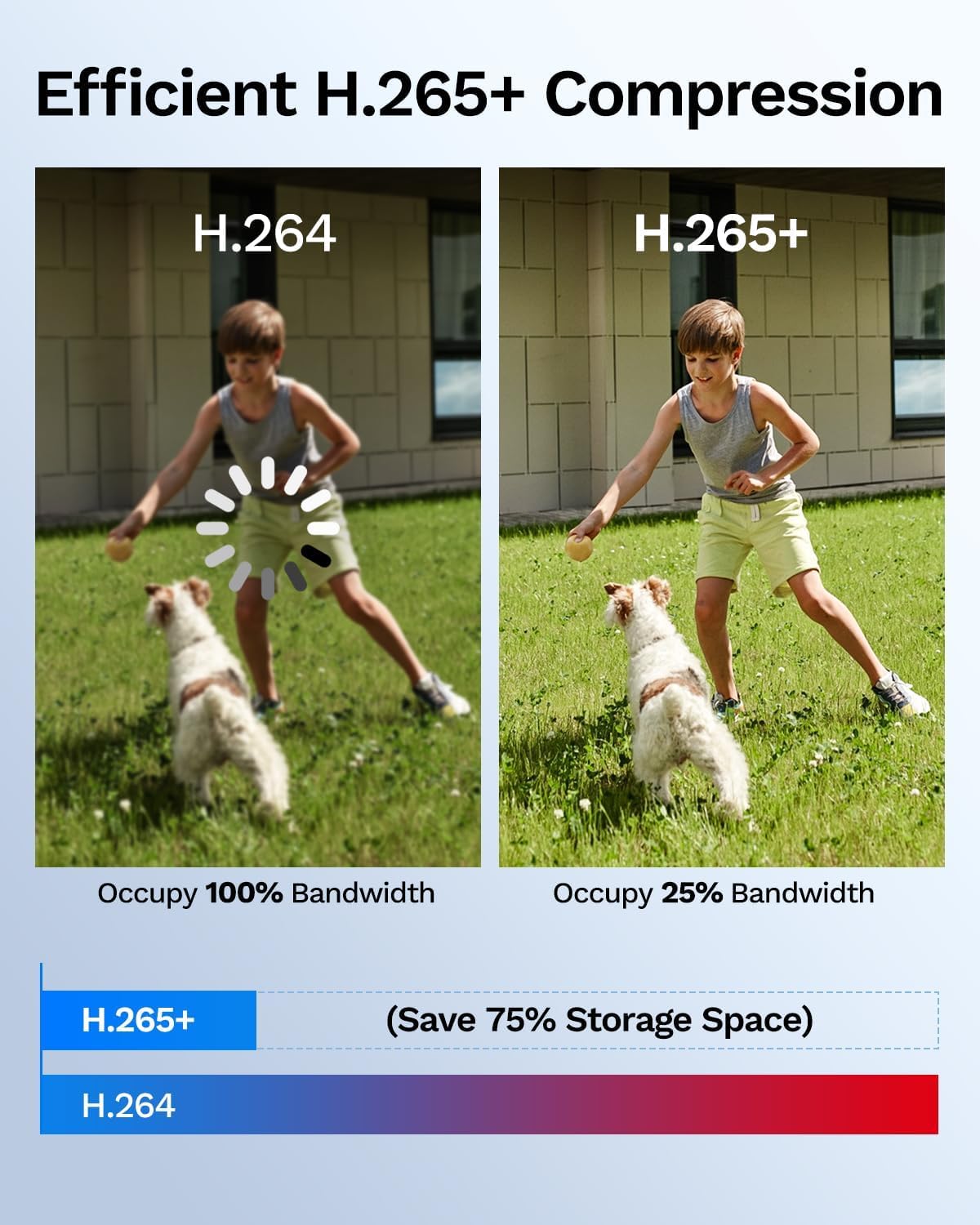
Figure 10: Comparison of H.264 vs. H.265+ compression for storage efficiency.
Remote Access and Sharing
Live foo кирүүtage and manage your security system remotely using the Longvision app, compatible with iOS, Mac, Windows, and Android devices. The system supports sharing video access with up to 32 users.

11-сүрөт: Viewing surveillance footage remotely on various devices.

Figure 12: Sharing access to the security system with family members.
Video 3: Product Features Introduction for the LongPlus 4K-UHD PoE Security Camera System. This video highlights key functionalities and benefits of the system.
Видео 4: Бүттүview of the 8-Channel LongPlus PoE Security Camera System. This video provides a general demonstration of the system's capabilities.
Техникалык тейлөө
Үзгүлтүксүз техникалык тейлөө коопсуздук системаңыздын оптималдуу иштешин жана узак мөөнөттүү иштешин камсыз кылат:
- Таза линзалар: Камера линзаларын мезгил-мезгили менен жумшак, d чүпүрөк менен тазалап туруңузamp cloth to remove dust and smudges that may affect image clarity.
- Кабелдерди текшерүү: Inspect all cable connections for wear, damage, or loose connections. Ensure waterproof gaskets are properly sealed for outdoor cameras.
- Программалык камсыздоо жаңыртуулары: Regularly check for and install firmware updates for the NVR and cameras to enhance security and features.
- Катуу дисктин ден соолугу: Маалыматтардын жоголушун алдын алуу үчүн NVRдин катуу дискинин абалын системанын жөндөөлөрү аркылуу көзөмөлдөңүз.
- Электр камсыздоо: Ensure the NVR and cameras receive stable power. Avoid using unapproved power adapters.
Проблемаларды чечүү
If you encounter issues, refer to these common troubleshooting tips:
- Видео дисплей жок: Check HDMI/VGA cable connections to the monitor and ensure the monitor is on the correct input source. Verify the NVR is powered on.
- Camera Not Showing: Ensure the Ethernet cable is securely connected to both the camera and the NVR's PoE port. Check if the camera's status light is on. Restart the NVR.
- Жаздыруу жок: Verify the 4TB HDD is properly installed and recognized by the NVR. Check recording schedules and ensure sufficient storage space.
- Алыстан кирүү маселелери: Ensure the NVR is connected to the internet and your mobile device has a stable network connection. Verify app settings and user permissions.
- Жалган кыймыл эскертүүлөрү: Adjust motion detection sensitivity and refine activity zones to exclude irrelevant areas.
For further assistance, please contact LongPlus technical support.
Техникалык шарттар
| Өзгөчөлүк | Description |
|---|---|
| Бренд | LongPlus |
| Модель номери | LP8MEF8D1 |
| Байланыш технологиясы | Зымдуу (PoE) |
| Видео тартуунун резолюциясы | 4K (3840x2160) |
| Каналдардын саны | 16 |
| NVR сактагычы | 4TB HDD (Included), Expandable up to 20TB |
| Камера түрү | 8x 4K Dome Turret PoE Cameras |
| Объектив | F=2.8mm, f/1.6 Lens; 132° FOV |
| Түнкү көрүү диапазону | 100 футка (30 м) чейин |
| Өзгөчөлүктөр | Person/Vehicle Detection, Triple Night Vision (IR/Color/Smart), Two-Way Audio, Strobe Light Alarm, IP67 Weatherproof |
| Операциялык системанын шайкештиги | Android, iOS, Windows, macOS |
| Аппараттык интерфейс | Ethernet, HDMI, USB, VGA |
| Жазуу режими | Event, Schedule, 24/7 Continuous |
Кепилдик жана колдоо
LongPlus provides a 2 жылдык кепилдик for this product. Additionally, lifetime technical support is available to all customers. If you have any questions or require assistance, please do not hesitate to contact our professional technical team. We aim to respond to all inquiries within 24 hours.
Колдоо үчүн, кириңиз LongPlus Store on Amazon or refer to the contact information provided in your Quick Setup Guide.