1. Киришүү
This manual provides essential information for the safe and effective operation, setup, and maintenance of your ARRMA VORTEKS 223S BLX 4X4 RC Stadium Truck. Please read this manual thoroughly before operating your vehicle to ensure proper function and longevity.

2. Коопсуздук маалыматы
ЭСКЕРТҮҮ: Иштетүүдөн мурун, өнүмдүн өзгөчөлүктөрү менен таанышуу үчүн БҮТҮН нускаманы окуп чыгыңыз. Продукт туура иштебей калса, продукт, жеке мүлк бузулуп, олуттуу жаракат келтириши мүмкүн.
Бул татаал хобби продуктусу. Аны этияттык жана акылдуулук менен иштетүү керек жана бир аз негизги механикалык жөндөмдү талап кылат. Бул продуктуну коопсуз жана жоопкерчиликтүү түрдө иштетпөө жаракат алууга же продуктуга же башка мүлккө зыян келтирүүгө алып келиши мүмкүн. Бул продукт чоңдордун түздөн-түз көзөмөлүсүз балдар тарабынан колдонуу үчүн арналган эмес. Horizon Hobby, LLC тарабынан берилген көрсөтмөлөрдөн тышкары, шайкеш келбеген компоненттер менен колдонбоңуз же бул продуктуну эч кандай жол менен өзгөртпөңүз. Продукциянын колдонмосунда коопсуздук, иштетүү жана техникалык тейлөө боюнча көрсөтмөлөр камтылган. Туура иштөө жана бузулуудан же олуттуу жаракат алуудан сактануу үчүн, чогултуудан, орнотуудан же колдонуудан мурун колдонмодогу бардык көрсөтмөлөрдү жана эскертүүлөрдү окуп чыгуу жана аткаруу маанилүү.
3. Кутуда эмне бар
Your ARRMA VORTEKS 223S BLX 4X4 RC Stadium Truck package includes the following items:
- (1) VORTEKS 223S BLX 4X4 1/10 Scale Stadium Truck RTR
- (1) Spektrum SLT 80A 2-In-1 Waterproof ESC & Receiver 2S/3S With DSC
- (1) Spektrum 3100Kv Brushless Motor
- (1) Spektrum SLT3 2.4 ГГц өткөргүч
- (1) Spektrum S662 Металл тиштүү 25T суу өткөрбөйт Digital Servo
- (4) AA батарейкалары (өткөргүч үчүн)
- (1) Пайдалануу боюнча колдонмо
- Misc. Tools
Note: Battery and charger for the vehicle are NOT included and must be purchased separately.
4. Орнотуу
4.1 Required Items (Not Included)
To operate your VORTEKS 223S BLX, you will need an IC5 compatible battery and a suitable charger. The battery tray can accommodate batteries with maximum dimensions of 165mm x 51mm x 48mm (6.5" x 2.01" x 1.89" inches). The vehicle is compatible with both 2S 7.4V LiPo and 3S 11.1V LiPo batteries.
4.2 Батареяны орнотуу
- Ensure the vehicle is powered off.
- Батарея бөлүмүнүн корпусун табыңыз.
- Securely place your charged LiPo battery into the battery tray.
- Connect the battery to the ESC using the IC5 connector.
- Secure the battery using the provided straps or clips.
4.3 Өткөргүчтү орнотуу
The Spektrum SLT3 2.4GHz Transmitter requires 4 AA batteries (included). Install these batteries into the transmitter's battery compartment, observing correct polarity. Familiarize yourself with the transmitter's controls, including steering wheel, throttle trigger, and trim adjustments.

5. Operating Your VORTEKS Truck
The ARRMA VORTEKS 223S BLX is designed for high-speed performance and durability across various terrains. It features a super-tough 4X4 drivetrain with a center differential and an all-terrain suspension package, making it suitable for both on-road and off-road bashing.
5.1 Айдоону башкаруу элементтери
Use the steering wheel on the transmitter to control the direction of the truck. The throttle trigger controls forward and reverse movement, as well as braking. Gently apply throttle to accelerate and release to coast. Push the trigger forward for braking and reverse.
5.2 Spektrum DSC (Dynamic Stability Control)
The integrated Spektrum DSC system provides dynamic stability control, assisting in maintaining control during high-speed maneuvers and on loose surfaces. This feature, along with throttle limiting, helps drivers of all skill levels keep the truck under control.

5.3 Жердин шартына ыңгайлашуусу
The VORTEKS is designed to handle various terrains, from smooth pavement to rough dirt and gravel. Its robust 4X4 system ensures excellent traction and handling. Be mindful of extremely wet conditions, as while the electronics are waterproof, prolonged submersion is not recommended.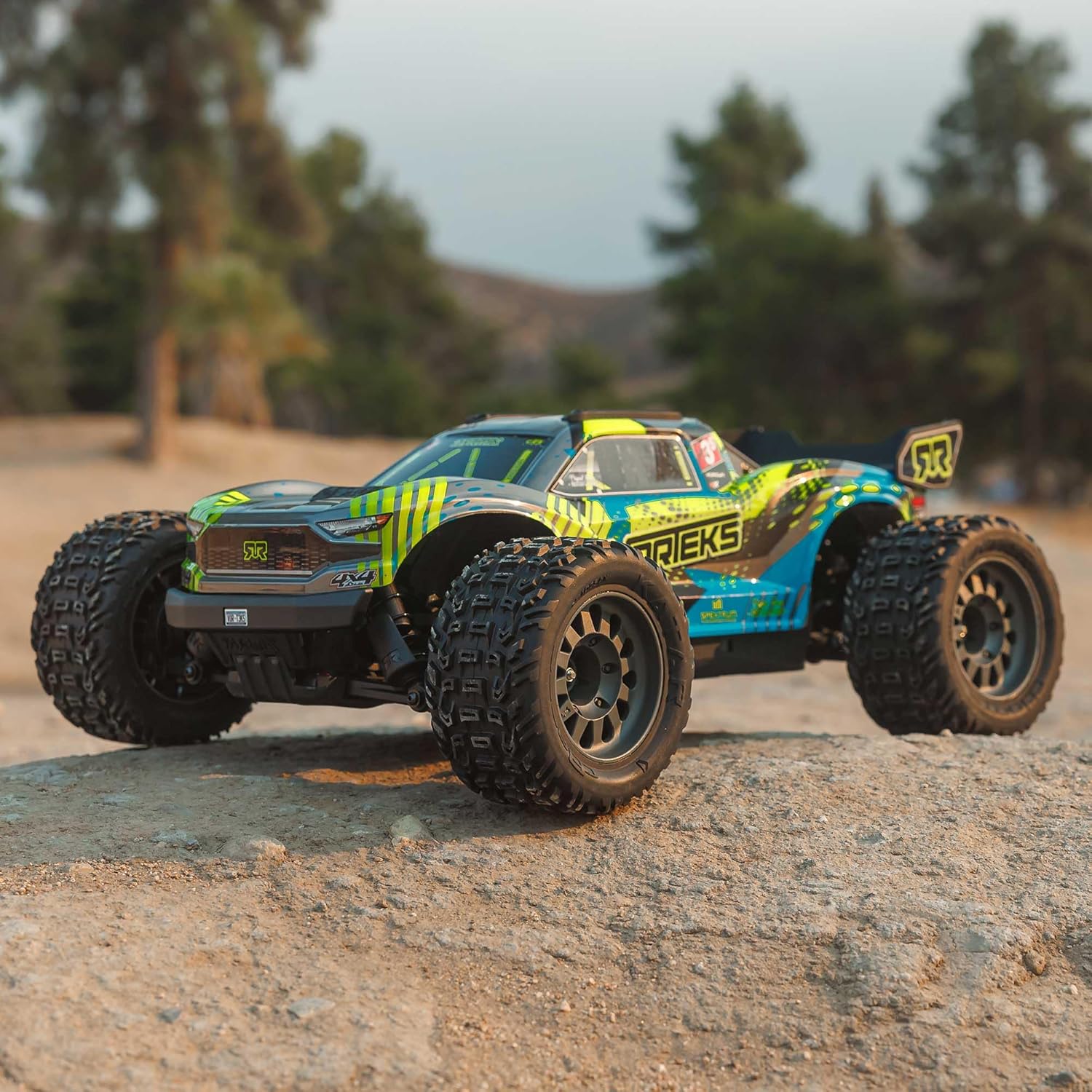
6. Техникалык тейлөө
Regular maintenance is crucial for the longevity and performance of your ARRMA VORTEKS truck. Perform these checks after every few runs or before extended storage.
6.1 Жалпы тазалоо
After each use, especially in dusty or dirty conditions, clean the truck to remove debris. Use a soft brush or compressed air to clear dirt from the chassis, suspension components, and motor area. Avoid using water directly on electronics unless specifically designed for it.

6.2 Компоненттерди текшерүү
- Жүргүзүүчү поезд: Inspect the gears, driveshafts, and differentials for wear or damage. Ensure the center differential is clean and functioning smoothly.
- Токтотуу: Check shocks for leaks and ensure they move freely. Inspect suspension arms and linkages for cracks or bends.
- Башкаруу: Verify that the steering servo operates smoothly and the steering linkages are free from binding.
- Электроника: Ensure all wires are securely connected and free from fraying. Check the motor and ESC for excessive heat buildup after use.


7. Кыйынчылыктарды
This section addresses common issues you might encounter with your VORTEKS truck.
| Көйгөй | Мүмкүн себеп | Чечим |
|---|---|---|
| Truck does not respond to transmitter | Low battery in truck or transmitter; binding issue; ESC/receiver off. | Charge truck battery, replace transmitter batteries. Re-bind transmitter to receiver. Ensure ESC is powered on. |
| Loss of power or intermittent operation | Батареянын көлөмү азtage; loose connections; motor/ESC overheating. | Charge battery fully. Check all electrical connections. Allow motor/ESC to cool down. |
| Steering not working or erratic | Damaged servo; loose steering linkages; incorrect trim settings. | Inspect servo and linkages for damage. Adjust steering trim on transmitter. |
| Unusual noises from drivetrain | Debris in gears; worn gears; differential issues. | Clean gears. Inspect for worn or stripped gears and replace if necessary. Check differential fluid/grease. |
8. Техникалык шарттар
| Өзгөчөлүк | Деталь |
|---|---|
| Продукциянын өлчөмдөрү | 19.5 x 14.15 x 7.65 дюйм |
| Элемент Салмагы | 7.56 фунт |
| Модель номери | ARA4305V4T2 |
| Өндүрүүчүнүн сунуш кылган курагы | 14 жаш жана андан жогору |
| Чыгарылган күнү | 14-ноябрь, 2024-жыл |
| Өндүрүүчү | Горизонт хобби |
| Мотор түрү | 3100Kv Brushless |
| ESC | Spektrum SLT 80A 2-In-1 Waterproof (2S/3S compatible) |
| Поезд | 4X4 with Center Differential |
| Туруктуулукту көзөмөлдөө | Spektrum DSC (Dynamic Stability Control) |
9. Кепилдик жана колдоо
For warranty information and technical support, please refer to the official ARRMA website or contact Horizon Hobby directly. Keep your proof of purchase for any warranty claims.
Horizon Hobby Байланыш маалыматы:
- Webсайт: www.horizonhobby.com
- Support: Refer to the support section on their website for contact details and service requests.