
Продукт бүттүview
The ATTACK SHARK X98PRO is a versatile wireless mechanical keyboard designed for both gaming and productivity. It features a compact 98-key layout, a customizable TFT screen, a multi-functional CNC metal knob, and tri-mode connectivity for seamless use across various devices and operating systems.

The ATTACK SHARK X98PRO keyboard in Starry Black with its distinctive yellow keycaps and coiled USB-C cable.
Негизги өзгөчөлүктөрү
- Fully Customizable Smart Screen: A 1.14-inch TFT screen capable of displaying custom GIFs, system status, battery life, time, and connection mode.
- Multi-Functional CNC Metal Knob: Precision control for volume, brightness, RGB effects, and connection modes.
- Tri-Mode туташуу: Supports Bluetooth 5.0, 2.4G wireless, and USB-C wired connections.
- Ыкчам алмаштыруучу которгучтар: Compatible with 3-pin and 5-pin mechanical switches for personalized typing feel.
- Premium Gasket Mount: Features a 20-point cross-beam gasket mount with 5 layers of sound-dampening materials for a satisfying and quiet keystroke.
- RGB арткы жарык: Offers multiple lighting effects and customization options.
- Жогорку кубаттуулуктагы 4000 мАч батарея: Ensures extended wireless usage.
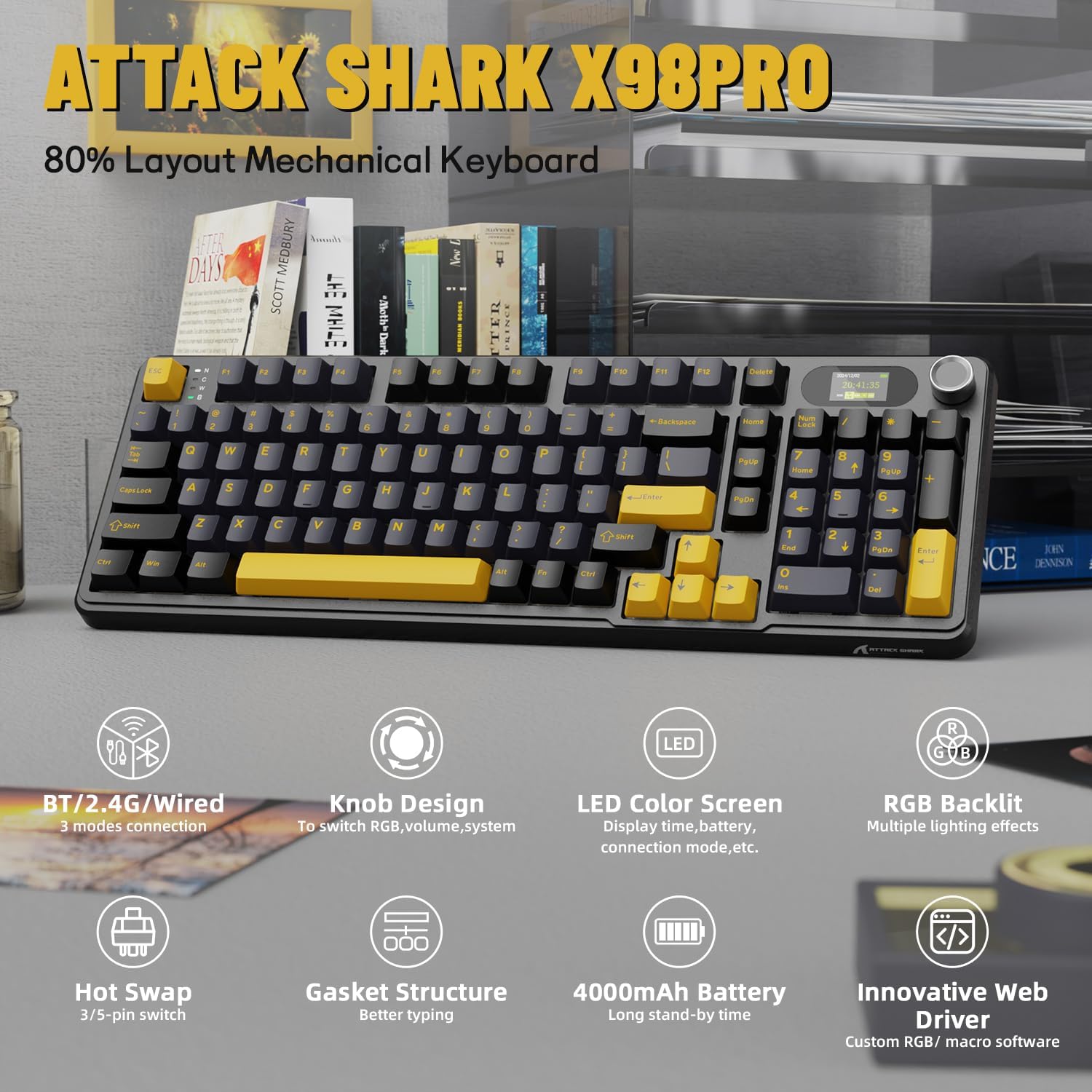
An overview of the ATTACK SHARK X98PRO's main features, including its tri-mode connection, knob design, LED color screen, RGB backlighting, hot-swappable switches, gasket structure, 4000mAh battery, and innovative web айдоочу.
Расмий продукт видео showcasing the ATTACK SHARK X98PRO 98-key mechanical keyboard, highlighting its design and TFT display capabilities.
Жайгашуу
Пакеттин мазмуну
Баштоодон мурун, пакетте бардык элементтер бар экенин текшериңиз:
- ATTACK SHARK X98PRO Keyboard
- USB-Cден USB-Aга өрүлгөн кабель
Баштапкы заряддоо
For optimal performance, fully charge the keyboard before its first use. Connect the provided USB-C cable to the keyboard's USB-C port and the other end to a powered USB-A port on your computer or a wall adapter. The 4000mAh battery ensures extended usage.
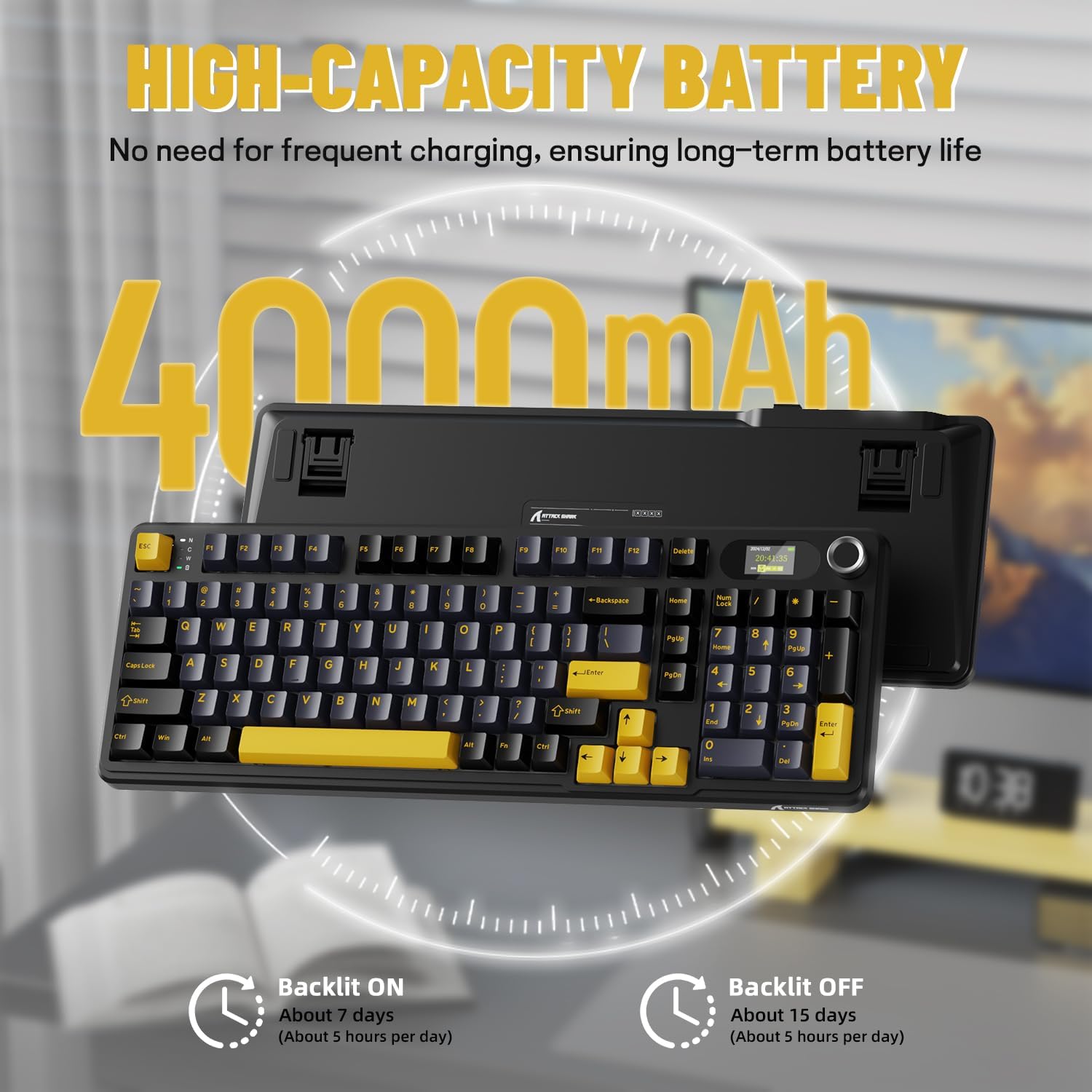
Details on the keyboard's high-capacity 4000mAh battery, indicating approximately 7 days of use with backlight on (5 hours/day) and 15 days with backlight off (5 hours/day).
Туташуу параметрлери
The X98PRO keyboard offers three connection modes:
- USB-C зымдуу режими: Connect the keyboard directly to your device using the provided USB-C cable. This mode offers the most stable connection and charges the keyboard simultaneously.
- 2.4G зымсыз режими: Insert the 2.4G USB dongle (usually found in a compartment on the keyboard) into your device's USB port. The keyboard will automatically connect.
- Bluetooth 5.0 режими: Enable Bluetooth on your device and put the keyboard into Bluetooth pairing mode (refer to operating instructions for specific key combinations). Select the keyboard from your device's Bluetooth list to connect. The keyboard can store up to three Bluetooth connections.

The keyboard supports tri-mode connection: USB-C wired, 2.4GHz wireless, and Bluetooth 5.0, allowing connection to multiple devices like PCs, laptops, and tablets.
Official product video demonstrating the ATTACK SHARK X98PRO Wireless Keyboard in use, highlighting its wireless capabilities.
Иштөө нускамалары
Multi-Function Knob and TFT Screen
The CNC metal knob provides intuitive control over various keyboard functions. Rotate the knob to adjust settings such as light intensity, light speed, and light color. Press the knob to confirm selections or switch between different menu options on the TFT screen.
The 1.14-inch TFT smart screen displays essential information including the current time, battery level, connection mode, and system status. It can also be customized to show personalized GIFs or animations.
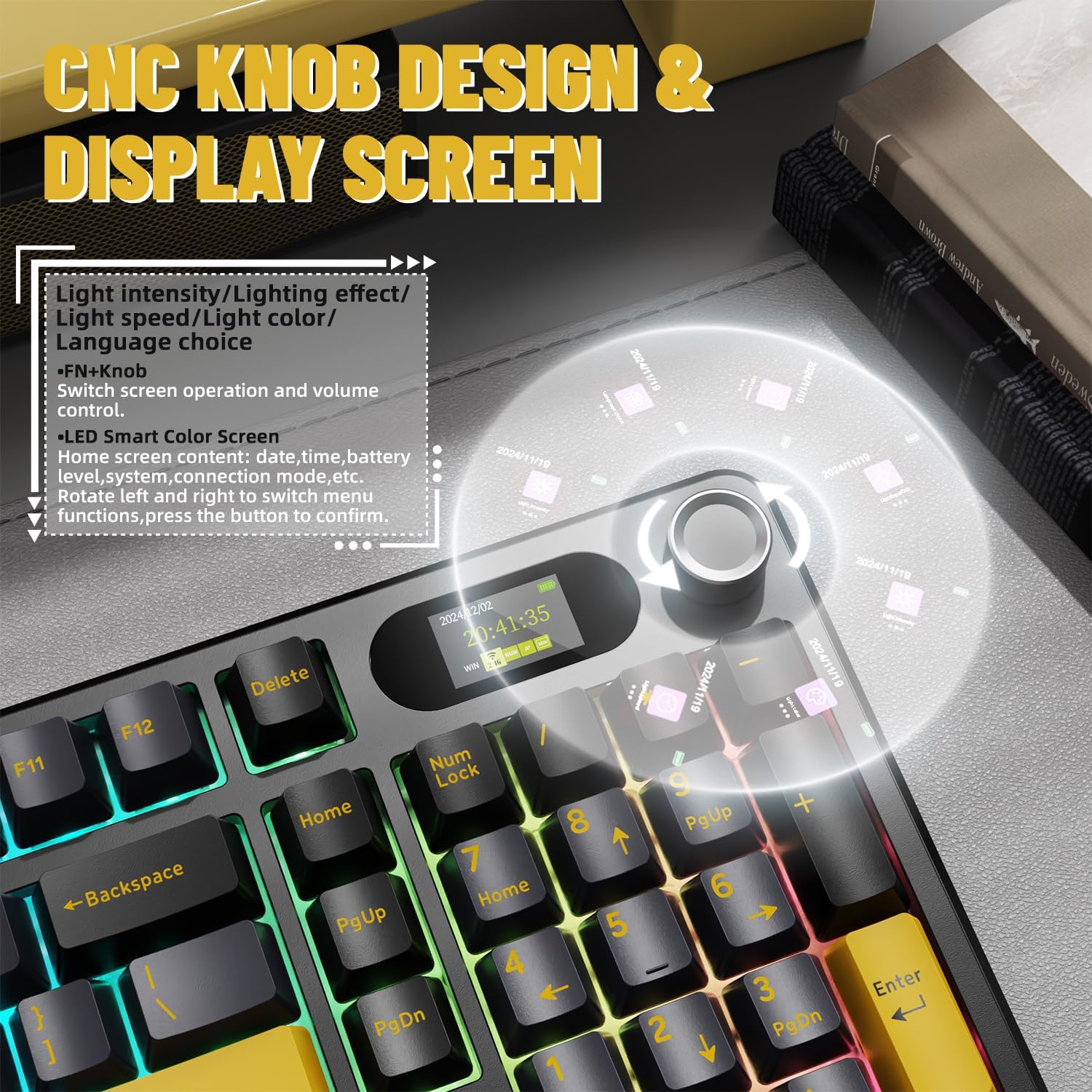
Деталдаштырылган view of the CNC knob and TFT display, explaining how to navigate menus, adjust light settings, and control volume. The screen can show time, battery, and connection mode.
RGB арткы жарыкты башкаруу
The keyboard features full RGB backlighting with over 16 million colors and various dynamic effects. You can switch light effects, change light colors, and adjust backlight brightness and speed directly from the keyboard using key combinations, typically involving the Fn key and other designated keys.

The keyboard supports music rhythm synchronization and allows customization of various lighting effects through its driver. Key combinations for switching light effects, color, brightness, and speed are also shown.
Ыңгайлаштыруу
Ыкчам алмаштыруучу которгучтар
The X98PRO keyboard is equipped with a hot-swappable PCB, allowing you to easily change mechanical switches without soldering. It supports both 3-pin and 5-pin switches, providing flexibility to customize your typing experience with different switch types (e.g., linear, tactile, clicky).
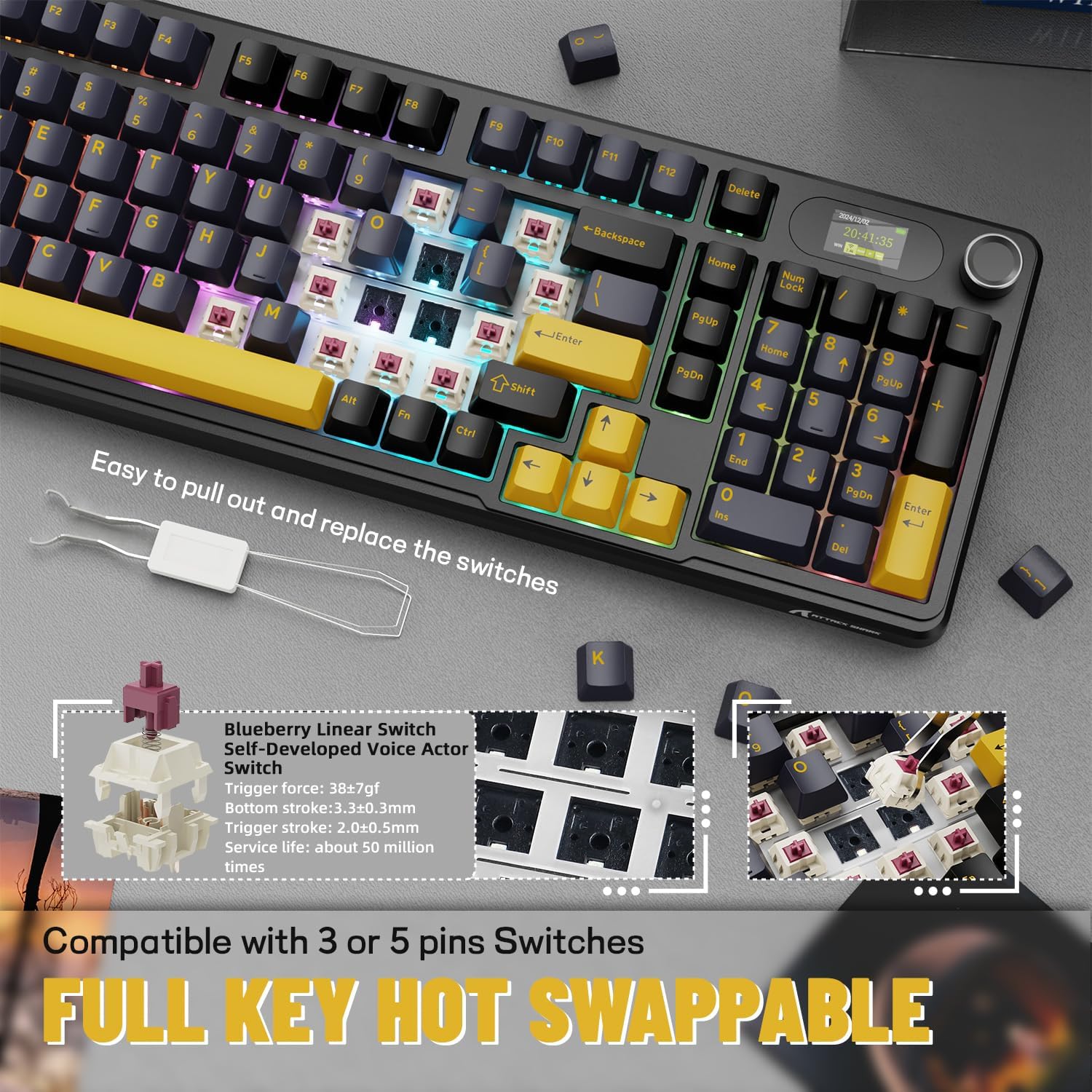
Demonstration of the hot-swappable feature, allowing users to easily replace switches. The keyboard is compatible with both 3-pin and 5-pin mechanical switches.
Web-Based Driver
The keyboard utilizes an intuitive web-based driver for advanced customization. This driver allows you to:
- Edit and upload custom GIFs to the TFT screen.
- RGB жарык эффекттерин жана түстөрүн өзгөчөлөштүрүү.
- Remap keys and create custom key combinations.
- Set up programmable macros for enhanced productivity or gaming.
No software installation is needed; simply access the driver through your web браузер.

Инновациялык web driver allows for full programmability, customization of backlight colors and effects, creation of custom key combinations, and setting screen animations, including GIF images.
Техникалык тейлөө
Proper maintenance ensures the longevity and performance of your ATTACK SHARK X98PRO keyboard.
Жалпы тазалоо
- Regularly dust the keyboard using compressed air to remove debris from between the keycaps.
- Баскыч капкактарын жана клавиатуранын бетин жумшак, бир аз сүртүңүз damp, мамыксыз кездеме. Катуу химиялык заттардан же абразивдүү материалдардан алыс болуңуз.
- Тереңирээк тазалоо үчүн, клавиатураларды кылдаттык менен клавиатура тарткыч менен алып салууга болот.
Care которуштуруу
As the switches are hot-swappable, ensure they are seated correctly after any replacement. Avoid excessive force when inserting or removing switches to prevent damage to the PCB or switch pins.
Батареяга кам көрүү
- Батареяны бат-баттан толук кубаттап калуудан алыс болуңуз.
- Клавиатураны узак убакыт бою колдонбогондо салкын, кургак жерде сактаңыз.
- Use only the provided or a certified USB-C cable for charging.
Проблемаларды чечүү
Жалпы маселелер жана чечимдер
- Туташуу көйгөйлөрү:
- Ensure the keyboard is in the correct mode (BT, 2.4G, or Wired).
- For 2.4G, ensure the dongle is securely inserted and try a different USB port.
- For Bluetooth, ensure the keyboard is in pairing mode and your device's Bluetooth is enabled. Try re-pairing.
- Баскычтоп кубатталганын текшериңиз.
- TFT Screen Not Displaying Correctly:
- Баскычтоптун батареясынын деңгээлин текшериңиз.
- кирүү web-based driver to reconfigure or update the screen content.
- Ensure the keyboard firmware is up to date (if applicable, check manufacturer's webсайт).
- Unexpected Key Presses (Miss-clicks):
- This can sometimes occur with sensitive switches. Ensure your typing posture does not put unintended pressure on keys.
- Consider if different switch types might be more suitable for your typing style (leveraging the hot-swap feature).
- Кыска батареянын иштөө мөөнөтү:
- Колдонуудан мурун клавиатура толук заряддалганын текшериңиз.
- Reduce RGB backlight brightness or turn it off when not needed to conserve battery.
- Ensure the keyboard is not constantly searching for a connection in wireless modes.
For more detailed troubleshooting or advanced issues, refer to the official ATTACK SHARK website and its web-based driver for specific diagnostic tools or firmware updates.
Техникалык шарттар
| Өзгөчөлүк | Деталь |
|---|---|
| Бренд | ATTACK SHARK |
| Модел | X98PRO |
| Байланыш технологиясы | 2.4 ГГц, Bluetooth, USB-C |
| Keyboard Description | Механикалык |
| Ачкычтардын саны | 98 |
| Өзгөчө өзгөчөлүк | Customizable Display Keys (TFT Screen) |
| Power Source | Батарея менен иштейт |
| Батарея сыйымдуулугу | 4000mAh |
| Шайкеш түзмөктөр | Ноутбук, компьютер, планшет |
| Элемент Салмагы | 2.86 фунт |
| Пакеттин өлчөмдөрү | 17.4 x 7.72 x 2.09 дюйм |
| Келип чыккан өлкө | Кытай |
| Дата биринчи жеткиликтүү | 19-ноябрь, 2024-жыл |
Кепилдик жана колдоо
The ATTACK SHARK X98PRO Wireless Mechanical Keyboard comes with a standard manufacturer's warranty. For specific details regarding warranty coverage, duration, and terms, please refer to the warranty card included with your product or visit the official ATTACK SHARK webсайт.
For technical support, product inquiries, or assistance with any issues not covered in this manual, please contact ATTACK SHARK customer service through their official website or designated support channels. Keep your purchase receipt or proof of purchase handy for warranty claims.
Расмий бренд дүкөнү: Amazon'догу ATTACK SHARK дүкөнү