Introduction
Thank you for choosing the Smart Ring. This innovative device is designed to seamlessly integrate into your daily life, providing comprehensive health monitoring, activity tracking, and convenient smart features. With its advanced sensors and durable design, the Smart Ring helps you stay informed about your well-being and enhances your digital experience. Please read this manual carefully to ensure proper use and maintenance of your Smart Ring.
Кутуда эмне бар
Your Smart Ring package includes the following items:
- Smart Ring
- Charging Cable for Ring
- Crystal Charging Case
- Колдонуучунун Колдонмосу (бул документ)

Image: The Smart Ring, its dedicated charging cable, and the elegant crystal charging case included in the package.
Орнотуу колдонмосу
1. Акылдуу шакекти кубаттоо
Before first use, fully charge your Smart Ring.
- Place the Smart Ring into the Crystal Charging Case. Ensure the charging contacts on the ring align with those in the case.
- Connect the Charging Cable to the Crystal Charging Case and a USB power source (e.g., computer USB port, wall adapter).
- The indicator light on the charging case will show the charging status. A full charge typically takes approximately 1-2 hours.
2. Колдонмону орнотуу жана жупташтыруу
To access all features and view your health data, download the companion mobile application.
- Scan the QR code provided in the packaging or search for the official Smart Ring app on the App Store (iOS 8.0 and above) or Google Play Store (Android 5.1 and above).
- Тиркемени смартфонуңузга орнотуңуз.
- Каттоо эсебин түзүү же кирүү үчүн колдонмону ачып, экрандагы нускамаларды аткарыңыз.
- Телефонуңуздун Bluetooth функциясы күйгүзүлгөнүн текшериңиз.
- Within the app, navigate to the device pairing section and select your Smart Ring from the list of available devices.
- Confirm the pairing request on both your phone and, if prompted, by interacting with the ring (e.g., placing it on the charger).
- Once paired, the app will synchronize with your ring, and you can begin monitoring your health data.
Өлчөм боюнча колдонмо
Accurate sizing is crucial for comfortable wear and precise data collection. Please follow these steps to determine your correct ring size. If the ring is too loose, it may affect data accuracy.
Measuring Your Finger
- 1-кадам: Choose a thin, non-stretchy wire or string. Wrap it snugly around the base of the finger where you intend to wear the ring. Mark the point where the wire/string overlaps with a pen or marker.
- 2-кадам: Straighten the marked wire/string and measure its length in millimeters using a ruler. This measurement is your finger's circumference.
- 3-кадам: Refer to the size chart below to find the corresponding Smart Ring size based on your measured inner diameter or circumference.
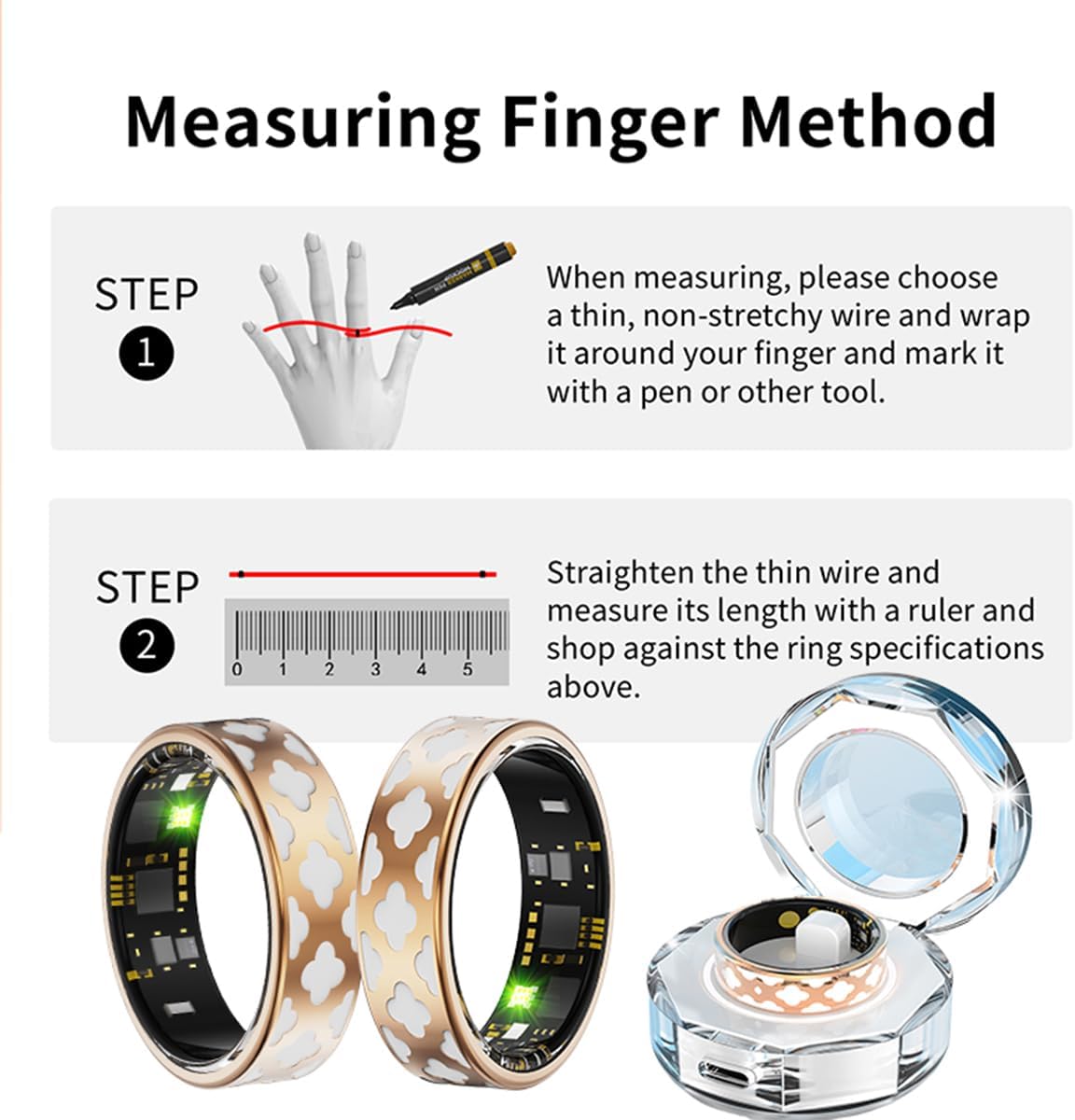
Image: Visual guide demonstrating the two-step process for accurately measuring your finger size using a string and ruler.
Smart Ring Size Chart
| Модель өлчөмү | Ички диаметри (мм) | Айлана (мм) |
|---|---|---|
| #7 | 17.3мм | 54.3мм |
| #8 | 18.1мм | 56.9мм |
| #9 | 18.9мм | 59.5мм |
| #10 | 19.8мм | 62.1мм |
| #11 | 20.6мм | 64.6мм |
| #12 | 21.4мм | 67.2мм |
| #13 | 22.2мм | 69.7мм |
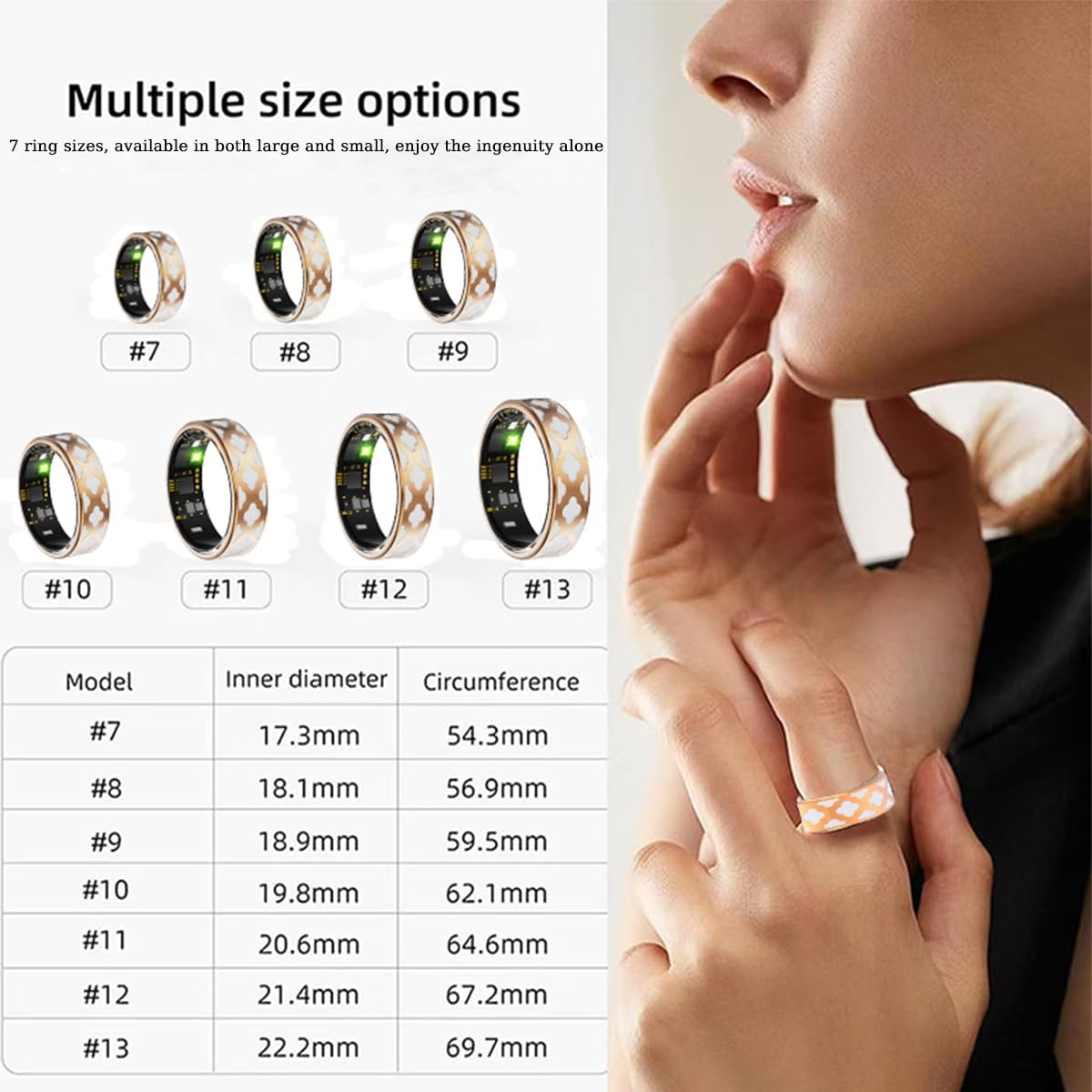
Image: A visual representation of the various Smart Ring sizes available, along with a detailed chart showing inner diameter and circumference measurements for each size.
Иштөө нускамалары
1. Ден соолукту 24 саат бою көзөмөлдөө
The Smart Ring continuously monitors your vital health parameters throughout the day.
- Жүрөктүн кагышы: Tracks your heart rate in real-time, providing insights into your cardiovascular health.
- Кандагы кычкылтек (SpO2): Сиздин кандын кычкылтек менен каныккандыгын өлчөйт.
- Кан басымы: Provides real-time blood pressure readings.
All collected data is automatically synchronized with the mobile app, allowing you to view trends and historical data. You can also add family members and friends within the app to view their health information (with their consent).
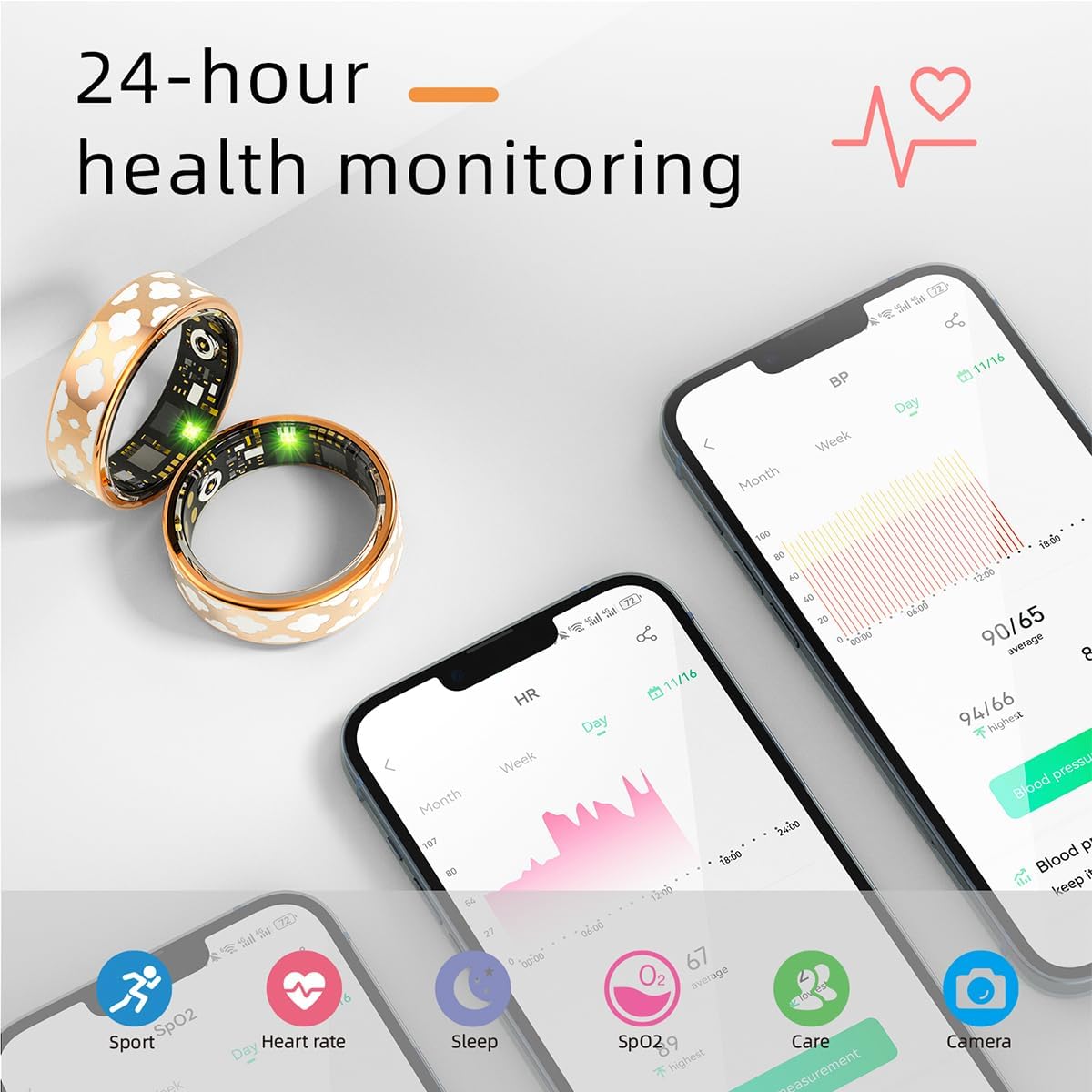
Image: A smartphone screen showing the Smart Ring app interface with detailed 24-hour health monitoring data, including graphs for blood pressure and heart rate.
2. Real-Time Sleep Tracking
The Smart Ring intelligently records your daily sleep information, helping you understand your sleep patterns.
- Ар кандай уйку режимдерин көзөмөлдөйтtages: deep sleep, light sleep, and wakefulness.
- Provides a sleep quality score and detailed reports in the app.

Image: The Smart Ring app interface displaying comprehensive real-time sleep tracking data, including sleep stages (deep, light, awake, REM) and a sleep quality score.
3. Exercise Data Monitoring
The Smart Ring supports multiple exercise modes, providing real-time recording of your activity data.
- Tracks heart rate, speed, time, and other relevant information during workouts.
- Utilizes GPS via smartphone for mapping outdoor activities like cycling.
- Records steps through motion detection.

Image: A person wearing the Smart Ring while exercising, with a smartphone displaying the app's exercise data monitoring interface, including a map of the activity route.
4. Remote Control Photography and Gesture Features
Enhance your smartphone experience with the Smart Ring's remote control capabilities.
- Алыстан башкарылуучу камеранын жапкычы: Use the app to activate the remote control photo function. Shake the Smart Ring to remotely trigger your cell phone's camera and take photos.
- Жаңсоо башкаруу: Built-in motion gesture features allow you to control certain applications, such as watching TikTok videos, by simply wearing the ring and performing specific gestures.

Image: A person demonstrating the remote control photography feature, using the Smart Ring to take a picture with their smartphone.
IP68 суу өткөрбөйт рейтинги
The Smart Ring boasts an IP68 waterproof rating, meaning it is designed to withstand immersion in water up to 1.5 meters for up to 30 minutes. This allows for worry-free use during daily activities.
- Suitable for hand washing, showering, and swimming in shallow water.
- Маанилүү эскертүү: DO NOT expose the Smart Ring to hot water or steam, as this can damage the internal components and compromise the waterproof seal.

Image: A hand wearing the Smart Ring submerged in water, illustrating its IP68 waterproof capability for daily activities like hand washing or swimming.
Техникалык тейлөө
To ensure the longevity and optimal performance of your Smart Ring, follow these maintenance guidelines:
- Clean the ring regularly with a soft, dry cloth. For stubborn dirt, a slightly damp кездемени колдонсо болот, андан кийин дароо кургатуу.
- Ensure the charging contacts on both the ring and the charging case are clean and free of debris to maintain efficient charging.
- Avoid exposing the ring to harsh chemicals, strong detergents, or abrasive materials.
- Шакекти колдонбогон учурда салкын, кургак жерде сактаңыз.
Проблемаларды чечүү
If you encounter issues with your Smart Ring, please refer to the following common solutions:
- Ring not connecting to app:
- Смартфонуңузда Bluetooth иштетилгенин текшериңиз.
- Шакектин заряддалганын текшериңиз.
- Restart the Smart Ring app and your phone's Bluetooth.
- Колдонмонун жөндөөлөрүнөн шакекти ажыратып, кайра жупташтырып көрүңүз.
- Туура эмес ден соолук маалыматтары:
- Ensure the ring is worn snugly on your finger. If it's too loose, data accuracy may be affected.
- Шакектин ички жагындагы сенсорлорду тазалаңыз.
- Колдонмоңуз эң акыркы версияга жаңыртылганын текшериңиз.
- Шакек кубатталбай жатат:
- Заряддоо кабели корпуска да, кубат булагына да туташтырылганын текшериңиз.
- Ensure the ring is correctly seated in the charging case with contacts aligned.
- Башка USB портун же кубат адаптерин колдонуп көрүңүз.
- Clean the charging contacts on both the ring and the case.
- Колдонмо иштебей калат же катып калат:
- Колдонмону жаап, кайра ачыңыз.
- Clear the app's cache (in your phone's settings).
- Телефонуңуздун операциялык системасы жаңыртылганын текшериңиз.
Эгер көйгөй чечилбесе, кошумча жардам алуу үчүн кардарларды колдоо бөлүмүнө кайрылыңыз.
Техникалык шарттар
| Өзгөчөлүк | Деталь |
|---|---|
| Модель номери | R10M-1 |
| Бренд | Жалпы |
| Байланыш технологиясы | Bluetooth |
| Операция системасы | Android Wear 1.0 (Compatible with Android 5.1+ / iOS 8.0+) |
| Батарея сыйымдуулугу | 15 миллионamp Саат |
| Батарея түрү | Литий полимери |
| Суу өткөрбөйт рейтинги | IP68 |
| Өзгөчөлүктөр | Multisport Tracker, Activity Tracker, Heart Rate, Blood Oxygen, Sleep Monitoring, Remote Control Photography |
| GPS | Смартфон аркылуу GPS |
| Материал | High-quality stainless steel and enamel craftsmanship |
| Өндүрүүчү | JTL |
| Биринчи жеткиликтүү күн | 16-ноябрь, 2024-жыл |
Кепилдик жана колдоо
Your Smart Ring is designed for durability and performance. For any questions or problems regarding your product, please do not hesitate to contact our customer service team.
- Кардарларды тейлөө: Our team is available to assist you with any inquiries. Please allow up to 24 hours for a response.
- Маанилүү эскертүү: The product is not suitable for hot water or steam exposure. Damage resulting from such exposure may not be covered under warranty.
For the most up-to-date support information and contact methods, please refer to the official product website or the contact section within the mobile application.


