
1. Киришүү
This manual provides detailed instructions for the installation, operation, and maintenance of your Rimoody 4Core 4G+64G Android 15 Car Radio. This advanced car stereo system is designed to enhance your driving experience with features such as Wireless Carplay, Android Auto, GPS navigation, 5G-WiFi connectivity, Bluetooth, FM/RDS radio, and a customizable EQ. Please read this manual thoroughly before use to ensure proper functionality and safety.
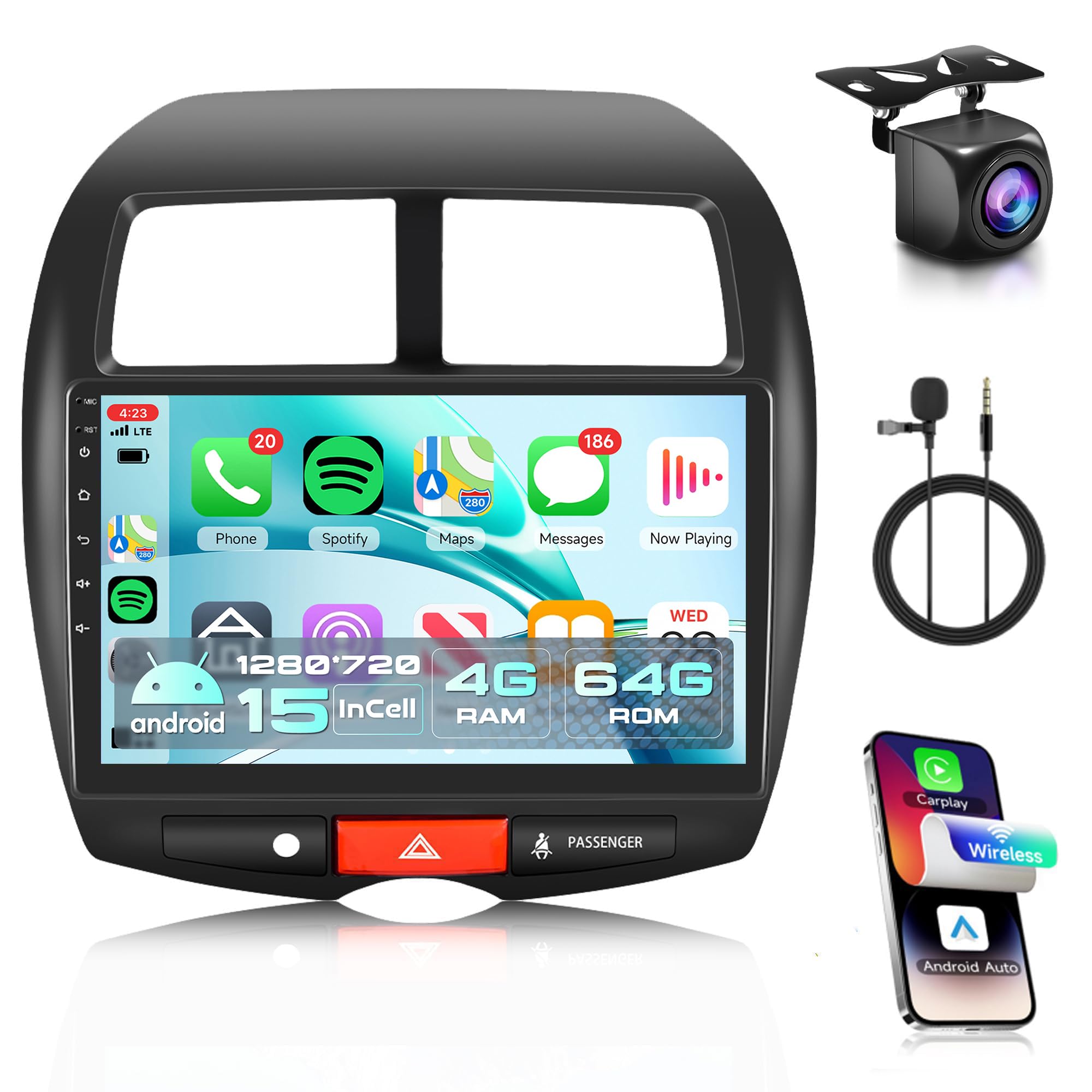
Figure 1: Rimoody 4Core 4G+64G Android 15 Car Radio main unit.
2. Унаа шайкештиги
Бул автоунаа радиосу төмөнкү автоунаа моделдери үчүн атайын иштелип чыккан:
- Mitsubishi ASX (2013-2015)
- Mitsubishi Outlander Sport (2011-2017)
- Mitsubishi RVR (2011-2017)
Маанилүү: Please confirm your original car center console matches Model A as shown in Figure 2. This product only supports Model A, not Model B. If your console is Model B, please contact customer service for recommendations.

Figure 2: Vehicle compatibility guide for center console types.
3. Кутуда эмне бар
Пакетти ачканда, төмөнкү компоненттердин бардыгы бар экенине ынаныңыз:
- Унаа радиосу
- Камера
- Микрофон
- Электр зымдары
- GPS антеннасы
- USB кабели
- User Manual
- RCA кабели
- Арткы камера киргизүү кабели
- Орнотуу куралы
- Унаа үчүн оригиналдуу USB адаптер (эгер бар болсо)

3-сүрөт: Продукциянын таңгагынын мазмуну жана бирдик өлчөмдөрү.
4. Орнотуу жана орнотуу
Installation of the car radio requires basic automotive electrical knowledge. If you are unsure, professional installation is recommended.
4.1 Орнотууга чейинки текшерүү
- Verify vehicle compatibility (refer to Section 2).
- 3-бөлүмдө саналып өткөн бардык компоненттер бар экендигин текшериңиз.
- Электр зымдарынын кыска төшөлүшүнө жол бербөө үчүн унаанын аккумуляторун ажыратыңыз.
4.2 Оригиналдуу радиону алып салуу
Carefully remove the existing car radio and trim panels. Refer to your vehicle's specific service manual for detailed instructions on panel removal.

Figure 4: Visual comparison of the dashboard before and after installing the Rimoody car radio.
4.3 Зымдарды туташтыруу
Connect the provided wiring harness to the car radio and your vehicle's existing wiring. Ensure all connections are secure. Refer to the wiring diagram for correct connections.
- Кубат кабели: Унаанын электр кубатына туташтырыңыз.
- RCA кабели: For audio/video output to external devices.
- USB кабели: Маалыматтарды өткөрүү жана кубаттоо үчүн.
- Арткы камеранын кириш кабели: Connect the backup camera.
- GPS антеннасы: Тунук жерге орнотуңуз view оптималдуу сигнал кабыл алуу үчүн асман.
- Микрофон: Үнсүз чалуу жана үн буйруктары үчүн туташыңыз.

Figure 5: Comprehensive wiring diagram and overview камтылган аксессуарлардан.
4.4 Агрегатты монтаждоо
Secure the new car radio unit into the dashboard opening using the provided installation tools and brackets. Reassemble any removed trim panels.
4.5 Орнотуудан кийинки
Reconnect the vehicle's battery. Turn on the ignition and test all functions of the car radio.
5. Иштөө нускамалары
Your Rimoody car radio runs on an Android 15 system, offering a wide range of features. The 10.1-inch HD touchscreen provides a clear display with 1280*720 resolution and responsive touch control.
5.1 Wireless Carplay & Android Auto & Mirror Link
Connect your smartphone wirelessly to access navigation, music, calls, and messages directly from the car radio display. The system supports both iOS (Wireless Carplay) and Android (Wireless Android Auto) devices. Mirror Link functionality allows you to display your phone's screen content via USB cable or WiFi.

Figure 6: Wireless Carplay/Android Auto interface on the car radio.
Video 1: Demonstration of Wireless Carplay and Android Auto functionality.
5.2 GPS багыттоо & WiFi
The built-in GPS module supports both online and offline maps, providing voice guidance and real-time traffic information. Connect to the internet via WiFi hotspot or tethering from your phone to browse the web, мазмунду агылтуу жана колдонмолорду жүктөп алуу.

Figure 7: GPS navigation interface and system hardware overview.
5.3 Bluetooth & FM/RDS & EQ
Bluetooth: Enjoy hands-free calling and music playback. The system supports automatic phone book loading for convenience.
FM/RDS радиосу: Tune into your favorite FM stations with clear reception and low noise. The system allows presetting up to 18 stations and supports RDS for station information display.
EQ (эквалайзер): Customize your audio experience with a variety of EQ sound effects and frequency division adjustments for a surround panoramic sound.

Figure 8: Bluetooth, EQ, FM/RDS radio, and steering wheel control interfaces.
Видео 2: Бүттүview of sound settings including equalizer, surround, and subwoofer adjustments.
5.4 Rear Camera and Steering Wheel Control (SWC)
Арткы камера: The system supports AHD camera image input. When reverse gear is engaged, the screen automatically switches to the rear view, коопсуз токтотууга жана маневр жасоого жардам берет.
Руль башкаруусу: Control various functions of the car radio directly from your vehicle's steering wheel buttons, enhancing convenience and safety while driving.
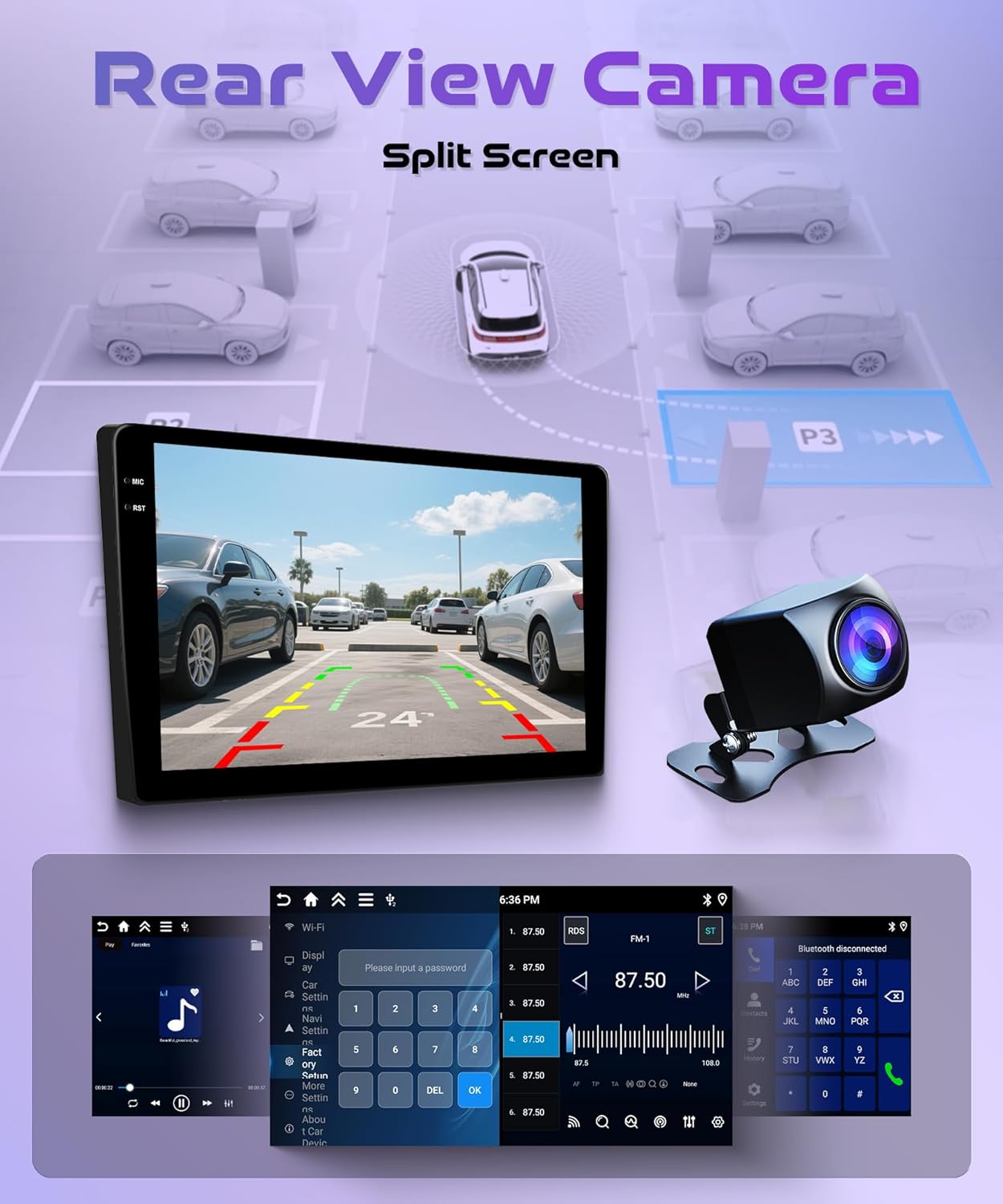
Figure 9: Rear camera display and split-screen functionality.
5.5 Split Screen and Customize Home Page APP
Бөлүнгөн экран: Түзмөктүн экранында бир эле учурда эки колдонмону колдонуңуз. Ар бир колдонмонун өлчөмүн жана жайгашуусун ыңгайлаштырып, алардын ортосунда жөнөкөй серпүү жаңсоосу менен которула аласыз.
Customize Home Page: Personalize your home screen by selecting which applications to display and rearranging their icons according to your preference.
6. Техникалык тейлөө
Унаа радиоңуздун узак мөөнөттүү иштешин жана оптималдуу иштешин камсыз кылуу үчүн, төмөнкү техникалык тейлөө көрсөтмөлөрүн аткарыңыз:
- Тазалоо: Экранды жана сыртын тазалоо үчүн жумшак, кургак чүпүрөктү колдонуңуз. Бетке зыян келтириши мүмкүн болгон абразивдүү тазалоочу каражаттарды же эриткичтерди колдонбоңуз.
- Температура: Аппаратты өтө ысык жана муздак температурага узак убакыт бою тийгизүүдөн сактаңыз.
- Программалык камсыздоо жаңыртуулары: Системанын натыйжалуу жана коопсуз иштешин камсыз кылуу үчүн мезгил-мезгили менен жеткиликтүү программалык камсыздоонун жаңыртууларын текшерип жана орнотуп туруңуз.
- Электр камсыздоо: Ensure the vehicle's electrical system is stable to prevent power fluctuations that could harm the unit.
7. Кыйынчылыктарды
Унаа радиоңузда көйгөйлөргө туш болсоңуз, төмөнкү жалпы көйгөйлөрдү жана чечимдерди караңыз:
| Көйгөй | Мүмкүн себеп | Чечим |
|---|---|---|
| Түзмөк күйбөйт | Бошоң электр туташуу, күйгөн сактагыч, унаанын аккумуляторунун көйгөйү | Check wiring harness connections, inspect vehicle fuses, verify battery charge. |
| Үн жок | Үн өтө төмөн, аудио булагы туура эмес, динамиктин зымдары көйгөйү | Үндү катуулатыңыз, туура аудио булагын тандаңыз, динамиктердин туташуусун текшериңиз. |
| GPS сигналы жоголду же так эмес | GPS antenna obstructed or improperly installed | GPS антеннасынын таза болушун текшериңиз view асмандан антеннанын туташуусун текшериңиз. |
| Wireless Carplay/Android Auto not connecting | Bluetooth/WiFi off on phone, incorrect pairing, software glitch | Enable Bluetooth/WiFi on phone, re-pair device, restart both phone and car radio. |
| Экран жооп бербейт же катып калган | Temporary software issue | Perform a soft reset (refer to device settings or contact support). |
Бул чечимдерди колдонуу аракетинен кийин көйгөй чечилбесе, кардарларды колдоо кызматына кайрылыңыз.
8. Техникалык шарттар
- Бренд: Римуди
- Операция системасы: Android 15
- CPU: 4Core
- Эстутум: 4 ГБ RAM + 64 ГБ ROM
- Экрандын өлчөмү: 10.1 дюйм
- Дисплей түрү: LCD, Capacitive Touch Screen
- Чечим: 1280*720
- Байланыш: Bluetooth, 5G-WiFi
- Навигация: Built-in GPS module, supports online and offline maps (North America)
- Радио: FM/RDS
- Өзгөчөлүктөр: Wireless Carplay, Wireless Android Auto, Mirror Link, EQ, Rear Camera Input (AHD), Steering Wheel Control (SWC), Split Screen, Customizable Home Page
- Монтаж түрү: Куралдар тактасы
- Камтылган компоненттер: Car radio, backup camera, microphone, wiring harness
9. Кепилдик жана колдоо
Your Rimoody car radio comes with a comprehensive warranty and dedicated customer support.
9.1 Кепилдик маалыматы
продукт камтыйт а 2 жылдык өндүрүүчүнүн кепилдиги covering defects in materials and workmanship. Please retain your proof of purchase for warranty claims.
9.2 Кардарларды колдоо
For any questions, technical assistance, or warranty claims, please contact Rimoody customer support. We offer:
- 24 сааттык тез жооп: Our support team is available to assist you promptly.
- Professional Installation Guide: Access to detailed manuals and videos for installation guidance.
- 90 Days Free Return: For refund or exchange if you are not satisfied with the product.
- Өмүр бою техникалык колдоо: Our technical support team is available for the lifetime of the product.

Figure 10: ашыкview of Rimoody's customer support services.