
1. Киришүү
This manual provides detailed instructions for the proper use, setup, and maintenance of your Caliber Scientific Calculator, Model 297208. Designed for students, engineers, and professionals, this calculator offers 240 functions for a wide range of mathematical and scientific calculations.
Оптималдуу иштөөсүн жана узак мөөнөттүү кызмат кылуусун камсыз кылуу үчүн, калькуляторду колдонуудан мурун, бул колдонмону кылдат окуп чыгыңыз.
2. Коопсуздук маалыматы
- Keep the calculator away from extreme temperatures, direct sunlight, and high humidity.
- Калькуляторду түшүрүп алуудан же катуу соккуга кабылтуудан алыс болуңуз.
- Do not attempt to disassemble or modify the calculator. This will void the warranty.
- Use only the specified battery type. Incorrect battery usage may cause leakage or explosion.
- Батарея эскертүүсү: Батареяларды балдардан жана үй жаныбарларынан алыс кармаңыз. Батареялар жутулса зыяндуу болушу мүмкүн. Эгерде бала же үй жаныбары батареяны жутуп алса, дароо медициналык жардамга кайрылыңыз.
3. Пакеттин мазмуну
Upon opening your Caliber Scientific Calculator package, please verify that all items are present and in good condition:
- Caliber Scientific Calculator (Model 297208)
- Protective Hard Sliding Cover
- One AG10 Button Cell Battery (pre-installed or included separately)
- Колдонуучунун Колдонмосу (бул документ)

Image 1: Caliber Scientific Calculator in retail packaging, showing key features.
4. Орнотуу
4.1. Кубат булагы
The Caliber Scientific Calculator operates on dual power sources: solar power and battery power. The solar panel provides power in well-lit environments, while the battery ensures operation in low-light conditions.
4.2. Батареяны орнотуу/алмаштыруу
Your calculator includes one AG10 button cell battery. If battery replacement is needed:
- Калькулятор өчүрүлгөнүн текшериңиз.
- Калькулятордун артындагы батарея бөлүкчөсүн табыңыз.
- Кичинекей бурагычты колдонуп, батарейка бөлүгүнүн капкагын кылдаттык менен ачыңыз.
- Remove the old battery and insert a new AG10 button cell battery, ensuring the correct polarity (+/-).
- Батарея уясынын капкагын ордуна коюңуз жана аны бурама менен бекитиңиз.
Note: Some models may require a AAA battery. Refer to the specific markings on your calculator's battery compartment if different from AG10.
5. Негизги функциялар бүттүview
The calculator features a 10-digit LCD display and 240 functions. Familiarize yourself with the key layout:
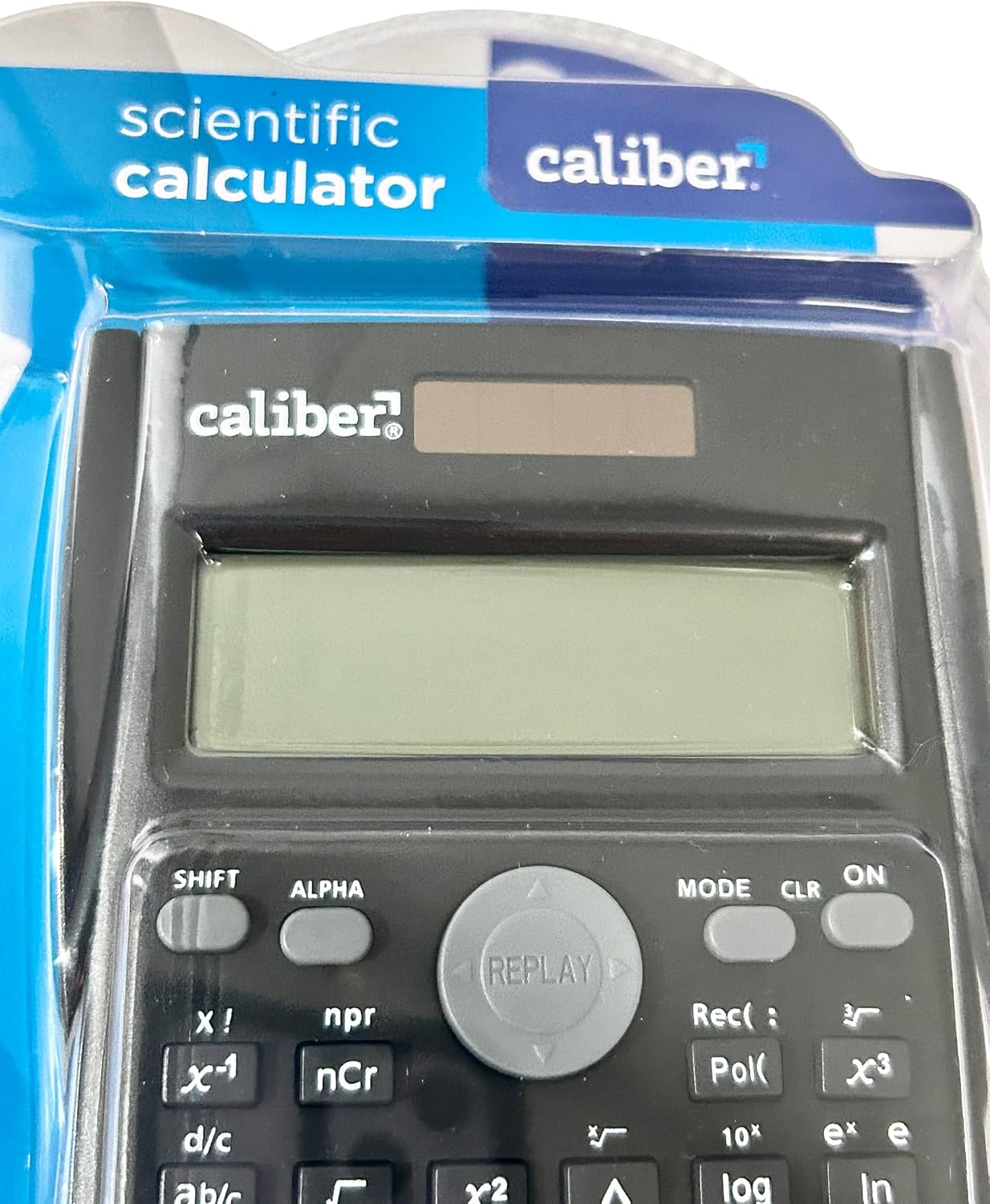
Image 2: Close-up of the calculator's display and key layout.
- Дисплей: 10-digit LCD for clear viewкиргизүүлөрдү жана натыйжаларды киргизүү.
- КҮЙГҮЗҮҮ/ӨЧҮРҮҮ: Power on/off the calculator.
- SHIFT: Accesses secondary functions printed above the keys (typically in yellow or orange).
- ALPHA: Accesses alpha characters and variables (typically in red or green).
- РЕЖИМ: Changes calculation modes (e.g., COMP, STAT, EQN).
- CLR: Clears memory or settings.
- НЫКЫ: Deletes the last entered digit.
- AC: Clears all entries and resets the calculation.
- Жебе баскычтары: Navigate through entries and results.
- = (Бирдей): Executes the calculation.
6. Иштөө нускамалары
6.1. Негизги эсептөөлөр
Негизги арифметикалык амалдарды аткаруу үчүн:
- басыңыз ON key to turn on the calculator.
- Биринчи санды киргизиңиз.
- Керектүү операция баскычын басыңыз (+, -, ×, ÷).
- Экинчи санды киргизиңиз.
- басыңыз = key to display the result.
6.2. Өркүндөтүлгөн функциялар
The calculator supports 240 functions, including trigonometric, logarithmic, statistical, and more. To access secondary functions (printed above keys), press the SHIFT key before the desired function key.
- Тригонометриялык функциялар: күнөө, cos, тан жана алардын тескери функциялары (SHIFT + күнөө⁻¹, жана башкалар.).
- Логарифмдик функциялар: журнал (база 10), ln (натурал логарифм).
- Power and Root Functions: x², √, xʸ.
- Эстутум функциялары: Колдонуу СТО (Дүкөн) жана RCL (Recall) to save and retrieve values.
- Статистикалык эсептөөлөр: Кириңиз РЕЖИМ and select STAT mode for statistical computations.
For detailed instructions on specific functions, refer to the comprehensive instructions enclosed with your product (if applicable) or consult online resources for scientific calculator usage.
7. Техникалык тейлөө
7.1. Тазалоо
To clean your calculator:
- Сыртын жумшак, кургак чүпүрөк менен сүртүңүз.
- өжөр кир үчүн, бир аз гampкездемени суу жана жумшак самын менен сүртүп, андан кийин дароо кургатыңыз.
- Do not use abrasive cleaners, solvents, or alcohol, as these can damage the casing же дисплей.
7.2. Сактоо
When not in use, store the calculator in a cool, dry place, away from direct sunlight and extreme temperatures. Always use the protective hard sliding cover to prevent damage to the keys and display.

Image 3: Packaging detail showing features including the hard sliding cover and dual power.
8. Кыйынчылыктарды
| Көйгөй | Мүмкүн себеп | Чечим |
|---|---|---|
| Калькулятор күйбөйт. | Күн энергиясы үчүн жарык жетишсиз же батареянын жараксыздыгы. | Move to a brighter area or replace the AG10 button cell battery. |
| Display shows "ERROR". | Mathematical error (e.g., division by zero, invalid input). | Басыңыз AC to clear the error and re-enter the calculation correctly. |
| Туура эмес эсептөө натыйжалары. | Incorrect mode selected, or input error. | Учурдагы режимди текшерүү (РЕЖИМ key) and ensure correct data entry. Clear all memory (SHIFT + CLR) зарыл болсо. |
9. Техникалык шарттар
| Модель номери | 297208 |
| Бренд | Калибр |
| Дисплей түрү | 10 орундуу ЖК |
| Функциялардын саны | 240 |
| Калькулятор түрү | Инженердик/Илимий |
| Power Source | Dual Power (Solar & Battery) |
| Батарея түрү | 1 x AG10 Button Cell (included) or 1 x AAA (may vary by model) |
| Screen Size | 3 дюйм |
| Өлчөмдөрү (L x W) | 6" x 3" |
| Коргоочу материал | Пластик |
| UPC | 050428205495 |
10. Кепилдик жана колдоо
10.1. Кепилдик маалыматы
This product is subject to a return policy. For details regarding returns, exchanges, or warranty claims, please refer to the retailer's return policy where the product was purchased.
10.2. Кардарларды колдоо кызматы
For further assistance, technical support, or inquiries not covered in this manual, please contact Caliber customer service through their official webсайтка же продуктуну сатып алган сатуучуга.
