Introduction
This manual provides essential information for the safe and efficient use of your SANSUI 75" VA Series 4K UHD Smart TV, model VA752024. This television features a frameless design, 4K UHD resolution with Dolby Vision HDR10 for stunning visuals, and Dolby Atmos for immersive audio. Powered by Google TV, it offers access to streaming services, voice control via Google Assistant, and Bluetooth connectivity for wireless audio. Please read this manual thoroughly before operating your TV and retain it for future reference.

The SANSUI 75" VA Series Smart TV features a sleek, frameless design, enhancing the viewing experience by making the screen the focal point.
Кутуда эмне бар
Please check the contents of your package against the list below. If any items are missing or damaged, contact SANSUI customer support.
- SANSUI 75" VA Series 4K UHD Smart TV
- Телевизордук стенд
- Алыстан башкаруу
- 2x Remote Control Batteries
- Электр кабели
- Колдонуучунун Колдонмосу (бул документ)
Жайгашуу
1. Пакеттен чыгаруу жана жайгаштыруу
Carefully remove the TV from its packaging. It is recommended that two people handle the TV due to its size and weight. Place the TV on a stable, level surface or prepare for wall mounting. Ensure adequate ventilation around the TV.
2. Стенд орнотуу
If using the included stand, attach the stand bases to the bottom of the TV using the provided screws. Refer to the diagram below for proper orientation. Ensure all screws are securely tightened.

Image showing the rear of the SANSUI TV, illustrating the stand attachment points and various input ports for connection.
3. Түзмөктөрдү туташтыруу
Connect your external devices such as cable boxes, Blu-ray players, gaming consoles, or sound systems to the TV's input ports. The TV supports HDMI and USB connectivity.
- HDMI: For high-definition audio and video. Use HDMI ports for devices like gaming consoles or streaming boxes.
- USB: Медияны ойнотуу үчүн USB сактагыч түзмөктөрдү туташтыруу үчүн files.
- Күч: Электр шнурду сыналгыга, андан кийин розеткага туташтырыңыз.
4. Баштапкы күйгүзүү жана Google TV орнотуу
After connecting all necessary cables, plug the TV into a power outlet. Press the power button on the remote control or on the TV. Follow the on-screen instructions to complete the initial setup, including connecting to your Wi-Fi network and logging into your Google account to activate Google TV features.
Телевизоруңузду иштетүү
1. Алыстан башкаруу функциялары
Insert the included batteries into the remote control. The remote allows you to navigate the Google TV interface, adjust volume, change channels, access settings, and use voice commands.
2. Google TV интерфейси
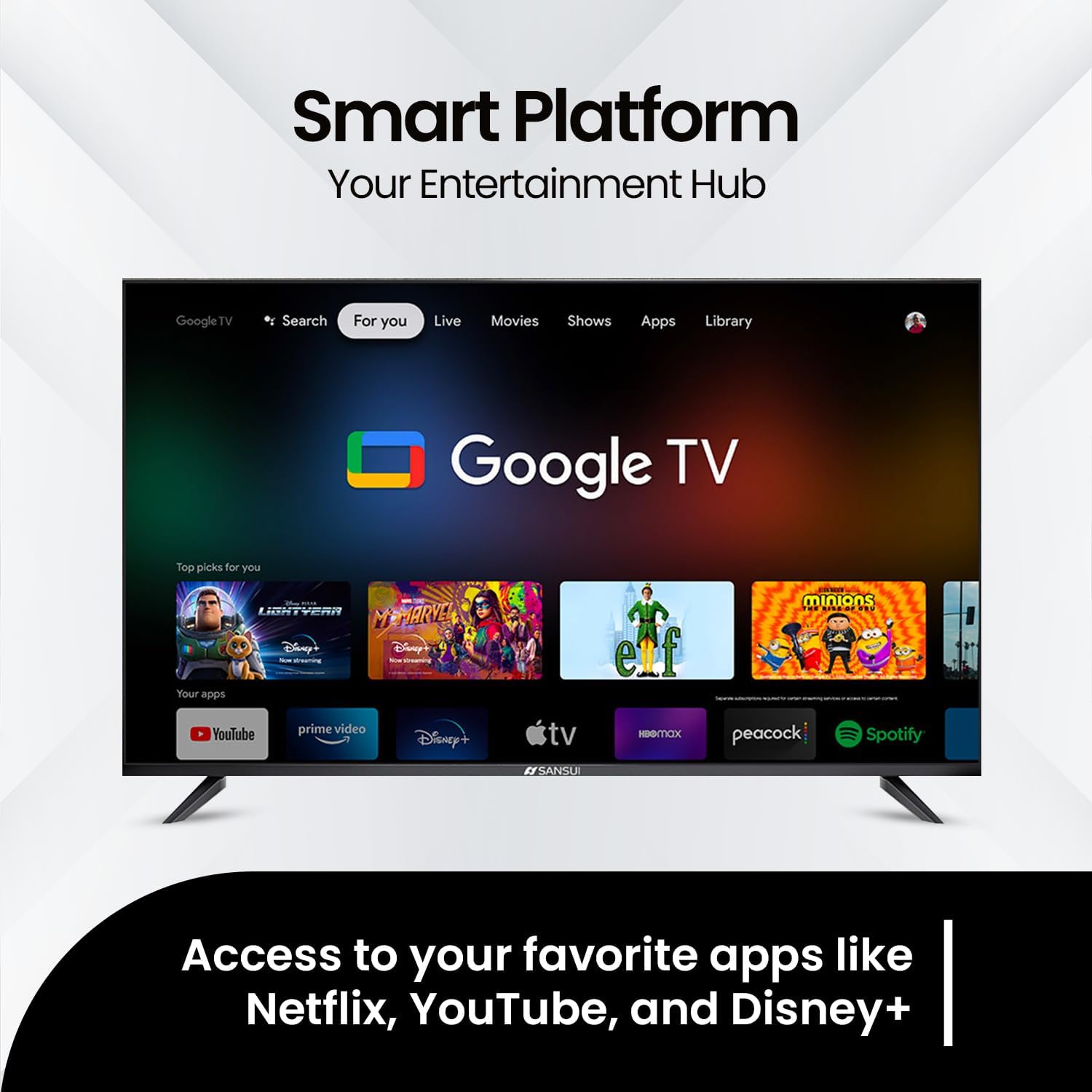
Google TV organizes your favorite content from various streaming services into one personalized home screen. Use the directional buttons on your remote to navigate through apps, movies, shows, and live TV options. You can download additional apps from the Google Play Store.

The Google TV interface provides easy access to popular streaming applications and personalized content recommendations.
3. Google Жардамчы менен Үн менен башкаруу
Your SANSUI TV integrates Google Assistant for hands-free control. Press the Google Assistant button on your remote and speak into the microphone to search for content, control smart home devices, get answers, and more.
4. Bluetooth байланышы
To connect Bluetooth headphones or other audio devices:
- Go to the TV's Settings menu.
- Select "Remotes & Accessories" or "Bluetooth Settings".
- Enable Bluetooth and put your device into pairing mode.
- Жупташтыруу үчүн тизмеден түзмөгүңүздү тандаңыз.
Easily pair your wireless headphones to the SANSUI TV for a private listening experience.
5. Сүрөт жана үн орнотуулары
Access the TV's settings menu to customize picture and sound. Your TV supports:
- Dolby Vision HDR10: Provides enhanced contrast, brightness, and color accuracy for a more realistic viewing experience. Adjust picture modes (e.g., Standard, Vivid, Movie, Game) to suit your content.
- Dolby Atmos: Delivers immersive, multi-dimensional audio that moves around you. Explore sound modes (e.g., Standard, Music, Movie, Speech) for optimal audio output.

Experience immersive sound with Dolby Atmos, creating a multi-dimensional audio environment.

Dolby Vision HDR ensures stunning realism in every frame with vivid colors and brilliant contrast.

Enjoy smooth motion and seamless action, optimizing the viewing experience for dynamic content.
Техникалык тейлөө
Телевизоруңузду тазалоо
- Тазалоодон мурун дайыма сыналгыдан ажыратыңыз.
- Экранды жана шкафты акырын сүртүү үчүн жумшак, кургак, түксүз чүпүрөктү колдонуңуз.
- өжөр белгилери үчүн, жеңил гampчүпүрөккө суу же атайын экран тазалоочу каражат. Эч качан тазалагычты түздөн-түз экранга чачпаңыз.
- Абразивдүү тазалагычтарды, момдорду же эриткичтерди колдонуудан алыс болуңуз, анткени алар сыналгыга зыян келтириши мүмкүн.
Жалпы кам көрүү
- Желдетүүчү тешиктерди жаппаңыз.
- Телевизорду күн нурунан, жылуулук булактарынан жана ашыкча чаңдан алыс кармаңыз.
- Телевизордун үстүнө оор нерселерди коюудан алыс болуңуз.
Проблемаларды чечүү
Кардарларды колдоо кызматына кайрылуудан мурун, жалпы маселелер боюнча төмөнкү чечимдерди колдонуп көрүңүз:
| Көйгөй | Мүмкүн чечим |
|---|---|
| Күч жок | Кубат шнуру телевизорго да, иштеп жаткан электр розеткасына да бекем сайылганын текшериңиз. Розеткада кубат бар же жок экенин текшериңиз. |
| Сүрөт жок, бирок Үн бар | Киргизүү булагын текшериңиз. Киргизүүлөрдү которуу үчүн алыстан башкаруу пультундагы "Киргизүү" же "Булак" баскычын басыңыз. Тышкы түзмөктөрдүн туура сайылып, туташтырылганын текшериңиз. |
| Үн жок, бирок Сүрөт бар | Check the volume level and ensure the TV is not muted. If using external audio devices, ensure they are properly connected and powered on. Check audio output settings in the TV menu. |
| Пульт иштебейт | Батареяларды алмаштырыңыз. Пульт менен сыналгынын IR сенсорунун ортосунда эч кандай тоскоолдуктар жок экенин текшериңиз. |
| Wi-Fi'га туташпай жатат | Ensure your Wi-Fi router is on and working. Try restarting your router and the TV. Re-enter the Wi-Fi password carefully in the TV's network settings. |
| Сүрөттүн сапаты көйгөйлөрү (мисалы, бүдөмүк, бурмаланган) | Check the resolution settings of your input source. Ensure cables are securely connected. Adjust picture settings in the TV menu. |
Техникалык шарттар
Below are the key specifications for the SANSUI 75" VA Series 4K UHD Smart TV (Model VA752024):
- Модель номери: VA752024
- Экрандын өлчөмү: 75 дюйм
- Дисплей технологиясы: UHD
- Чечим: 4K (3840 x 2160)
- Жаңыртуу ылдамдыгы: 60 Гц
- Аспект катышы: 16:9
- Өзгөчөлүктөр: Built-In Speaker, Dolby Vision HDR10, Dolby Atmos, Google TV, Voice Control (Google Assistant), Bluetooth Connectivity
- Байланыш технологиясы: HDMI, USB, Wi-Fi
- Продукциянын өлчөмдөрү (D x W x Y): 65.65 x 37.6 x 3.35 дюйм (тактагычсыз)
- Элемент Салмагы: 69.4 фунт
- Камтылган компоненттер: Stand, Remote Control, 2x Remote Control Batteries, Power Cord, User Manual
Кепилдик жана колдоо
For warranty information, please refer to the warranty card included with your product or visit the official SANSUI website. For technical support, troubleshooting assistance beyond this manual, or service inquiries, please contact SANSUI customer support. Contact details can typically be found on the SANSUI webсайтында же продуктунун таңгагында.