
1. Киришүү
This manual provides instructions for the setup, operation, and maintenance of your Simply Smart Home PhotoShare MyLuma LED 7-inch WiFi Digital Photo Frame. Please read this manual thoroughly before using the device to ensure proper functionality and to maximize your experience.
2. Пакеттин мазмуну
Пакетиңизде бардык буюмдар бар экенин текшериңиз:
- PhotoShare MyLuma LED 7-inch Digital Photo Frame
- Кубаттуу адаптер
- Ыкчам баштоо колдонмосу (эгер бар болсо)
3. Түзмөк бүттүview
Familiarize yourself with the physical components of your PhotoShare MyLuma frame.

Сүрөт 3.1: Арткы view of the PhotoShare MyLuma frame, highlighting the SD port, USB-C port, USB port, and the LED light bar.
- 7 дюймдук HD сенсордук экран: Main display for photos and videos.
- LED жарык тилкеси: Located on the back, provides customizable color alerts.
- Soft-Touch Fabric Back Panel: Enhances aesthetic and grip.
- SD Port: For memory card expansion.
- USB-C порту: For power and data transfer.
- USB порт: USB түзмөктөрүн туташтыруу үчүн.
4. Орнотуу
4.1 Күйгүзүү
- Connect the power adapter to the USB-C port on the back of the frame.
- Кубат адаптерин розеткага сайыңыз.
- Кадр автоматтык түрдө күйүп, баштапкы орнотуу экранын көрсөтөт.
4.2 Wi-Fiга туташуу
- On the touchscreen, select your preferred language.
- Follow the on-screen prompts to connect to your Wi-Fi network. You will need your Wi-Fi network name (SSID) and password.
- Once connected, the frame will guide you through creating a PhotoShare account or logging into an existing one.
4.3 Installing the PhotoShare App
To send photos and videos to your frame, download the free PhotoShare app on your smartphone or tablet.

Сүрөт 4.1: Screenshot of a smartphone displaying options to download the PhotoShare app from the Apple App Store and Google Play Store.
- Издөө "PhotoShare" in the Apple App Store (for iOS devices) or Google Play Store (for Android devices).
- Install the app and log in with the same account credentials used for your frame.
5. Иштөө нускамалары
5.1 Сүрөттөрдү жана видеолорду жөнөтүү
You can send photos and videos to your frame using the PhotoShare app or via email.

Сүрөт 5.1: A visual guide demonstrating how to capture a photo with a smartphone, edit it within the PhotoShare app, and then share it to the digital frame.
- Колдонмону колдонуу:
- Open the PhotoShare app.
- Сиз жөнөткүңүз келген сүрөттөрдү же видеолорду тандаңыз.
- Choose your MyLuma frame as the recipient.
- Tap "Send."
- Using Email:
- Each PhotoShare frame has a unique email address. Find this in your frame's settings or the app.
- Attach photos or videos (up to 50MB per email) to an email and send it to your frame's email address.
5.2 Customizing LED Alerts
Assign unique LED colors and sounds to contacts so you can instantly identify who sent a new photo or video.
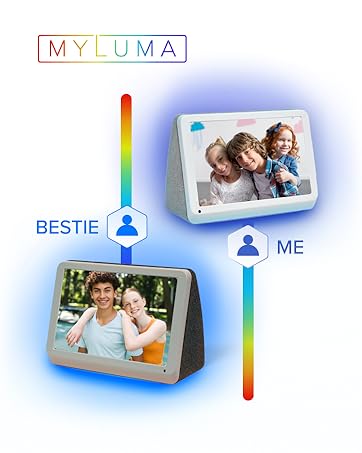
Сүрөт 5.2: The MyLuma frame showing how different contacts can be assigned specific LED colors for notifications.
- In the PhotoShare app, navigate to the "Contacts" or "Settings" section.
- Select a contact and choose a desired LED color and notification sound.
- The frame's LED light bar will illuminate with the assigned color when that contact sends new content.
5.3 Digital Effects and Slideshows
Enhance your photos with borders, stickers, and captions using the PhotoShare app. The frame can also display seasonal themes automatically.

Сүрөт 5.3: The digital frame showcasing a photo with applied digital effects, including borders, stickers, and captions, managed through the app.
- Borders, Stickers, Captions: Use the PhotoShare app's editing tools to add these to your photos before sending.
- Seasonal Themes: The frame can automatically apply seasonal themes to your slideshows. This option can be managed in the frame's settings.
5.4 Кошумча функциялар

Сүрөт 5.4: The PhotoShare MyLuma frame highlighting its various functionalities such as Wi-Fi connectivity, photo and video display, clock and calendar, weather updates, and auto on/off.
- Clock & Calendar: Убакыт жана күндү көрсөтүү.
- Аба ырайы: Show local weather information.
- Авто күйгүзүү/өчүрүү: Schedule the frame to turn on and off at specific times to conserve energy.
6. Техникалык тейлөө
6.1 Рамканы тазалоо
- Экрандын жана алкактын сыртын тазалоо үчүн жумшак, кургак, мамыксыз чүпүрөктү колдонуңуз.
- Do not use liquid cleaners, aerosols, or abrasive cleaners, as these may damage the screen or finish.
6.2 Программалык камсыздоо жаңыртуулары
The frame may receive automatic software updates to improve performance and add new features. Ensure your frame is connected to Wi-Fi for these updates.
7. Кыйынчылыктарды
| Маселе | Мүмкүн себеп | Чечим |
|---|---|---|
| Рамка күйбөйт. | Кубат адаптери туташкан эмес же туура эмес. | Кубат адаптери рамкага жана иштеп жаткан розеткага бекем туташтырылганын текшериңиз. Башка розетканы колдонуп көрүңүз. |
| Wi-Fi'га туташпай жатат. | Туура эмес сырсөз, начар сигнал же тармак маселеси. | Verify Wi-Fi password. Move the frame closer to the router. Restart your router and the frame. |
| Сүрөттөр кадрда көрүнбөйт. | Not sent correctly, frame not connected to internet, or app issue. | Check app's send status. Ensure frame is connected to Wi-Fi. Restart the app and try again. Verify the frame's email address if sending via email. |
| LED lights are not changing color. | LED alert settings not configured or app synchronization issue. | Ensure LED colors are assigned to contacts in the PhotoShare app. Check app and frame for updates. |
8. Техникалык шарттар
| Өзгөчөлүк | Деталь |
|---|---|
| Модель номери | FML07SD |
| Screen Size | 7 дюйм |
| Резолюция | 1280x800 |
| Байланыш | Wi-Fi, Bluetooth, USB, Memory Stick |
| Эстутум сактоо сыйымдуулугу | 1 TB (Internal, for cloud storage) |
| Башкаруу ыкмасы | Колдонмо, тийүү |
| Power Source | Электр зымдары |
| Frame Material | Кездеме |
| Аспект катышы | 16:9 |
9. Кепилдик маалыматы
The PhotoShare MyLuma LED 7-inch WiFi Digital Photo Frame comes with a 1 Year End User Warranty. For detailed terms and conditions, please refer to the warranty card included in your product packaging or visit the Simply Smart Home official webсайт.
10. Колдоо
Кошумча жардам, техникалык колдоо же үчүн view frequently asked questions, please visit the Simply Smart Home support webсайтка же кардарларды тейлөөгө кайрылыңыз.
- Онлайн колдоо: www.simplysmarthome.com/support (Чыгample URL, please verify official support link)
- Кардарларды тейлөө: Продуктуңуздун таңгагына же расмий өкүлгө кайрылыңыз webбайланыш номерлери жана иштөө убактысы жөнүндө маалымат алуу үчүн сайтка кириңиз.
11. Продукт видеосу бүттүview
Көрүү үчүн бул видеону көрүңүзview of the PhotoShare MyLuma LED Digital Smart Frame's features, including its color-changing LEDs.
Видео 11.1: An official product video demonstrating the key features of the PhotoShare MyLuma frame, including its color-changing LED notifications.