
Introduction
This manual provides detailed instructions for the safe and efficient operation of your Phomemo M836-B Portable Thermal Printer. The M836-B is an inkless, wireless thermal printer designed for portability and convenience, supporting various paper sizes including US Letter and A4. Please read this manual thoroughly before using the printer to ensure optimal performance and longevity.
Продукт бүттүview
Негизги өзгөчөлүктөрү
- Сыясыз термикалык басып чыгаруу: Utilizes thermal technology, eliminating the need for ink cartridges or ribbons.
- Зымсыз туташуу: Supports Bluetooth for seamless connection with iOS and Android devices.
- USB туташуу: Compatible with Windows, macOS, ChromeOS, and Linux via USB Type-C.
- Жогорку чечим: Offers a print resolution of 300 DPI for clear text and graphics.
- Портативдик дизайн: Compact and lightweight, ideal for travel and on-the-go printing.
- Multi-Size Paper Support: Accommodates various thermal paper sizes, including US Letter (8.5'' x 11'') and A4.
- Монохромдуу чыгаруу: Prints in black and white.

Image: The Phomemo M836-B printer demonstrating its inkless thermal printing capability, highlighting no mess from ink.

Сүрөт: An overview of the Phomemo M836-B's key features, including wireless connectivity, inkless operation, 2600mAh battery capacity, and 300 DPI resolution.
Пакеттин мазмуну
Пакетте бардык буюмдар бар экенин текшериңиз:
- Phomemo M836-B Portable Thermal Printer
- Thermal Paper (as specified in the box)
- USB Type-C кабели
- Колдонуучунун Колдонмосу (бул документ)
Орнотуу колдонмосу
1. Принтерди заряддоо
- Connect the provided USB Type-C cable to the printer's charging port.
- USB кабелинин экинчи учун туура келген USB кубат адаптерине (кошумча эмес) же компьютердин USB портуна туташтырыңыз.
- The indicator light will show charging status. Charge the printer fully before first use.
2. Кагазды жүктөө
The Phomemo M836-B supports both thermal paper rolls and sheet-fed thermal paper.
- Кагаз бөлүктүн капкагын ачыңыз.
- For roll paper: Insert the thermal paper roll into the designated slot, ensuring the printing side faces upwards. Gently pull a small length of paper out.
- For sheet-fed paper: Insert the thermal paper sheet into the input slot, ensuring it is straight and aligned.
- Кагаз бөлүктүн капкагын бекем жабыңыз.

Image: Illustration of how to load different types of thermal paper (roll and sheet) into the Phomemo M836-B printer, showing the paper selection mechanism.
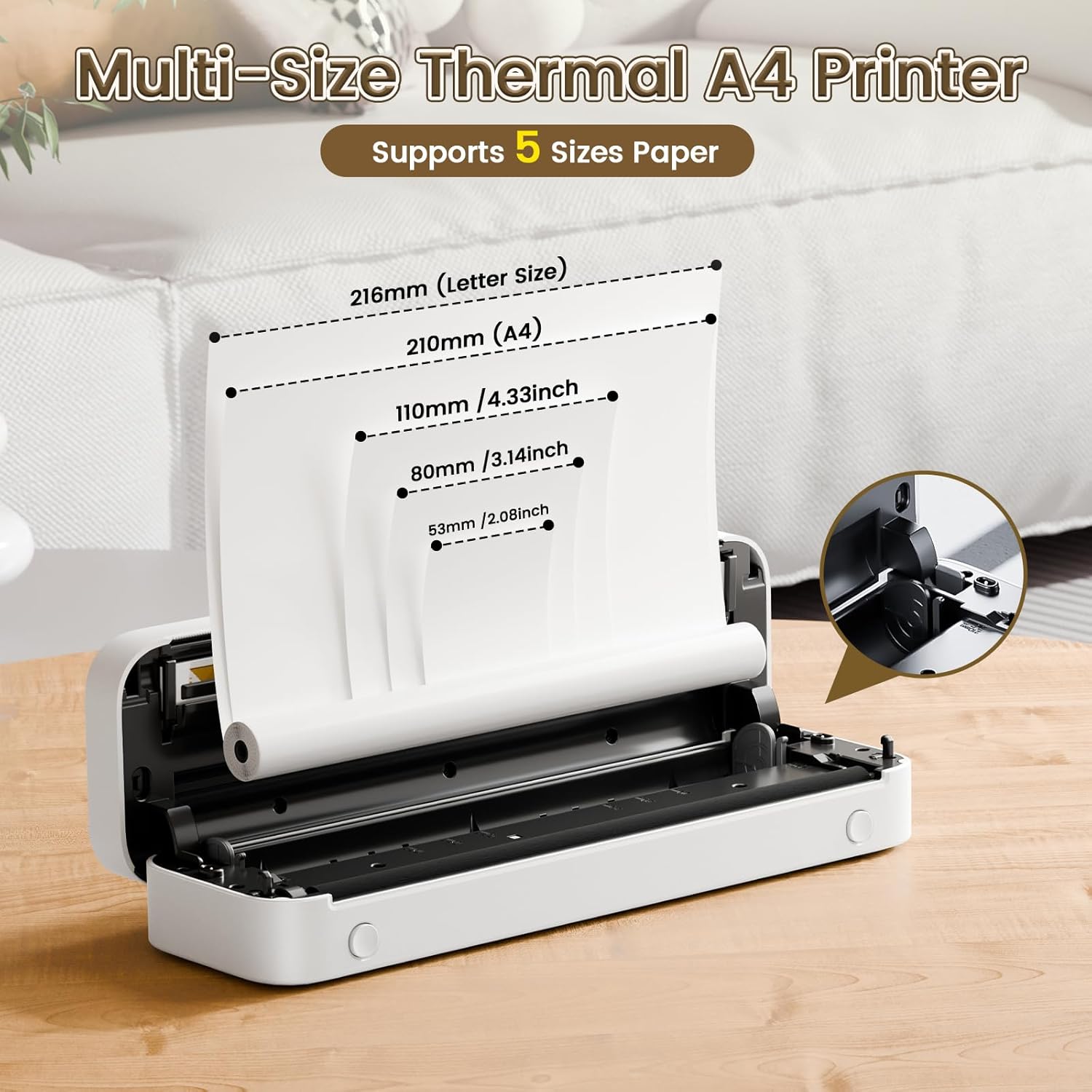
Image: The Phomemo M836-B printer demonstrating support for multiple paper sizes, including US Letter (216mm) and A4 (210mm).
3. Түзмөктөргө туташуу
Принтер Bluetooth жана USB туташууларын колдойт.
Bluetooth Connection (for iOS/Android)
- Download the official Phomemo app from your device's app store.
- Принтерди күйгүзүү үчүн кубат баскычын басып жана кармап туруңуз.
- Мобилдик түзмөгүңүздө Bluetooth'ду иштетиңиз.
- Open the Phomemo app, search for the printer (M836-B), and pair with it.
- Жупташтыруу процессин аяктоо үчүн экрандагы көрсөтмөлөрдү аткарыңыз.
USB Connection (for Windows/macOS/ChromeOS/Linux)
- Принтер күйгүзүлгөнүн текшериңиз.
- Connect the printer to your computer using the provided USB Type-C cable.
- Расмий Phomemo сайтына кириңиз webсайт (www.phomemo.com) to download and install the appropriate drivers for your operating system.
- Драйверлер орнотулгандан кийин, принтер компьютериңиз тарабынан таанылышы керек.

Image: Diagram illustrating the two types of connections supported by the Phomemo M836-B: Bluetooth for Android, iOS, and iPad, and USB for Windows, macOS, ChromeOS, and Linux.
Иштөө нускамалары
Printing from Mobile Devices
- Ensure your printer is charged, loaded with paper, and connected via Bluetooth to your mobile device.
- Phomemo колдонмосун ачыңыз.
- Select the document or image you wish to print from within the app.
- Adjust print settings (e.g., paper size, density) as needed.
- Tap the print button to initiate printing.
Printing from Computers
- Ensure your printer is charged, loaded with paper, and connected via USB to your computer with drivers installed.
- Документти ачуу же file компьютериңизде басып чыгаргыңыз келет.
- "" бөлүмүнө өтүңүзFile" > "Print" (or use the shortcut Ctrl+P/Cmd+P).
- Select the Phomemo M836-B from the list of available printers.
- Adjust print preferences (e.g., paper size, orientation) as required.
- "Басып чыгаруу" баскычын чыкылдатыңыз.
Paper Handling Tips
- Always use high-quality thermal paper for best results.
- Ensure the paper is loaded correctly with the printable side facing the print head.
- Avoid exposing thermal paper to direct sunlight or high temperatures, as this can degrade print quality over time.
- Manually tear off printed documents carefully after printing, as the printer does not have an automatic cutter.
Техникалык тейлөө
Принтерди тазалоо
- Принтерди өчүрүп, аны кубат булагынан ажыратыңыз.
- Бир аз жумшак, түксүз кездемени колдонуңуз dampбасып чыгаруу башын акырын сүртүш үчүн изопропил спирти менен иштетилген. Колдонуудан мурун аны толугу менен кургатуу керек.
- Clean the exterior of the printer with a soft, dry cloth. Do not use abrasive cleaners or solvents.
Сактагыч
- Принтерди салкын, кургак жерде, тике күндүн нурунан жана экстремалдык температурадан алыс сактаңыз.
- If storing for an extended period, ensure the printer is fully charged to maintain battery health.
- Keep thermal paper in its original packaging in a dark, cool place to prevent premature fading.
Проблемаларды чечүү
If you encounter issues with your Phomemo M836-B printer, refer to the following common problems and solutions:
Printer Not Turning On
- Батареяны текшерүү: Ensure the printer is sufficiently charged. Connect it to a power source and try again.
- Кубат баскычы: Press and hold the power button for a few seconds to ensure it's properly activated.
Connectivity Issues (Bluetooth/USB)
- Bluetooth:
- Ensure Bluetooth is enabled on your device and the printer is within range.
- Unpair and re-pair the printer in your device's Bluetooth settings.
- Принтерди да, мобилдик түзмөгүңүздү да өчүрүп-күйгүзүңүз.
- USB:
- Verify the USB cable is securely connected to both the printer and the computer.
- Ensure the correct printer drivers are installed on your computer. Reinstall if necessary.
- Башка USB портун же кабелин колдонуп көрүңүз.
Poor Print Quality (Blurry, Faded, Streaks)
- Таза басып чыгаруучу баш: Follow the cleaning instructions in the Maintenance section.
- Paper Quality/Type: Ensure you are using high-quality thermal paper and that it is loaded correctly.
- Басып чыгаруу тыгыздыгы: Adjust print density settings in the Phomemo app or printer driver.
- Кагазды сактоо: Thermal paper exposed to heat or light can degrade. Try a fresh roll of paper.
Paper Jams
- Turn Off Printer: Immediately turn off the printer.
- Кагазды алып салуу: Gently pull out any jammed paper. Do not force it, as this can damage the printer.
- Кайра жүктөө: Ensure paper is loaded correctly and not wrinkled or bent before restarting.
Техникалык мүнөздөмөлөр
| Өзгөчөлүк | Спецификация |
|---|---|
| Бренд | Phomemo |
| Модель аты | M836-B |
| Байланыш технологиясы | Bluetooth, USB түрү C |
| Басма технологиясы | Термикалык |
| Принтердин чыгышы | Монохромдуу |
| Max Print Resolution | 300 DPI |
| Макс басып чыгаруу ылдамдыгы (монохромдуу) | Мүнөтүнө 1.5 бет |
| Шайкеш түзмөктөр | Android Devices, Mac, Windows, iPhone, iPad |
| Максималдуу медиа өлчөмү | 8.5 x 11 дюйм (АКШ тамгасы менен) |
| Кагаз өлчөмүн колдоо | US Letter, A4 |
| Printing Media Type | Термалдык кагаз |
| Элемент Салмагы | 1.53 фунт (болжол менен 694 г) |
| Продукциянын өлчөмдөрү (D x W x Y) | 7.8D x 26.4W x 4.5H Сантиметр |
| Башкаруу ыкмасы | Колдонмо |
| Келип чыккан өлкө | Кытай |
Кепилдик жана колдоо
Specific warranty details for the Phomemo M836-B Portable Thermal Printer are not provided within this document. For information regarding warranty coverage, technical support, or service, please refer to the warranty card included with your product or contact Phomemo customer service directly through their official webсайт же продукт таңгагында көрсөтүлгөн байланыш маалыматы.
Official Phomemo Webсайт: www.phomemo.com