1. Киришүү
Сатып алганыңыз үчүн рахматasing the Generic L018 Projector. This portable projector is designed to deliver a high-quality home theater experience with its Native 1080P resolution, 650 ANSI Lumens brightness, and 4K support. Featuring Android 11, Wi-Fi 6, Bluetooth 5.2, and automatic keystone correction and focus, it offers versatile entertainment options for various environments, including bedrooms, home theaters, outdoor settings, and gaming.

Figure 1.1: The L018 Projector, showcasing its compact design and included remote control. The projected image highlights its visual capabilities.

Figure 1.2: Versatile applications of the L018 Projector, suitable for gaming, bedroom viewing, dedicated home theaters, and outdoor movie nights.
2. Коопсуздук боюнча маанилүү маалымат
Проекторду колдонуудан мурун бардык коопсуздук нускамаларын кылдат окуп чыгыңыз. Бул колдонмону келечекте маалымат алуу үчүн сактаңыз.
- l болгондо проектордун объективине тике карабаamp күйүк. Жарык жарык көзгө зыян келтириши мүмкүн.
- Туура желдетүүнү камсыз кылыңыз. Вентиляция тешиктерин жаап албаңыз.
- Өрт же электр тогуна урунуп калбаш үчүн проекторду жамгырга же нымдуулукка дуушар кылбаңыз.
- Өндүрүүчү белгилеген тиркемелерди/аксессуарларды гана колдонуңуз.
- Чагылган бороондордо же көпкө колдонулбаганда проекторду электр розеткасынан ажыратыңыз.
- Бардык тейлөөлөрдү квалификациялуу тейлөө кызматкерлерине тапшырыңыз.
3. Пакеттин мазмуну
Пакетиңизде бардык буюмдар бар экенин текшериңиз:
- Generic L018 Projector
- Алыстан башкаруу
- Кубат адаптери (ачык тизмеде жок, бирок иштөө үчүн арналган)
- Колдонуучунун Колдонмосу (бул документ)
4. Продукт бүтүп калдыview
Familiarize yourself with the components of your L018 Projector.

Figure 4.1: Key features and components of the L018 Projector, highlighting its advanced capabilities.
4.1. Interfaces
The projector includes various ports for connectivity:
- USB порт: USB сактагыч түзмөктөрдү туташтыруу үчүн.
- HDMI порту: For connecting external video sources like laptops, gaming consoles, or Blu-ray players.
- Аудио чыгаруу: Тышкы динамиктерди же наушниктерди туташтыруу үчүн.
- Кубат киргизүү: Кубат адаптерин туташтыруу үчүн.
5. Орнотуу
5.1. Жайгаштыруу
The L018 Projector features a 360° removable adjustable stand, allowing for flexible placement and projection angles. You can easily rotate and tilt the projector to achieve the perfect viewing angle on a wall, ceiling, or screen.
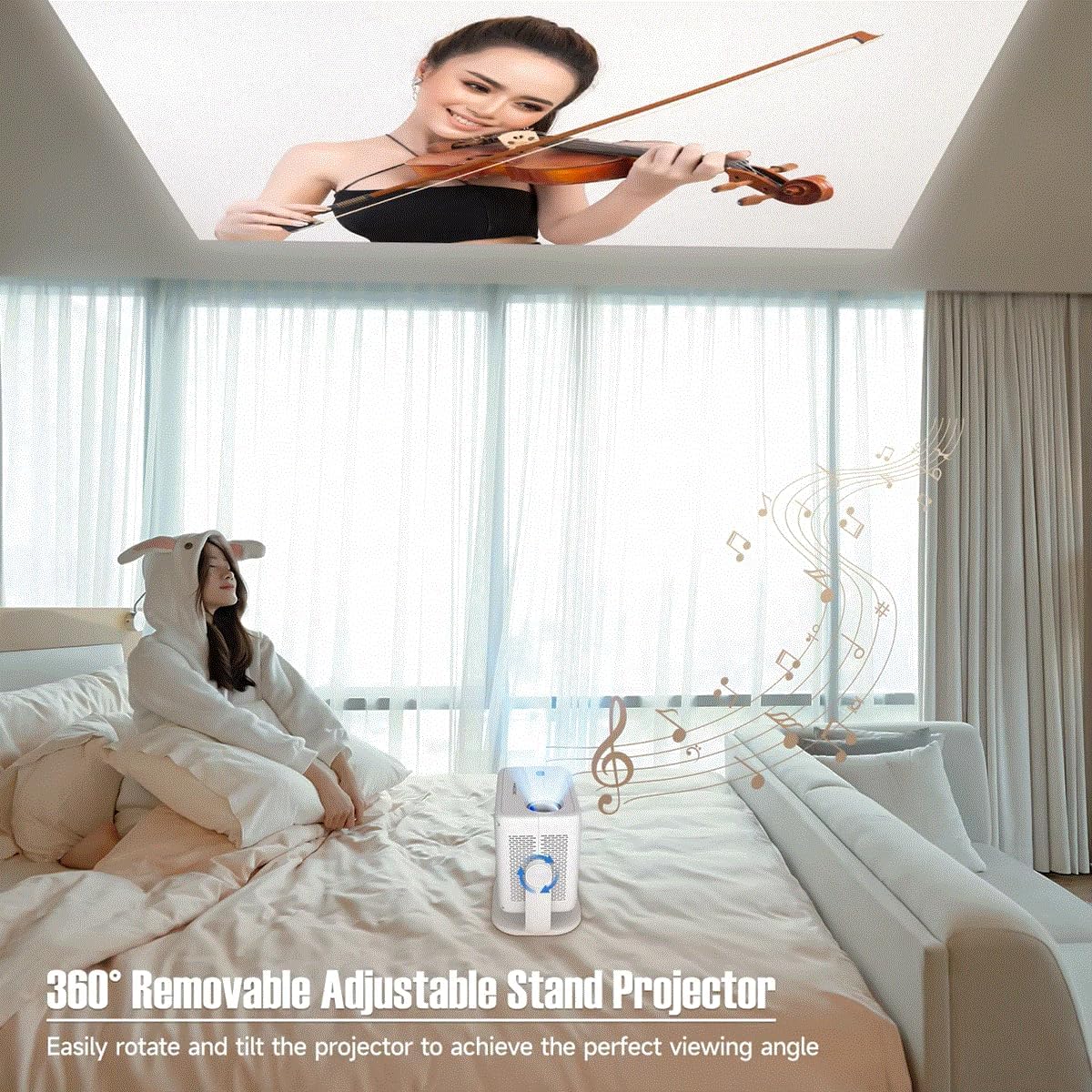
Figure 5.1: The projector's adjustable stand enables projection onto various surfaces, including ceilings, for comfortable viewing.
5.2. Power Connection
- Кубат адаптерин проектордун кубат киргизүү портуна туташтырыңыз.
- Кубат адаптерин ылайыктуу электр розеткасына сайыңыз.
5.3. Баштапкы күйгүзүү
Press the power button on the projector or the remote control to turn on the device. The projector will automatically perform keystone correction and focus.
6. Иштөө нускамалары
Video 6.1: This video demonstrates key features of the L018 Projector, including its 360° adjustable stand, automatic focus and keystone correction, projection throw distance capabilities, integrated Bluetooth 5.2 Hi-Fi stereo speaker, 1080P native resolution with 4K support, and wireless screen mirroring functionality.
6.1. Auto Keystone Correction & Focus
The L018 Projector features automatic keystone correction and focus. This means the image will automatically adjust to be rectangular and sharp, even if the projector is placed at an angle. This process typically takes only 2 seconds.
Figure 6.1: The projector automatically corrects image distortion and focuses for a clear picture.
6.2. Image Adjustment (Zoom In & Zoom Out)
You can easily adjust the image size from 50% to 100% without physically moving the projector. After using this function, it may be necessary to slightly move the projector for the auto-focus and keystone correction to re-engage and optimize the image.
6.3. Зымсыз экранды чагылдыруу
Seamlessly cast content from your phone, tablet, or laptop to the projector. The built-in Android 11 system and high-performing Allwinner H713 Chip ensure a smooth mirroring experience.

Figure 6.2: The projector delivers sharp and detailed images with high brightness and contrast.
6.4. Байланыш
- Dual-band WiFi 6 (2.4G+5G): Provides ultra-fast and stable connection for streaming and online content without delay.
- Bluetooth 5.2: Жакшыртылган аудио тажрыйбасы үчүн тышкы Bluetooth динамиктерин же гарнитураны туташтырыңыз.
- HDMI & USB: Wired connectivity options for various devices.

Figure 6.3: The benefits of Dual-band WiFi 6 for fast and stable streaming.
6.5. Үн
The projector is equipped with a built-in Hi-Fi Stereo Speaker, allowing you to enjoy an immersive sound experience directly from the device. For private listening or enhanced audio, connect external speakers or headphones via Bluetooth 5.2 or the audio output port.
6.6. Проекция режимдери
The projector offers three distinct projection modes to suit your viewмуктаждыктар:
- Стандарттык режим: Balanced settings for general viewing.
- Highlight Mode: Increases brightness for clearer visibility in brighter environments.
- Энергияны үнөмдөө режими: Reduces power consumption, ideal for extended viewing or when battery life is a concern.
7. Техникалык тейлөө
Проекторуңуздун узак мөөнөттүү иштешин жана оптималдуу иштешин камсыз кылуу үчүн үзгүлтүксүз техникалык тейлөө жүргүзүү керек.
- Линзаны тазалоо: Оптикалык линзалар үчүн атайын жасалган жумшак, түксүз кездемени колдонуңуз. Абразивдүү тазалагычтарды же эриткичтерди колдонбоңуз.
- Вентиляция порттору: Periodically check and clean the ventilation openings to prevent dust buildup, which can lead to overheating. Use a soft brush or compressed air.
- Тышкы тазалоо: Проектордун сыртын жумшак, кургак чүпүрөк менен сүртүңүз. өжөр белгилери үчүн, бир аз гamp кездеме, андан кийин кургак аарчый колдонсо болот.
- Сактагыч: Узак мөөнөткө пайдаланылбаганда, проекторду салкын, кургак жерде, тике күн нурунан жана экстремалдык температурадан алыс сактаңыз.
8. Кыйынчылыктарды
Проекторуңузда көйгөйлөргө туш болсоңуз, төмөнкү жалпы көйгөйлөрдү жана чечимдерди караңыз:
| Көйгөй | Мүмкүн себеп | Чечим |
|---|---|---|
| Күч жок | Электр кабели туташкан эмес; Электр розеткасынын маселеси. | Кубат кабелинин бекем туташтырылганын текшериңиз. Башка розетканы колдонуп көрүңүз. |
| Сүрөт жок | Input source not selected; Cable connection issue; Lens cap on. | Select correct input source. Check HDMI/USB cable connections. Remove lens cap. |
| бүдөмүк сүрөт | Out of focus; Projector moved after zoom adjustment. | Allow auto-focus to re-engage (slight movement may help). Ensure projector is within optimal throw distance. |
| Бурмаланган сүрөт (трапеция) | Проектор экранга перпендикуляр эмес. | Auto keystone correction should fix this. If not, slightly adjust projector position. |
| Үн жок | Volume too low; Muted; External audio device not connected/selected. | Increase volume. Unmute. Check Bluetooth connection or external audio cable. |
| Wireless Mirroring Issues | Network instability; Device compatibility. | Ensure both devices are on the same Wi-Fi network. Restart both devices. Check device compatibility. |
9. Техникалык шарттар
| Өзгөчөлүк | Description |
|---|---|
| Бренд аты | Жалпы |
| Элемент моделинин номери | L018 проектор |
| Түс аты | Ак |
| Өзгөчөлүктөр | 360° Removable Adjustable Stand Projector, BT5.2 & Hl-Fl Stereo Speaker, Ultra-fast connection Dual-band WiFi6 (2.4G+5G), High-Performing Processor Allwinner H713 Chip |
| Сунушталган Колдонуулар | Билим берүү, үй кинотеатры, оюн, бизнес |
| Байланыш технологиясы | Bluetooth, Wi-Fi, USB, HDMI |
| Display Resolution | 1920 x 1080 (Native 1080P, 4K Supported) |
| ANSI Lumens | 650 ANSI |
| Болжолдонгон өлчөм | 30-300 дюйм |
| Жарык булагы | LED |
| Экран масштабы | 16:09 |
| Контраст катышы | 10,001:1-20,000:1 |
| Keystone Correction | Auto Correction |
| Операция системасы | Android 11 |
| Процессор | Allwinner H713 Chip |
| Bluetooth | BT5.2 |
| Камтылган динамик | Ооба |
| Remote Controller | Ооба |
| Projection Throw Ratio | 1.2:1 |
10. Кепилдик жана колдоо
For warranty information and customer support, please refer to the documentation provided at the time of purchase or contact the manufacturer directly. Keep your purchase receipt as proof of purchase.
For technical assistance or further inquiries, please visit the official Generic brand webсайтка же кардарларды тейлөөгө кайрылыңыз.


