
1. Киришүү
This manual provides detailed instructions for the installation, operation, and maintenance of the ADVANTECH PCIE-1612C-AE 4-Port RS-232/422/485 PCIe Communication Card. This interface module is designed to expand your system's serial communication capabilities, offering robust and reliable data transfer for industrial and commercial applications. Please read this manual thoroughly before attempting to install or operate the device.
2. Коопсуздук маалыматы
Түзмөккө зыян келтирбөө жана жеке коопсуздугуңуз үчүн төмөнкү коопсуздук чараларын сактаңыз:
- Always disconnect power from your computer system before installing or removing any internal components.
- Wear an anti-static wrist strap and work on an anti-static mat to prevent electrostatic discharge (ESD) damage to the card and other components.
- Картанын сезгич бөлүктөрүнө тийип албаш үчүн четтеринен кармаңыз.
- Ашыкча ысып кетүүнүн алдын алуу үчүн компьютериңиздин корпусунун ичинде туура желдетүүнү камсыз кылыңыз.
- Картаны нымдуулукка же өтө жогорку температурага дуушар кылбаңыз.
3. Пакеттин мазмуну
Таңгактагы бардык буюмдардын бар экенин текшериңиз. Эгерде кандайдыр бир буюм жок болсо же бузулуп калса, дароо сатуучуга кайрылыңыз.
- 1 x ADVANTECH PCIE-1612C-AE 4-Port RS-232/422/485 PCIe Communication Card
- Documentation (e.g., Quick Start Guide, Driver CD/USB - may vary by package)
4. Продукт бүтүп калдыview
The ADVANTECH PCIE-1612C-AE is a high-performance PCIe communication card designed for reliable serial data transmission. It features four independent serial ports, configurable for RS-232, RS-422, or RS-485 standards, making it versatile for various industrial and embedded applications.
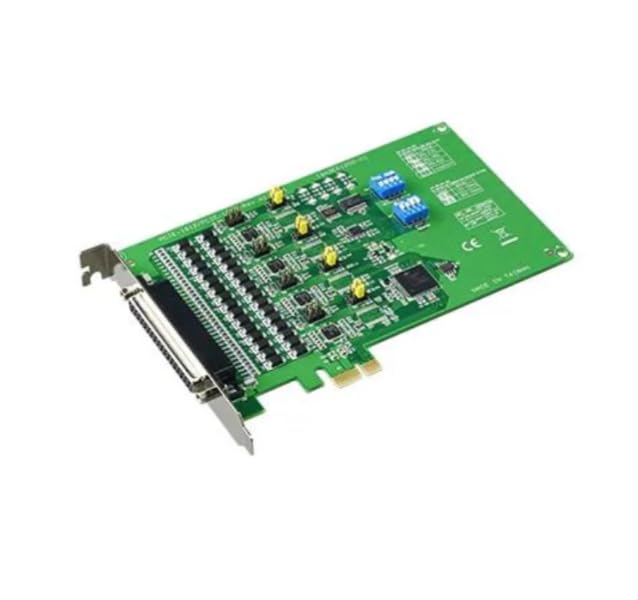
Figure 1: ADVANTECH PCIE-1612C-AE 4-Port RS-232/422/485 PCIe Communication Card. This image shows the physical card with its PCIe connector and four serial port connectors.
Негизги өзгөчөлүктөрү:
- Number of Channels / Ports: 4 Порт
- Максималдуу маалымат ылдамдыгы: 921.6 кб/сек
- Интерфейс түрү: PCIe, RS-232/422/485
- Operating Supply Voltage: 3.3 V
- Иштөө температурасы диапазону: -10°Cден +60°Cге чейин
5. Орнотуу
Follow these steps to properly install the PCIE-1612C-AE card into your computer system:
- Системаңызды даярдаңыз: Power off your computer and disconnect the power cord from the wall outlet. Disconnect all peripheral devices.
- Компьютер корпусун ачуу: Эне платага жана кеңейтүү уячаларына кирүү үчүн компьютериңиздин каптал панелин алып салыңыз.
- Жеткиликтүү PCIe слотун табыңыз: Identify an empty PCI Express (PCIe) slot on your motherboard. The PCIE-1612C-AE requires a standard PCIe slot.
- Slot капкагын алып салуу: Компьютериңиздин корпусунун арткы жагынан тандалган PCIe уячасына туура келген металл уяча капкагын алып салыңыз.
- Картаны орнотуу: Carefully align the PCIE-1612C-AE card with the PCIe slot. Apply even pressure to both ends of the card until it is firmly seated in the slot. Ensure the card's bracket is flush with the back of the computer case.
- Картаны коргоо: Secure the card's bracket to the computer case using the screw or latch mechanism provided by your case.
- Ишти жабуу: Replace the computer's side panel and secure it.
- Кубатты кайра туташтыруу: Reconnect the power cord and all peripheral devices. Power on your computer.
- Драйверлерди орнотуу: Once the operating system boots, it may automatically detect the new hardware. Install the necessary drivers from the provided media or download them from the ADVANTECH webсайт. Драйверди орнотуу үчүн экрандагы көрсөтмөлөрдү аткарыңыз.
6. Иштөө
After successful installation and driver setup, the PCIE-1612C-AE card's serial ports will be available in your operating system's Device Manager (Windows) or equivalent system information utility (Linux). Each port can be configured for its specific communication parameters (baud rate, data bits, parity, stop bits, flow control) through your operating system's settings or application software.
- Түзмөктөрдү туташтыруу: Connect your RS-232, RS-422, or RS-485 compatible devices to the corresponding ports on the PCIE-1612C-AE card using appropriate serial cables.
- Программанын конфигурациясы: Use your serial communication software or application to select the correct COM port number assigned to each physical port on the card and configure the communication parameters to match your connected device.
- RS-422/485 Mode: For RS-422/485 modes, ensure proper termination and biasing are applied if required by your network topology. Refer to your device's documentation for specific requirements.
7. Техникалык тейлөө
The PCIE-1612C-AE card is designed for long-term reliability with minimal maintenance. However, adhering to general computer maintenance practices will help ensure optimal performance:
- Чаңды тазалоо: Periodically open your computer case (after disconnecting power) and use compressed air to gently remove dust buildup from the card and surrounding components. Dust can impede heat dissipation and lead to component failure.
- Экологиялык көзөмөл: Иштөө чөйрөсү белгиленген температуранын жана нымдуулуктун чегинде сакталышын камсыз кылыңыз.
- Кабелдик башкаруу: Keep internal cables tidy to maintain good airflow within the case.
8. Кыйынчылыктарды
If you encounter issues with your PCIE-1612C-AE card, consider the following troubleshooting steps:
- Карта табылган жок:
- Карта толугу менен PCIe уячасына орнотулганын текшериңиз.
- Картаны башка PCIe уячасына орнотуп көрүңүз.
- Check your computer's BIOS/UEFI settings to ensure PCIe slots are enabled.
- Драйверлер орнотулбай/иштебей жатат:
- Verify you have downloaded the correct drivers for your operating system and card model from the ADVANTECH webсайт.
- Uninstall any previous serial port drivers before installing new ones.
- Check Device Manager for any error codes related to the serial ports.
- Байланыш каталары:
- Confirm that the serial cable is correctly connected and not damaged.
- Verify that the communication parameters (baud rate, data bits, parity, stop bits, flow control) in your software match those of the connected device.
- For RS-485, check for proper wiring (A/B lines) and termination.
- Test with a known working serial device or loopback test if possible.
9. Техникалык шарттар
| Өзгөчөлүк | Спецификация |
|---|---|
| Модель номери | PCIE-1612C-AE |
| Өндүрүүчү | ADVANTECH |
| Продукт түрү | Интерфейс модулдары |
| Number of Channels / Ports | 4 Порт |
| Interface Type | PCIe, RS-232/422/485 |
| Максималдуу маалымат ылдамдыгы | 921.6 кб/сек |
| Operating Supply Voltage | 3.3 V |
| Минималдуу иштөө температурасы | -10°C |
| Максималдуу иштөө температурасы | +60°C |
| Элемент Салмагы | 7 фунт |
10. Кепилдик жана колдоо
For warranty information, please refer to the documentation included with your purchase or contact your reseller or ADVANTECH directly. Warranty terms and conditions may vary by region and purchase agreement.
For technical support, driver downloads, or further assistance, please visit the official ADVANTECH website or contact their customer support services. Provide your product model number (PCIE-1612C-AE) and any relevant system information when seeking support.