
1. Киришүү
The Xvive XV1-R is a compact and versatile portable stereo audio recorder designed for musicians, podcasters, filmmakers, and anyone requiring high-quality audio capture. It features 32-bit float recording, X/Y stereo microphones, and supports both WAV and AAC formats. This manual provides comprehensive instructions for setting up, operating, maintaining, and troubleshooting your XV1-R recorder.

This image displays the Xvive XV1-R portable audio recorder from the front, highlighting its ergonomic design, integrated X/Y stereo microphones at the top, and the central control panel with a monochrome display and various function buttons.
2. Продукт бүтүп калдыview
Негизги өзгөчөлүктөрү
- 32-bit Float Recording: Captures audio with an extended dynamic range, preventing clipping and preserving detail without manual gain adjustment.
- High-Quality X/Y Microphones: Integrated directional microphones capable of capturing clear audio up to 130 dB SPL without distortion.
- Көп функциялуу жаздыруу форматтары: Supports high-fidelity WAV (32-bit float or 24-bit PCM) and efficient AAC formats.
- USB Microphone Functionality: Connects to PC, Mac, iOS, and Android devices via USB-C for use as an external microphone.
- Портативдик дизайн: Compact and lightweight, suitable for various recording scenarios with features like auto-record, pre-record, and noise reduction.
Understanding 32-bit Float Recording
The 32-bit float recording capability ensures that your audio is captured with a vast dynamic range, making it virtually impossible to clip or distort the signal. This eliminates the need for precise gain staging during recording, simplifying the process and ensuring high-quality results.

This graphic explains 32-bit float lossless recording. It shows how 32-bit float can scale up low gain audio and scale down high gain audio without clipping or noise, unlike 16/24-bit float which can lose detail or distort.
X/Y Microphone Configuration
The integrated X/Y stereo microphones are designed to capture a wide and accurate stereo image, ideal for recording live performances, ambient sounds, or interviews. Their high SPL handling ensures clean recordings even in loud environments.

An image showing the Xvive XV1-R recorder placed on a stand in front of a person playing an acoustic guitar, illustrating its use for capturing high-quality audio with its X/Y directional microphones in a musical setting.
WAV vs. AAC Formats
The XV1-R offers flexibility with two primary recording formats:
| Өзгөчөлүк | WAV форматы | AAC Format |
|---|---|---|
| Аудио сапаты | Lossless, Highest Fidelity | Compressed, Clear Sound |
| File Өлчөмү | Larger (More storage required) | Smaller (Optimized for storage) |
| Sample Rate Support | Up to 96 kHz, 48 kHz, 44.1 kHz | 48 кГц, 24 кГц |
| Use Cases | Music production, professional recording | Meetings, voice memos, everyday use |

A comparison table outlining the differences between WAV and AAC recording formats available on the Xvive XV1-R.
3. Баштоо (Орнотуу)
3.1 Пакеттин мазмуну
Ensure your package contains the Xvive XV1-R recorder and 2 AA batteries.
3.2 Батареяны орнотуу
- Locate the battery compartment on the back of the XV1-R.
- Бөлүмдүн капкагын ачыңыз.
- Туура полярдуулукту (+/-) камсыз кылуу менен эки AA батарейкасын салыңыз.
- Батарея уясынын капкагын бекем жабыңыз.
3.3 MicroSD картасын салуу
The XV1-R records directly to a MicroSD card. Supported card types include MicroSDHC (up to 32GB) and MicroSDXC (up to 128GB).
- Түзмөктүн капталынан MicroSD карта уячасын табыңыз.
- Gently insert the MicroSD card with the contacts facing down until it clicks into place.
- Чыгаруу үчүн картаны сыртка чыкканга чейин бир аз түртүңүз.
3.4 Күйгүзүү/өчүрүү
- To power on, press and hold the Power button (often integrated with the Play button) until the display illuminates.
- Өчүрүү үчүн, түзмөк өчмөйүнчө Кубат баскычын басып, кармап туруңуз.
3.5 Controls and Ports Overview
Familiarize yourself with the layout of the XV1-R's controls and ports:
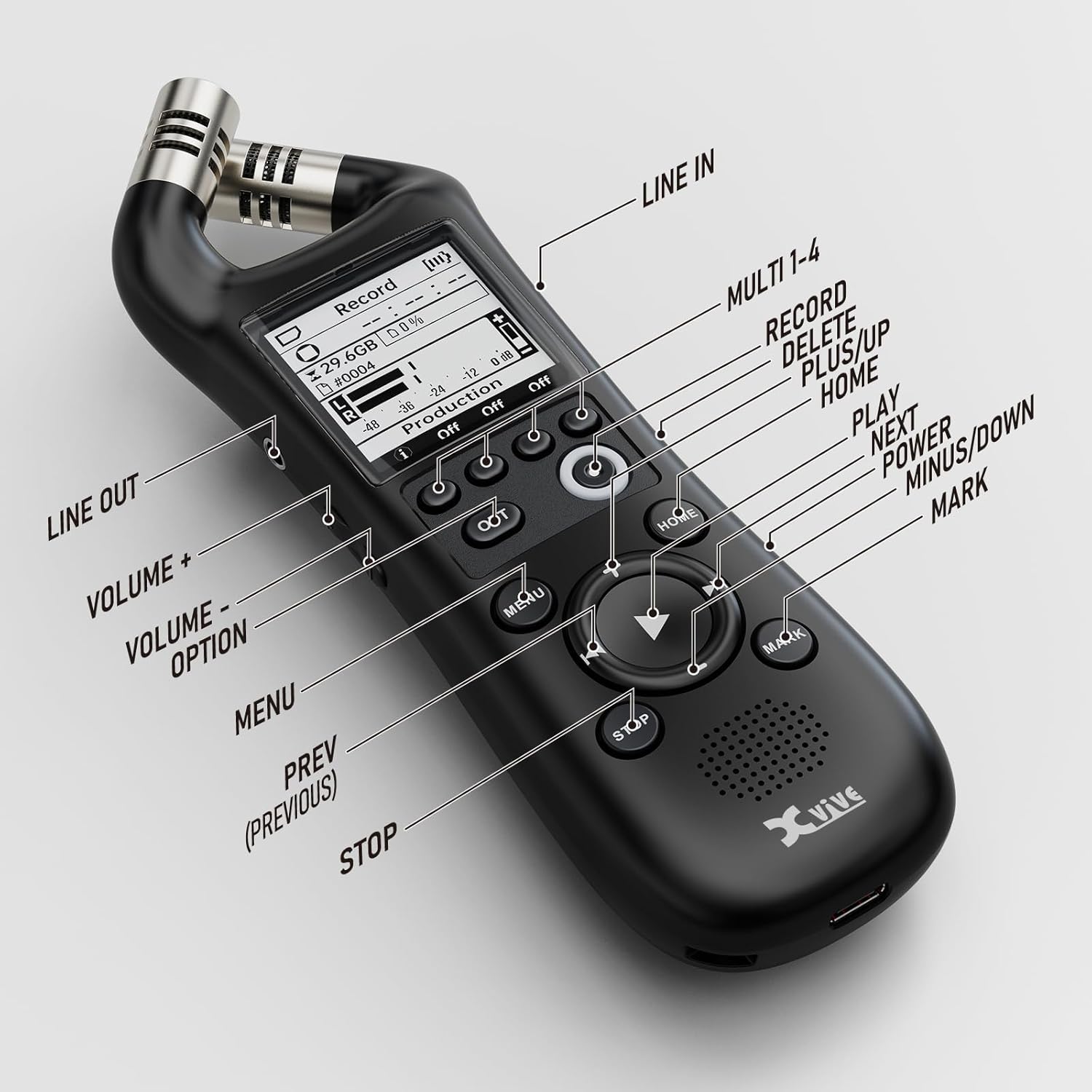
A close-up image of the Xvive XV1-R recorder with labels pointing to each button and port, including Line In, Line Out, Volume controls, Menu, Home, Play, Stop, Mark, and the Multi 1-4 buttons for record, delete, plus, and up functions.
- X/Y Microphones: Top-mounted stereo microphones.
- Дисплей экраны: Shows recording status, menu options, and settings.
- Multi 1-4 Buttons: Context-sensitive buttons for Record, Delete, Plus, and Up functions.
- OPT Button: Option button for specific settings.
- MENU баскычы: Негизги менюга кирет.
- Үй баскычы: Returns to the main recording screen.
- Navigation Pad (Up/Down/Left/Right/Play): Менюну башкаруу жана ойнотууну башкаруу үчүн колдонулат.
- STOP баскычы: Жазууну же ойнотууну токтотот.
- MARK баскычы: Adds markers during recording or playback.
- Line In (3.5mm): Тышкы аудио киргизүү.
- Чыгуу (3.5 мм): Audio output for headphones or external speakers.
- USB-C порту: For data transfer and USB microphone functionality.
4. Иштөө нускамалары
4.1 Негизги жаздыруу
- Ensure a MicroSD card is inserted and batteries are charged.
- Түзмөктү күйгүзүңүз.
- Үй экранынан, баскычын басыңыз Жаздыруу button (often labeled as one of the Multi buttons or a dedicated record button). The recording indicator will illuminate.
- Жазууну токтотуу үчүн, басыңыз ТОКТОТ баскычы.
- Recordings are saved automatically to the MicroSD card.
4.2 Ойнотуу
- From the home screen, use the navigation pad to select a recorded file.
- басыңыз Play button (center of the navigation pad) to begin playback.
- Use the navigation pad to fast forward, rewind, or skip tracks.
- Adjust playback volume using the dedicated Volume buttons.
- басыңыз ТОКТОТ ойнотууну аяктоо үчүн баскыч.
4.3 USB Microphone Functionality
The XV1-R can function as a high-quality USB microphone for your computer or mobile device.
- Connect the XV1-R to your computer or compatible mobile device using a USB-C cable.
- The device will prompt you to select a mode (e.g., USB Audio, Card Reader). Select USB аудио.
- On your computer/device, select the XV1-R as the audio input device in your recording software or system settings.
- The XV1-R will now function as an external microphone with a fixed sampле ылдамдыгы 48 кГц.

The Xvive XV1-R recorder is shown connected to a laptop via a USB-C cable, demonstrating its functionality as a high-quality USB microphone for computer-based audio tasks like streaming or online meetings.
4.4 Өркүндөтүлгөн жаздыруу функциялары
- Автоматтык түрдө жаздыруу: Configures the recorder to start recording automatically when an audio signal above a set threshold is detected.
- Алдын ала жаздыруу: Captures a few seconds of audio before the record button is pressed, ensuring you don't miss the beginning of an event.
- Ызы-чууну азайтуу: Applies digital processing to reduce unwanted background noise during recording or playback.
These features can be accessed and configured through the device's МЕНЮ settings. Refer to the on-screen menu for detailed options and adjustments.
5. Техникалык тейлөө
5.1 Тазалоо
- Use a soft, dry cloth to clean the exterior of the recorder.
- Суюк тазалоочу каражаттарды же эриткичтерди колдонбоңуз, анткени алар капталга же ички компоненттерге зыян келтириши мүмкүн.
- Keep the microphone grilles free of dust and debris.
5.2 Сактоо
- Узак мөөнөткө колдонулбаганда, батарейкалардын агып кетпеши үчүн алып салыңыз.
- Диктофонду күн нуру жана экстремалдык температурадан алыс салкын, кургак жерде сактаңыз.
- Protect the device from impacts and excessive vibration.
6. Кыйынчылыктарды
Жалпы маселелер жана чечимдер
- Түзмөк күйбөйт:
- Батареялар туура полярдуулук менен туура салынганын текшериңиз.
- Жаңы AA батарейкалары менен алмаштырыңыз.
- Батарея отсеги бекем жабылганын текшериңиз.
- If using USB power, ensure the cable and power source are functional.
- No audio during recording:
- Verify that the microphones are not obstructed.
- Check recording settings in the menu to ensure input levels are appropriate.
- Ensure a MicroSD card is properly inserted and has sufficient free space.
- Аудио сапаты начар:
- Ensure the recording environment is suitable (minimize background noise).
- Үн булагына салыштырмалуу микрофондун жайгашуусун текшериңиз.
- Consider enabling noise reduction if applicable.
- Verify the selected recording format and sample rate meet your quality requirements.
- Device not recognized as USB microphone:
- Ensure the XV1-R is set to 'USB Audio' mode after connecting to your computer/device.
- Check your computer's sound settings to select the XV1-R as the input device.
- Try a different USB-C cable or port.
7. Техникалык шарттар
| Спецификация | Деталь |
|---|---|
| Модель номери | XVR1 |
| Продукциянын өлчөмдөрү | 5.9 x 2 x 2 дюйм |
| Элемент Салмагы | 6.4 унция |
| Жазуу форматы | WAV (32-bit float, 24-bit PCM), AAC |
| Sample Rate | Up to 96 kHz (WAV), 48 kHz (AAC, USB Audio) |
| Микрофондор | High-Quality X/Y Directional |
| Max SPL | 130 дБ |
| Сактагыч медиа | MicroSDHC (up to 32GB), MicroSDXC (up to 128GB) |
| Power Source | 2 AA батарейка (кошулган) |
| Байланыш | USB-C, 3.5mm Line In, 3.5mm Line Out |
8. Кепилдик жана колдоо
Xvive products are designed for reliability and performance. For warranty information, technical support, or service inquiries, please refer to the official Xvive webсайтка же түздөн-түз кардарларды колдоо менен байланышыңыз. Сатып алуу квитанциясын кепилдик дооматтары үчүн сатып алуунун далили катары сактаңыз.
Кошумча жардам алуу үчүн, сураныч, баш багыңыз Xvive Store on Amazon.