
Introduction
This manual provides essential information for the safe and efficient operation of your SCULPFUN S9 PRO 10W Laser Engraver. The S9 PRO features 10W laser beam shaping technology, offering a 0.06mm ultra-fine laser focus for strong cutting penetration and precision. It is capable of cutting materials such as 15mm thick wood and 10mm acrylic, and engraving ceramics and stainless steel. Please read this manual thoroughly before use to ensure proper setup, operation, and maintenance.

Коопсуздук маалыматы
Лазердик гравёрду колдонууда потенциалдуу коркунучтар бар. Жаракат алуунун же бузулуунун алдын алуу үчүн бардык коопсуздук көрсөтмөлөрүн аткарыңыз.
- Көздү коргоо: Always wear appropriate laser safety glasses when operating the machine. The integrated laser filter on the S9 PRO blocks 98% of ultraviolet light, allowing observation without additional safety glasses for bystanders, but direct laser exposure should always be avoided.
- Кубат которгучу: The machine is equipped with a secure power switch. Always turn off the machine when not in use or during maintenance.
- Коопсуз жайгаштыруу: Utilize the fastening holes on the four feet and frame structure to secure the machine and data cables, preventing accidental movement.
- Беттик коргоо: Use the provided A4-sized steel pad to protect your work surface from laser damage.
- Вентиляция: Ensure adequate ventilation in your workspace to dissipate fumes produced during engraving and cutting.
- Күйүүчү материалдар: Do not engrave or cut highly flammable materials without proper precautions.
- Балдар жана үй жаныбарлары: Keep children and pets away from the operating area. The laser point can attract attention, but direct exposure is dangerous.

Пакеттин мазмуну
Таңгактан чыгарууда бардык компоненттер бар экенин текшериңиз:
- 1 x SCULPFUN S9 Pro 10 W Laser Engraver
- A4-sized steel pad
- Кубаттуу адаптер
- USB кабели
- Монтаждоо куралдары
- Колдонуучунун Колдонмосу (бул документ)
Орнотуу колдонмосу
1. Ассамблея
The SCULPFUN S9 PRO features a fast assembly design, allowing for installation typically within 10 to 20 minutes. Follow the steps below:
- 1-кадам: Assemble the main frame components.
- 2-кадам: Attach the X-axis and laser module to the frame.
- 3-кадам: Бардык керектүү кабелдерди туташтырыңыз.
- Бүтүрүү: Бардык туташуулардын бекем экенин жана рамканын туруктуу экенин текшериңиз.
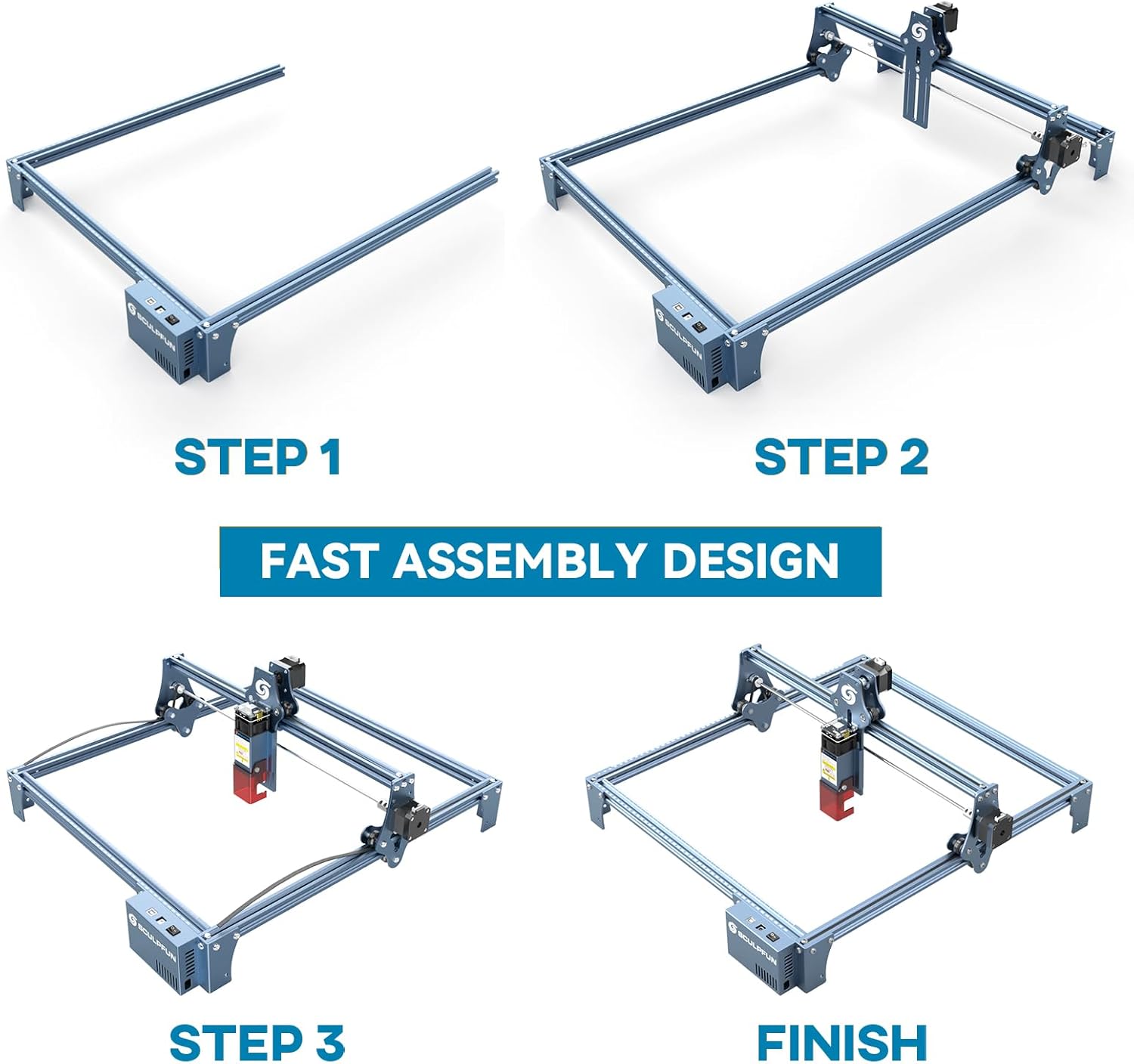
The full-metal structure enhances robustness and engraving accuracy. The X and Y axes include precise scale lines, forming a rectangular measuring ruler for quick object sizing.


2. Фокусту тууралоо
The S9 PRO features a quick fixed-focus design. The laser combines a fixed-focus lens with a sliding design for easy adjustment.
- Place the laser module over your material.
- Move the laser module up or down until the focus is achieved.
- Tighten the screws to secure the laser module in place.

Иштөө нускамалары
1. Программанын шайкештиги
The SCULPFUN S9 PRO is compatible with various advanced engraving software:
- LaserGRBL (Windows)
- LightBurn (Windows, macOS, Linux)
- Benbox
- GrblController
- LiteFire
It supports engraving in PWM mode and various file formats including JPG, PNG, DXF, SVG, AI, G-code, NC, and BMP.

2. Material Capabilities
The 10W laser module provides strong cutting and engraving capabilities across a wide range of materials:
- Кесүү: Up to 15mm thick wood, 10mm black acrylic.
- Гравюра: Wood, leather, ceramics, stainless steel, aluminum oxide, PCB board, paper, cardboard, dark stone, and more.


3. General Operation Workflow
- Дизайн: Create or import your design using compatible software (e.g., LightBurn, LaserGRBL).
- Материалды жайгаштыруу: Place your material on the work surface, ensuring it is flat and secure. Use the integrated rulers for precise positioning.
- Фокусту тууралоо: Adjust the laser focus as described in the Setup section.
- Программалык камсыздоонун жөндөөлөрү: Configure laser power, speed, and passes in your chosen software according to the material and desired effect. Refer to software documentation for detailed settings.
- Ишти баштоо: Программалык камсыздоодон гравюра же кесүү процессин баштаңыз. Машинанын иштешин көзөмөлдөңүз.
- Аяктоо: Once the process is complete, turn off the machine and carefully remove your finished piece.
Техникалык тейлөө
Regular maintenance ensures optimal performance and extends the lifespan of your SCULPFUN S9 PRO.
- Лазердик линзаны тазалоо: Periodically clean the laser lens with a soft, lint-free cloth and lens cleaning solution to maintain laser precision.
- Clean the Work Area: Remove debris and dust from the engraving area after each use to prevent interference with machine movement.
- Inspect Belts and Rails: Check the drive belts for tension and wear. Keep the guide rails clean and lubricated if necessary to ensure smooth movement of the laser module.
- Программалык камсыздоонун жаңыртуулары: Check the official SCULPFUN website for any available firmware updates to ensure your machine has the latest features and improvements.
Проблемаларды чечүү
Бул бөлүм сиз кабылышы мүмкүн болгон жалпы көйгөйлөрдү карайт.
- Лазер күйбөйт:
- Check if the power cable is securely connected and the power switch is on.
- Verify that the USB cable is connected to your computer and the machine.
- Ensure the software is correctly configured and sending commands.
- Check the laser module connection.
- Гравюра/кесүү сапаты начар:
- Re-check the laser focus. An incorrect focus is a common cause of poor quality.
- Adjust laser power and speed settings in your software. Different materials require different settings.
- Материалдын тегиз жана бекем орнотулганын текшериңиз.
- Лазердик линза кир болуп көрүнсө, тазалаңыз.
- Machine Not Moving Correctly:
- Check for any obstructions on the rails or belts.
- Ensure belts are properly tensioned and not slipping.
- Бардык кабелдер бекем туташтырылганын текшериңиз.
- Restart the software and the machine.
- Программалык камсыздоого туташуу маселелери:
- Программалык камсыздооңузда туура COM порту тандалганын текшериңиз.
- Try restarting your computer and the engraver.
- Reinstall the software or drivers if necessary.
For persistent issues, refer to the SCULPFUN support webсайтка же кардарларды тейлөөгө кайрылыңыз.
Техникалык шарттар
| Бренд | SCULPFUN |
| Модель номери | S9PRO10W-ELE |
| Лазердик күч | 10W (Diode Laser) |
| Лазердик фокус | 0.06mm (Ultrafine) |
| Гравюра тактыгы | 0.01мм |
| Гравюра аянты | 400 x 410 мм |
| Power Source | AC |
| Пакеттин өлчөмдөрү | 61.79 x 38.4 x 13.4 см |
| Пакет Салмагы | 4.95 кг |
| Камтылган компоненттер | 1 x SCULPFUN S9 Pro 10 W laser engraver |
| Программалык камсыздоонун шайкештиги | LaserGRBL, LightBurn, Benbox, GrblController, LiteFire |
| Колдоого алынган OS | Windows, macOS, Linux |
| Колдоого алынган File Форматтар | JPG, PNG, DXF, SVG, AI, G-code, NC, BMP |
Кепилдик жана колдоо
For warranty information, technical support, or service inquiries, please contact SCULPFUN customer support through their official webпродукт сатылып алынган сайт же сатуучу. Сатып алганыңыздын далили катары сатып алуу дүмүрчөгүңүздү сактаңыз.
Өндүрүүчү: SCULPFUN
Биринчи жеткиликтүү датасы: 29-ноябрь, 2024-жыл