
1. Киришүү
This manual provides detailed instructions for the installation, configuration, and operation of the MD430 Stepper Motor Controller Board Driver, featuring the TB6560 chip. This single-axis driver is designed for controlling stepper motors with a maximum current of 3.5A and supports up to 16 microsteps, making it suitable for various automation and motion control applications.
2. Коопсуздук маалыматы
Please read and understand all safety precautions before installing or operating this device. Failure to comply with these instructions may result in electrical shock, fire, or damage to the product or connected equipment.
- Зымдарды туташтыруудан мурун, электр кубатынан ажыратылганын текшериңиз.
- Verify correct polarity for all power connections.
- Көрсөтүлгөн көлөмдөн ашпаңызtage жана учурдагы рейтингдер.
- Ашыкча ысып кетпеши үчүн, тактаны жакшы желдетилген жерге орнотуңуз.
- Avoid touching components while the board is powered.
3. Продукциянын өзгөчөлүктөрү
- Integrated TB6560AHQ chip for reliable stepper motor control.
- Single-axis control for one stepper motor.
- Maximum output current: 3.5A.
- Microstepping capabilities: 1, 2, 8, 16 microsteps.
- Adjustable current settings.
- Overheat and overcurrent protection.
- Compact design with integrated heatsink for efficient heat dissipation.
4. Компонентти идентификациялоо
Familiarize yourself with the various components on the MD430 driver board:

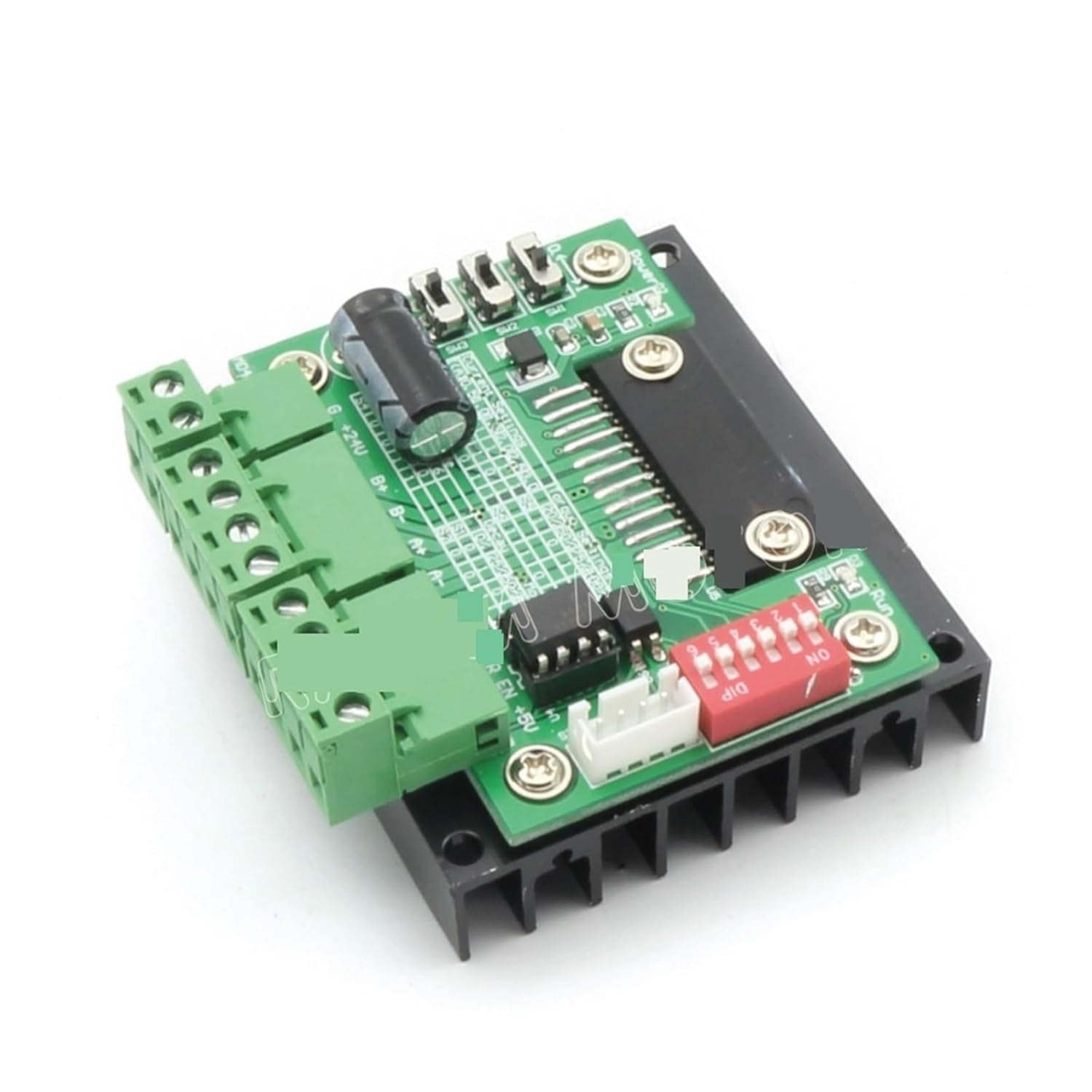

Негизги компоненттерге төмөнкүлөр кирет:
- Кубат киргизүү терминалдары: DC электр булагы туташтыруу үчүн.
- Мотордун чыгуучу терминалдары: For connecting the stepper motor windings (A+, A-, B+, B-).
- Башкаруучу сигнал киргизүү: Terminals for Step, Direction, and Enable signals.
- DIP өчүргүчтөр: Used to configure microstepping resolution and output current.
- Жылыткыч: Large black aluminum heatsink for thermal dissipation.
5. Орнотуу жана зымдар
Follow these steps to correctly set up and wire your MD430 stepper motor driver:
- Кубат менен камсыздоого туташуу:
Connect a DC power supply (typically 12V-36V) to the power input terminals. Ensure correct polarity: +V to positive, GND to negative. The power supply should be capable of providing sufficient current for your motor (e.g., 24V, 5A).
- Stepper Motor Connection:
Connect your 4-wire or 6-wire stepper motor to the motor output terminals (A+, A-, B+, B-). For 6-wire motors, connect the center taps to the power supply positive or leave them disconnected, depending on your motor type and desired configuration (unipolar/bipolar). Refer to your motor's datasheet for specific wiring.
- Control Signal Connection:
Connect your control signals (STEP, DIR, EN) from your microcontroller or CNC controller to the corresponding input terminals on the MD430 board. Ensure common ground connection between the controller and the driver.
- STEP (CLK): Pulse input for each step.
- DIR (CW/CCW): Direction control input (High/Low).
- EN (ENA): Enable input (Low to enable, High to disable motor current).
- DIP которуштуруу конфигурациясы:
Configure the DIP switches for desired microstepping resolution and output current. Refer to the tables below for settings. Always adjust DIP switches when power is off.
Microstepping Settings:
Microstep S1 S2 S3 1 (Full Step) ON ON ON 2 (Half Step) ӨЧҮРҮҮ ON ON 8 (1/8 Step) ON ӨЧҮРҮҮ ON 16 (1/16 Step) ӨЧҮРҮҮ ӨЧҮРҮҮ ON Note: ON typically means the switch is pushed down or towards the "ON" label. OFF means up or away from "ON".
Учурдагы орнотуулар:
Жогорку ток S4 S5 S6 0.5A ON ON ON 1.0A ӨЧҮРҮҮ ON ON 1.5A ON ӨЧҮРҮҮ ON 2.0A ӨЧҮРҮҮ ӨЧҮРҮҮ ON 2.5A ON ON ӨЧҮРҮҮ 3.0A ӨЧҮРҮҮ ON ӨЧҮРҮҮ 3.5A ON ӨЧҮРҮҮ ӨЧҮРҮҮ 4.0A (макс.) ӨЧҮРҮҮ ӨЧҮРҮҮ ӨЧҮРҮҮ Note: The maximum current for the TB6560 is typically 3.5A. Setting it to 4.0A might exceed the chip's safe operating limits and is not recommended for continuous use. Match the current setting to your motor's rated current.
6. Иштөө нускамалары
Once the MD430 driver board is correctly wired and configured:
- Күйгүзүү: Apply power to the driver board. The motor should be energized (if EN is low).
- Send Step Pulses: Send pulse signals to the STEP input from your controller. Each pulse will cause the motor to move one step (or microstep, depending on configuration).
- Control Direction: Change the logic level (High/Low) on the DIR input to reverse the motor's rotation direction.
- Enable/Disable Motor: Set the EN input to low to enable the motor and high to disable it. When disabled, the motor will be free-spinning and consume less power.
Monitor the motor and driver for excessive heat during operation. If the heatsink becomes too hot to touch, reduce the current setting or improve ventilation.
7. Техникалык тейлөө
The MD430 stepper motor driver board requires minimal maintenance. Follow these guidelines:
- Тактаны таза жана чаңдан жана таштандылардан таза кармаңыз.
- Ensure adequate airflow around the heatsink to prevent overheating.
- Мезгил-мезгили менен бардык зымдарды туташтыргычтын бекемдигин жана бүтүндүгүн текшерип туруңуз.
- Avoid exposing the board to moisture or corrosive environments.
8. Кыйынчылыктарды
| Көйгөй | Мүмкүн себеп | Чечим |
|---|---|---|
| Мотор кыймылдабайт. | No power, incorrect wiring, EN pin high, no step pulses, motor current too low. | Check power supply, verify motor and control wiring, ensure EN is low, check step pulse generation, increase current setting. |
| Motor moves erratically or vibrates. | Incorrect microstep setting, motor wiring issues, insufficient power, mechanical binding. | Verify microstep DIP switch settings, recheck motor phase wiring, ensure power supply is stable, check for mechanical obstructions. |
| Driver board overheats. | Motor current too high, insufficient ventilation, short circuit in motor wiring. | Reduce motor current setting, ensure adequate airflow around heatsink, check motor wiring for shorts. |
| Motor rotates in the wrong direction. | DIR signal polarity incorrect, motor phase wiring reversed. | Reverse the DIR signal logic (High/Low) or swap one pair of motor phase wires (e.g., A+ with A-). |
9. Техникалык шарттар
- Модел: MD430
- Драйвер чипи: TB6560AHQ
- Киргизүү көлөмүtage: 12V - 36V DC (Recommended)
- Чыгуу ток: 0.5A - 3.5A (Adjustable, Peak 4.0A)
- Microstepping: 1, 2, 8, 16 (selectable via DIP switches)
- Коргоо: Overheat, Overcurrent
- Өлчөмдөрү: Approximately 1.18 x 0.79 x 0.39 inches (Board only, excluding heatsink/terminals)
- Салмагы: Болжол менен 1.76 унция
10. Кепилдик жана колдоо
Information regarding warranty and customer support for this product was not provided in the available data. Please refer to the seller or manufacturer's website for specific details regarding warranty terms and technical assistance.
For further assistance, you may contact the seller chengbaihuoshangmao via their Amazon seller page: Сатуучу Profile.