
Introduction
This manual provides detailed instructions for the installation, operation, and maintenance of your Rimoody MC7 Wireless CarPlay/Android Auto Motorbike Navigation System. Please read this manual thoroughly before use to ensure proper functionality and safety. The Rimoody MC7 is a portable 7-inch IPS touchscreen device designed for motorcycles, offering seamless integration with your smartphone via wireless CarPlay and Android Auto, along with features like Airplay, Android Cast, Dual Bluetooth, EQ sound settings, and IP67 waterproofing.
Пакеттин мазмуну
Төмөндө тизмеленген нерселердин баары пакетиңизде бар экенин текшериңиз. Эгерде кандайдыр бир нерселер жок болсо же бузулса, кардарларды колдоо менен байланышыңыз.
- Rimoody MC7 Main Unit (Autoradio)
- Электр кабели
- Mounting Accessories (Adjustable Bracket)
- User Manual
1-сүрөт: Included components: the main unit, power cable, and various mounting accessories for installation.
Орнотуу & Орнотуу
The Rimoody MC7 offers flexible mounting options to suit various motorcycle configurations. Ensure the device is securely mounted before riding.
Монтаждоо параметрлери
The adjustable bracket allows for installation on the handlebar or at the center of the motorcycle dashboard. Choose the position that provides the best visibility and accessibility without obstructing your view же башкаруу.
- Attach the adjustable bracket to your desired location on the motorcycle (handlebar or center).
- Securely fasten the main unit to the bracket. Ensure all screws are tightened to prevent vibration during operation.
- тууралаңыз viewОптималдуу көрүнүү үчүн экрандын бурчун тууралаңыз.
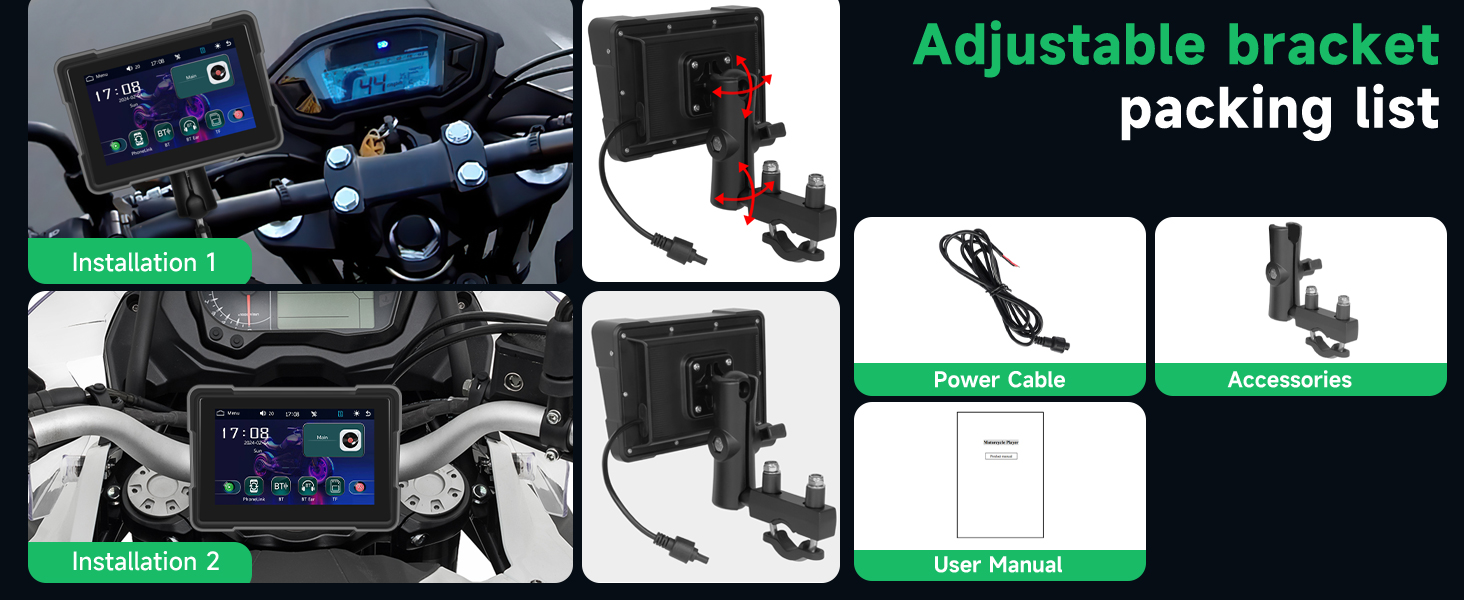
2-сүрөт: Examples of the Rimoody MC7 mounted on a motorcycle handlebar and dashboard, demonstrating adjustable bracket flexibility.
Power Connection
Connect the provided power cable to the Rimoody MC7 and to your motorcycle's power source. It is recommended to connect the device to a switched power source (under key) to prevent battery drain when the motorcycle is off, as the unit does not feature a dedicated on/off button and powers on automatically when connected to power.
Иштөө нускамалары
Күйгүзүү/өчүрүү
The Rimoody MC7 powers on automatically when it receives power and turns off when power is disconnected. Ensure it is connected to a switched power source on your motorcycle.
Зымсыз CarPlay жана Android Auto туташуу
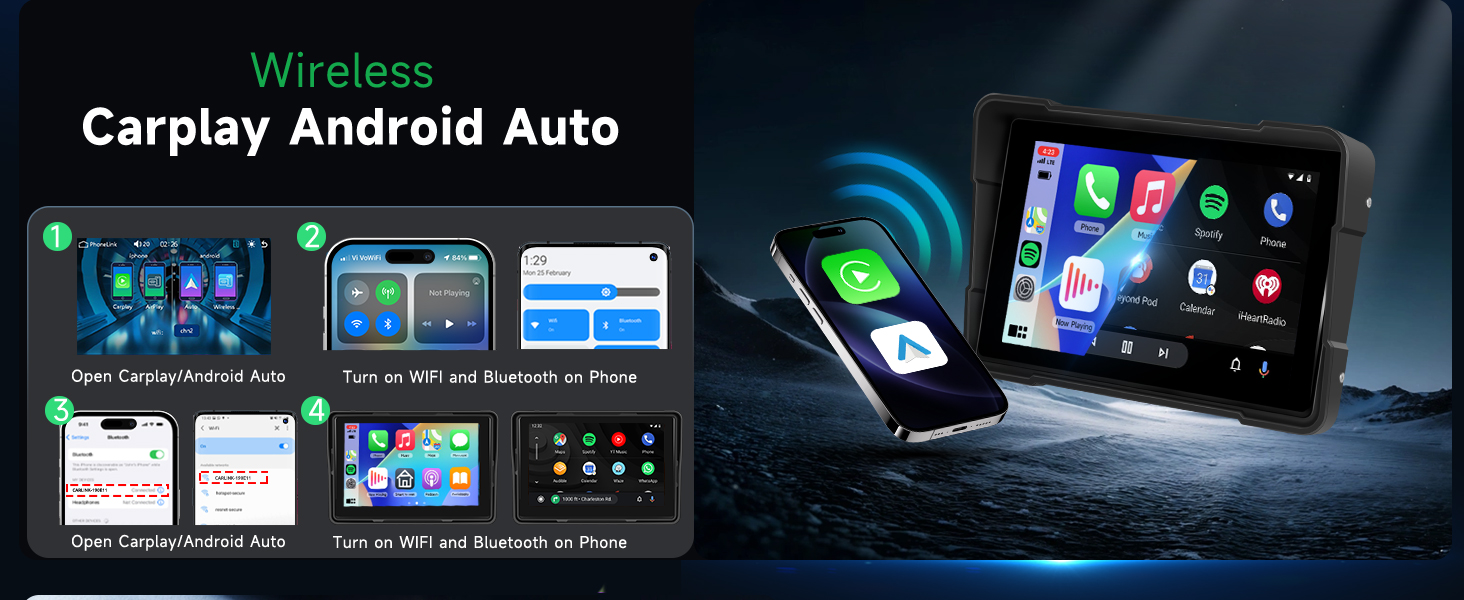
This device supports wireless CarPlay for iOS devices and wireless Android Auto for Android devices, allowing access to navigation, music, calls, and more directly on the 7-inch screen.
- Смартфонуңузда Bluetooth жана Wi-Fi иштетилгенин текшериңиз.
- On the Rimoody MC7, navigate to the CarPlay or Android Auto interface.
- Издөө and pair with the device's Bluetooth name (e.g., "CarBT_XXXX") on your smartphone.
- Once Bluetooth is paired, the system will automatically establish a Wi-Fi connection for CarPlay or Android Auto.
- Subsequent connections will be automatic once your phone's Bluetooth and Wi-Fi are active.

3-сүрөт: The main screen displaying the Wireless CarPlay and Android Auto interface, showing various applications.
Airplay & Android Cast (Mirror Link)
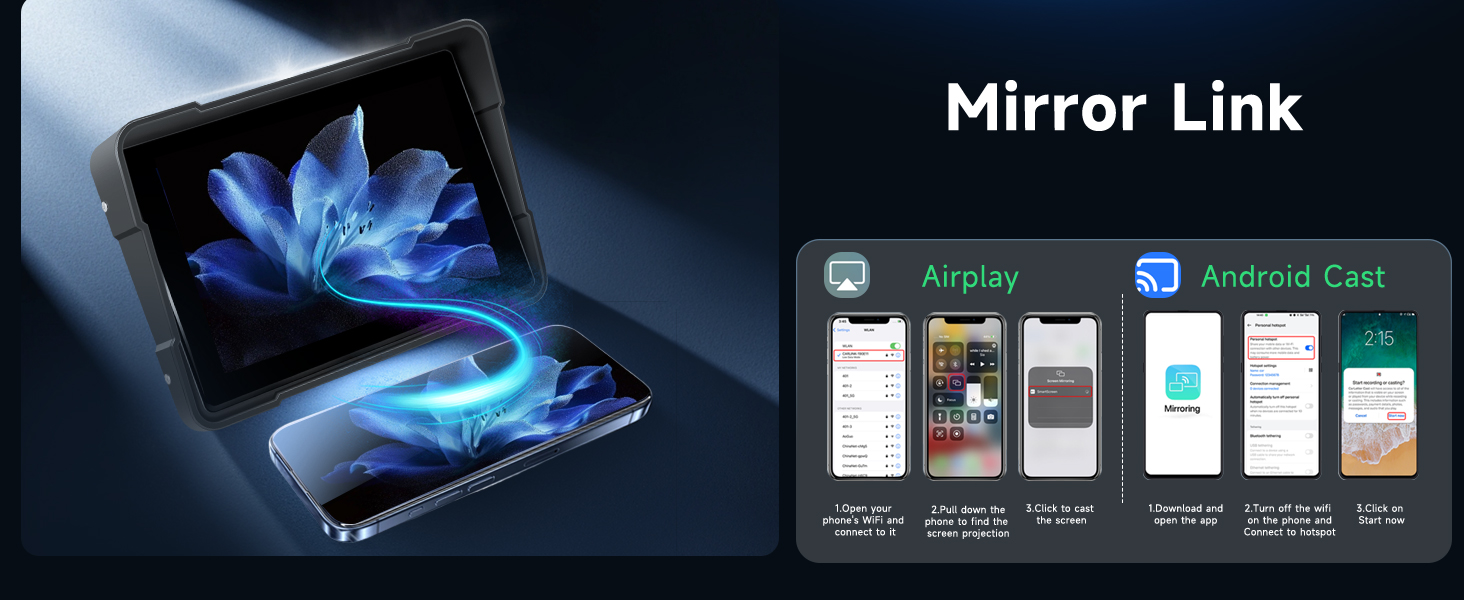
The Mirror Link function allows you to mirror your smartphone's screen directly onto the Rimoody MC7 display.
- On the Rimoody MC7, select the Airplay or Android Cast option.
- For iOS (Airplay): Connect your iPhone to the device's Wi-Fi network. Then, use the screen mirroring function on your iPhone to select the Rimoody MC7.
- For Android (Android Cast): Download and open the specified mirroring app on your Android phone. Connect your phone to the device's Wi-Fi hotspot and initiate the cast.
4-сүрөт: Illustration of Airplay and Android Cast, demonstrating how a smartphone screen can be mirrored onto the Rimoody MC7 display.
Dual Bluetooth Connectivity
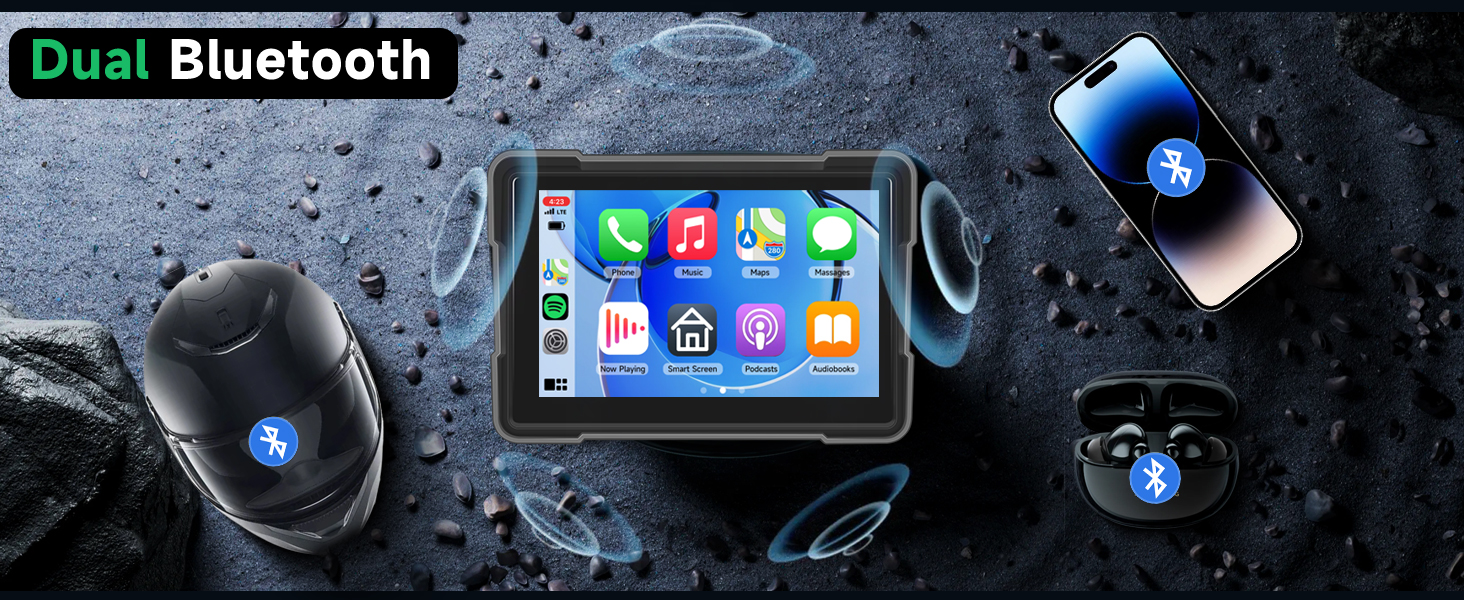
The device features dual Bluetooth, allowing connection to both your smartphone and a Bluetooth headset or helmet for audio output and hands-free communication.
- Смартфонго туташуу: Pair your smartphone via Bluetooth as described in the CarPlay/Android Auto section. This enables calls and music playback from your phone.
- Connect to Bluetooth Headset/Helmet:
- Ensure your Bluetooth headset or helmet is in pairing mode.
- On the Rimoody MC7, go to Орнотуулар > Система > Device MIC жана аны коюңуз ӨЧҮРҮҮ if you are using a Bluetooth helmet microphone.
- Андан кийин, багыттоо Bluetooth Emit on the Rimoody MC7 to search for and connect to your Bluetooth headset or helmet.
5-сүрөт: Diagram illustrating the dual Bluetooth functionality, connecting the device to both a smartphone and a Bluetooth helmet headset.
EQ Үн Орнотуулары
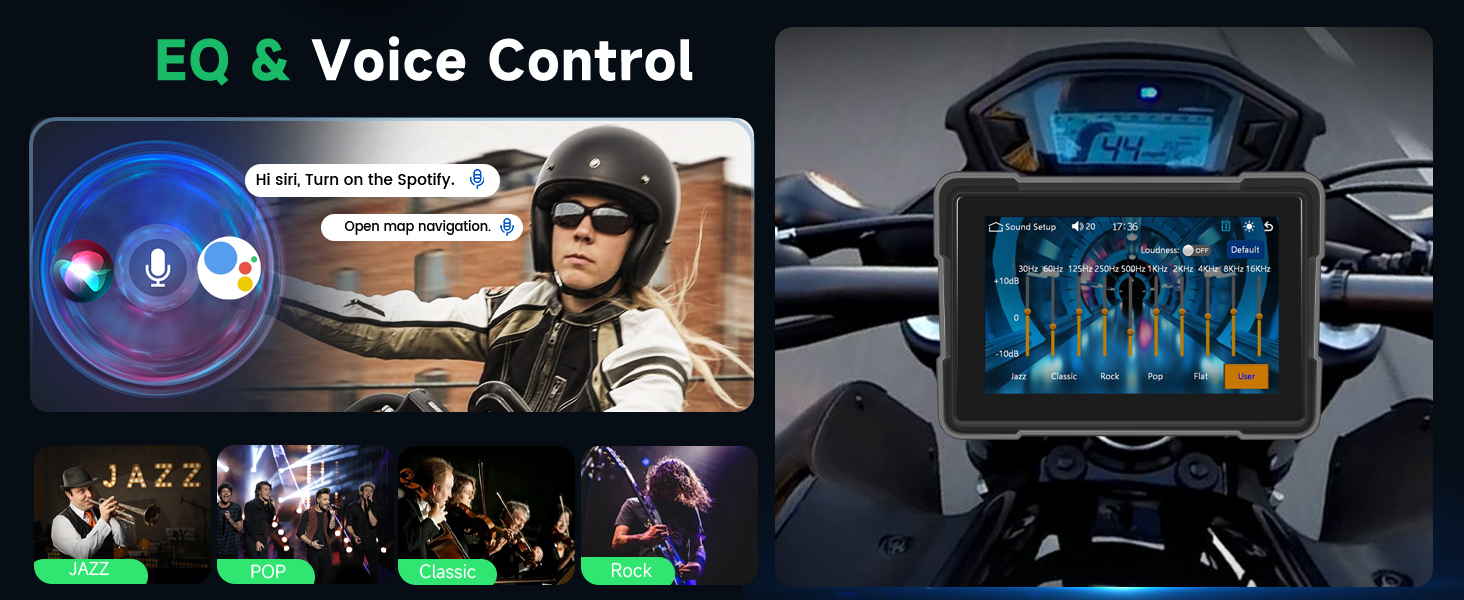
Customize your audio experience with the built-in equalizer. Select from preset modes or create a custom profile.
- Эквалайзер жөндөөлөрүнө негизги менюдан кириңиз.
- Choose from modes such as Jazz, Pop, Classic, Rock, or select "User" to manually adjust frequency bands.
6-сүрөт: The EQ sound settings interface, showing various audio modes and adjustable frequency bands.
Жарыктыкты жөндөө
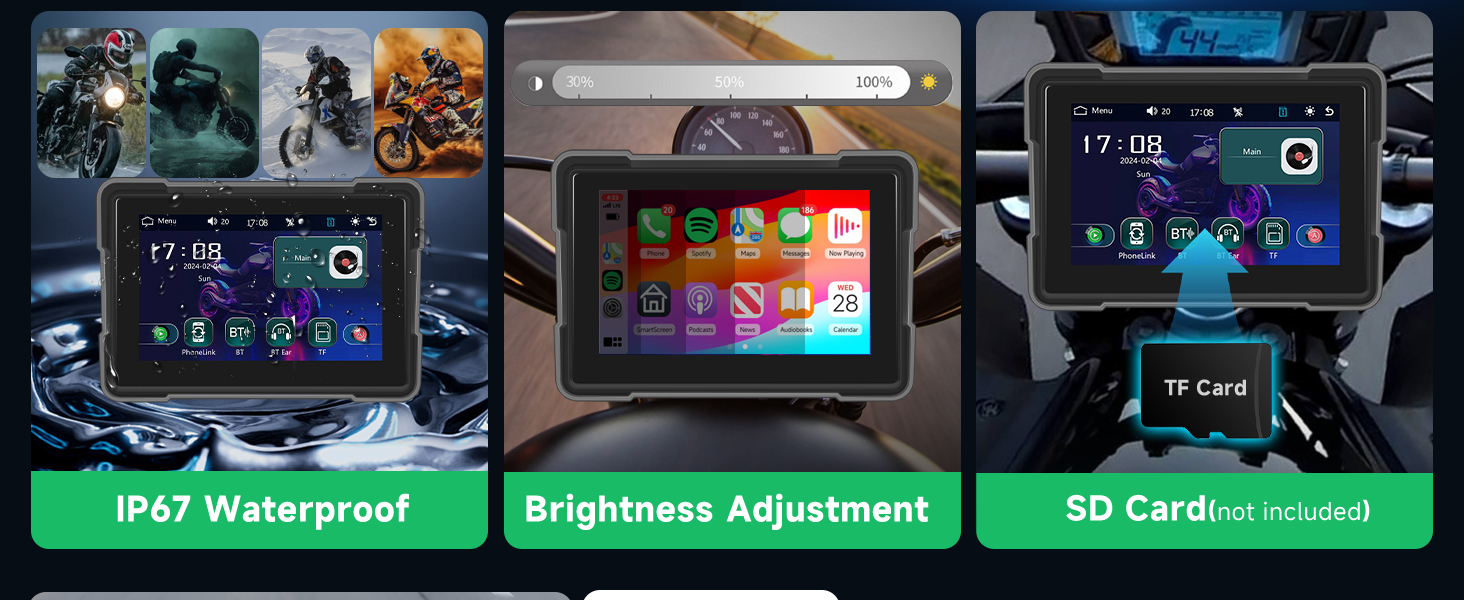
Adjust the screen brightness to ensure optimal visibility in various lighting conditions, from bright daylight to nighttime riding.
- Access brightness settings through the device's menu.
- Adjust the slider from 15% to 100% to suit your environment.
7-сүрөт: The brightness adjustment interface, alongside a visual representation of the device's IP67 waterproof rating.
TF картасын колдонуу
The device supports TF (microSD) cards for storing and playing media files. Insert a TF card (not included) into the designated slot to access your music and videos.
Үн менен башкаруу
Utilize voice assistants like Google Assistant or Siri through CarPlay or Android Auto for hands-free control of navigation, calls, and music, enhancing safety while riding.
Техникалык тейлөө
Тазалоо
Экранды жана түзмөктүн корпусун тазалоо үчүн жумшак, damp кездеме. Экранга зыян келтирүүчү абразивдүү тазалагычтардан же эриткичтерден качыңыз же вasing. Ensure the device is off and disconnected from power before cleaning.
Waterproofing (IP67)
The Rimoody MC7 is rated IP67 waterproof, meaning it is protected against dust ingress and can withstand immersion in water up to 1 meter for 30 minutes. While designed for outdoor use, avoid prolonged submersion or high-pressure water jets to maintain its integrity.
Проблемаларды чечүү
- Түзмөк күйбөйт: Ensure the power cable is securely connected to both the device and a functional power source on your motorcycle. Verify the power source is active (e.g., ignition is on if connected to a switched power line).
- CarPlay/Android Auto туташуу маселелери:
- Confirm Bluetooth and Wi-Fi are enabled on your smartphone.
- Forget the device's Bluetooth connection on your phone and re-pair.
- Restart both your smartphone and the Rimoody MC7 (by cycling motorcycle power).
- Unstable mounting/vibration: Re-check all mounting screws and connections. Ensure the bracket is tightly secured to the motorcycle and the main unit is firmly attached to the bracket.
- No dedicated on/off button: This is by design. The unit powers on and off with the motorcycle's ignition if wired correctly.
- Audio issues with Bluetooth headset: Ensure the "Device MIC" setting is correctly configured (OFF for Bluetooth helmet mic). Verify the headset is paired to the "Bluetooth Emit" function of the Rimoody MC7.
- Screen not responsive: Ensure the screen is clean and dry. If issues persist, try restarting the device.
Техникалык шарттар
| Модель аты | MC7 |
| Screen Size | 7 дюйм |
| Экран түрү | IPS Touch Screen (Capacitive) |
| Резолюция | 1024*600 |
| Байланыш технологиясы | Bluetooth, Wi-Fi, USB |
| Өзгөчөлүктөр | Wireless CarPlay & Android Auto, Airplay & Android Cast, Dual Bluetooth, EQ Adjustment, IP67 Waterproof, Adjustable Brightness, Voice Control |
| Суу өткөрбөйт рейтинги | IP67 |
| Supported Navigation | GPS |
| Туура эстутум картасы | microSD (TF Card) |
| Монтаж түрү | Handlebar Mount, Center Mount |
| Аудио чыгаруу режими | Стерео |
Кепилдик жана колдоо
For warranty information and technical support, please refer to the documentation included with your purchase or visit the official Rimoody webсайт. Кепилдик дооматтар үчүн сатып алганыңыздын далилин сактаңыз.
Кайтаруу саясаты: The product typically includes a 14-day return policy for refund/replacement. Please check your specific purchase details for exact terms.
Кардарларды тейлөө: If you encounter any issues not covered in this manual, please contact Rimoody customer service for assistance. Contact details can usually be found on the product packaging or the brand's official webсайт.