
1. Киришүү
Thank you for choosing the MESWAO 15.6 inch Android 14 Tablet Pro. This tablet is designed to provide a superior visual and performance experience with its large Full HD display, powerful octa-core processor, and extended battery life. This manual will guide you through the setup, operation, maintenance, and troubleshooting of your new device, ensuring you get the most out of its advanced features.
2. Кутуда эмне бар
Пакетиңиздин мазмунун текшериңиз. Эгерде кандайдыр бир нерселер жок болсо же бузулса, кардарларды колдоо менен байланышыңыз.
- 1 x MESWAO 15.6 inch Android Tablet
- 1 х кубат адаптери
- 1 x Type-C кабели
- 1 x User Manual
- 1 x Type-C - USB адаптер
- 1 x Stuck pin (SIM ejector tool)

Image: Visual representation of the MESWAO tablet and its included accessories.
3. Продукт бүтүп калдыview
3.1 Негизги өзгөчөлүктөрү
- 15.6-inch 1080P FHD IPS Display: Large screen with 1920x1080p resolution, 16:9 aspect ratio, 85% screen-to-body ratio, and 350 nits adjustable brightness for clear visuals.
- Android 14 OS: Latest Android version for faster app launches, intuitive user interface, split-screen multitasking, and GMS certification for Google Play access.
- MediaTek Helio G99 CPU: Octa-core processor (6nm, up to 2.2GHz) and ARM Mali-G57 GPU for smooth performance in multitasking, streaming, and gaming.
- 12,000mAh Mega Battery & 30W Fast Charging: Provides up to 15 hours of video playback and 12+ hours of daily use, with 90% charge in 3 hours.
- 6 ГБ оперативдүү эстутум + 128 ГБ ROM (1 ТБ чейин көбөйтүлөт): Ample storage for apps, photos, and videos, with expandable memory via microSD card (FAT32 format).
- Dual-band Wi-Fi & Bluetooth 5.0: High-speed 2.4G/5G Wi-Fi and efficient Bluetooth connectivity for peripherals.
- 5MP Front + 32MP Rear Cameras: Capture moments and conduct clear video calls.
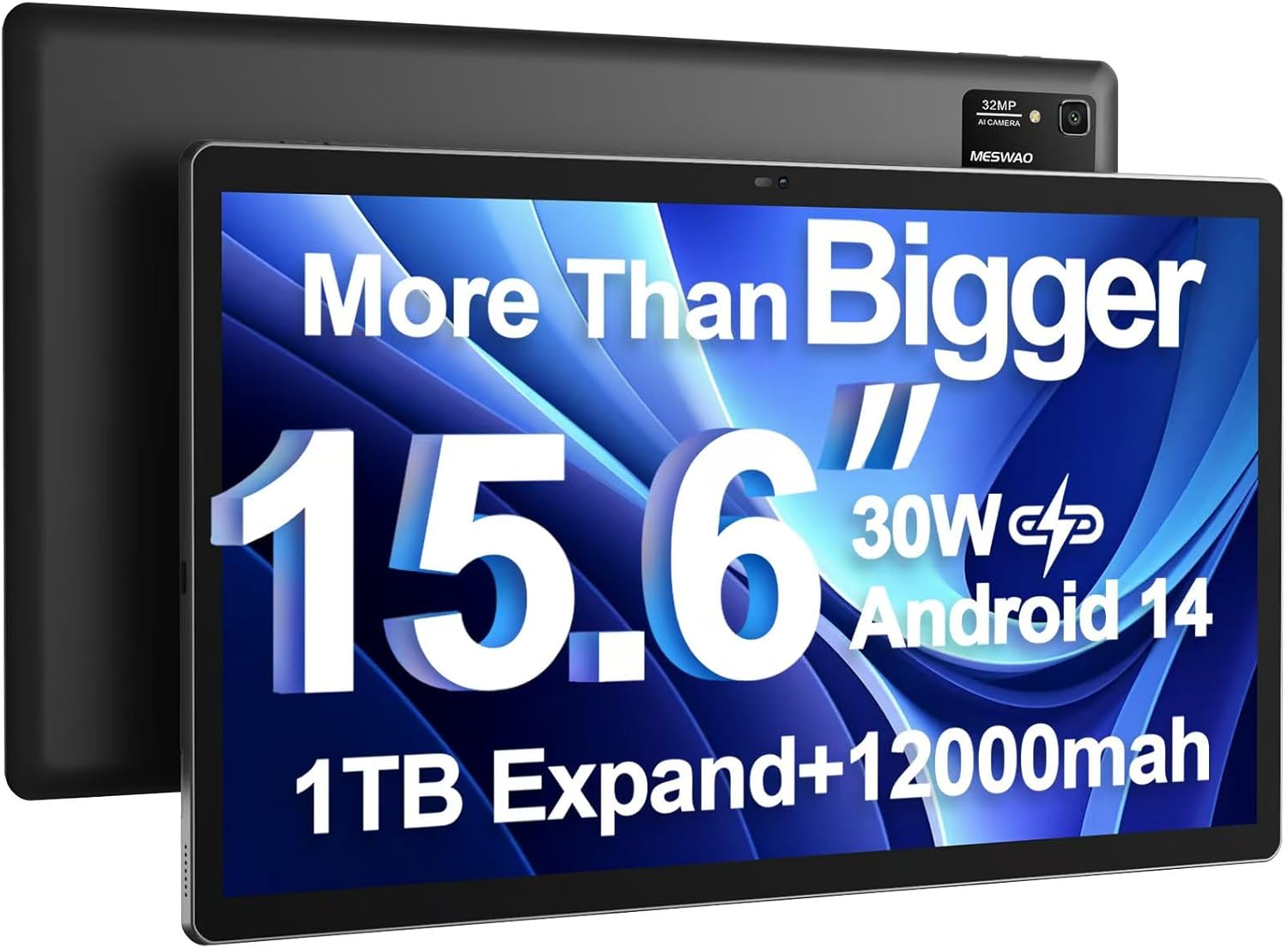
Image: The MESWAO 15.6 inch Android 14 Tablet Pro, showcasing its large display and rear camera module.

Image: Visual comparison highlighting the significantly larger screen area of the 15.6-inch tablet compared to a standard 10-inch tablet.

Image: Illustration of the tablet's 12,000mAh ultra-large capacity battery and 30W fast charging, indicating quick charge times and extended usage.
3.2 Планшеттин компоненттери
Familiarize yourself with the physical components of your MESWAO tablet:
- Кубат баскычы: Капталында жайгашкан, планшетти күйгүзүү/өчүрүү же экранды ойготуу/уйку режимине өткөрүү үчүн колдонулат.
- Үн баскычтары: Аудио чыгаруу деңгээлин тууралаңыз.
- Алдыңкы камера: Видео чалуулар жана селфилер үчүн 5 МП камера.
- Арткы камера: 32MP camera with flash for high-resolution photos and videos.
- Тип-C Port: Заряддоо жана маалыматтарды өткөрүү үчүн.
- TF карта уячасы: For expanding storage with a microSD card.
- Стерео динамиктер: Аудио тажрыйбасын жакшыртуу үчүн төрт динамик.
- 3.5 мм гарнитура уясы: For wired audio connection (requires included Type-C to 3.5mm adapter).
4. Орнотуу
4.1 Баштапкы күйгүзүү
- басып, кармап туруңуз Кубат баскычы until the MESWAO logo appears on the screen.
- Тилди, аймакты тандоо жана Wi-Fi тармагына туташуу үчүн экрандагы көрсөтмөлөрдү аткарыңыз.
- Sign in with your Google account or create a new one to access Google Play Store and other services.
4.2 Планшетти заряддоо
Before first use, fully charge the tablet. Use the provided power adapter and Type-C cable.
- Connect the Type-C cable to the tablet's Type-C port.
- Кубат адаптерин розеткага сайыңыз.
- The charging indicator will appear on the screen. A full charge takes approximately 3 hours with the 30W fast charger.
4.3 MicroSD картасын салуу
To expand storage, insert a microSD card (FAT32 format, up to 1TB, sold separately).
- Планшеттин капталынан TF карта уячасын табыңыз.
- Use the provided stuck pin to gently press into the small hole next to the slot to eject the tray.
- MicroSD картасын алтын түстүү контакттары ылдый каратып, лотокко салыңыз.
- Тапканды кылдаттык менен уячага кайра кыстарыңыз.
5. Иштөө нускамалары
5.1 Негизги навигация
- Башкы экран: Үй экрандарынын ортосунда чабыттоо үчүн солго же оңго сүрүңүз.
- Колдонмо тартмасы: Access all installed applications (if using a launcher with an app drawer, otherwise apps are on home screens).
- Эскертмелер жана Ыкчам жөндөөлөр: Swipe down from the top of the screen to access notifications and quick settings toggles (Wi-Fi, Bluetooth, Brightness, etc.).
- Акыркы колдонмолор: Чарчы сүрөтчөсүн таптаңыз (же жаңсоолор менен навигацияны колдонуп жатсаңыз, өйдө сүрүп, ылдый жагынан кармап туруңуз) view жана жакында колдонулган колдонмолордун ортосунда которулуу.
5.2 Бөлүнгөн экран менен көп тапшырмалуулук
The Android 14 OS supports split-screen functionality for enhanced productivity.
- Колдонгуңуз келген биринчи колдонмону ачыңыз.
- Go to the Recent Apps view.
- Tap the app icon at the top of the first app's card and select 'Split screen'.
- Choose the second app from your recent apps or app drawer to open it in the other half of the screen.
- Adjust the size of each app by dragging the divider in the middle.

Сүрөт: бүттүview of key features of the Android 14 operating system on the tablet, including multitasking capabilities.
5.3 Байланыш
- Wi-Fi: барыңыз Орнотуулар > Тармак жана интернет > Wi-Fi to connect to available networks. Supports 2.4Ghz and 5Ghz bands.
- Bluetooth: барыңыз Орнотуулар> Туташкан түзмөктөр> Байланыштын каалоолору> Bluetooth to pair with Bluetooth headphones, keyboards, or other devices.
- Экранды чыгаруу: The tablet supports wireless screen casting to compatible displays. Access this feature from Quick Settings or Орнотуулар > Туташкан түзмөктөр > Туташуу артыкчылыктары > Тышкы экранга чыгаруу.

Image: Depiction of the tablet's stable dual-band Wi-Fi and Bluetooth 5.0 capabilities, enabling seamless wireless connections.
6. Техникалык тейлөө
6.1 Батареяга кам көрүү
- Батареянын иштөө мөөнөтүн кыскартышы мүмкүн болгондуктан, өтө жогорку температурадан (ысык же суук) алыс болуңуз.
- Батареянын бат-баттан түгөнүп калышына жол бербеңиз. 0% жеткенге чейин аны заряддаңыз.
- Use only the provided charger or a certified 30W PD fast charger.
6.2 Тазалоо
- Экранды жана денени тазалоо үчүн жумшак, түксүз чүпүрөктү колдонуңуз.
- өжөр тактар үчүн, бир аз гampчүпүрөккө суу же экран тазалоочу каражат. Катуу химиялык заттардан алыс болуңуз.
- Do not spray liquids directly onto the tablet.
6.3 Программалык камсыздоо жаңыртуулары
Оптималдуу аткарууну жана коопсуздукту камсыз кылуу үчүн системанын жаңыртууларын дайыма текшерип, орнотуңуз.
- Connect your tablet to a stable Wi-Fi network.
- барыңыз Орнотуулар > Система > Системаны жаңыртуу.
- Бардык жеткиликтүү жаңыртууларды жүктөп алуу жана орнотуу үчүн экрандагы нускамаларды аткарыңыз.
7. Кыйынчылыктарды
Эгерде сиз планшетиңизде көйгөйлөргө туш болсоңуз, төмөнкү кеңири таралган чечимдерди караңыз:
| Көйгөй | Мүмкүн себеп | Чечим |
|---|---|---|
| Планшет күйбөйт | Аз батарея; Системанын бузулушу | Планшетті кеминде 30 мүнөт кубаттаңыз. Күйгүзүп кайра иштетүү үчүн Күйгүзүү баскычын 10-15 секунд басып туруңуз. |
| Slow performance/Lag | Өтө көп тиркемелер иштеп жатат; Сактагычтын аздыгы; Эскирген программалык камсыздоо | Close background apps. Clear cache. Free up storage. Check for system updates. |
| Wi-Fi туташуу маселелери | Туура эмес сырсөз; Роутердеги көйгөй; Планшеттин Wi-Fi өчүрүлгөн | Ensure Wi-Fi is on. Re-enter password. Restart router. Forget and reconnect to network. |
| Батарея бат эле түгөнөт | High screen brightness; Background apps; Heavy usage | Reduce screen brightness. Close unused apps. Limit background data. Check battery usage in settings. |
| Touchscreen unresponsive/Phantom touches | Temporary software glitch; Defective unit | Restart the tablet. If the issue persists, contact MESWAO customer support for assistance. |
If the problem persists after trying these solutions, please contact MESWAO customer support for further assistance.
8. Техникалык шарттар
| Өзгөчөлүк | Деталь |
|---|---|
| Модель аты | MES-B3 Pro |
| Операция системасы | Android 14 |
| Screen Size | 15.6 дюйм |
| Screen Resolution | 1920 x 1080 пиксел (Full HD IPS) |
| Процессор | MediaTek Helio G99 Octa-ядро (2.2 ГГц чейин) |
| Графикалык сопроцессор | ARM Mali-G57 |
| RAM | 6 ГБ |
| Ички сактагыч (ROM) | 128 ГБ |
| Кеңейтүүчү сактагыч | Up to 1TB via MicroSD card (FAT32 format) |
| Батарея сыйымдуулугу | 12,000mAh |
| Батареянын иштөө мөөнөтү (орточо) | 13 Hours (up to 15 hours video playback) |
| Заряддоо | 30 Вт PD тез кубаттоо |
| Зымсыз байланыш | 802.11a/b/ac/ax (2.4G/5G Dual-band Wi-Fi), Bluetooth 5.0 |
| Алдыңкы камера | 5MP |
| Арткы камера | 32MP |
| Элемент Салмагы | 4.42 фунт (болжол менен 2 кг) |
| Продукциянын өлчөмдөрү | 14.49 x 8.66 x 0.39 дюйм (36.8 x 22 x 1 см) |
9. Кепилдик жана колдоо
MESWAO products come with a standard manufacturer's warranty. Please refer to the warranty card included in your package for specific terms and conditions. For technical support, troubleshooting assistance, or warranty claims, please contact MESWAO customer service through the contact information provided on the official MESWAO webсайт же сатып алуу платформаңыз.
Байланыш маалыматы: Please visit the official MESWAO website or refer to the support card included in your product packaging for the most up-to-date contact details.