1. Киришүү
Thank you for choosing the Drone E88 Pro. This foldable quadcopter with camera and remote control is designed for aerial photography and videography enthusiasts. Its compact design, advanced features, and user-friendly controls make it an excellent choice for exploring the world from a new perspective. Please read this manual thoroughly before operating the drone to ensure safe and optimal performance.
2. Коопсуздук боюнча көрсөтмөлөр
Operating a drone requires responsibility. Adhere to the following safety guidelines to prevent injury or damage.
- Учуу алдында текшерүү: Always inspect the drone, remote control, and batteries for any damage before each flight.
- Экологиялык шарттар: Do not fly in strong winds, rain, snow, or fog. Avoid flying near power lines, buildings, or crowded areas.
- Көрүү сызыгы: Учуу учурунда дрондун көрүү сызыгын дайыма сактаңыз.
- Батареянын коопсуздугу: Use only the provided charger and batteries. Do not overcharge or puncture batteries. Store batteries in a cool, dry place.
- Пропеллердин коопсуздугу: Колдоруңузду, бетиңизди жана кенен кийимдериңизди айлануучу пропеллерлерден алыс кармаңыз. Учуудан мурун пропеллерлердин бекем бекитилгенин текшериңиз.
- Жаш чектөө: This product is recommended for adults.
- Купуялыкты урматтоо: Аэрофону тартып жатканда купуялык мыйзамдарын эстен чыгарбаңызtage.
- Emergency Landing: In case of emergency, land the drone immediately in a safe, open area.
3. Пакеттин мазмуну
Төмөндө тизмеленген нерселердин баары пакетиңизге камтылганын текшериңиз:
- 1 x Drone E88 Pro
- 1 x Remote Controller
- 1 x USB заряддоо кабели
- 1 x User Manual
- Spare Propellers (quantity may vary)
- Drone Battery (pre-installed or separate)
- AAA Batteries for Remote Controller (2 included)
4. Компонентти идентификациялоо
4.1 Drone E88 Pro
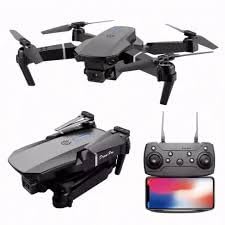
Сүрөттүн сүрөттөлүшү: This image displays the Drone E88 Pro in both its unfolded flight configuration and its compact, folded state. Alongside the drone, the remote control is shown with a smartphone mounted in its holder, illustrating the complete operational setup.
- Бүктөлүүчү курал: Allow for compact storage and portability.
- Пропеллер: Four main propellers for lift and thrust.
- Моторлор: Power the propellers.
- HD камера: Located at the front, capable of capturing photos and videos.
- Батарея бөлүмү: Located on the underside or rear of the drone.
- LED көрсөткүч жарыктары: Provide status information (e.g., power, pairing, low battery).
4.2 Алыстан башкаруу
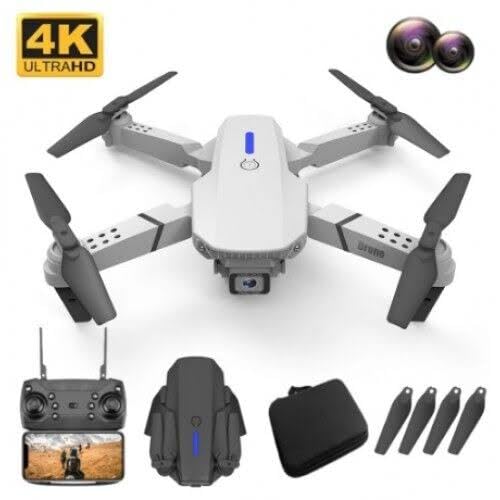
Сүрөттүн сүрөттөлүшү: This image features a white version of the Drone E88 Pro, accompanied by its remote control, a carrying case, and a set of spare propellers. This illustrates the typical contents of the product package.
- Сол джойстик: Бийиктикке (өйдө/төмөн) жана айланууну (солго/оңго) көзөмөлдөйт.
- Оң Джойстик: Алдыга/артка жана сол/оң кыймылды көзөмөлдөйт.
- Бир баскычтуу учуп-конуу баскычы: Автоматтык түрдө учууну же конууну баштайт.
- Башсыз режим баскычы: Activates headless flight mode.
- One-Key Return Button: Commands the drone to return to its take-off point.
- Ылдамдыкты которуштуруу баскычы: Ар кандай учуу ылдамдыктарынын ортосунда которулат (мисалы, төмөнкү, орточо, жогорку).
- Сүрөт/Видео баскычы: Сүрөткө тартат же видео жаздырууну баштайт/токтотот.
- Кубат баскычы: Алыстан башкаруу пультун күйгүзөт/өчүрөт.
- Смартфон кармагыч: Смартфонуңузду орнотуу үчүн view FPV (Биринчи жак View) footage.
5. Орнотуу
5.1 Дрондун батареясын кубаттоо
- Remove the drone battery from the drone.
- USB заряддоо кабелин батареяга туташтырыңыз.
- USB кабелинин экинчи учун 5V/1A USB кубат адаптерине (кошулмада жок) же компьютердин USB портуна сайыңыз.
- The indicator light on the USB cable will show charging status (e.g., red for charging, off when fully charged).
- Charging typically takes 60-90 minutes. Do not leave unattended while charging.
5.2 Installing Propellers
The drone comes with pre-installed propellers. If replacement is needed, ensure correct orientation. Propellers are marked 'A' and 'B'. Match them to the corresponding motor arms.
5.3 Дрон батареясын орнотуу
- Дрондун өчүрүлгөнүн текшериңиз.
- Insert the fully charged battery into the battery compartment on the drone until it clicks into place.
5.4 Алыстан башкаруу пультунун батареяларын орнотуу
- Алыстан башкаруунун артындагы батарея капкагын ачыңыз.
- Insert 2 x AAA batteries (included) according to the polarity markings (+/-).
- Батареянын капкагын бекем жабыңыз.
5.5 Дронду жана пультту жупташтыруу
- Дронду тегиз, тегиз жерге орнотуңуз.
- Power on the drone by pressing and holding the power button. The drone's LED lights will flash.
- Power on the remote controller. The remote's indicator light will flash.
- Push the left joystick (throttle) all the way up, then pull it all the way down.
- The drone's and remote's indicator lights will stop flashing and become solid, indicating successful pairing.
5.6 App Installation (Optional for FPV)
FPV үчүн (Биринчи жак үчүн View) and advanced features, download the dedicated app (e.g., "WiFi_CAM" or similar, refer to packaging for exact app name) from your smartphone's app store (iOS/Android).
- Scan the QR code on the packaging or search for the app name in your app store.
- Колдонмону орнотуу.
- Connect your smartphone to the drone's Wi-Fi network (usually named "WiFi_UFO" or similar) in your phone's Wi-Fi settings.
- колдонмону ачуу view the live camera feed and access additional controls.
6. Иштөө нускамалары
6.1 Учуу алдындагы текшерүүлөр
- Дрондун жана пульттун батареялары толук заряддалганын текшериңиз.
- Пропеллерлердин бекем орнотулганын жана бузулбаганын текшериңиз.
- Confirm drone and remote are successfully paired.
- Тоскоолдуктарсыз, адамдарсыз жана жаныбарларсыз ачык, таза аймакты тандаңыз.
6.2 Учуп-конуу
- Кол менен учуу: After pairing, push both joysticks simultaneously outwards and downwards to unlock the motors. Then, slowly push the left joystick (throttle) up to ascend.
- Бир баскычтуу учуу: Press the One-Key Take-off/Landing button. The drone will automatically ascend to a certain height and hover.
- Кол менен конуу: Slowly pull the left joystick (throttle) down until the drone lands. Once landed, hold the joystick down for a few seconds until the motors stop.
- Бир ачкыч конуу: Press the One-Key Take-off/Landing button again. The drone will automatically descend and land.
6.3 Учууну башкаруунун негизги каражаттары
| Control | Акция | Description |
|---|---|---|
| Left Joystick Up/Down | Өтүү/Төмөн | Controls the drone's altitude. |
| Left Joystick Left/Right | Солго/Оңго айлантуу | Controls the drone's yaw (rotation around its vertical axis). |
| Right Joystick Up/Down | Алга/Артка | Controls the drone's pitch (movement along its longitudinal axis). |
| Right Joystick Left/Right | Солго/Оңго учуу (каптал) | Controls the drone's roll (movement along its lateral axis). |
6.4 Өркүндөтүлгөн функциялар
- Бийиктикти кармоо: The drone will automatically maintain its current altitude when the left joystick is released, providing stable hovering.
- Башсыз режим: Press the Headless Mode button. In this mode, the drone's orientation is relative to the pilot, regardless of the drone's actual front. This simplifies control for beginners. Press again to exit.
- Бир ачкыч менен кайтаруу: Press the One-Key Return button. The drone will attempt to fly back towards its take-off point. This feature is basic and relies on the drone's internal compass; it is not GPS-accurate. Press any joystick to cancel.
- Ылдамдык которуштуруу: Press the Speed Switch button to cycle through different flight speeds (e.g., low, medium, high). Low speed is recommended for beginners.
6.5 Камеранын иштеши
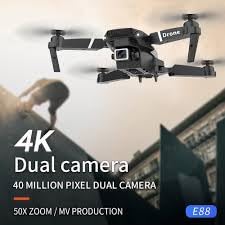
Сүрөттүн сүрөттөлүшү: This image shows the Drone E88 Pro in flight, with text overlays highlighting its "4K Dual camera" capability and "40 MILLION PIXEL DUAL CAMERA" feature, emphasizing its high-resolution imaging.
- Сүрөткө тартуу: While flying, press the Photo/Video button once on the remote control to take a photo. The drone's lights may flash to indicate a photo has been taken.
- Видео жаздыруу: Press and hold the Photo/Video button for 2-3 seconds to start video recording. Press and hold again to stop recording. The drone's lights may flash differently or continuously during recording.
- Viewing Footage: If using the app, photos and videos will be saved directly to your smartphone's gallery. If using an SD card (not included, if applicable), remove the card from the drone and insert it into a card reader to view fileкомпьютерде.
7. Техникалык тейлөө
- Тазалоо: Дронду жана пультту тазалоо үчүн жумшак, кургак чүпүрөктү колдонуңуз. Суу же химиялык тазалоочу каражаттарды колдонбоңуз.
- Пропеллерди алмаштыруу: If propellers are damaged or bent, replace them immediately with spare parts. Ensure correct 'A' and 'B' propeller types are installed on the correct motor arms.
- Батареяга кам көрүү:
- Батареяларды ашыкча заряддабаңыз же ашыкча разрядтабаңыз.
- Батареяларды салкын, кургак жерде, күндүн нуру жана ысык тийбеген жерде сактаңыз.
- Эгер батарейкаларды узак убакытка сактасаңыз, кубаттуулугунун 50% га чейин заряддаңыз.
- Сактагыч: Store the drone and its accessories in a cool, dry environment, preferably in its original packaging or a protective case, away from direct sunlight and extreme temperatures.
8. Кыйынчылыктарды
| Көйгөй | Мүмкүн себеп | Чечим |
|---|---|---|
| Дрон пультка жооп бербейт. | Not paired; low battery; interference. | Re-pair drone and remote; charge batteries; move to an area with less interference. |
| Учуу учурунда учкучсуз учат. | Not calibrated; uneven surface at take-off; wind. | Calibrate the drone (refer to app or specific remote sequence); take off from a flat surface; avoid flying in windy conditions. |
| Пропеллерлер айланбай жатат. | Motors locked; damaged propellers; motor issue. | Unlock motors (joysticks outwards/downwards); replace damaged propellers; contact support if motors are faulty. |
| Camera feed is choppy or disconnected. | Weak Wi-Fi signal; too far from drone; app issue. | Ensure strong Wi-Fi connection; fly closer to the drone; restart app and drone. |
| Кыска учуу убактысы. | Battery not fully charged; old battery; aggressive flying. | Ensure battery is fully charged; consider replacing old batteries; fly more conservatively. |
9. Техникалык шарттар
| Өзгөчөлүк | Деталь |
|---|---|
| Бренд | Жалпы |
| Модель аты | E88 Pro |
| Өзгөчөлүктөр | Headless Mode, Foldable, Wifi Fpv, Altitude Hold |
| Жаш аралыгы (сүрөттөө) | бойго жеткен |
| Түс | Боз |
| Видео тартуунун резолюциясы | 1080p |
| Натыйжалуу дагы эле чечим | 32 депутат |
| Байланыш технологиясы | Bluetooth, WiFi |
| Камтылган компоненттер | User Manual, USB Cable, Drone, Remote Controller |
| Skill Level | Beginner |
| Элемент Салмагы | 220 грамм |
| Батарея сыйымдуулугу | 2 Amp Саат |
| Алыстан башкаруу технологиясы | 2.4 ГГц |
| Башкаруу түрү | Алыстан башкаруу |
| Медиа түрү | Micro SDXC (if applicable, not included) |
| Материал | Пластик, металл |
| Зымсыз байланыш технологиясы | Wi-Fi |
| Батарея клеткасынын курамы | Литий ион |
| Батареялар камтылган | Yes (2 AAA for remote) |
| Колдоого алынган сүрөт форматы | JPEG, MP4 |
| Video Output токтому | 1080p |
| Продукциянын өлчөмдөрү | 25L x 15W x 5H Сантиметр |
| Өндүрүүчү | Riya global |
| Дата биринчи жеткиликтүү | 2 декабрь 2024 жыл |
10. Кепилдик жана колдоо
This product is manufactured by Riya global. For any manufacturing defects or issues not covered by troubleshooting, please contact the seller or manufacturer directly.
Please retain your proof of purchase for any warranty claims. Specific warranty terms and conditions may vary by region and retailer.
For further assistance, refer to the contact information provided with your purchase or visit the manufacturer's official webсайт.


