
Introduction
This manual provides detailed instructions for the setup, operation, and maintenance of your LFF Atomic Clock LWC204-TEMU. This digital wall clock features a large LCD display, atomic time synchronization, indoor and outdoor temperature readings, and date display. Please read this manual thoroughly before using the device to ensure proper function and longevity.
Пакеттин мазмуну
Сураныч, таңгактын ичиндегисин кылдаттык менен текшериңиз. Эгерде кандайдыр бир буюмдар жок болсо же бузулуп калса, кардарларды колдоо кызматына кайрылыңыз.
- Clock Unit (Main Display)
- Колдонмо (бул документ)
- Тышкы температура сенсору
- Mounting Hardware (Screws, Wall Anchors)
- Power Adapter (for optional continuous power)
Note: Batteries are not included and must be purchased separately. The main clock unit requires 3x AA batteries, and the outdoor sensor requires 2x AAA batteries.
Продукт өзгөчөлүктөрү
- Large LCD Digital Display for easy readability
- Atomic Clock (RCC) for precise time synchronization
- Indoor Temperature display (°C/°F)
- Outdoor Temperature display (°C/°F) with wireless sensor
- Date and Weekday display
- Alarm Clock function with snooze
- Daylight Saving Time (DST) symbol
- Supports up to 3 outdoor remote sensors (one included)
- Wireless range of up to 330 feet (100 meters)
Продукт бүттүview
Familiarize yourself with the main display and control buttons of your LFF Atomic Clock.

Сүрөт: Алдыңкы жана арткы view of the LFF Atomic Clock. The front display shows time, indoor temperature, date, weekday, and outdoor temperature, along with icons for alarm, RCC reception, and DST. The back panel highlights the 'SET', 'ALARM', 'CHANNEL', 'DOWN/WAVE/°C/°F', and 'UP/ALARM' buttons.
Дисплейдин элементтери:
- Убакытты көрсөтүү: Учурдагы убакытты көрсөтөт (HH:MM).
- PM көрсөткүчү: Appears for afternoon hours.
- DST Symbol: Indicates Daylight Saving Time is active.
- RCC Reception Icon: Shows status of atomic clock signal reception.
- Alarm Clock Icon: Indicates alarm is set.
- Ички температура: Current temperature inside (°C/°F).
- Date/Month/Weekday: Учурдагы күн жана жуманын күнү.
- Тышкы температура: Current temperature from the wireless sensor (°C/°F).
Control Buttons (Rear Panel):
- SET баскычы: Enters setup mode for time, date, and other settings.
- ALARM баскычы: Activates/deactivates the alarm and enters alarm setting mode.
- КАНАЛ баскычы: Switches between outdoor sensor channels (if multiple sensors are used).
- DOWN/WAVE/°C/°F Button: Decreases values during setting, manually initiates atomic signal search (WAVE), and switches temperature units.
- UP/ALARM Button: Increases values during setting, and can also activate/deactivate alarm.
Жайгашуу
1. Батареяны орнотуу
The clock unit and outdoor sensor require batteries for operation. Ensure correct polarity (+/-) when inserting batteries.
- Main Clock Unit: Open the battery compartment on the back and insert 3x AA batteries (not included).
- Тышкы сенсор: Open the battery compartment and insert 2x AAA batteries (not included).

Сүрөт: This image illustrates the battery requirements for the LFF Atomic Clock. The main clock unit requires three AA batteries, and the wireless outdoor sensor requires two AAA batteries. Batteries are not included with the product.
Alternatively, the main clock unit can be powered continuously using the included power adapter. Insert the adapter into the DC port on the back of the clock.
2. Initial Synchronization (Atomic Clock)
After inserting batteries, the clock will automatically attempt to synchronize with the atomic time signal (RCC). This process may take several minutes to several hours, depending on your location and signal strength. The RCC reception icon will flash during synchronization and become solid when a stable signal is received.
- For best reception, place the clock near a window and away from electronic devices that may cause interference.
- To manually initiate an atomic signal search, press and hold the DOWN/WAVE/°C/°F баскычын бир нече секунда басыңыз.
3. Сырткы сенсорлорду жайгаштыруу
Place the outdoor sensor in a shaded, dry location, protected from direct sunlight and precipitation, to ensure accurate temperature readings. The sensor should be within the 330ft (100m) wireless range of the main clock unit.

Сүрөт: This image demonstrates the wireless range and ideal placement for the LFF Atomic Clock's outdoor sensor. The sensor should be placed outdoors, within 330 feet (100 meters) of the main unit, and in a location that allows for clear signal transmission, such as mounted on an exterior wall.
- Ensure the sensor is mounted vertically to allow for proper drainage.
- Avoid placing the sensor near heat sources (e.g., vents, windows) or reflective surfaces that could affect temperature accuracy.
- The clock supports up to 3 outdoor sensors. If using multiple sensors, press the КАНАЛ button on the main unit to cycle through them.
Иштөө нускамалары
1. Manual Time and Date Setting
If the atomic clock signal is not available or you prefer to set the time manually:
- басып, кармап туруңуз SET button for 3 seconds to enter time setting mode. The hour digit will flash.
- колдонуу UP/ALARM or DOWN/WAVE/°C/°F жаркыраган маанини тууралоо үчүн баскычтар.
- Басыңыз SET again to confirm and move to the next setting (e.g., Minute, Year, Month, Day, Time Zone, 12/24-hour format).
- Бардык орнотуулар конфигурацияланганга чейин 2 жана 3-кадамдарды кайталаңыз.
- Басыңыз SET one last time or wait 15 seconds for the clock to exit setting mode automatically.
2. Ойготкучту орнотуу
- басыңыз АЛАРМ button once to display the alarm time.
- басып, кармап туруңуз АЛАРМ button for 3 seconds to enter alarm setting mode. The hour digit will flash.
- колдонуу UP/ALARM or DOWN/WAVE/°C/°F саатты тууралоо үчүн баскычтар.
- Басыңыз АЛАРМ Саатты ырастоо жана мүнөт жөндөөсүнө өтүү үчүн кайрадан басыңыз.
- колдонуу UP/ALARM or DOWN/WAVE/°C/°F мүнөттү тууралоо үчүн баскычтар.
- Басыңыз АЛАРМ one last time to confirm and exit alarm setting mode.
Ойготкучту иштетүү же өчүрүү үчүн, баскычын басыңыз АЛАРМ button briefly when the current time is displayed. The alarm icon will appear or disappear on the display.
3. Температура бирдигин тандоо (°C/°F)
To switch between Celsius and Fahrenheit for temperature display, press the DOWN/WAVE/°C/°F button briefly during normal time display.
4. Жайкы убакыт (DST)
The clock is designed to automatically adjust for Daylight Saving Time if the atomic signal is received. A DST icon will appear on the display when DST is active.
5. Large Display Readability
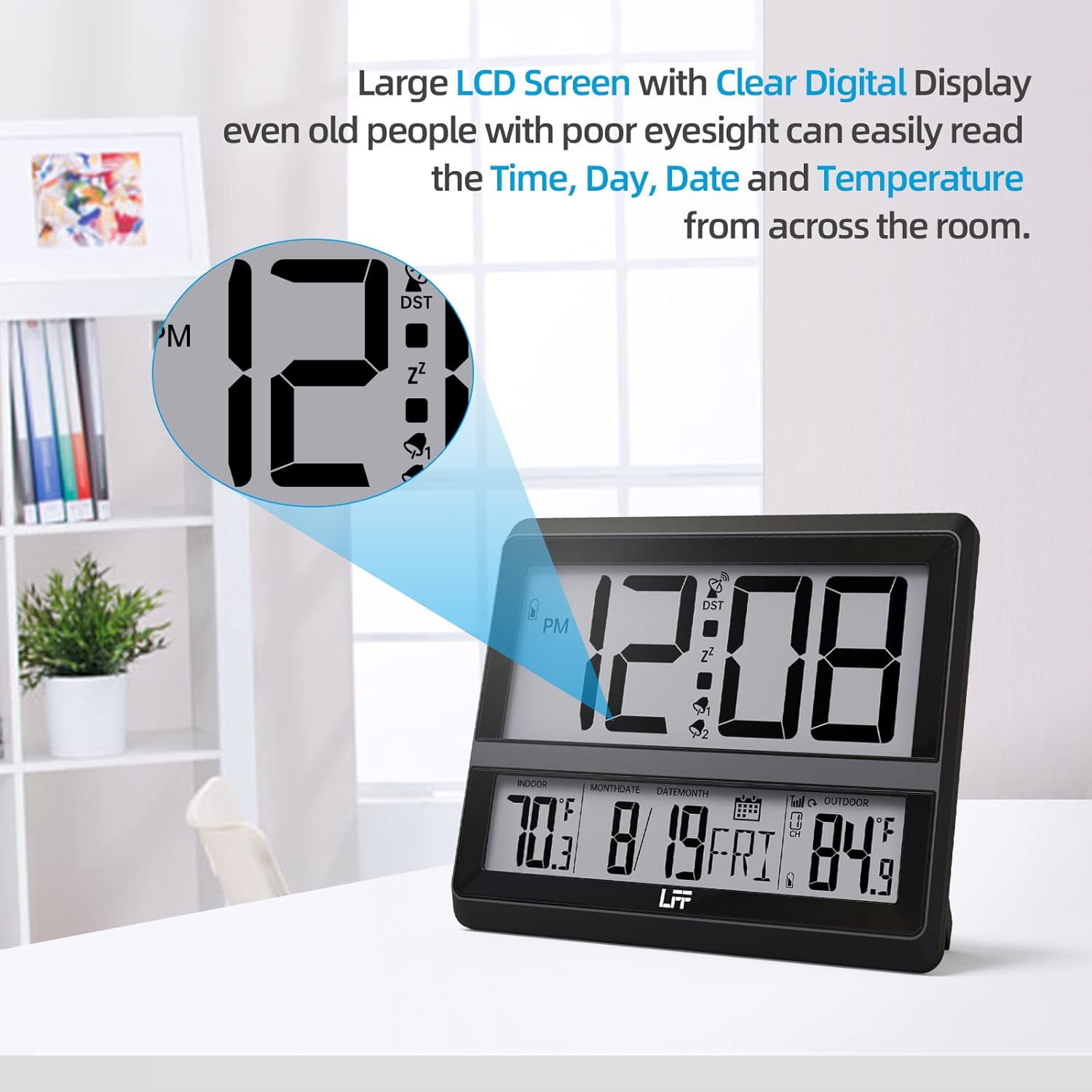
Сүрөт: This image highlights the large LCD screen of the LFF Atomic Clock, demonstrating its clear digital display. The large numbers for time, day, date, and temperature are easily readable from a distance, enhancing user convenience.
The LFF Atomic Clock features a large LCD screen with clear digital numbers, designed for easy readability of time, day, date, and temperature from various distances.
Техникалык тейлөө
- Тазалоо: Саатты жана сенсорду жумшак, кургак чүпүрөк менен сүртүңүз. Абразивдүү тазалоочу каражаттарды же химиялык заттарды колдонбоңуз.
- Батареяны алмаштыруу: Replace batteries in both the main unit and outdoor sensor when the low battery indicator appears on the display. Always replace all batteries at once with new ones of the same type.
- Сактагыч: If storing the clock for an extended period, remove all batteries to prevent leakage.
Проблемаларды чечүү
| Көйгөй | Мүмкүн чечим |
|---|---|
| No display on clock unit. | Check battery installation (polarity, charge). Ensure power adapter is securely connected if used. |
| Убакыт туура эмес же синхрондоштурулбай жатат. | Ensure the clock is placed near a window, away from interference. Manually initiate atomic signal search (press and hold DOWN/WAVE/°C/°F). Check time zone setting. |
| Сырткы температура көрсөтүлгөн эмес же так эмес. | Check batteries in the outdoor sensor. Ensure sensor is within range (330ft/100m) and not obstructed. Press КАНАЛ button to re-establish connection. Relocate sensor to a shaded, dry area. |
| Ойготкуч угулбайт. | Ensure the alarm is activated (alarm icon visible). Check alarm time setting. |
Техникалык шарттар
- Модель номери: LWC204-TEMU
- Бренд: LFF кеңейтүүсү
- Дисплей түрү: Санарип LCD
- Кубат булагы (Негизги блок): 3x AA Batteries (not included) or Power Adapter (included)
- Кубат булагы (тышкы сенсор): 2x AAA батарейкалар (киргизилген эмес)
- Өзгөчө өзгөчөлүгү: Alarm, Atomic Time (RCC), Indoor/Outdoor Temperature
- Түсү: Кара
- Продукциянын өлчөмдөрү: 8.7 x 1.5 x 7.5 дюйм (22.1 x 3.8 x 19.1 см)
- Элемент Салмагы: 1.3 фунт (0.59 кг)
- Зымсыз диапазон: 330 фут (100 метр) чейин
- UPC: 799849203702
Кепилдик жана колдоо
LFF products are manufactured to high-quality standards. For warranty information or technical support, please refer to the contact details provided on the product packaging or visit the official LFF webсайт. Сатып алуу квитанциясын кепилдик дооматтары үчүн сатып алуунун далили катары сактаңыз.