
Conambo K10C-CBOX
Conambo K10C Bluetooth Headset User Manual
Model: K10C-CBOX
Introduction
Thank you for choosing the Conambo K10C Bluetooth Headset. This manual provides detailed instructions on how to set up, operate, and maintain your new headset, ensuring you get the best experience from its advanced features, including dual-mic noise canceling and extended battery life with the charging case.
Кутуда эмне бар
- Conambo K10C Bluetooth Headset
- Зымсыз кубаттоо кутусу
- USB заряддоо кабели
- Наушниктер (ар кандай өлчөмдөгү)
- User Manual
Продукт бүттүview
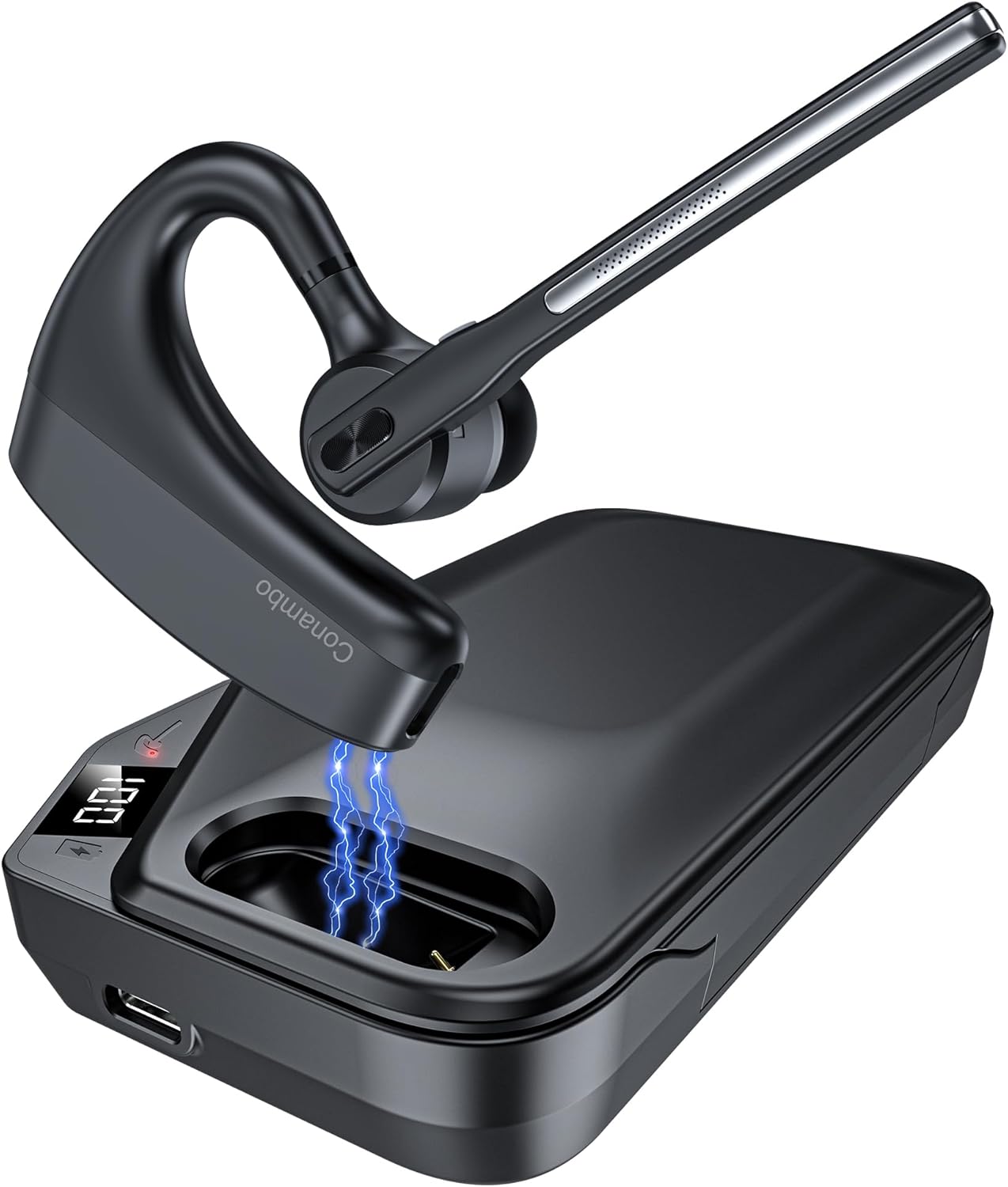
The Conambo K10C Bluetooth Headset with its dedicated charging case. The headset features an ergonomic design for comfortable wear, and the charging case provides extended battery life.
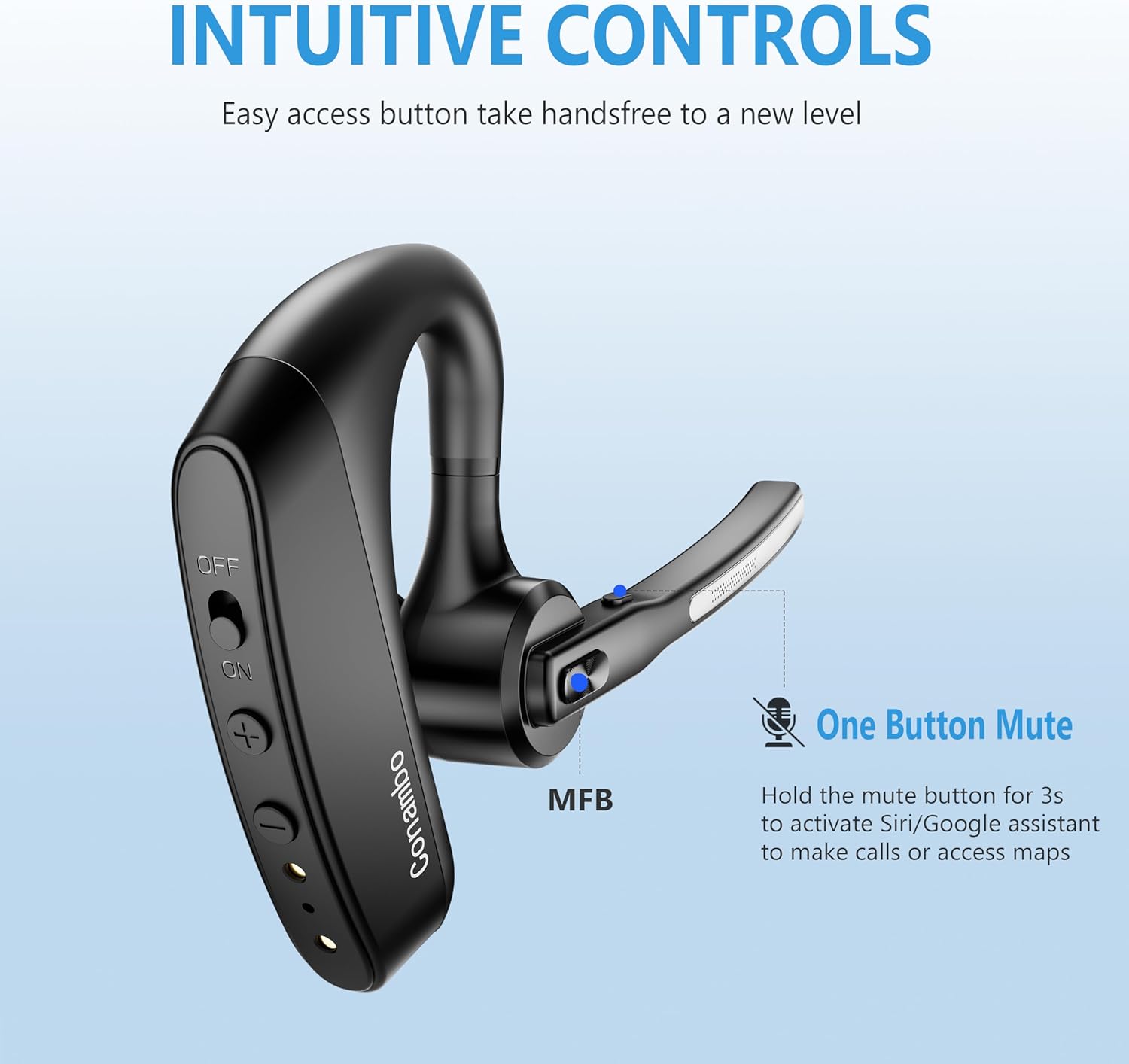
Деталдаштырылган view of the headset's intuitive controls, including the power switch, volume buttons, and the Multi-Function Button (MFB). The microphone boom also features a dedicated mute button.
Негизги компоненттер:
- Гарнитура: Earpiece, Microphone Boom, Power Switch, Volume Up/Down Buttons, Multi-Function Button (MFB), Mute Button.
- Заряддоо кутусу: Headset charging slot, USB-C Charging Port, LED Digital Display for battery life.
Жайгашуу
1. Charging the Headset and Charging Case
Before first use, fully charge both the headset and the charging case.
- Гарнитураны кубаттоо: Place the headset into the charging slot of the charging case. Ensure the charging contacts align. The headset's indicator light will show charging status.
- Ишти заряддоо: Connect the USB charging cable to the USB-C port on the charging case and to a power source (e.g., computer USB port, wall adapter). The LED digital display on the case will show the battery percentagд заряддоо учурунда.

The 750mAh charging case provides up to 64 hours of talk time. The LED display indicates the remaining battery life of the case.
2. Күйгүзүү / Өчүрүү
- Күйгүзүү: Slide the power switch on the headset to the "ON" position. You will hear a voice prompt indicating power on.
- Өчүрүү: Slide the power switch on the headset to the "OFF" position. You will hear a voice prompt indicating power off.
3. Bluetooth Жупташтыруу
The first time you power on the headset, it will automatically enter pairing mode.
- Ensure the headset is powered on and in pairing mode (indicator light will flash).
- Түзмөгүңүздө (смартфон, ноутбук ж.б.) Bluetooth иштетиңиз.
- Издөө available Bluetooth devices and select "K10C-CBOX" from the list.
- Once connected, the headset's indicator light will stop flashing, and you will hear a voice prompt confirming the connection.

The K10C supports fast pairing and multi-point technology, allowing connection to two devices simultaneously within a 59-foot (18-meter) range.
4. Көп чекиттүү туташуу
The K10C headset supports connecting to two Bluetooth devices simultaneously.
- Connect the headset to the first device as described in the "Bluetooth Pairing" section.
- Disable Bluetooth on the first device. The headset will re-enter pairing mode.
- Connect the headset to the second device.
- Re-enable Bluetooth on the first device. The headset should automatically connect to both devices. You can then switch between audio sources as needed.
Иштөө нускамалары
1. Чалууларды башкаруу
- Чалууга жооп берүү/аяктоо: Көп функциялуу баскычты (MFB) бир жолу басыңыз.
- Чакырууну четке кагуу: MFBди 2 секунд басып туруңуз.
- Микрофондун үнүн басуу/ачуу: Press the dedicated mute button on the microphone boom once during a call.

The Conambo K10C headset provides crystal clear audio quality for calls, supported by dual mic noise-canceling technology.

Equipped with CVC8.0 and ENC noise canceling technology, the K10C effectively blocks 96% of background noise, ensuring clear voice transmission.
2. Үн жардамчысын жандыруу
To activate your device's voice assistant (Siri, Google Assistant), press and hold the mute button on the microphone boom for 2 seconds.
3. Үндү башкаруу
Use the Volume Up (+) and Volume Down (-) buttons on the headset to adjust the audio volume.
Техникалык тейлөө
- Тазалоо: Use a soft, dry cloth to clean the headset and charging case. Do not use abrasive cleaners or solvents.
- Сактагыч: When not in use, store the headset in its charging case to protect it and keep it charged. Store in a cool, dry place away from extreme temperatures.
- Батареяга кам көрүү: Батареянын иштөө мөөнөтүн узартуу үчүн, бат-баттан батарейканы толук зарядсыздандырбаңыз. Аппаратты дайыма колдонууда болбосо да, үзгүлтүксүз заряддаңыз.
Проблемаларды чечүү
| Көйгөй | Мүмкүн себеп | Чечим |
|---|---|---|
| Гарнитура күйбөй жатат | Батарея аз; Кубат өчүк | Charge the headset; Slide power switch to ON. |
| Түзмөк менен жупташтыруу мүмкүн эмес | Headset not in pairing mode; Bluetooth off on device; Device too far | Ensure headset is in pairing mode; Enable Bluetooth on device; Move device closer (within 18m). |
| Чалуулар/музыка учурунда аудио жок | Үн өтө төмөн; Туташкан эмес; Туура эмес аудио чыгышы тандалды | Increase volume on headset/device; Reconnect headset; Select K10C as audio output on device. |
| Poor call quality/noise | Interference; Headset too far from device; Microphone blocked | Move away from interference sources; Move closer to device; Ensure microphone is clear. |
| Заряддоо куту заряддалбай жатат | Cable issue; Power source issue | Try a different USB cable or power adapter; Ensure connection is secure. |
Техникалык шарттар
| Өзгөчөлүк | Деталь |
|---|---|
| Модель аты | K10C-CBOX |
| Байланыш технологиясы | Bluetooth V5.2 |
| Bluetooth диапазону | 59 фут (18 метр) чейин |
| Гарнитуранын батареянын иштөө мөөнөтү | Up to 16 hours talk time (single charge) |
| Заряддоого Батарея Өмүрү | Up to 64 hours total talk time (with 750mAh case) |
| Noise Control | Dual Mic CVC8.0 & ENC Noise Canceling |
| Наушник формасы | Ашыкча кулак |
| Салмагы | Approx. 18g (headset only) |
| Шайкеш түзмөктөр | Cellphones, Laptops, Tablets (IOS, Android, PC) |
| Сууга туруктуулук деңгээли | Сууга чыдамдуу |
Кепилдик жана колдоо
Conambo products are designed for reliability and performance. For warranty information or technical support, please refer to the contact details provided on the product packaging or visit the official Conambo webсайт. Кепилдик дооматтары үчүн сатып алганыңыздын далилин сактап коюңуз.
Ask a question about this manual
Ask about setup, troubleshooting, compatibility, parts, safety, or missing instructions. Manuals+ will review the question and use this page’s manual context to help answer it.