
MiBOXER FUT088
FUT088 RGB+CCT Full Touch Remote User Manual
Модел: FUT088
1. Киришүү
The MiBOXER FUT088 RGB+CCT Full Touch Remote is an advanced wireless controller designed for seamless management of RGB+CCT (Color Changing + Tunable White) lighting systems. This remote provides intuitive control and customization of your lighting environment, allowing for dynamic and personalized ambiance.
It features a sleek, ergonomic design with a responsive full-touch interface, utilizing 2.4GHz RF technology for reliable wireless connectivity up to 30 meters. The FUT088 is compatible with MiBoxer/Mi-Light 2.4G series products, offering control over 16 million colors, brightness, color temperature, and saturation.
2. Продукт бүтүп калдыview
2.1 Негизги өзгөчөлүктөрү
- 2.4G RF Wireless Transmission: Ensures strong anti-interference and a control distance of up to 30 meters.
- RGB+CCT Control: Full control over 16 million colors, brightness, color temperature (2700K-6500K), and saturation.
- Full-Touch Interface: Responsive touch-sensitive controls for intuitive operation.
- Көп зоналуу шайкештик: Can be paired with multiple lights or zones for synchronized or independent control (requires compatible MiBoxer/Mi-Light 2.4G series products).
- Динамикалык жарык режимдери: Includes pre-set lighting effects.
- Караңгылыкты колдоо: Flicker-free, stepless dimming for precise light adjustment.
- Delay Off Function: Convenient 60-second or 10-minute delay off options.
2.2 Алыстан башкаруунун схемасы
The FUT088 remote features a clear and intuitive layout. Refer to the diagram below for an understanding of each control element.

Figure 1: FUT088 Remote Control Function Diagram. This diagram illustrates the various touch and button controls on the remote, including the Color Ring, Saturation/CCT Control, Dimming Slider, and individual function buttons.
- Түстүү шакек: Touch to select any of 16 million colors.
- Индикатор жарыгы: Illuminates to confirm button presses or touch input.
- Каныктыруу / CCT Control: Slide to adjust color saturation or color temperature (Cool White to Warm White).
- Караңгылыктын сыдырмасы: Slide to adjust brightness from 1% to 100%.
- ON / Link (Unlink): Press to turn lights ON. For linking/unlinking, see Section 3.2.
- W (White): Press to switch to pure white light mode.
- ӨЧҮК: Press to turn lights OFF.
- R (Кызыл): Press for static red light.
- G (жашыл): Press for static green light.
- B (Көк): Press for static blue light.
- S- / 60s Delay OFF: In dynamic mode, press to decrease speed. Long press for 60-second delay off.
- M (режим): Press to cycle through various dynamic lighting modes.
- S+ / 10min Delay OFF: In dynamic mode, press to increase speed. Long press for 10-minute delay off.
3. Орнотуу
3.1 Батареяны орнотуу
The FUT088 remote requires 2x AAA batteries (not included). Follow these steps to install them:
- Пульттун артындагы батарея бөлүкчөсүнүн капкагын табыңыз.
- Бөлүмдү ачуу үчүн капкакты ылдый карай жылдырыңыз.
- Бөлүмдүн ичинде көрсөтүлгөндөй, туура полярдуулукту (+ жана -) текшерип, 2 AAA батарейкасын салыңыз.
- Батареянын капкагын бекем чыккыча ордуна жылдырыңыз.
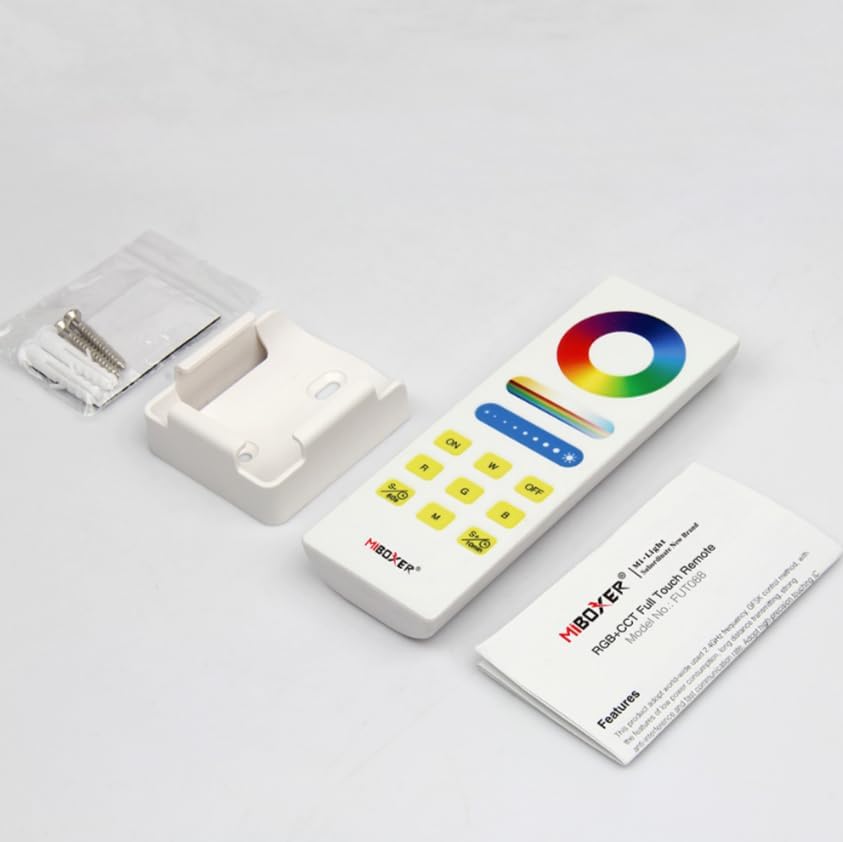
Figure 2: FUT088 Remote with included accessories, including the wall mount.
3.2 Linking (Pairing) the Remote with Lights
To control your MiBoxer/Mi-Light 2.4G series products, the remote must be linked to them. This process typically involves the following steps:
- Ensure the light fixture you wish to control is powered off.
- Turn the light fixture ON.
- Within 3 seconds of turning the light ON, press the "ON" button on the FUT088 remote үч жолу.
- The light should flash slowly three times, indicating successful linking.
If the light does not flash, repeat the linking process. Ensure the remote is within range of the light fixture.
3.3 Unlinking (Unpairing) the Remote from Lights
To unlink the remote from a light fixture, follow these steps:
- Ensure the light fixture you wish to unlink is powered off.
- Turn the light fixture ON.
- Within 3 seconds of turning the light ON, press the "ON" button on the FUT088 remote беш жолу.
- The light should flash quickly ten times, indicating successful unlinking.
4. Иштөө нускамалары
Once linked, the FUT088 remote provides comprehensive control over your lighting. Refer to the "Remote Control Layout" in Section 2.2 for button locations.
4.1 Негизги башкаруу
- Күйгүзүү/өчүрүү: басыңыз ON button to turn lights on, and the ӨЧҮРҮҮ button to turn lights off.
- Жарыктыкты жөндөө: Манжаңызды бойлото жылдырыңыз Караңгылыктын сыдырмасы to increase or decrease the brightness level.
- Түс тандоо: тийиңиз Түс шакеги to select any desired color from the 16 million available options.
- Ак жарык режими: басыңыз W button to switch to pure white light.
- Түс температурасын жөндөө: Манжаңызды бойлото жылдырыңыз Каныктыруу / CCT Control to adjust the color temperature from warm white (2700K) to cool white (6500K) when in white light mode.
- Saturation Adjustment: Манжаңызды бойлото жылдырыңыз Каныктыруу / CCT Control to adjust the saturation of the selected color.
- Статикалык түстөр: Басыңыз R for Red, G for Green, and B for Blue.
4.2 Динамикалык режимдер жана ылдамдыкты башкаруу
- Режим тандоо: басыңыз M button to cycle through various pre-programmed dynamic lighting modes (e.g., color fades, jumps, flashes).
- Ылдамдыкты жөндөө: While in a dynamic mode, press S+ to increase the speed of the effect, and S- ылдамдыгын азайтуу үчүн.
4.3 Кечиктирүү функциясы
The remote includes a convenient delay off feature:
- 60 секунддук кечиктирүү өчүрүү: көпкө басыңыз S- / 60s button. The lights will automatically turn off after 60 seconds.
- 10-Minute Delay Off: көпкө басыңыз S+ / 10min button. The lights will automatically turn off after 10 minutes.

Figure 3: Delay Off Light Function. This image highlights the buttons used for setting a 60-second or 10-minute delay before the lights turn off.
5. Техникалык шарттар
| Өзгөчөлүк | Деталь |
|---|---|
| Модель номери | FUT088 |
| Башкаруу түрү | RGB+CCT (Red, Green, Blue, Tunable White) |
| Сигналдын жыштыгы | 2.4GHz RF |
| Башкаруу диапазону | 30 метрге чейин (98 фут) |
| Түс температурасы диапазону | 2700K - 6500K |
| Power Source | 2x AAA батарейкалар (киргизилген эмес) |
| Өлчөмдөр | 5.5 x 2 x 1 дюйм (болжол менен) |
| Элемент Салмагы | 2.56 унция |
| Өндүрүүчү | Miboxer |
6. Кыйынчылыктарды
- Lights not responding to remote:
- Батареялардын туура орнотулганын жана түгөнүп калбагандыгын текшериңиз. Керек болсо алмаштырыңыз.
- Verify the remote is properly linked to the light fixture (refer to Section 3.2).
- Check if the light fixture is powered on and functioning correctly.
- Ensure the remote is within the 30-meter control range and there are no significant obstructions.
- Remote indicator light not illuminating:
- Батареянын орнотулганын текшерип, батареяларды алмаштырыңыз.
- Inconsistent control or flickering lights:
- Interference from other 2.4GHz devices might be present. Try moving the remote or light fixture.
- Ensure the light fixture is compatible with the FUT088 remote.
7. Техникалык тейлөө
- Тазалоо: Пультту жумшак, кургак чүпүрөк менен сүртүңүз. Абразивдүү тазалагычтарды же эриткичтерди колдонбоңуз.
- Сактагыч: Пультту күн нурунан жана экстремалдык температурадан алыс, салкын, кургак жерде сактаңыз.
- Батареяга кам көрүү: Эгерде пульт көпкө чейин колдонулбаса, агып кетүүнүн алдын алуу үчүн батарейкаларды алып салыңыз.
8. Кепилдик жана колдоо
Кепилдик маалыматы жана техникалык колдоо үчүн расмий MiBOXERди караңыз webсайтка же сатуучуга кайрылыңыз. Сатып алуу квитанциясын кепилдик дооматтары үчүн сатып алуунун далили катары сактаңыз.
Кошумча жардам алуу үчүн, сиз иш сапары менен болот Amazon боюнча MiBOXER дүкөнү.
Ask a question about this manual
Ask about setup, troubleshooting, compatibility, parts, safety, or missing instructions. Manuals+ will review the question and use this page’s manual context to help answer it.