1. Киришүү
Thank you for choosing the Generic G1200 Digital Microscope. This device is designed for detailed observation, inspection, and analysis of various objects, offering a 12-megapixel camera and a 7-inch LCD display with 1-1200X continuous magnification. This manual provides essential information for the safe and effective use of your microscope.
2. Коопсуздук маалыматы
- Keep the microscope away from water and other liquids to prevent electric shock or damage.
- Do not disassemble or modify the device. Repairs should only be performed by qualified personnel.
- Аппаратты түз күндүн нуруна же жогорку температурага калтырбаңыз.
- Handle the lens and screen with care to prevent scratches.
- This product is not a toy; keep it out of reach of children without adult supervision.
3. Пакеттин мазмуну
Сураныч, кутудан чыкканда пакеттин мазмунун текшериңиз:
- G1200 Digital Microscope Unit (with 7-inch LCD)
- Adjustable Stand and Base
- USB кубат кабели
- Колдонуучунун Колдонмосу (бул документ)
- Calibration Ruler (may vary by package)
4. Продукт бүтүп калдыview
The G1200 Digital Microscope features a robust design for stable observation and a clear display for detailed viewing.

Сүрөт 4.1: Алдыңкы view of the G1200 Digital Microscope displaying a circuit board.
The microscope consists of a main unit with an integrated 7-inch LCD screen, a high-resolution lens, and an adjustable stand. The stand allows for precise positioning and stable observation of specimens.

Figure 4.2: The adjustable stand allows for flexible viewбурчтар.
The 7-inch LCD provides a large, clear viewing area, enhancing the user experience for prolonged observation and group viewing.
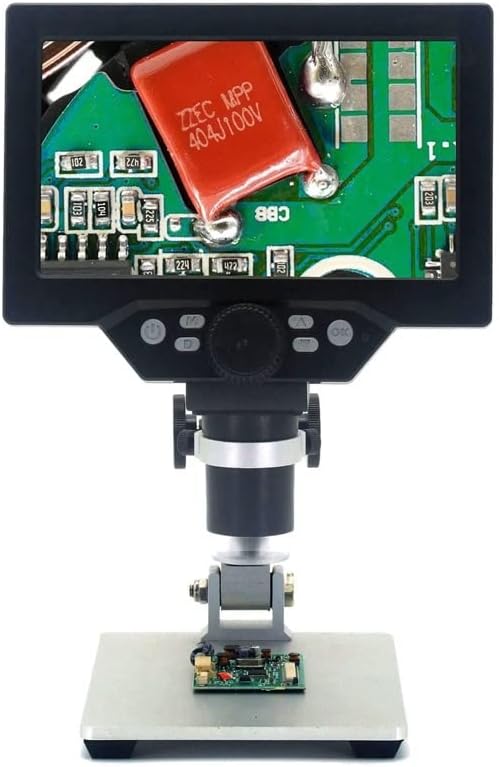
Figure 4.3: The G1200 features a 7-inch display for enhanced viewачыктык.
5. Орнотуу
- Таңылганын ачуу: Бардык компоненттерди таңгактан кылдаттык менен алып салыңыз.
- Стендди чогултуу: Attach the microscope unit to the adjustable stand. Ensure all screws are tightened securely to prevent wobbling.
- Кубат туташуу: Connect the USB power cable to the microscope's power input port and then to a suitable USB power adapter (not included) or a powered USB port. For the Bluit Battery Model, ensure the internal battery is charged before first use.
- Баштапкы күйгүзүү: Press and hold the power button located on the microscope unit until the LCD screen illuminates.
6. Иштөө нускамалары
6.1 Күйгүзүү/өчүрүү
- Күйгүзүү: Кубат баскычын болжол менен 3 секунд басып туруңуз.
- Өчүрүү: Press and hold the power button again for approximately 3 seconds until the screen turns off.
6.2 Placing a Specimen
Place the object you wish to observe directly on the base plate beneath the microscope lens. Ensure it is centered for optimal viewing.
6.3 Adjusting Focus and Magnification
- Бийиктигин тууралоо: Use the knob on the stand to raise or lower the microscope unit, bringing the lens closer or further from the specimen.
- Майда фокус: Rotate the focus wheel on the microscope unit to achieve a clear image.
- Чоңойтуу: The G1200 offers 1-1200X continuous amplification. Adjust the distance between the lens and the object, and then fine-tune the focus to change the magnification level.
6.4 Using the LCD Display and Controls
The 7-inch LCD displays the live view from the microscope camera. Buttons on the unit typically include:
- Меню баскычы: Accesses settings for image resolution, video resolution, date/time, language, etc.
- Режим баскычы: Сүрөт, видео жана ойнотуу режимдери ортосунда которулат.
- Тартуу/жаздыруу баскычы: Сүрөткө тартат же видео жазууну баштайт/токтот.
- Өйдө/ылдый баскычтары: Navigate menus or adjust digital zoom (if available).
Refer to the on-screen menu for specific functions and settings.
7. Техникалык тейлөө
- Линзаны тазалоо: Оптикалык линзалар үчүн атайын иштелип чыккан жумшак, түксүз чүпүрөктү колдонуңуз. Абразивдүү материалдарды же катуу химиялык заттарды колдонбоңуз.
- Экранды тазалоо: Wipe the LCD screen gently with a soft, dry microfiber cloth.
- Сактагыч: Store the microscope in a clean, dry, and dust-free environment when not in use.
- Battery Care (Bluit Battery Model): Батареянын оптималдуу иштөө мөөнөтү үчүн, бат-баттан батареяны толук зарядсыздандырбаңыз. Аппаратты узак убакыт бою колдонбосо дагы, үзгүлтүксүз заряддаңыз.
8. Кыйынчылыктарды
- Кубат жок: Ensure the USB power cable is securely connected and the power source is active. For battery models, check if the battery is charged.
- бүдөмүк сүрөт: Adjust the height of the microscope unit and rotate the focus wheel until the image is clear. Ensure the specimen is flat and well-lit.
- Экран көрсөтүлбөй жатат: Check power connection. If the device is on but no image appears, try restarting the microscope.
- Баскычтар жооп бербейт: Power off the device and restart it. If the issue persists, ensure no debris is obstructing the buttons.
9. Техникалык шарттар
| Өзгөчөлүк | Спецификация |
|---|---|
| Модель аты | G1200 (EENKNDXQA-BLUITBATTERYMODEL-1-1200X) |
| Дисплей | 7 дюймдук LCD |
| Чоңойтуу катышы | 1-1200X Continuous Ampжашоо |
| Камеранын чечилиши | 12 мегапиксел |
| Материал | Пластик |
| Элемент Салмагы | 2.2 фунт (1000 грамм) |
| Пакеттин өлчөмдөрү | 1.18 x 0.79 x 0.39 дюйм |
| Power Source | USB Powered / Built-in Battery (Bluit Battery Model) |
10. Кепилдик жана колдоо
For warranty information and customer support, please refer to the documentation provided at the time of purchase or contact your retailer. The manufacturer is committed to providing high-quality after-sales service.


