1. Киришүү
This manual provides essential information for the safe and effective use of your H9 Pro Max Smartwatch. Please read it thoroughly before operating the device and retain it for future reference. The H9 Pro Max Smartwatch is designed to integrate into your daily life, offering fitness tracking, communication features, and health monitoring.
2. Кутуда эмне бар
Upon opening your H9 Pro Max Smartwatch package, you should find the following items:
- H9 Pro Max Smartwatch
- User Manual
- Заряддоо кабели
- Көрүү тобу
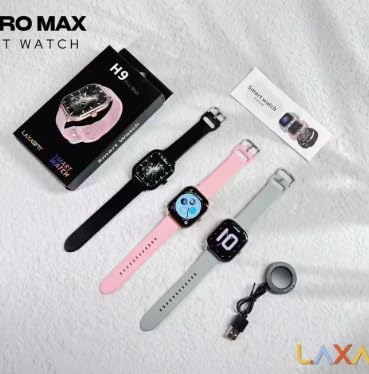
Image: The H9 Pro Max Smartwatch packaging, showing the smartwatch in various colors, the charging cable, and the user manual.
3. Продукт бүтүп калдыview
The H9 Pro Max Smartwatch features a 2.01-inch HD Retina Display, providing clear visuals and an intuitive touch interface. Its design is suitable for various daily activities and fitness routines.
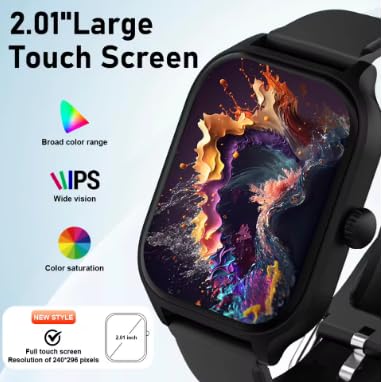
Сүрөт: деталдуу view of the smartwatch's 2.01-inch large touch screen, highlighting its IPS display with broad color range and saturation.
Негизги компоненттер:
- Дисплей: 2.01-inch HD Retina IPS Touch Screen (240x240 resolution)
- Сенсорлор: Heart rate sensor, Blood oxygen sensor, Accelerometer
- Байланыш: Bluetooth
- Батарея: Lithium Ion (180 Amp Hours capacity)
4. Орнотуу
4.1 Алгачкы заряддоо
Before first use, fully charge your H9 Pro Max Smartwatch. Connect the charging cable to the watch's charging port and a compatible USB power source. The watch will display a charging indicator.
4.2 Колдонмону орнотуу жана жупташтыруу
Акылдуу саатыңыздын толук функцияларын ачуу үчүн, жүктөп алып, орнотуңуз LaxasFit app on your smartphone. You can find the app by scanning the QR code provided in the user manual or searching in your device's app store.
- Смартфонуңузда Bluetooth иштетилгенин текшериңиз.
- LaxasFit колдонмосун ачып, аккаунт түзүү же кирүү үчүн экрандагы көрсөтмөлөрдү аткарыңыз.
- Колдонмодон "Түзмөк кошуу" же ушул сыяктуу опцияны тандаңыз.
- The app will search for your H9 Pro Max Smartwatch. Select it from the list of available devices.
- Confirm the pairing request on both your smartwatch and smartphone.
5. Иштөө нускамалары
5.1 Негизги навигация
The smartwatch is operated primarily via its touchscreen. Swipe left, right, up, or down to navigate through menus and features. Press the side button to return to the home screen or access the app list.
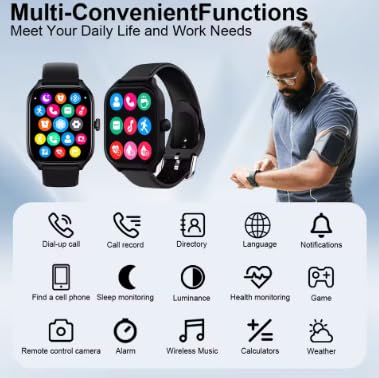
Image: The smartwatch interface showing multiple functions and app icons, demonstrating its versatile capabilities.
5.2 Bluetooth чалуу
Смартфонуңуз менен жупташтырылгандан кийин, сиз түздөн-түз акылдуу саатыңыздан чалууларды жасай жана кабыл ала аласыз.
- Чалууларды жасоо: Чалууну баштоо үчүн саатыңыздагы тергичке же байланыштар тизмесине кириңиз.
- Чалууларды кабыл алуу: An incoming call notification will appear on your watch. Tap to answer or decline.
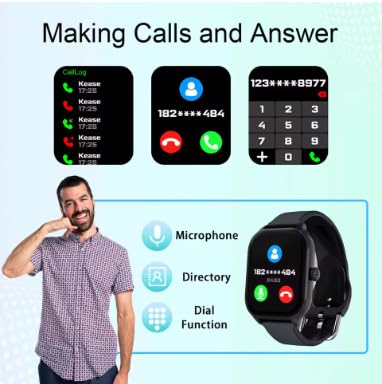
Image: The smartwatch demonstrating its Bluetooth calling features, including call logs, answering calls, and using the dial function.
5.3 Smart эскертмелер
Receive notifications from various apps (WeChat, WhatsApp, Instagram, etc.) directly on your wrist. Ensure notification permissions are granted in the LaxasFit app and your phone's settings.
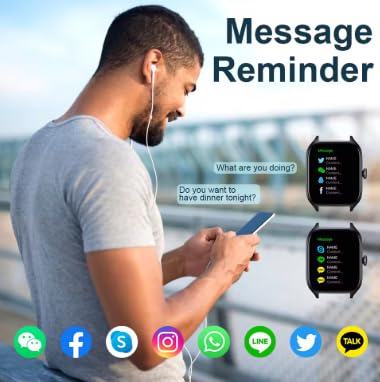
Image: The smartwatch showing message reminders from popular social media applications.
5.4 Ден соолуктун мониторинги
Акылдуу саат ден соолуктун ар кандай көрсөткүчтөрүн көзөмөлдөйт:
- Жүрөктүн кагышы: Жүрөктүн кагышын үзгүлтүксүз же талап боюнча көзөмөлдөө.
- Кандагы кычкылтек: Кандын кычкылтек менен каныккандыгын өлчөйт.
- Уйкунун мониторинги: Уйкунун үлгүсүн жана сапатын көзөмөлдөйт.
- Кан басымы: Кан басымынын көрсөткүчтөрүн берет.
Жоопкерчиликтен баш тартуу: The health monitoring features are for general wellness and fitness purposes only and are not intended for medical diagnosis, treatment, or prevention of any disease. Consult a medical professional for any health concerns.
5.5 Көп спорттук режимдер
Select from various sport modes to track your workouts accurately. Modes include outdoor running, walking, indoor cycling, indoor running, and free exercise.

Image: The smartwatch interface showing available sports modes, with examples of people performing different exercises.
5.6 Music Playback and Remote Camera Control
- Музыкалык башкаруу: Туташкан смартфонуңузда музыка ойнотууну башкарыңыз (ойнотуу, тындыруу, тректерди өткөрүп жиберүү).
- Алыскы камера: Use your smartwatch as a remote shutter button for your smartphone's camera.
6. Өзгөчөлүктөр
- TWS Bluetooth Headset Pairing: Connect your True Wireless Stereo (TWS) Bluetooth headsets directly to the smartwatch for an enhanced audio experience.
- Ыңгайлаштырылган саат жүздөрү: Personalize your smartwatch with a variety of watch faces available through the LaxasFit app.
- OTA Firmware Жаңыртуулары: Receive over-the-air (OTA) updates to keep your smartwatch software current with the latest features and improvements.
- Global Weather Forecast: Stay informed with accurate, up-to-date weather information displayed on your watch.
7. Техникалык тейлөө
7.1 Тазалоо
Wipe the smartwatch and band regularly with a soft, dry cloth. Avoid using harsh chemicals or abrasive materials.
7.2 Заряддоо
Charge the device using the provided charging cable. Avoid using damaged cables or chargers. The average battery life is 3 years, with a charging time of approximately 90 hours for a full charge.
7.3 Сууга туруктуулук
Маанилүү: This smartwatch is сууга чыдамдуу эмес. Avoid exposure to water, including showering, swimming, or heavy rain, to prevent damage.
8. Кыйынчылыктарды
- Түзмөк күйбөй жатат: Аппараттын толук заряддалганын текшериңиз.
- Смартфон менен жупташуу мүмкүн эмес: Check if Bluetooth is enabled on both devices and the LaxasFit app is open. Try restarting both the watch and phone.
- Эскертмелер көрүнбөй жатат: Verify notification permissions in the LaxasFit app and your phone's settings.
- Туура эмес ден соолук маалыматтары: Ensure the watch is worn snugly on your wrist. Environmental factors and movement can affect readings.
9. Техникалык шарттар
| Өзгөчөлүк | Деталь |
|---|---|
| Модел | LAXASFIT H9 Pro Max |
| Дисплей өлчөмү | 2.01 дюйм |
| Дисплей түрү | IPS 240x240 resolution |
| Эстутум сактоо сыйымдуулугу | 512 MB |
| Операция системасы | Android Wear 1.4, Android Wear 2.8 |
| Байланыш технологиясы | Bluetooth |
| Батарея сыйымдуулугу | 180 Amp Саат |
| Батареянын орточо иштөө мөөнөтү | 3 жыл |
| Заряддоо убактысы | 90 саат |
| Элемент Салмагы | 180 г |
| Шайкеш түзмөктөр | Смартфон, iPhone |
| Өзгөчөлүктөр | Accelerometer, Activity Tracker, Custom Activity Tracking, Lightweight, Music Player |
10. Кепилдик жана колдоо
10.1 Кепилдик маалыматы
Your H9 Pro Max Smartwatch comes with a 1 ай кепилдик сатып алынган күндөн тартып. Бул кепилдик өндүрүш кемчиликтерин камтыйт. Кепилдик дооматтары үчүн сатып алганыңыздын далилин сактап коюңуз.
10.2 Кардарларды колдоо
For further assistance, troubleshooting, or warranty claims, please contact your retailer or the manufacturer's customer support. Refer to the packaging or product webбайланыш маалыматы үчүн сайт.


