
1. Киришүү
This manual provides detailed instructions for the installation, operation, and maintenance of your MekedeTech Android Car Stereo Head Unit, model 8-Core 4+64G. This 9-inch touch screen stereo is specifically designed as an upgrade for VW Sharan vehicles manufactured between 2010 and 2018. It features an Android 12 OS, 8-Core A53 1.8GHz CPU, 4GB RAM, and 64GB ROM, offering a responsive and feature-rich in-car entertainment and navigation experience. Key functionalities include built-in 4G LTE, WiFi, wireless CarPlay, Android Auto, GPS navigation, and AM/FM radio.
2. Орнотуу жана орнотуу
The MekedeTech Android Car Stereo is designed for a straightforward installation process. The package includes a frame kit and a plug-and-play wiring harness, which retains factory steering wheel controls. No splicing of wires is typically required.
2.1 Орнотууга чейинки текшерүү
- Орнотууну баштоодон мурун унаанын от алдыруу өчүрүлгөнүн жана батареянын ажыратылганын текшериңиз.
- Таңгактоо тизмесинде көрсөтүлгөн бардык компоненттердин бар экендигин текшериңиз.
- Familiarize yourself with the vehicle's existing radio removal procedure.
2.2 Орнотуу кадамдары
- Carefully remove the original radio unit from your VW Sharan. Refer to your vehicle's service manual for specific instructions.
- Connect the provided plug-and-play wiring harness to the vehicle's existing wiring. Ensure all connections are secure.
- Connect the other end of the harness to the MekedeTech head unit.
- Install the new head unit into the dashboard opening, securing it with the provided frame kit.
- Унаа аккумуляторун кайра туташтырыңыз жана блокту текшерүү үчүн от алдыргычты күйгүзүңүз.

This image illustrates the appearance of the VW Sharan dashboard before and after the installation of the MekedeTech Android Car Stereo. The top image shows the new 9-inch touch screen installed, while the bottom left shows the original radio, and the bottom right shows the new unit in place.
2.3 Cooling Fan Setup
The unit includes a cooling fan to manage internal temperatures, especially during prolonged use or in hot environments. Ensure the cooling fan is properly connected and configured.

This diagram shows the physical connection point for the cooling fan (1. Connect) and the software settings to enable it (2. Settings -> Device -> Sound, 3. Device -> AMP ON, 4. The cooling fan starts working). It also illustrates the difference in CPU temperature with and without the cooling fan.
3. Иштөө нускамалары
3.1 Негизги функциялар
- Күйгүзүү/өчүрүү: Press and hold the power button (usually located on the front panel) to turn the unit on or off. A short press typically mutes/unmutes audio.
- Сенсордук экран: Navigate the Android interface by tapping, swiping, and pinching on the 9-inch IPS touch screen.
- Үндү көзөмөлдөө: Adjust volume using the physical buttons on the unit or the steering wheel controls.
- Радио (AM/FM): Access the built-in AM/FM tuner application to scan for stations, save presets, and listen to broadcasts.
3.2 Wireless CarPlay жана Android Auto
The unit supports wireless CarPlay for iOS devices and wireless Android Auto for Android devices, providing seamless integration of your smartphone's features.

This image displays the user interface for both Wireless CarPlay (iOS system) and Wireless Android Auto (Android system). Connection steps are provided: 1. Connect Bluetooth (BT), 2. Click on "Car Link" and wait for connection. Both systems can also be connected via USB cable.
3.3 4G LTE and WiFi Connectivity
The head unit features built-in 4G LTE and WiFi modules, allowing internet access directly from the unit or via a WiFi hotspot.
- 4G LTE: Insert a compatible SIM card into the designated 4G LTE card slot to access cellular data. The unit includes two SIM card slots: one on the back of the main unit and one on the RCA cable.
- WiFi: Connect to available WiFi networks by navigating to the settings menu and selecting your desired network.
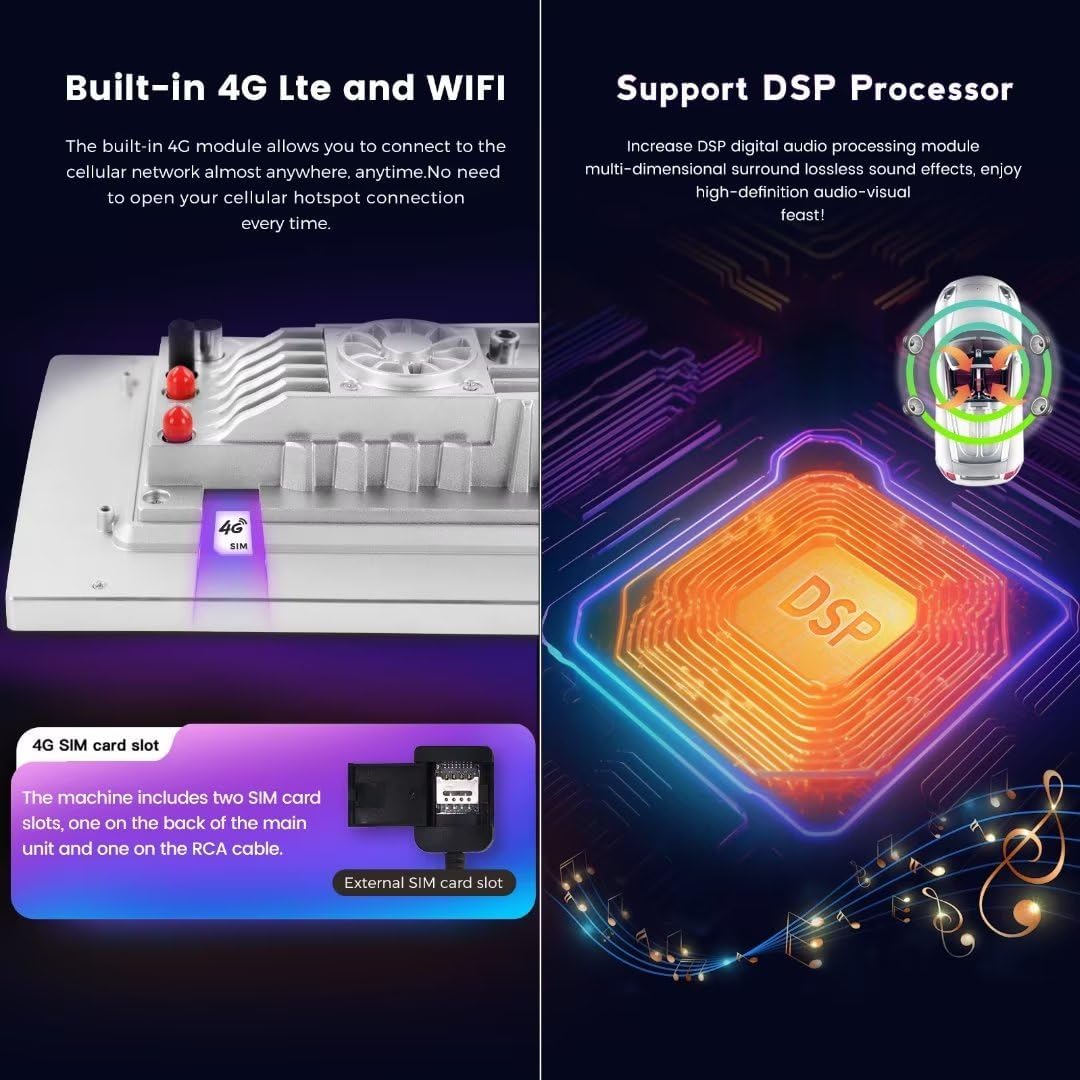
This image highlights the built-in 4G LTE functionality, showing the SIM card slot location. It also illustrates the DSP (Digital Signal Processor) for enhanced audio quality.
3.4 GPS навигациясы
The unit comes with built-in GPS navigation and supports various map applications. Ensure the GPS antenna is properly installed for optimal signal reception.
3.5 DSP үн системасы
The integrated DSP (Digital Signal Processor) provides multi-dimensional surround lossless sound effects, enhancing your audio experience with high-definition quality.
4. Техникалык тейлөө
Унааңыздын стереосун туура тейлөө анын узак мөөнөттүү иштешин жана оптималдуу иштешин камсыз кылат.
- Экранды тазалоо: Электроника экрандары үчүн атайын иштелип чыккан жумшак, мамыксыз кездемени колдонуңуз. Dampзарыл болсо, кездемени суу же этегин тазалагыч менен бир аз сүртүңүз. Катуу химиялык заттардан же абразивдүү материалдардан алыс болуңуз.
- Жалпы тазалоо: Түзмөктү чаңдан жана таштандылардан таза кармаңыз. Желдеткичтерди жана жаракаларды тазалоо үчүн жумшак щетканы же кысылган абаны колдонуңуз.
- Программалык камсыздоо жаңыртуулары: Periodically check for software updates through the unit's settings menu or the manufacturer's webакыркы функцияларды жана каталарды оңдоону камсыз кылуу үчүн сайт.
- Ашыкча температурадан сактаныңыз: Do not expose the unit to extreme heat or cold for extended periods, as this can affect its performance and lifespan.
5. Кыйынчылыктарды
If you encounter issues with your MekedeTech Android Car Stereo, refer to the following common troubleshooting steps:
- Кубат жок:
- Бардык электр туташууларын текшерип, алардын бекем экенине ынаныңыз.
- Унаанын радиосунун сактагычынын бүтүндүгүн текшериңиз.
- Унаанын аккумулятору туура туташтырылганын жана заряддалганын текшериңиз.
- Үн жок:
- Динамик байланыштарын текшериңиз.
- Үндүн үнү өчүп же минималдуу деп коюлбагандыгын текшериңиз.
- Бирдиктин менюсунда аудио жөндөөлөрүн текшериңиз.
- Сенсордук экран жооп бербейт:
- Restart the unit by turning the vehicle ignition off and on, or by pressing and holding the power button.
- Экран таза жана таштандылардан таза экенин текшериңиз.
- GPS сигналын жоготуу:
- GPS антеннасынын туура орнотулганын жана ачык экенин текшериңиз view асмандын.
- Сигналдын өтүшүнө тоскоол боло турган тоскоолдуктарды текшериңиз.
- CarPlay/Android Auto туташуу маселелери:
- Баш блогуңузда жана смартфонуңузда Bluetooth иштетилгенин текшериңиз.
- Forget and re-pair the Bluetooth connection.
- Смартфонуңуздун операциялык системасын эң акыркы версиясына жаңыртыңыз.
6. Техникалык шарттар
| Бренд | MekedeTech |
| Модел | 8-Core 4+64G |
| Screen Size | 9 дюйм |
| Операция системасы | Android 12 |
| CPU | 8 ядролуу A53 1.8 ГГц |
| Эстутум (RAM) | 4 ГБ |
| Сактагыч (ROM) | 64 ГБ |
| Screen Resolution | 1280 * 720 IPS |
| Байланыш технологиясы | Wireless (Bluetooth, Cellular, Wi-Fi) |
| Өзгөчөлүктөр | 4G LTE, Bluetooth, Touchscreen, Wireless Android Auto, Wireless CarPlay, Built-in DSP |
| Power Output | 4*50 Вт |
| Карта түрү | Бүткүл дүйнөлүк |
| Адам интерфейсинин киргизүү | Buttons, Keyboard, Touchscreen |
| Өндүрүүчү | Shenzhen Mekede Technology Co.,Ltd |
7. Кепилдик жана колдоо
7.1 Кепилдик маалыматы
This MekedeTech Android Car Stereo Head Unit comes with a 1 жылдык кепилдик сатып алынган күндөн тартып. Бул кепилдик кадимки колдонуудагы өндүрүштүк кемчиликтерди жана бузулууларды камтыйт. Ал туура эмес колдонуудан, кырсыктардан, уруксатсыз өзгөртүүлөрдөн же туура эмес орнотуудан келип чыккан зыянды камтыбайт.
7.2 Кардарларды колдоо
For technical assistance, warranty claims, or any questions regarding your product, please contact MekedeTech customer support. Refer to the contact information provided with your purchase or visit the official MekedeTech webколдоо булактары үчүн сайт.