
1. Introduction and Overview
This manual provides instructions for the installation, operation, and maintenance of your MekedeTech Android Car Stereo Head Unit, model 8-Core 4+64G. This unit is specifically designed for VW Golf 7 MK7 vehicles manufactured between 2013 and 2018, offering a seamless upgrade to your vehicle's infotainment system.
Негизги өзгөчөлүктөр төмөнкүлөрдү камтыйт:
- Android 12 операциялык системасы
- 8-Core A53 1.8GHz CPU with 4GB RAM and 64GB ROM
- 10-inch IPS Touch Screen with 1280x720 resolution
- Built-in 4G LTE and Wi-Fi module for internet access
- Wireless CarPlay and Android Auto support
- Integrated GPS navigation and AM/FM radio
- Support for original steering wheel controls
- 4x50W Power Output with built-in DSP sound system

1.1-сүрөт: Негизги view of the MekedeTech Android Car Stereo Head Unit.
2. Орнотуу жана орнотуу
The MekedeTech Android Car Stereo Head Unit is designed for a plug-and-play installation, utilizing your vehicle's existing wiring harness. No splicing of wires is typically required.
2.1 Пакеттин мазмуну
Орнотууну баштоодон мурун, бардык компоненттер бар экенин текшериңиз:
- MekedeTech Android Car Stereo Head Unit
- Vehicle-specific frame kit
- Plug-and-play wiring harness
- GPS антеннасы
- 4G LTE antenna (if applicable)
- USB кабелдери
- Колдонуучунун Колдонмосу (бул документ)
2.2 Орнотуу кадамдары
- Даярдоо: Turn off your vehicle's ignition and disconnect the negative terminal of the car battery to prevent electrical shorts.
- Түпнуска радиону алып салуу: Carefully remove the trim panels and screws securing the factory radio. Refer to your vehicle's service manual for specific instructions on removing the original head unit.
- Зымдарды туташтыруу: Connect the provided plug-and-play wiring harness to the vehicle's factory connectors and then to the new Android head unit. Ensure all connections are secure.
- Антенналарды туташтыруу: Attach the GPS antenna and 4G LTE antenna (if using a SIM card) to their respective ports on the head unit. Position the antennas in a location with clear signal reception, away from metal obstructions.
- Башкы блокту орнотуу: Mount the new head unit into the dashboard opening using the provided frame kit and screws. Ensure it is securely fastened.
- Батареяны кайра туташтыруу: Унаа аккумуляторунун терс терминалын кайра туташтырыңыз.
- Баштапкы күйгүзүү: Turn on the vehicle's ignition and power on the head unit. Follow any on-screen prompts for initial setup.

Figure 2.1: Visual comparison of the dashboard before and after installing the MekedeTech Android Car Stereo.

Figure 2.2: Illustration of cooling fan support and setup steps for the head unit.
3. Иштөө нускамалары
3.1 Негизги операция
- Күйгүзүү/өчүрүү: Түзмөктү күйгүзүү же өчүрүү үчүн кубат баскычын (адатта алдыңкы панелде жайгашкан) басып, кармап туруңуз. Кыска басуу, адатта, аудиону өчүрөт же кайра күйгүзөт.
- Сенсордук экран: Navigate the Android interface by tapping, swiping, and pinching on the 10-inch IPS touch screen, similar to a smartphone or tablet.
- Үндү көзөмөлдөө: Adjust volume using the physical knobs/buttons on the unit or via the steering wheel controls.
3.2 Wireless CarPlay жана Android Auto
The unit supports wireless CarPlay for iOS devices and wireless Android Auto for Android devices, allowing seamless integration of your smartphone's features.
- Bluetooth иштетүү: Ensure Bluetooth is enabled on both your smartphone and the head unit.
- Түзмөктөрдү жупташтыруу: On the head unit, go to the Bluetooth settings and pair with your smartphone.
- CarPlay/Android Auto иштетиңиз: Once paired, select the CarPlay or Android Auto icon on the head unit's main screen. Follow any on-screen prompts to complete the connection.
- USB туташуу (кошумча): If wireless connection is unstable or unavailable, you can connect your phone via a USB cable to use CarPlay/Android Auto.

Figure 3.1: Steps for connecting to Wireless CarPlay (iOS) and Wireless Android Auto (Android).
3.3 4G LTE and Wi-Fi Connectivity
The head unit features built-in 4G LTE and Wi-Fi for internet access.
- Wi-Fi: Go to Settings > Network & Internet > Wi-Fi to connect to available Wi-Fi networks (e.g., a mobile hotspot).
- 4G LTE: Insert a compatible 4G SIM card into the designated slot on the unit. The unit will automatically connect to the cellular network for data access. This eliminates the need for a constant Wi-Fi hotspot from your phone.
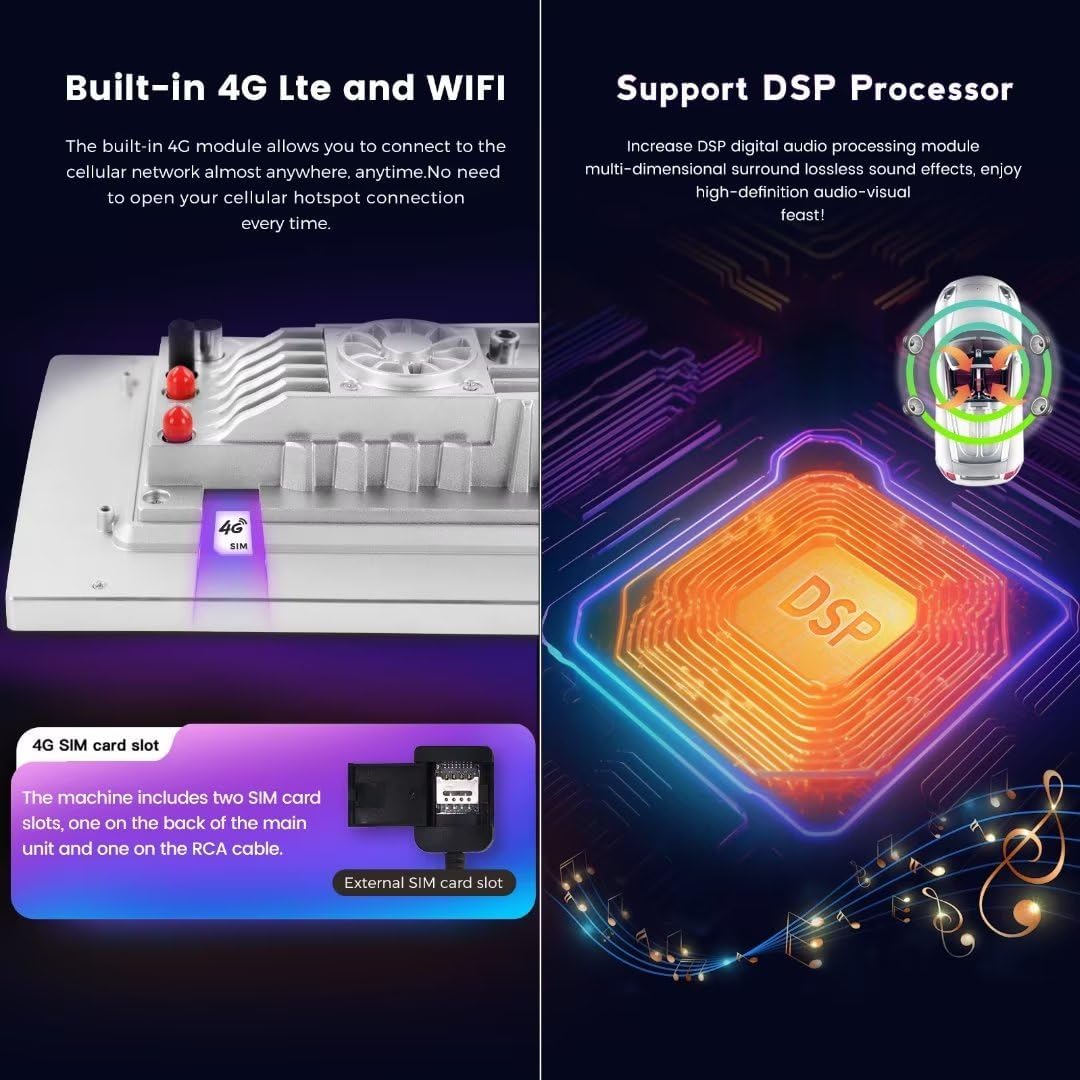
Figure 3.2: Location of the 4G SIM card slot and illustration of the DSP processor.
3.4 GPS навигациясы
The unit comes with built-in GPS and supports various navigation applications. Ensure the GPS antenna is properly installed for optimal signal reception.
3.5 Аудио жана видеону ойнотуу
The unit supports a wide range of audio and video formats. The integrated DSP (Digital Signal Processor) enhances audio quality, providing a multi-dimensional surround sound experience.
- Аудио форматтары: APE, FLAC, WAV, MP3, WMA ж.б.
- Видео форматтары: MKV, RMVB, AVI, MP4, MDV ж.б.
- Picture Жылдар: PNG, JPEG, JPG, GIF, WBMP, BNP ж.б.
3.6 Рулдун башкаруу элементтери
The unit retains compatibility with your vehicle's factory steering wheel controls, allowing you to manage audio, calls, and other functions without taking your hands off the wheel.
4. Техникалык тейлөө
Proper maintenance ensures the longevity and optimal performance of your car stereo head unit.
- Экранды тазалоо: Жумшак, түксүз кездемени колдонуңуз, бир аз dampened with water or a screen-safe cleaner, to gently wipe the touch screen. Avoid abrasive materials or harsh chemicals.
- Чаңды тазалоо: Periodically use a soft brush or compressed air to remove dust from vents and button crevices.
- Программалык камсыздоо жаңыртуулары: Check for available software updates through the unit's settings menu to ensure you have the latest features and bug fixes.
- Муздатуу системасы: The unit is equipped with a cooling fan to manage internal temperatures. Ensure the fan vents are not obstructed to allow proper airflow.
5. Кыйынчылыктарды
Эгерде сиз башкы блок менен көйгөйлөргө туш болсоңуз, төмөнкү жалпы көйгөйлөрдү чечүү кадамдарын караңыз:
| Көйгөй | Мүмкүн себеп | Чечим |
|---|---|---|
| Түзмөк күйбөйт | Бошоң электр туташуу, күйгөн сактагыч, унаанын аккумуляторунун көйгөйү | Check wiring harness connections. Inspect vehicle fuses. Ensure car battery is charged. |
| Үн жок | Volume muted, speaker wires disconnected, incorrect audio settings | Check volume level and mute status. Verify speaker wire connections. Adjust audio output settings. |
| CarPlay/Android Auto туташпай жатат | Bluetooth/Wi-Fi off, incorrect pairing, phone software issue | Ensure Bluetooth/Wi-Fi is on for both devices. Re-pair devices. Try connecting via USB. Restart phone and head unit. |
| GPS сигналы алсыз же так эмес | GPS antenna improperly placed or faulty | GPS антеннасын тунук жерге жылдырыңыз view асмандын. Антенна байланышын текшериңиз. |
| Сенсордук экран жооп бербейт | Программанын катасы, экранды калибрлөө маселеси | Restart the head unit. If issue persists, perform a factory reset (note: this will erase all user data). |
| Бирдиктин ысып кетиши | Obstructed cooling vents, prolonged heavy use | Ensure cooling vents are clear. Reduce usage of demanding applications. The built-in cooling fan should help regulate temperature. |
6. Техникалык шарттар
Detailed technical specifications for the MekedeTech Android Car Stereo Head Unit (8-Core 4+64G):
| Өзгөчөлүк | Спецификация |
|---|---|
| Бренд | MekedeTech |
| Screen Size | 10 дюйм |
| Операция системасы | Android 12 |
| CPU | 8 ядролуу A53 1.8 ГГц |
| Эстутум (RAM) | 4 ГБ |
| Сактагыч (ROM) | 64 ГБ |
| Screen Resolution | 1280 * 720 IPS |
| Сенсордук экран түрү | Capacitive |
| Байланыш технологиясы | Wireless (Bluetooth, Wi-Fi, Cellular) |
| Өзгөчөлүктөр | 4G LTE, Bluetooth, Touchscreen, Wireless Android Auto, Wireless CarPlay, Built-in DSP |
| Power Output | 4*50 Вт |
| Карта түрү | Бүткүл дүйнөлүк |
| Адам интерфейсинин киргизүү | Баскычтар, сенсордук экран |
| Өндүрүүчү | Shenzhen Mekede Technology Co.,Ltd |
7. Кепилдик маалыматы
The MekedeTech Android Car Stereo Head Unit comes with a 1 жылдык кепилдик from the date of purchase. This warranty covers manufacturing defects and malfunctions under normal use. It does not cover damage caused by improper installation, accident, misuse, abuse, unauthorized modifications, or natural disasters.
Кепилдик дооматтары үчүн сатып алганыңыздын далилин сактап коюңуз.
8. Колдоо
For technical assistance, troubleshooting beyond this manual, or warranty inquiries, please contact MekedeTech customer support through the retailer where the product was purchased or visit the official MekedeTech webбайланыш маалыматы үчүн сайт.
When contacting support, please have your product model (8-Core 4+64G) and proof of purchase readily available.