
1. Киришүү
This manual provides comprehensive instructions for the installation, operation, and maintenance of your MekedeTech Android Car Stereo Head Unit. This unit is specifically designed for the VW Golf 7 MK7 models from 2013 to 2018, offering an enhanced in-car entertainment and navigation experience.
The system features an Android 12 OS, an 8-Core A53 1.8GHz CPU, 2GB RAM, and 32GB ROM. It supports steering wheel controls, built-in 4G LTE and WiFi, GPS navigation, and a 10-inch IPS touch screen with 1280*720 resolution. Enjoy a power output of 4*50W and support for various audio and video formats.
2. Пакеттин мазмуну
Орнотууну баштоодон мурун, бардык компоненттердин бар экендигин текшериңиз:
- MekedeTech Android Car Stereo Head Unit
- Frame kit for VW Golf 7 MK7
- Plug and play wiring harness
3. Орнотуу жана орнотуу
The installation process is designed to be plug-and-play, minimizing the need for wire splicing. The included frame kit and wiring harness are tailored for a direct fit in your VW Golf 7 MK7 (2013-2018).
3.1 Орнотууга чейинки текшерүү
- Унааны баштоодон мурун, анын от алдыруу системасы өчүрүлгөнүнө жана аккумулятору ажыратылганына ынаныңыз.
- Пакеттин бардык мазмуну бар экенин жана бузулбаганын ырастаңыз.
3.2 Орнотуу кадамдары
- Carefully remove the factory radio unit from your VW Golf 7 MK7. Refer to your vehicle's service manual for specific removal instructions.
- Connect the provided plug-and-play wiring harness to the vehicle's existing wiring. Ensure all connections are secure.
- Attach the MekedeTech Android Car Stereo Head Unit to the new frame kit.
- Connect the wiring harness to the back of the new head unit.
- Carefully slide the assembled unit into the dashboard opening until it clicks into place.
- Унаа аккумуляторун кайра туташтырыңыз жана блокту текшерүү үчүн от алдыргычты күйгүзүңүз.

Image: Visual comparison of the car dashboard before and after the installation of the MekedeTech Android Car Stereo. The 'Before installation' image shows the original factory radio, while the 'After installation' image displays the new 10-inch touch screen unit seamlessly integrated.
3.3 Cooling Fan Setup
The unit includes a cooling fan to manage operating temperatures. Follow these steps to ensure proper cooling fan operation:
- Connect the cooling fan cable to the designated port on the head unit.
- Access the system settings on the head unit: Орнотуулар > Түзмөк > Үн.
- багыттоо Түзмөк > AMP ON.
- The cooling fan should activate, indicated by a change in temperature readings from 'High temperature' to 'Normal temperature' within the system diagnostics.
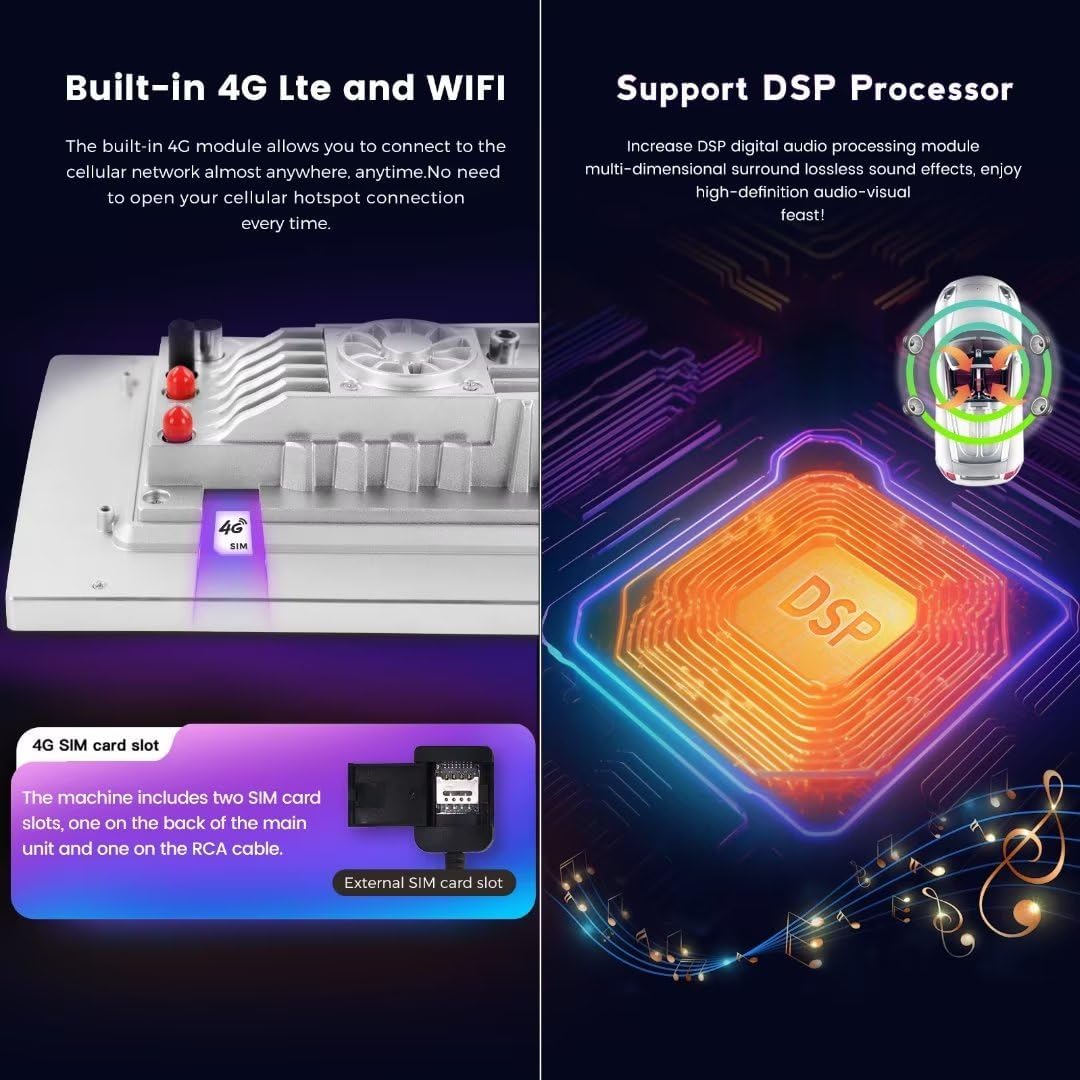
Image: This diagram illustrates the cooling fan support system, highlighting how it prevents overheating. It also details the OCTA CORE CPU (up to 1.6GHz, 2+32GB, CPU: 8*Cortex A55 (28NM)) and provides a visual guide for accessing setup steps within the device's settings menu to activate the cooling fan.
4. Иштөө нускамалары
4.1 Wireless CarPlay жана Android Auto
The head unit features built-in wireless CarPlay and Android Auto, allowing seamless integration with your smartphone without the need for a wired connection.
4.1.1 Wireless CarPlay (iOS System) Connection Steps:
- iPhone'уңузда Bluetooth'ду иштетиңиз.
- On the head unit, open the 'Car Link' application.
- Connect your iPhone to the head unit via Bluetooth.
- Wait for the connection to establish. CarPlay can also be connected via a USB cable if preferred.
4.1.2 Wireless Android Auto (Android System) Connection Steps:
- Android телефонуңузда Bluetooth'ду иштетиңиз.
- On the head unit, open the 'Car Link' application.
- Connect your Android phone to the head unit via Bluetooth.
- Wait for the connection to establish. Android Auto can also be connected via a USB cable if preferred.

Image: This image displays the user interface for built-in wireless CarPlay and Android Auto. It shows the main screen with various app icons and detailed connection steps for both iOS (CarPlay) and Android (Android Auto) devices, emphasizing the wireless capability.
4.2 4G LTE and WiFi Connectivity
The head unit supports 4G LTE connectivity and has a built-in WiFi module for internet access.
- 4G LTE: Insert a compatible SIM card into the designated 4G SIM card slot to access cellular data. There are two SIM card slots: one on the back of the main unit and one on the RCA cable.
- WiFi: Connect to a WiFi hotspot for internet access. This allows you to download applications and browse online content.

Image: This diagram illustrates the built-in 4G LTE and WiFi capabilities, showing the location of the 4G SIM card slot (both on the unit and on the RCA cable). It also highlights the DSP (Digital Sound Processor) feature, which enhances audio quality with multi-dimensional surround sound effects.
4.3 DSP үн системасы
The integrated DSP (Digital Sound Processor) provides enhanced audio quality, offering multi-dimensional surround sound effects for an improved listening experience.
4.4 GPS навигациясы
The unit comes with built-in GPS navigation and supports worldwide maps. Ensure the GPS antenna is properly connected for optimal signal reception.
4.5 AM/FM радиосу
Access the AM/FM radio function through the main interface. Use the touch screen to scan for stations, save presets, and adjust volume.
4.6 Рулдун башкаруу элементтери
The unit retains factory steering wheel controls, allowing you to easily switch songs, channels, and adjust volume without taking your hands off the wheel. Configuration may be required in the system settings.
5. Техникалык тейлөө
To ensure the longevity and optimal performance of your MekedeTech Android Car Stereo, follow these maintenance guidelines:
- Тазалоо: Экранды жана сыртын тазалоо үчүн жумшак, кургак чүпүрөк колдонуңуз. Дисплейге же сырткы көрүнүшүнө зыян келтириши мүмкүн болгон абразивдүү тазалоочу каражаттардан же эриткичтерден алыс болуңуз.
- Программалык камсыздоо жаңыртуулары: Periodically check for system software updates to ensure you have the latest features and security patches. Updates can typically be performed via WiFi.
- Температураны көзөмөлдөө: The built-in cooling fan helps manage internal temperatures. Ensure the fan is not obstructed and operates correctly, especially during prolonged use or in hot climates.
- Энергияны башкаруу: Avoid frequent power cycles or sudden disconnections. Always turn off the vehicle's ignition before disconnecting the battery or performing any electrical work.
6. Кыйынчылыктарды
If you encounter issues with your head unit, refer to the following common problems and solutions:
- Кубат жок:
- Бардык электр туташууларын жана сактагычтарды текшериңиз.
- Унаанын аккумулятору туура туташтырылганын жана заряддалганын текшериңиз.
- Үн жок:
- Динамиктердин туташууларын текшериңиз.
- Check volume settings on the unit and ensure it's not muted.
- Confirm DSP settings are correctly configured.
- Сенсордук экран жооп бербейт:
- Унаанын от алдыруучу системасын өчүрүп, кайра иштетүү менен түзмөктү кайра иштетиңиз.
- Экран таза жана таштандылардан таза экенин текшериңиз.
- GPS сигналынын көйгөйлөрү:
- GPS антеннасы бекем туташтырылганын жана тунук экенин текшериңиз view асмандын.
- Унааны бийик имараттардан же жыш өсүмдүктөрдөн алыс ачык жерге жылдырыңыз.
- CarPlay/Android Auto туташпай жатат:
- Ensure Bluetooth is enabled on both the phone and the head unit.
- Verify the 'Car Link' app is open on the head unit.
- Try connecting with a USB cable to rule out wireless issues.
- Restart both the phone and the head unit.
If problems persist after attempting these solutions, please contact MekedeTech customer support.
7. Техникалык шарттар
| Өзгөчөлүк | Спецификация |
|---|---|
| Бренд | MekedeTech |
| Модел | 8-Core 2+32G |
| Операция системасы | Android 12 OS |
| CPU | 8-Core A53 1.8GHz (8*Cortex A55 (28NM)) |
| Эстутум (RAM) | 2 ГБ |
| Сактагыч (ROM) | 32 ГБ |
| Screen Size | 10 дюйм |
| Screen Resolution | 1280*720 IPS сенсордук экран |
| Power Output | 4*50 Вт |
| Байланыш | 4G LTE, WiFi, Bluetooth |
| Өзгөчөлүктөр | Wireless CarPlay, Wireless Android Auto, DSP, GPS Navigation, AM/FM Radio, Steering Wheel Control Support |
| Унаанын шайкеш түрү | VW Golf 7 MK7 (2013-2018) |
| Камтылган компоненттер | Frame kit, Plug and play harness |
8. Кепилдик жана колдоо
8.1 Кепилдик маалыматы
This MekedeTech Android Car Stereo Head Unit comes with a 1 жылдык кепилдик сатып алынган күндөн тартып. Бул кепилдик өндүрүштүк кемчиликтерди жана нормалдуу колдонуудагы бузулууларды камтыйт. Бул туура эмес орнотуу, туура эмес колдонуу, кырсыктар же уруксатсыз өзгөртүүлөрдөн келип чыккан зыянды камтыбайт.
8.2 Кардарларды колдоо
For technical assistance, warranty claims, or any questions regarding your product, please contact MekedeTech customer support. Refer to your purchase documentation for specific contact details or visit the official MekedeTech webсайт.