
1. Киришүү
The ESSAGER USB to Dual 3.5mm Jack Audio Adapter is an external sound card designed to provide dedicated audio input and output ports via a USB-A connection. It allows users to connect headphones, speakers, and microphones to devices that lack these ports or have malfunctioning internal sound cards. This adapter offers a plug-and-play solution for enhanced audio experience across various platforms.
Негизги өзгөчөлүктөрү:
- Жалпы шайкештик: Works with PCs, laptops, desktops, PlayStation 4/5, and Nintendo Switch.
- Plug and Play: No drivers or software installation required.
- Dual 3.5mm Ports: Separate jacks for microphone (audio-in) and headphones/speakers (audio-out).
- Жогорку сапаттагы аудио: Bypasses internal audio for clear, high-fidelity sound.
- Туруктуу дизайн: Constructed with an aluminum alloy casing узак жашоо үчүн.

Image 1.1: The ESSAGER USB to 3.5mm External Sound Card, highlighting its features and compact design.
2. Продукт бүтүп калдыview
The ESSAGER USB Audio Adapter features a USB-A connector on one end and two 3.5mm audio jacks on the other. These jacks are clearly labeled for their respective functions:
- Microphone Jack (Audio In): Marked with a microphone icon, this port is for connecting external microphones or the microphone plug of a headset.
- Headphone/Speaker Jack (Audio Out): Marked with a headphone icon, this port is for connecting headphones or speakers.
The adapter's compact size and durable aluminum alloy body ensure portability and resistance to daily wear.

Сүрөт 2.1: Детальдуу view of the ESSAGER adapter's dual 3.5mm audio jacks, showing the microphone and headphone icons.
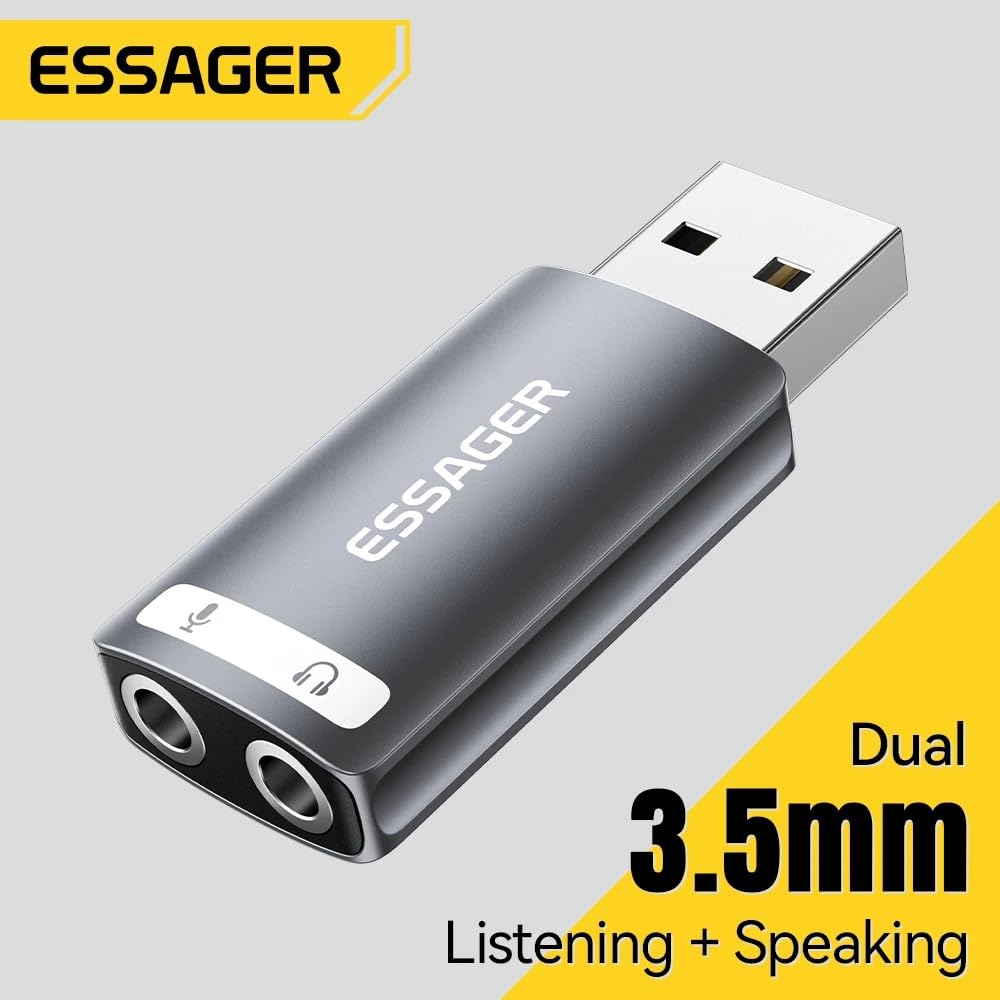
Image 2.2: The ESSAGER USB audio adapter, illustrating its dual functionality for listening and speaking.
3. Орнотуу нускамалары
Setting up the ESSAGER USB Audio Adapter is a straightforward plug-and-play process.
- USB портуна туташуу: Insert the USB-A connector of the adapter into an available USB port on your computer (PC, Mac, Linux), PlayStation 4/5, or Nintendo Switch.
- Системаны таануу: Your operating system will automatically detect and install the necessary drivers. No manual driver installation is required.
- Аудио түзмөктөрдү туташтыруу:
- For headphones or speakers, plug the 3.5mm audio jack into the port marked with the headphone icon.
- For a microphone, plug the 3.5mm audio jack into the port marked with the microphone icon.
- Select Audio Device (if necessary): In some operating systems (e.g., Windows, macOS), you may need to manually select the "USB Audio Device" or similar as your default playback and recording device in the sound settings.
Маанилүү эскертүү:
This USB audio adapter is not compatible with the USB ports of TVs, amplifiers, CD players, cars, or trucks. Ensure your device is a compatible computer or gaming console as listed above.

Image 3.1: The ESSAGER USB audio adapter connected to a laptop, demonstrating a typical setup.

Image 3.2: Compatibility chart for the ESSAGER USB audio adapter, showing supported USB devices, audio devices, and operating systems.
4. Иштөө нускамалары
Once connected and recognized by your device, the ESSAGER USB Audio Adapter functions as your primary sound input and output device.
- Аудио ойнотуу: Any audio played on your device will be routed through the headphone/speaker jack. Adjust volume using your device's system controls.
- Микрофон киргизүү: Audio captured by a connected microphone will be processed through the adapter. Ensure the microphone is selected as the input device in your application settings (e.g., communication software, game settings).
- Жакшыртылган аудио: The built-in external sound card is designed to bypass your device's internal audio, providing clearer sound and improved fidelity for both playback and recording.

Image 4.1: Illustration of the advanced audio processing chip, responsible for high-fidelity audio reproduction.
5. Техникалык тейлөө
The ESSAGER USB Audio Adapter is designed for durability and requires minimal maintenance.
- Тазалоо: Use a soft, dry cloth to wipe the adapter. Avoid liquid cleaners or abrasive materials.
- Сактагыч: Адаптерди колдонбогондо салкын, кургак жерде сактаңыз.
- Колдонуу: Avoid dropping the adapter or exposing it to extreme temperatures or moisture. The aluminum alloy casing provides protection, but proper handling extends its lifespan.

Image 5.1: The ESSAGER USB audio adapter, showcasing its full aluminum alloy shell and durable metal connector.
6. Кыйынчылыктарды
If you encounter issues with your ESSAGER USB Audio Adapter, consider the following troubleshooting steps:
- Үн чыгаруу/киргизүү жок:
- Адаптер USB портуна толугу менен киргизилгенин текшериңиз.
- Verify that your headphones/speakers and microphone are correctly plugged into the respective jacks on the adapter.
- Check your device's sound settings (e.g., Windows Sound Control Panel, macOS System Preferences > Sound) and ensure the "USB Audio Device" is selected as the default playback and recording device.
- Test with another pair of headphones/microphone to rule out faulty audio peripherals.
- Адаптер таанылган жок:
- Try plugging the adapter into a different USB port on your device.
- Компьютериңизди же оюн консолуңузду өчүрүп күйгүзүңүз.
- Confirm your device is compatible (PC, Mac, PS4/PS5, Switch). Remember, it is not compatible with TVs, amplifiers, cars, etc.
- Аудио сапаты начар/статикалык:
- Бардык байланыштар коопсуз экенин текшериңиз.
- Avoid placing the adapter near sources of electromagnetic interference.
- Башка аудио менен сынап көрүңүз files or applications to determine if the issue is specific to certain content.

Image 6.1: Common audio challenges that the ESSAGER USB External Sound Card is designed to resolve.
7. Техникалык шарттар
| Өзгөчөлүк | Деталь |
|---|---|
| Бренд | ESSAGER |
| Модель аты | usb a to 3.5mm |
| Модель номери | EZJ2K-YY0G-P |
| Аппараттык интерфейс | USB |
| Аудио чыгаруу режими | Стерео |
| Шайкеш түзмөктөр | Personal Computer, Laptop, Desktop, PS4/PS5, Nintendo Switch |
| Платформанын шайкештиги | Linux, Windows, Mac OS, Android |
| Максималдуу С.ample Rate | 48 KHz |
| Элементтин өлчөмдөрү (L x W x Y) | 30L x 19W x 50H Millimeters |
| Элемент Салмагы | 0.1 грамм |
| кутучанын мазмуну | USB Sound Card only |
8. Кепилдик жана колдоо
Кепилдик маалыматы:
This product comes with a 6-month warranty. Please note that the warranty is void if there is no original packaging or if any kind of damage occurs to the product.
Колдоо байланышы:
For any support inquiries or assistance, please contact:
MRJ ELECTRONICS AHMEDABAD
Байланыш: 9023265213