
1. Киришүү
This manual provides essential instructions for the safe and efficient operation of your EPEVER Tracer4210ANG3 MPPT Solar Charge Controller. This device is designed to manage power flow from your solar panels to your battery bank, ensuring optimal charging and extending battery life. Please read this manual thoroughly before installation and use.
2. Коопсуздук маалыматы
Орнотуу жана иштетүү учурунда төмөнкү коопсуздук чараларын сактаңыз:
- Ensure all wiring is correctly polarized and securely connected to prevent damage to the controller or other components.
- Always connect the battery first, then the solar panel, and finally the load. Disconnect in the reverse order.
- Контроллерди өз алдынча бөлүктөргө бөлүүгө же оңдоого аракет кылбаңыз. Тейлөө үчүн квалификациялуу адистерге кайрылыңыз.
- Контроллерди күйүүчү материалдардан жана тике күндүн нурунан алыс, жакшы желдетилген жерге орнотуңуз.
- Ашыкча токтун таасиринен коргоо үчүн бардык туташуулар үчүн тиешелүү автоматтык өчүргүчтөрдү же сактагычтарды колдонуңуз.
- Батареялар менен иштегенде коргоочу көздү кийиңиз.
3. Продукт бүтүп калдыview
The EPEVER Tracer4210ANG3 is an advanced Maximum Power Point Tracking (MPPT) solar charge controller designed for off-grid solar systems. It automatically identifies 12V or 24V system voltages and supports various battery types, including Lithium. Key features include high tracking and conversion efficiency, and comprehensive electronic protections.
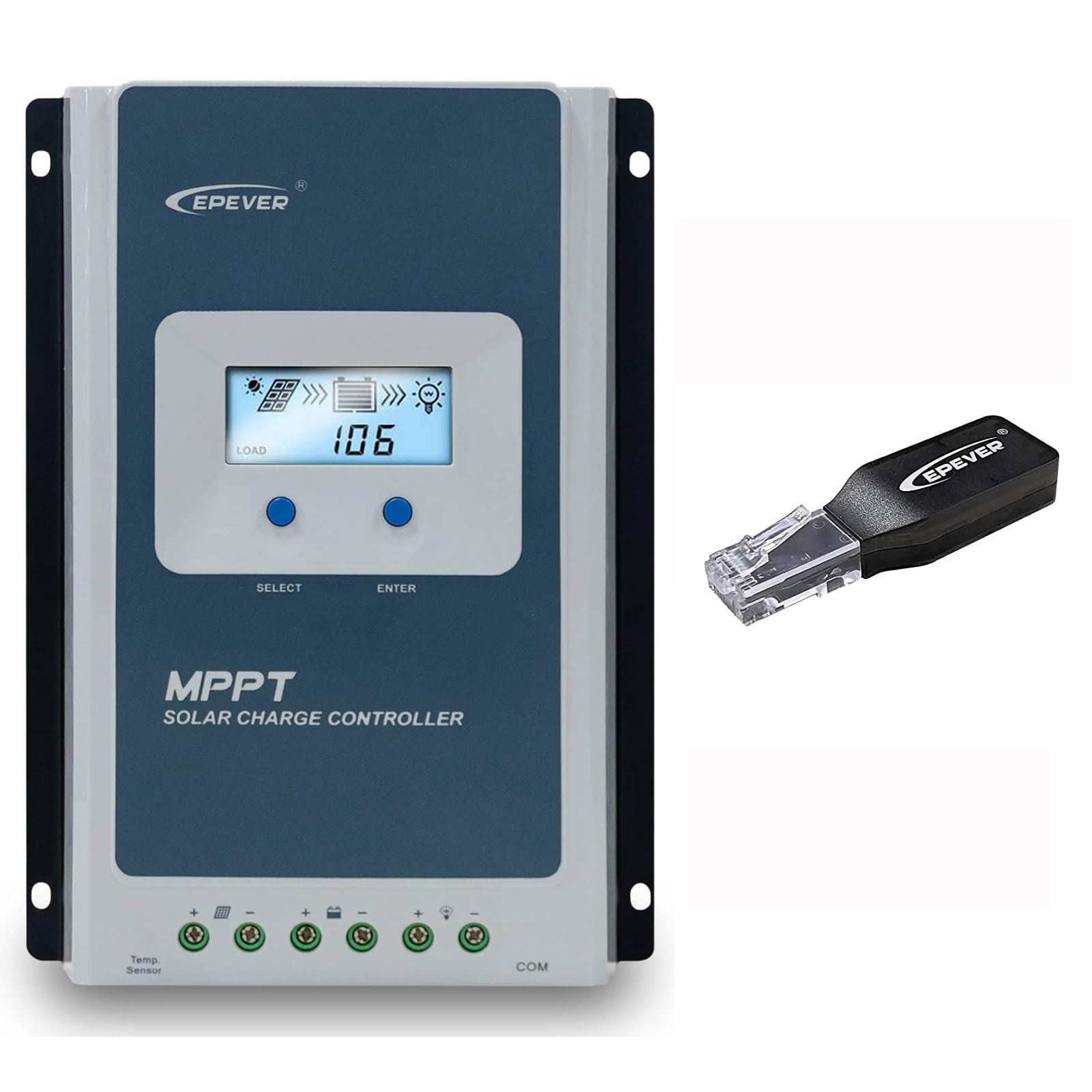
Figure 3.1: EPEVER Tracer4210ANG3 MPPT Solar Charge Controller with LCD display and connection terminals.
3.1 Негизги өзгөчөлүктөрү
- Автоматтык 12V/24V система тtage идентификация.
- Advanced MPPT technology with tracking efficiency above 99.5% and conversion efficiency up to 98%.
- Төрт-сtage charging (Bulk, Boost, Float, Equalization) to optimize battery health and lifespan.
- Supports various battery types including Sealed, Gel, Flooded, and Lithium.
- Comprehensive electronic protection functions: PV over current, short-circuit, reverse polarity, night reverse charging, battery reverse, over voltage, over-discharging, overheating, Lithium battery low temperature, load short circuit/overload, device overheating, and TVS high voltage transients protection.
- Remote control and monitoring capabilities via BLE (Bluetooth Low Energy) module (included with this model).

Figure 3.2: The Tracer4210ANG3 controller is compatible with multiple battery types, including Lithium (LI), Sealed (SLD), Flooded (FLD), Gel, and AGM, automatically identifying 12V/24V battery voltage.

Figure 3.3: System diagram illustrating the high tracking efficiency (above 99.5%) and conversion efficiency (98%) of the MPPT solar charge controller within a typical solar power setup for a home.

Figure 3.4: The controller offers real-time monitoring via a mobile application using BLE (Bluetooth Low Energy) or an optional MT50 remote meter. Note: BLE module is included with this model, while MT50 or WiFi modules are sold separately.
4. Орнотуу жана орнотуу
4.1 Контроллерди орнотуу
- Кургак, жакшы желдетилген, тике күндүн нурунан, жогорку температурадан жана нымдуулуктан корголгон жерди тандаңыз.
- Ensure sufficient clearance around the controller for heat dissipation.
- Mount the controller vertically on a wall or suitable surface using appropriate fasteners.
4.2 Зымдарды туташтыруу
Маанилүү: Always connect in the following order: Battery → Solar Panel → Load. Disconnect in the reverse order.
- Батареяны туташтыруу: Батареянын оң жана терс терминалдарын контроллердеги тиешелүү батарея терминалдарына туташтырыңыз. Туура полярдуулукту текшериңиз. Контроллер системанын көлөмүн автоматтык түрдө аныктайт.tage (12V же 24V).
- Күн панелин туташтыруу: Connect the positive and negative terminals of the solar panel array to the corresponding PV terminals on the controller. Ensure correct polarity.
- Жүктү туташтыруу: Connect the positive and negative terminals of the DC load to the corresponding load terminals on the controller.
After all connections are made, the controller's LCD display should illuminate, indicating proper power-up.
5. Иштөө нускамалары
5.1 ЖК дисплей жана баскычтар
The controller features an LCD display for real-time system status and parameters, along with buttons for navigation and settings adjustment.
- ТАНДОО баскычы: Used to cycle through display screens and menu options.
- ENTER баскычы: Used to confirm selections or enter parameter editing mode.
Refer to the detailed user manual (available for download from the manufacturer's website) for a complete guide on LCD navigation and parameter settings.
5.2 Батареянын түрүн тандоо
It is crucial to select the correct battery type in the controller's settings to ensure proper charging algorithms and prevent battery damage. The Tracer4210ANG3 supports various battery types, including:
- Мөөр басылган (SLD)
- Гель
- Суу каптаган (FLD)
- Литий (LI)
- User-defined (for custom parameters)
Access the battery settings via the LCD menu and select the type that matches your connected battery bank. For Lithium batteries, ensure the correct voltage and charging parameters are set, especially if using user-defined settings.
5.3 Remote Monitoring (BLE)
This model includes a Bluetooth Low Energy (BLE) module, allowing you to monitor and configure the controller wirelessly via a smartphone application. Download the official EPEVER app from your device's app store, connect to the controller via Bluetooth, and follow the in-app instructions for monitoring system data and adjusting parameters.
6. Техникалык тейлөө
Regular maintenance ensures optimal performance and longevity of your solar charge controller:
- Байланыштарды текшерүү: Бардык зымдардын туташууларынын бекемдигин жана дат баскандыгын мезгил-мезгили менен текшерип туруңуз. Бош туташууларды бекемдеңиз.
- Контроллерди тазалоо: Keep the controller clean and free of dust and debris. Use a dry cloth for cleaning. Do not use liquids.
- Вентиляция: Ensure that the ventilation openings are not blocked to allow for proper heat dissipation.
- Батареяны текшерүү: Regularly check your battery bank for signs of damage, corrosion, or electrolyte levels (for flooded batteries).
7. Кыйынчылыктарды
If you encounter issues with your Tracer4210ANG3 controller, refer to the following common problems and solutions:
| Көйгөй | Мүмкүн себеп | Чечим |
|---|---|---|
| Контроллердин дисплейи өчүк. | No power from battery or solar panel; reversed battery polarity. | Батарея байланыштарын жана тtage. Ensure solar panels are receiving sunlight. Verify battery polarity. |
| Батарея заряддалбай жатат. | Solar panel not connected; low solar input; incorrect battery type setting; faulty wiring. | Check solar panel connections and ensure sufficient sunlight. Verify battery type setting. Inspect all wiring. |
| Жүктөө иштебей жатат. | Load disconnected; battery voltage too low; load overcurrent protection activated. | Check load connections. Allow battery to charge. Reduce load or check for short circuits. |
| Ашыкча ысып кетүү эскертүүсү. | Начар желдетүү; айлана-чөйрөнүн температурасынын жогору болушу; ашыкча жүктөлгөн система. | Ensure adequate airflow around the controller. Reduce load if possible. Relocate to a cooler environment. |
For more complex issues, please contact EPEVER customer support.
8. Техникалык шарттар
| Параметр | Нарк |
|---|---|
| Системанын номиналдык томуtage | 12V / 24V Auto Identify |
| Номиналдуу заряд ток | 40A |
| Макс. PV Input Voltage | 100V |
| Макс. PV киргизүү күчү | 520W (12V system) / 1040W (24V system) |
| MPPT Tracking Efficiency | >99.5% |
| Charge Conversion Efficiency | 98% чейин |
| Батареянын түрлөрү колдоого алынат | Sealed, Gel, Flooded, Lithium, User-defined |
| Заряддоо Сtages | Bulk, Boost, Float, Equalization |
| Байланыш порту | RS485 (for BLE module, MT50, or PC connection) |
| Камтылган компоненттер | MPPT Solar Controller, BLE Module |
9. Кепилдик жана колдоо
EPEVER products are designed for reliability and performance. For warranty information, please refer to the warranty card included with your product or visit the official EPEVER website. If you have any questions, require technical assistance, or need to report an issue, please contact EPEVER customer support directly. Contact details can typically be found on the manufacturer's webсайтында же продуктунун таңгагында.
Сиз да зыярат кылсаңыз болот Amazon'догу EPEVER дүкөнү кошумча продукт маалымат жана колдоо ресурстар үчүн.